Tencent WorkBuddy In-Depth Review: An AI Office Agent That Actually Does the Work

WorkBuddy is a desktop AI agent that executes tasks locally—not a chat tool.
The article argues that most people use Tencent WorkBuddy as an ordinary AI chat tool, severely underestimating it. WorkBuddy is positioned as an "AI brain + hands + automation engine": conversational AI only tells you how to do something, while it completes the work directly on your local computer. Using HR compiling 80 resumes into an Excel file as an example, the article breaks down three core capabilities—local file read/write, multi-step task planning and course correction, and scheduled background execution. It also covers remote instructions via WeChat, integration with Tencent Docs, WeCom, and databases, and capability extensions through Skill packages like browser operation and speech recognition. The criterion for use: does the task require hands-on action?
Many people treat WorkBuddy as just another AI chat tool—they ask a few questions, generate a few paragraphs, and conclude it's "nothing special." That approach barely scratches one percent of what it can do. Tencent positions WorkBuddy as an "all-scenario workplace AI assistant," but a more accurate way to understand it is this: it's a combination of an "AI brain + a pair of hands + an automation engine" installed on your computer. Ordinary AI tells you what to do; WorkBuddy just does it for you.
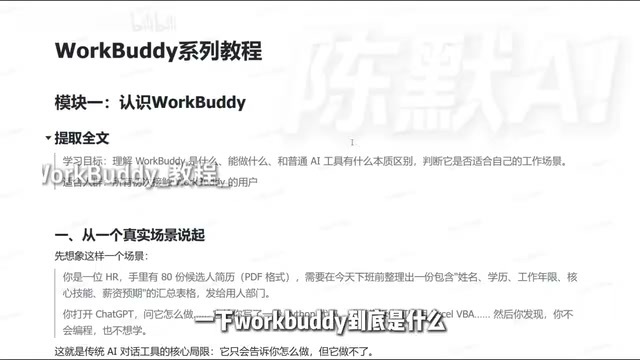
The Fundamental Difference Between WorkBuddy and Ordinary AI Tools
The most intuitive way to understand this difference is through a concrete scenario.
Suppose an HR professional has 80 candidate resumes and needs to compile an Excel summary table containing name, education, years of experience, core skills, and salary expectations before end of day, to hand off to the hiring department for screening. With a conversational AI like ChatGPT, Doubao, or Tongyi Qianwen, what you typically get is a piece of Python code or a set of step-by-step instructions—and then you have to follow them yourself, one step at a time, on your computer. The AI gives you the "how," but the act of "doing" still falls on you.
With WorkBuddyAd, you just issue one instruction: read all the resume PDFs in a specified folder, extract name, education, years of experience, core skills, and salary expectations, generate an Excel summary table, and save it to a given directory. Then you can go grab a glass of water and come back to check the result.
That's the fundamental difference: conversational AI is an advisor; WorkBuddy is an executor. It doesn't just plan the "how"—it actually reads the files and writes the spreadsheet on your local computer.
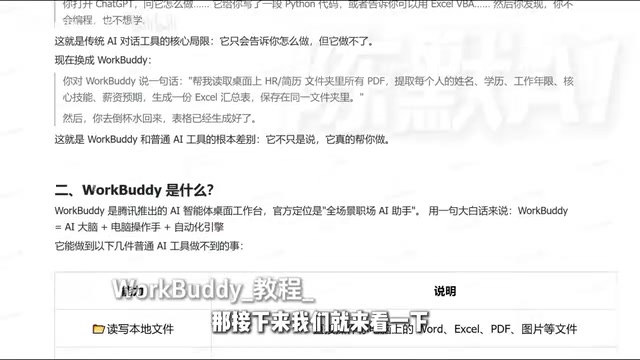
Breaking Down the Three Core Capabilities
Local File Operations: From "Armchair Theory" to "Real Action"
WorkBuddy can directly read and write Word, Excel, PDF, image, and other files on your computer. This means it works with data in your actual work environment, not fragments you have to manually upload or copy-paste into a chat box. For roles that deal with reports and documents every day, the value of this capability is an order-of-magnitude improvement—what you save isn't just operation time, but also the attention drain from constantly switching between tools.
The "local file operations" mentioned here rely on the desktop agent's direct access to the operating system's file system, rather than uploading files to the cloud for processing. Traditional web-based AI is constrained by the browser sandbox and can only see content fragments that users actively paste or upload; a desktop agent runs on the user's own computer and can traverse directories, parse binary formats, and call system APIs for reading and writing just like any ordinary program. The trade-off is a more sensitive permission boundary—the scope it can access depends on the directory authorizations it's granted. In use, you should confine it to working folders as much as possible, and avoid exposing the entire disk or paths containing sensitive information.
Multi-Step Task Planning: It Decomposes—and Course-Corrects
When faced with complex tasks, WorkBuddy can automatically break down the execution path and advance step by step. More importantly, if a step goes wrong, it can re-plan its route and keep going rather than getting stuck and throwing an error. This gives it a far higher ceiling for task complexity than Q&A-style AI tools—the latter perform well on single-step information retrieval and output, but once multiple stages need to be chained together, they fall short.
Multi-step task planning typically relies on an "agent loop" mechanism: the model first outputs an action plan, calls a tool to execute one step, observes the returned result, then decides the next action—repeating until the task is complete. "Course correction" means that when a step returns an error (e.g., format mismatch, path not found), the model can regenerate a plan based on the new observation instead of stubbornly continuing down the failed path. This capability is fundamentally different from generating a complete script in one shot: a script aborts entirely if any intermediate step fails, whereas an agent can dynamically adjust at runtime—at the cost of more execution rounds and longer runtimes, and it's less stable than a fixed script for processes that require strict reproducibility.
Scheduled Automation: A Background Worker You Don't Have to Watch
Once a process is fixed, it can be placed into a scheduled task for automatic execution. For example, have it compile a weekly report and send it to you every week—it runs automatically on time, and no one needs to sit in front of the computer, as long as WorkBuddy is running. This is a form that conversational AI completely lacks: the latter must be initiated by a human in real time, whereas WorkBuddy can "go to work" on its own.
Remote Control and Ecosystem Integration
WorkBuddy's reach isn't limited to the desktop. Through a mobile mini-program or WeChat client, you can send an instruction in WeChat and have the desktop WorkBuddy execute the operation—results can be saved locally or sent back to your phone.
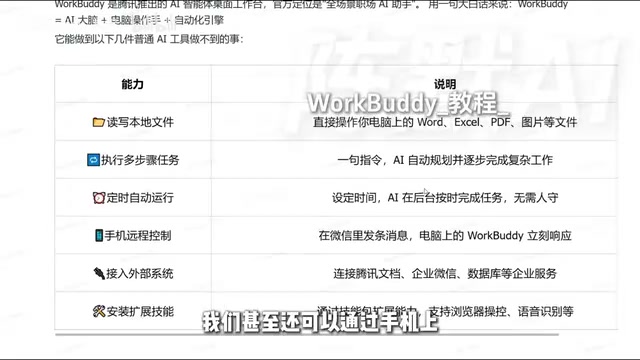
It can also connect to external systems: searching data in Tencent Docs, connecting to WeCom, integrating with databases. The more data sources it connects to, the broader the task boundary it can handle. In addition, installing Skill packages extends its capabilities—for example, browser data browsing and speech recognition: send it a recording and have it compile a summary. This extension mechanism is similar to how OpenClawAd works, so users who have used that kind of tool will find it natural to pick up.
Skill packages can be understood as preset "capability plugins" for the agent: each skill encapsulates the invocation method and parameter specifications for a specific type of operation, and the model selects them on demand when planning tasks. This aligns with the tool-calling approach at the open-protocol level—standardizing the description of external capabilities and handing them to the model for orchestration. The OpenClaw mentioned in the article is a similar local agent tool, and its working method is also "model planning + local tool execution," so users who have used such tools will be familiar with permission granting, skill installation, and viewing task logs. Note that installing third-party skill packages is equivalent to introducing external code or interfaces; the credibility of the source should be the primary criterion before installation.
When to Use It
The criterion is actually simple: does the task require "hands-on action"?
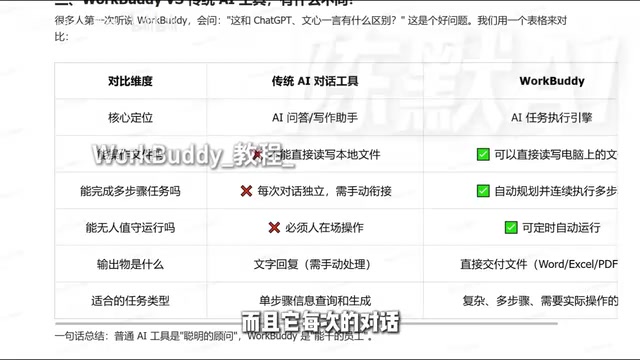
If you're only looking up information, polishing text, or generating a piece of content, ordinary conversational AI is enough—there's no need for WorkBuddy. But whenever a task involves reading local files, operating across multiple steps, generating a deliverable final file (Word, Excel, PDF, and format conversions), or repeating on a fixed cadence, WorkBuddy's advantages come into play.
Based on the video author's hands-on testing, WorkBuddy performs quite well on local operation-type tasks. It's not suited to being used as a "smarter chatbot," but rather as a digital colleague you can assign work to—you define the goals and acceptance criteria, and it handles the intermediate execution process. Once this positioning is clear, the tool's value can truly be unleashed.
One-line Summary
WorkBuddy is a desktop AI agent that can execute tasks locally, not a chat tool.
Paragraph Summary
The article points out that most people use Tencent WorkBuddy as an ordinary AI chat tool, severely underestimating its capabilities. WorkBuddy is positioned as a combination of "AI brain + hands + automation engine": conversational AI only tells you how to do something, while it completes the work directly on your local computer. The article uses the example of HR compiling 80 resumes into an Excel file to illustrate this difference, and breaks down three core capabilities—local file read/write, multi-step task planning and course correction, and scheduled background automatic execution. In addition, it supports remote instructions via a WeChat mini-program, can connect to Tencent Docs, WeCom, and databases, and can extend capabilities like browser operation and speech recognition through Skill packages. The author's criterion for applicability is: whether the task requires "hands-on action"—its advantages are obvious when local files and multi-step execution are involved.
Related articles

The Truth Behind Titanic's Sinking: Key Decisions and Communication Failures in the National Geographic Documentary
National Geographic's The Unsinkable Ship uses survivor testimony to reconstruct Titanic's fatal decisions—from the missing MSG telegram prefix and the broken boiler-room-to-bridge link to how 'unsinkable' thinking delayed damage control and evacuation.

74M-Parameter Open-Source Model Partially Outperforms Jev AI in Testing
Fastino AI's Glider 2.5 models, with just 74M–300M parameters, reportedly outperform Jev AI in some guardrail benchmarks per YouTube testing, run on consumer hardware, and even play Doom. We analyze small models' competitiveness and deployment value on specific tasks.

Gemini 4 Argon Hands-On: Aggressive Pricing, 3D Capabilities Need Coaching
Gemini 4 Argon hands-on: limited-time $2/$10 pricing, million-token output, strong 3D and reverse-engineering work, but weak front-end aesthetics and zero-shot ability need coaching.