The Complete WorkBuddy Guide: How a Desktop AI Agent Does Your Work for You
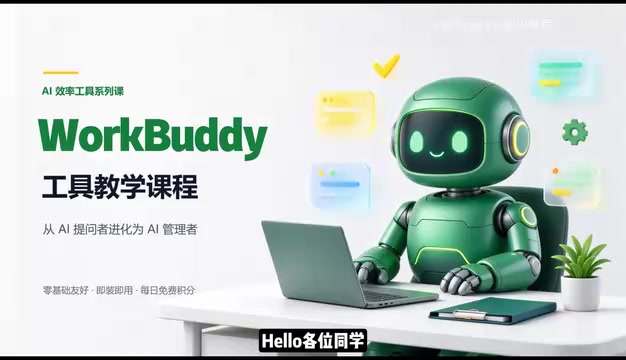
WorkBuddy desktop agent course: let AI do the work instead of giving advice, with zero-barrier onboarding for domestic professionals.
The article centers on the WorkBuddy course featured on Bilibili, noting that most professionals remain stuck in the inefficient loop of "AI gives ideas, I do the work." As a desktop AI agent, WorkBuddy receives tasks in natural language and automatically breaks them down, retrieves information, executes, and delivers results—its key difference from traditional Q&A AI is that it gets things done for you rather than telling you how. The article compares it with Codex on onboarding difficulty, domestic ecosystem fit, cost, and extensibility, arguing it suits non-programming domestic professionals, and corrects three misconceptions. Its capabilities cover batch file management, document and spreadsheet processing, light development, and scheduled tasks; the course has 28 knowledge points and a daily credit mechanism, with the core message being to practice while watching and hand real repetitive tasks to it.
Many professionals still use AI in a loop of "open the chat box, type a request, copy the result, do it yourself." Strictly speaking, that's not using AI—it's assisting AI. It comes up with ideas, and you handle execution. A recently featured WorkBuddy course on Bilibili tackles exactly this pain point: get a desktop AI agent actually running so repetitive work can be handed off.
From Q&A tool to desktop agent
The essential difference between the two types of AI
Traditional web-based AI excels at analysis, suggestions, and content generation, but it has no permission to operate files on your computer. Organizing folders, editing spreadsheets, sending messages—these concrete actions still have to be done manually. Desktop agents like WorkBuddyAd work differently: you assign tasks in natural language, and it automatically breaks them down, retrieves information, executes, and delivers results. You only need to review and accept the outcome.
According to the Bilibili creator's demonstration in the course, if you give a messy formatted meeting-notes file to a traditional chat AI, it will suggest you select all text, unify fonts, and adjust line spacing—the advice is all correct, but you still have to do the work yourself. Give it to WorkBuddy, and it will find the document itself and complete the formatting. If there are twenty files, it will process them all according to a consistent standard.
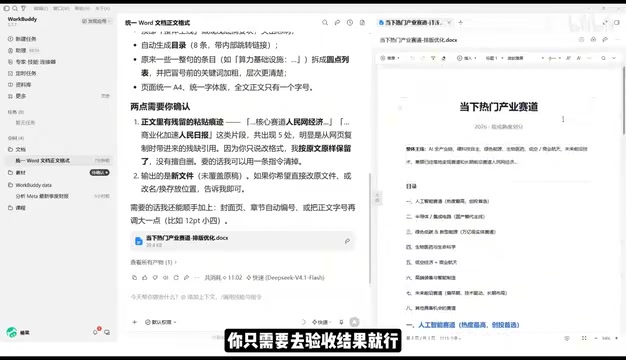
AI Agent and conventional conversational AI differ fundamentally in "the right to act." Traditional large models can only output text; all operations on local systems must be relayed and executed by humans. An agent adds a layer of "tool calling" capability on top of the model—it can autonomously decide which API to call, which file to read or write, what request to send, and adjust its next action based on the returned results, forming a "perception-decision-execution" loop. The technical foundation of this concept is Function Calling and Planning mechanisms: the former lets the model initiate operations in a structured way, and the latter lets the model break vague instructions into executable steps. Understanding this makes it clear why WorkBuddy's value lies not in "how well it answers" but in "it can complete tasks on its own."
The boundaries of an agent
The course defines AI Agent clearly: within the scope you determine and authorize, it calls tools and operates the computer to drive tasks to a final result. This means the learning focus shifts from "asking AI questions" to "managing AI's work." If you're a manager, WorkBuddy is the employee, and your computer is the company.
Why domestic users are better suited to WorkBuddy
A four-dimensional comparison with Codex
The course compares Codex to a race car that requires professional driving skills—plenty of horsepower, but you have to tune the parameters yourself, suitable for people with a programming background. WorkBuddy is like an automatic family car: get in and drive. The specific differences show up in four dimensions:
Onboarding difficulty: WorkBuddy is download-install-and-use; no environment configuration, no command line. Adjusting Codex parameters requires programming fundamentals.
Ecosystem fit: WorkBuddy is deeply integrated with Feishu, DingTalk, WeCom, and Tencent Docs. After connecting to Feishu, it can also help reply to messages and turn conversations into documents. Codex leans more toward overseas ecosystems.
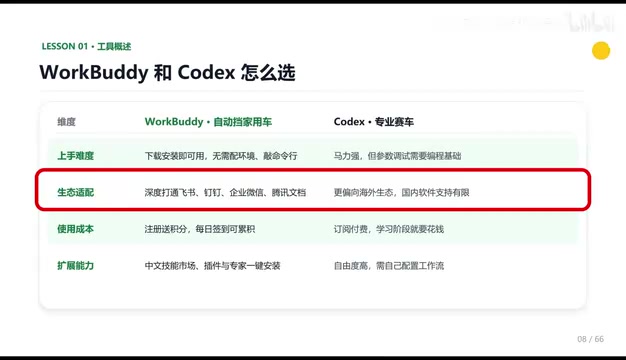
Usage cost: WorkBuddy gives free credits upon registration and daily check-ins, and credits accumulate without expiring. Codex is subscription-based and relatively more expensive.
Extensibility: WorkBuddy comes with a Chinese skill marketplace and plugin library that can be added and installed with one click. The "experts" inside are essentially digital employees for different roles, which you can directly invoke when you need a developer engineer to build a workflow. Codex offers greater freedom, but you have to configure workflows yourself, making operation more complex.
Codex originally referred to OpenAI's series of code-generation models and later evolved into a developer-oriented programming agent product form, typically used by integrating into an IDE or command line and writing prompts and configuring parameters to complete tasks such as code completion, refactoring, and debugging. Its design assumes users have programming literacy: they can read error messages, judge the correctness of generated code, and set up the runtime environment themselves. This is fundamentally different from the "out-of-the-box" positioning aimed at ordinary professionals. Comparing the two in the same table is essentially comparing two product philosophies—"professional tools" and "consumer-grade tools." The former leaves the ceiling of capability for users to explore; the latter lowers the barrier to entry as much as possible. Each has its audience.
Three misconceptions to correct
First, WorkBuddy is not a desktop chat version of ChatGPT; beyond conversation, it can read local files, call tools, and execute tasks automatically. Second, it's not that because Codex is more powerful you must learn Codex directly—the more powerful the tool, the higher the barrier. Professionals without a programming background are better off using WorkBuddy to get their current work done, which offers better value; upgrade when you feel it's not enough. Third, more features doesn't mean hard to learn—the interface is similar to mainstream chat products, and what you really need to learn is rewriting problems as commands.
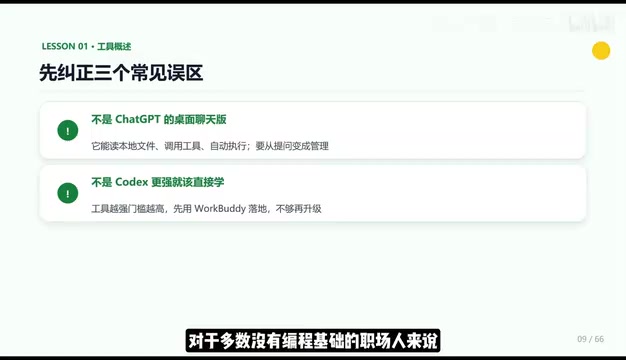
Behind "more features doesn't mean hard to learn" is actually a shift in thinking toward Natural Language Programming. Traditional software requires users to learn its menus and operation paths, while agent products require users to learn to "write tasks clearly": state the goal, constraints, output format, and acceptance criteria. For example, "organize files" is a vague instruction, while "create subfolders by month for all PDFs in the Downloads folder, classify them, and rename them to 'date-filename'" is an executable command. The entry barrier for this "prompt engineering" is not high, but it requires deliberate practice in converting colloquial needs into structured instructions—which is why the course repeatedly emphasizes "rewriting problems as commands."
Four types of work it can do for you
File management: batch classification, batch renaming, and summarizing information across multiple documents.
Document processing: writing weekly reports, organizing Excel data, and other daily affairs.
Light development and collaboration: developing simple websites and collaborating with Feishu and DingTalk.
Scheduled tasks: automatically generating work reports on a regular basis.
What these tasks have in common is that they don't just give advice—they actually execute. You only need to check the results.
Course structure and credit mechanism
The course is divided into four sections—introductory, advanced, practical, and industry—with 28 knowledge points in total, covering everything from basic operations to real office cases and advanced workflows, with step-by-step guidance. Supporting materials include four major sections: installation, case explanations, Skill customization, and industry implementation, plus 100 Skills and practical materials.
Regarding credits: after registering and logging in, go to "Buddy Gas Station" via your profile avatar. You can claim 100 general credits every day; credits accumulate and do not expire. It's recommended to make daily claiming a habit.
The Skill mentioned in the course can be understood as a "pluggable capability pack" for the agent: a packaged set of prompts, tool-calling flows, or industry knowledge. Once installed, the agent gains the ability to handle the corresponding scenario, similar to installing an app on a phone. The skill marketplace is a sharing platform where developers or industry practitioners package validated workflows and list them; ordinary users can add them with one click and reuse them, avoiding configuring workflows from scratch. For non-technical users, the richness of the Skill ecosystem often determines practical usability more than the model itself—after all, most office scenarios require specific skills like "can prepare reimbursement forms" or "can organize meeting notes," not general reasoning ability.
Getting-started advice
The value of a tool lies in execution, not in collecting it. One point the course repeatedly emphasizes is to practice while watching: start by getting installation working, hand it a real repetitive task (such as batch organizing files or generating weekly reports), and then gradually expand to more complex workflows. Don't let it sit in a folder—this is the most practical reminder in this tutorial.
One-line Summary
WorkBuddy desktop agent course: let AI do the work instead of giving advice, with zero-barrier onboarding for domestic professionals.
Paragraph Summary
The article centers on the WorkBuddy course featured on Bilibili, pointing out that most professionals remain stuck in the inefficient loop of "AI gives ideas, I do the work." As a desktop AI agent, WorkBuddy can receive tasks in natural language and automatically break them down, retrieve information, execute, and deliver results. Its essential difference from traditional Q&A AI is that it "gets things done for you" rather than "tells you how to do it." The article compares it with Codex across four dimensions—onboarding difficulty, domestic ecosystem fit, usage cost, and extensibility—arguing that it is better suited to domestic professionals without programming backgrounds, and corrects three common misconceptions. Its capabilities cover batch file management, document and spreadsheet processing, light development, and scheduled tasks. The course has 28 knowledge points and a daily credit mechanism, with the core message being to practice while watching and hand real repetitive tasks to it.
Related articles

The Truth Behind Titanic's Sinking: Key Decisions and Communication Failures in the National Geographic Documentary
National Geographic's The Unsinkable Ship uses survivor testimony to reconstruct Titanic's fatal decisions—from the missing MSG telegram prefix and the broken boiler-room-to-bridge link to how 'unsinkable' thinking delayed damage control and evacuation.

74M-Parameter Open-Source Model Partially Outperforms Jev AI in Testing
Fastino AI's Glider 2.5 models, with just 74M–300M parameters, reportedly outperform Jev AI in some guardrail benchmarks per YouTube testing, run on consumer hardware, and even play Doom. We analyze small models' competitiveness and deployment value on specific tasks.

Gemini 4 Argon Hands-On: Aggressive Pricing, 3D Capabilities Need Coaching
Gemini 4 Argon hands-on: limited-time $2/$10 pricing, million-token output, strong 3D and reverse-engineering work, but weak front-end aesthetics and zero-shot ability need coaching.