The Most Detailed Codex Tutorial on Bilibili: From Installation and Configuration to Real-World Pitfall Avoidance

A complete guide to registration, installation, login pitfall avoidance, and quota upgrades for the Codex desktop AI coding assistant.
Based on a beginner-friendly tutorial from a Bilibili creator, this article systematically outlines a getting-started guide for OpenAI's desktop AI coding assistant Codex. It covers registering a GPT account, downloading and installing (be sure to install on the C drive), two solutions for phone number verification, handling network and cache issues such as 403 and token exchange failure, and the method of creating a `.env` file to configure the proxy port to radically fix "reconnecting 5 times." The article also explains in detail the Plus membership quota mechanism of 100 points per week and 20 points every 5 hours—the highest model consumes extremely fast and should be used cautiously—and introduces the process of upgrading to Pro by paying the difference to remove limits. Finally, it gives setting suggestions for permissions, reasoning intensity, and model selection, and reminds readers not to be taken in by paid AI tutorials: start using it first and ask GPT directly when problems arise—that is the most efficient path.
Why Is Codex Worth Trying?
Codex is a desktop AI coding assistant released by OpenAI. It deeply integrates the GPT model and can directly execute tasks, write code, and generate content on your computer. Unlike the web version of ChatGPT, Codex can access local files and run commands, truly becoming your "digital employee." A Bilibili creator recently released a beginner-friendly tutorial that covers almost every pitfall a newcomer might encounter, from registration to real-world use. This article is based on that video's content, combined with information from multiple sources, to give you a clear Codex getting-started guide.
Registration and Installation: Starting from Scratch
Registering a GPT Account
Open the GPT official website and click "Sign Up Free" in the top right corner. You can use either a 163 email or a QQ email. After entering your email, receive the verification code, then fill in any name and age to complete registration. The process itself has few barriers, but using Codex afterward requires a subscription membership to unlock the full experience.
Downloading and Installing Codex
After logging in, click Codex on the official website to download the desktop version. There's a key detail here: be sure to install it on the C drive. The creator emphasized in the video that installing to another drive may cause the program to fail to open. If you're unsure, you can also open the Microsoft Store, search for ChatGPT, and install it directly—the system will automatically install it to the system drive, so you basically won't run into the "won't open" problem.
Full Breakdown of Login Issues: Network, Verification, and Tokens
Two Solutions for Phone Number Verification
When logging into Codex, some accounts will require phone number verification. The creator offers two options: first, subscribe to a membership, which has a chance of skipping verification; second, find a US phone number for SMS verification. However, newly registered accounts will most likely still need verification even after subscribing, while older accounts will most likely skip it after subscribing.
Network and Cache Issues
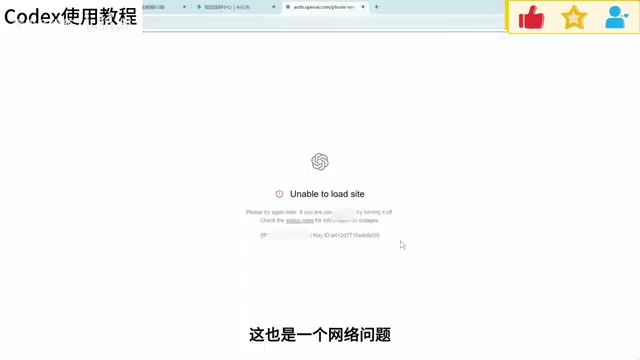
During login, you may encounter prompts such as 403 region not supported or token exchange failure—these are essentially network or cache problems. The creator recommends optimizing your network, clearing the cache, and then logging in again, which should basically solve it.
TUN mode and global proxy are the prerequisites for understanding many of the network configuration suggestions in this article. In normal proxy mode, only applications that explicitly support system proxy settings (such as browsers) will go through the proxy; desktop programs like Codex, which need to access local files, run commands, and connect to external services, often do not read system proxy settings. TUN mode (virtual network adapter mode) takes over all traffic at the operating system level, so any program automatically goes through the proxy—which is why the article requires the proxy to be "global or TUN mode." The "port" mentioned in the article refers to the local port that the proxy software listens on on your machine (such as 7890, 12343, etc.). The configuration in the .env file tells Codex to forward requests through this local entry point. If the port is wrong or the proxy is not enabled, the symptoms are usually connection failure, repeated reconnection, or abnormal token exchange.
The Radical Fix for "Reconnecting 5 Times"
Repeatedly showing "reconnecting 5 times" during a conversation is a common problem. The solution is to find the .codex folder in your C drive user directory, create a txt file, and paste specific code (in the code, change the 12343 at the end to your network proxy's port—it must be global or TUN mode). Can't find the port? The creator offers a clever trick: let Codex find the port itself, then send code and let Codex create the .env environment file for you. After saving, rename the txt file to .env and restart Codex.

Restoring Configuration and Switching Accounts
If you encounter other login abnormalities, the safest approach is to go to the web version of GPT, explain the situation, and let it teach you step by step how to restore the configuration. Sometimes logging out and back in will solve it; the most drastic method is to delete the .codex directory and reinstall, but this may lose local projects, so be sure to have GPT teach you how to back up before doing so. The creator also reminds: beginners should not log in via API or unofficial methods, as this easily causes various problems. First get comfortable with an official account before considering advanced tools.
The .codex directory and the .env file are the core locations where Codex saves configuration locally. This directory is usually located in the user's home directory (on Windows, Users\your username on the C drive) and stores login credentials, session state, proxy and environment variables, and other settings—which is why many of the failures mentioned in the article can be resolved by modifying or rebuilding it. .env is a common environment variable file format, with each line in the form KEY=VALUE, which the program automatically reads at startup. Note two things: first, Windows hides known file extensions by default, so after renaming txt to .env it may actually become .env.txt—you need to first enable "show file extensions" in Folder Options; second, deleting this directory is equivalent to resetting all local configuration, and login status and project association information may be lost along with it, so back up before operating.
Quota Mechanism and Membership Upgrades: Pain Points for Plus Users
The Real Meaning of the 5-Hour Limit
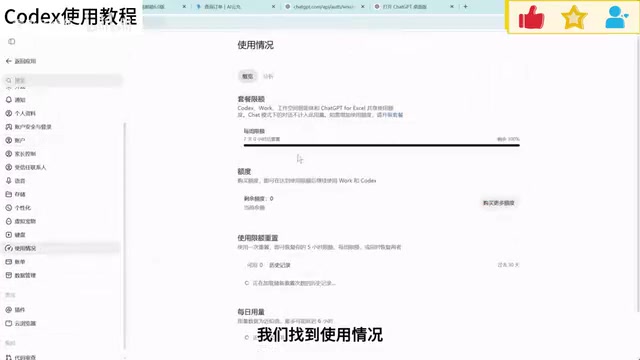
Many Plus users mistakenly believe they can use it unlimited within 5 hours. The actual rule is: a total quota of 100 points per week, with a maximum of 20 points usable every 5 hours. When the 20 points are used up, you must wait for the next 5-hour period to recover; when the weekly quota is exhausted, you must wait until next week. The highest model consumes extremely fast—it can be used up in a few minutes if maxed out—so Plus users should use it cautiously.
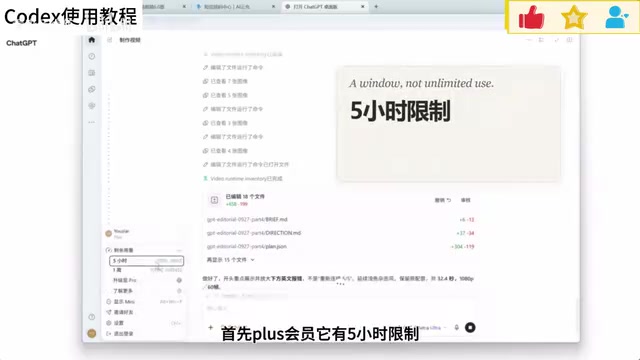
The quota systems of Plus and Pro deserve a separate explanation. OpenAI sets rolling-window usage limits on paid ChatGPT subscriptions: a short-term window (such as every 5 hours) limits burst usage, and a long-term window (such as weekly) limits total volume. The two take effect in combination, which is why "unlimited use within 5 hours" is a common misunderstanding. Different models have different consumption weights—the more capable the model, the more points each request deducts—which is the reason in the article that "the highest model can be maxed out in a few minutes." The Pro tier effectively multiplies the quota ceiling and relaxes or removes short-term window limits, making it suitable for high-frequency heavy users; light users are better off staying on Plus. Only by understanding this "points + window" mechanism can you reasonably plan tasks and reserve high-consumption models for truly complex problems.
Upgrading to Pro by Paying the Difference
If your demand is high, the creator recommends upgrading your plan in the store by paying the difference. Confirm whether you are recharging from a non-region: open the web version settings—billing, and if the currency shown in the transaction record is PHP, then it is a non-region. The upgrade process is similar to the first recharge: open GPT to confirm the account, obtain the session, paste the code to calculate the difference, and submit payment. After upgrading, one month is recalculated starting from that day, and the system usually automatically upgrades you to Pro within a minute. The Pro 5x membership has 5 times the quota of Plus, and the 5-hour limit disappears.
General Settings and Practical Advice
Permissions and Reasoning Intensity
On first use, Codex frequently requests permissions. The creator recommends enabling full access in settings to avoid repeated confirmations. Configure permissions as high as possible, choose real-time for web search, and adjust reasoning intensity according to task complexity. For model selection, Astra is the strongest but consumes quota fastest, followed by CO and Luna; choose according to your needs.
Don't Treat AI Tutorials as Overpriced Courses
The creator shares a sharp viewpoint at the end of the video: most paid AI tutorials online are essentially overpriced courses. Today's large models are already very capable—for needs like building a website or editing a video, just ask directly and the model will automatically install plugins. Rather than burying yourself in tutorials, it's better to start using it first, watch more finished products shared by creators, and use them directly for creation. With long-term use, you'll naturally be able to achieve results according to your own ideas.
Summary
The main barrier to getting started with Codex lies in login and network configuration. Once you get it working, it is a powerful productivity tool. This article covers registration, installation, login pitfall avoidance, the quota mechanism, upgrade paths, and setting suggestions, hoping to help you avoid detours. Remember the creator's core advice: start using it first, and when you encounter problems, ask GPT directly—that's more efficient than reading any tutorial.
One-line Summary
A complete guide to registration, installation, login pitfall avoidance, and quota upgrades for the Codex desktop AI coding assistant.
Paragraph Summary
Based on a beginner-friendly tutorial from a Bilibili creator, this article systematically outlines a getting-started guide for OpenAI's desktop AI coding assistant Codex. It covers registering a GPT account, downloading and installing (be sure to install on the C drive), two solutions for phone number verification, handling network and cache issues such as 403 and token exchange failure, and the method of creating a .env file to configure the proxy port to radically fix "reconnecting 5 times." The article also explains in detail the Plus membership quota mechanism of 100 points per week and 20 points every 5 hours—the highest model consumes extremely fast and should be used cautiously—and introduces the process of upgrading to Pro by paying the difference to remove limits. Finally, it gives setting suggestions for permissions, reasoning intensity, and model selection, and reminds readers not to be taken in by paid AI tutorials: start using it first and ask GPT directly when problems arise—that is the most efficient path.
Related articles
 Tech Frontiers
Stylome Bot Slammed as Useless Junk: Why Do AI Detection Tools Keep Failing?
Reddit users test the Stylome AI detection bot: Gemini-rewritten text judged human-written, consistently low confidence. An analysis of AI text detection's technical dilemmas, privacy concerns, and credibility crisis in community governance.
 Tech Frontiers
When AI Becomes a Productivity Divide: Clarity or "AI Psychosis"?
A civil engineer's deep use of agentic AI boosted efficiency but bred contempt for peers who refuse to learn. Is this clarity or AI psychosis? An analysis of the cognitive and psychological challenges behind the AI productivity divide.
 Tech Frontiers
Opus 5.5 Benchmark Scores Climb, Community Says Its "Weights Are Blessed"
Reddit community discusses Opus 5.5's rising scores on the Benchmaxxing Bench, with users describing its performance as "weights are blessed." This article interprets the community reaction and cautions against conflating benchmark scores with real capability.