The Ultimate Guide to AI Coding Tools in 2026: Five Tools, How to Choose, and the Dual-Stack Strategy

2026 AI coding tools guide: the autocomplete-first vs. agent-first divide and the dual-tool-stack strategy.
AI coding tools have leapt from smart autocomplete to agents that autonomously execute multi-hour tasks across a codebase. The key 2026 selection criterion is architecture—autocomplete-first (Copilot, Windsurf) vs. agent-first (Cursor, Clawed Code). The article compares five tools on price and capability—Copilot ($10/mo, deep GitHub integration but weak multi-file agent composition), Cursor (Composer coordinates 50 files with 8 background agents, Ultra $200/mo), Clawed Code ($20/mo terminal agent), Windsurf ($15/mo best-value agentic IDE), and GROK 4.7 (API-first model layer, long-context pricing cliff, no enterprise DPA)—and recommends a dual-tool stack, stressing that benchmark scores do not equal productivity gains.
The Ultimate Guide to AI Coding Tools in 2026: Five Tools, How to Choose, and the Dual-Stack Strategy
Over the past twelve months or so, AI coding tools have made a fundamental leap: from "smart autocomplete" to autonomous agents capable of sustained sessions across an entire codebase for hours on end. According to the Stack Overflow 2026 survey, only 17% of developers use no AI tools at all. The question is no longer "should I use one" but "which one, at which tier, and for which workflow."
Autocomplete-First vs. Agent-First: The Key Divide in 2026
The most important selection criterion today is not price but architectural approach. Copilot and Windsurf started with autocomplete, and their product evolution has layered agent capabilities on top of the completion experience; Cursor and Clawed Code (as spelled in the source material) were agent-first from the architectural level, designed around multi-file orchestration and autonomous task execution.
This dividing line determines each tool's ceiling. Autocomplete-first tools offer a mature experience for single-line or local code generation, but their agent modes often lack cross-file composition capability—as the video notes, GitHub Copilot's agent mode lacks the multi-file composition capability of Cursor Composer.
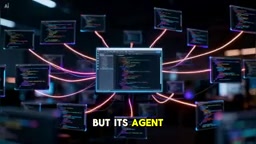
Agent-first architecture is built on the logic of "task-level delegation": the developer describes a goal, and the agent itself completes the full loop of code retrieval, multi-file edits, running tests, and iterating on errors. It relies on three capabilities—large context windows (typically hundreds of thousands of tokens to hold multiple related files), tool calling (reading and writing files, executing terminal commands, accessing version control), and multi-step planning with self-correction. By contrast, autocomplete-first tools center on low-latency inline suggestions within the editor, with agent capabilities usually bolted on as an add-on module; their context organization and triggering mechanisms are still designed around "near the current cursor," so when a change requires coordinating across a dozen or more files, context breaks and missed edits are common. This is also a practical standard for judging whether a tool is a "true agent" or an "agent wrapper": can it independently complete a cross-file refactor and verify its own work without line-by-line human confirmation?
Five Major Tools Compared
GitHub Copilot: The Lowest-Friction Entry Point
At $10 per month, Copilot remains the lowest-barrier option, deeply integrated with GitHub infrastructure. At higher tiers, Copilot Pro's $10 unlocks $15 in credits, while Copilot Business is $19 per user with credit pooling—a contrast with Cursor Teams' $40 per user model. For teams already on a GitHub workflow, migration cost is essentially zero.
Cursor: The Benchmark for Multi-File Orchestration
Cursor's core competitiveness lies in Composer's ability to coordinate changes across up to 50 files at once, paired with 8 background agents, with the Ultra tier priced at $200 per month. It is positioned for senior engineers who need large-scale refactors and cross-module coordination, not as a replacement for everyday autocomplete.
Composer is Cursor's multi-file editing agent mode. Unlike traditional single-file chat editing, it holds the context of multiple files simultaneously within a single task, generates a coordinated set of edits, and applies them together—making it suited to interface refactors, cross-module renames, and batch migrations, the kind of changes where "one move affects everything." Background agents are agent instances running asynchronously in the cloud or a separate environment, able to handle multiple tasks in parallel; developers submit a task, continue their own work, and review results later—in effect bringing "parallel manpower" into an individual's development process. Together, these mean Cursor's positioning is not about accelerating typing but about expanding the surface area a single engineer can advance at once. The cost is a higher subscription tier and stronger requirements for reviewing results: the more parallel changes, the more merge conflicts and hidden regressions need human oversight.
Clawed Code: The Autonomous Agent in the Terminal
At $20 per month, Clawed Code is a terminal agent: it reads the codebase, plans the work, then executes—no line-by-line guidance required. The video describes it as one of the "lowest-friction entry points," suited to developers comfortable with command-line workflows who want to delegate architecture-level tasks wholesale to an agent.
Windsurf: The Best-Value Agentic IDE
At $15 per month, Windsurf is rated the most cost-effective agentic IDE, with its Cascade feature maintaining project context at 950 tokens per second, and its free tier is considered the most generous.

GROK 4.7: The API-First Model Layer
GROK 4.7 leads on coding indices and is an API-first model layer for custom toolchains, with strong math benchmark performance. But the video cautions about the 200K-token pricing cliff—costs jump sharply once you cross the threshold. Another governance-level caveat: tools like Copilot offer an enterprise DPA, while GROK currently does not—a substantive consideration for EU institutions.

A DPA (Data Processing Agreement) is a contract between a data controller and a processor specifying how data is processed, stored, transferred across borders, and deleted—a key link in the GDPR compliance chain. For enterprises and public institutions, choosing an AI service that does not offer a DPA means user code and prompts lack clearly defined processing boundaries and accountability under the law; in the event of a data breach or a cross-border transfer dispute, the organization itself bears the primary compliance responsibility. This is why EU institutions typically evaluate "whether there is an enterprise DPA, whether data is used for training, and where servers are located" alongside model capability. The 200K-token pricing cliff deserves the same attention: many APIs use tiered pricing, where unit prices can multiply once the long-context threshold is exceeded—and long-session agent tasks are exactly the ones most likely to hit that threshold, so cost estimates cannot rely on the nominal unit price alone.
Choosing by Role: Who Should Use What
For independent developers on a limited budget, Windsurf Pro at $15 per month is explicitly named the best value. For scenarios requiring multi-file handling, the video mentions Conpex Multifile (as stated in the source, £25 per month) as a more suitable choice. Senior engineers and large project teams are better served by a combination of agent-first tools.
The Key Recommendation for 2026: The Dual-Tool Stack
The video's core recommendation is to adopt a "dual-tool stack": use Copilot for autocomplete and Clawed Code for deep architecture work. The logic of this combination is to acknowledge that the two categories have different capability boundaries—completion prioritizes immediacy and low disruption, while architecture-level tasks require an agent's multi-step planning and execution.
Another important point: model benchmark scores do not equal productivity gains. You can run strong models like GROK or Claude Opus inside Cursor, combining the best models with the strongest agent architecture, rather than being locked into a single vendor's end-to-end solution. Market data shows 73% of developers use these tools daily—whether your toolchain can keep up is now a question engineering teams must proactively answer.
FAQ
Q: Which should I prioritize on a limited budget? A: The video's answer points to Windsurf Pro ($15 per month), whose free tier is also considered the most generous.
Q: Can Copilot and Cursor replace each other? A: Not entirely. Copilot wins on GitHub ecosystem integration and low barrier to entry, while Cursor wins on multi-file agent orchestration; using both together is the more realistic approach.
Q: What should EU organizations watch for when choosing tools? A: Pay attention to Data Processing Agreement (DPA) coverage. The video notes that GROK currently lacks an enterprise DPA, which poses a compliance risk for EU institutions.
Related articles

Fifty Years Studying Power: Robert Caro's Writing and Insights on Power
Robert Caro reflects on 50 years studying power: Lyndon Johnson's persuasion and leverage, Robert Moses's transformation from idealist to ruthless builder, the dilemmas of large-scale construction, and his methods of compressing themes and solitary focus in biography writing.

Can a $20,000 Robot Do Your Chores? The Test Results Are Surprising
A YouTube test video shows how a $20,000 robot responds to commands like washing dishes, turning off lights, taking out trash, and feeding the dog. This article analyzes its real capability boundaries, the state of voice interaction technology, and how far household robots are from mainstream adoption.
The Complete Guide to Running AI Models Locally: Inference Engines and Tool Stack Explained
A systematic breakdown of the complete local LLM tool stack: from PyTorch and GGML compute libraries to llama.cpp, vLLM, SGLang inference engines and Ollama, LM Studio wrapper layers, with benchmark data on performance differences and selection logic.