The Ultimate WorkBuddy Tutorial: AI Agents from Beginner to Real-World Practice
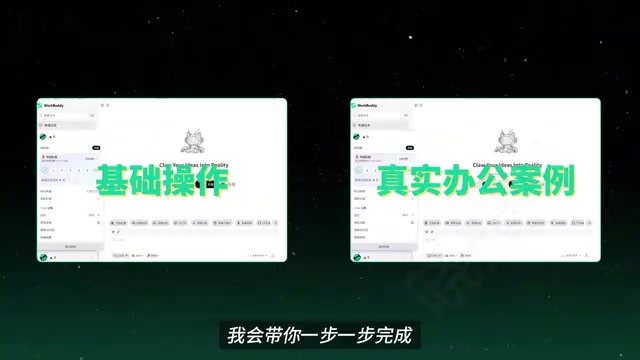
WorkBuddy is a domestic Chinese alternative to Codex—an AI Agent that can directly operate your computer to complete tasks, not just offer suggestions.
The article explains the essential difference between AI Agents and traditional large models: the latter only provide suggestions, while the former can directly operate the computer and invoke tools to drive tasks through to completion within the scope of authorization. WorkBuddy is positioned as a domestic alternative to Codex, with similar interface logic but friendlier to users in China—no complex configuration, credits upon registration, a daily claimable allowance, and compatibility with domestic office software such as WeCom through connectors. The article compares WorkBuddy with tools like Codex across four dimensions: ease of onboarding, office scenario compatibility, usage cost, and plugin and Skill ecosystem, noting that its built-in Chinese Skill marketplace and expert roles significantly lower the barrier for beginners. Finally, it offers getting-started advice: once you have the materials, read and do at the same time, start hands-on practice from installation, and gradually hand repetitive, time-consuming work over to AI.
Why You Need to Understand AI Agents
AI has been trending for years, but most people still use it in a "ask a question, get an answer" way—having it analyze a piece of text, offer some suggestions, and then doing the work themselves. This model essentially treats AI as nothing more than a smarter search engine.
But the emergence of AI Agents is changing that. They no longer just answer questions—within the scope of your authorization, they can directly operate your computer, call tools, and drive tasks through to completion. WorkBuddyAd is one such tool that is especially friendly to users in China.
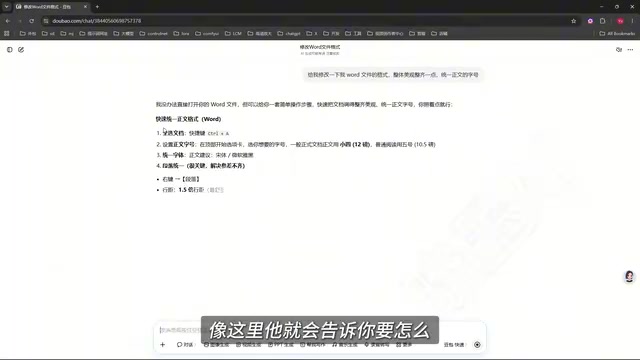
In the tutorial, the Bilibili creator offers an intuitive comparison: faced with a document in a messy format, a traditional large model will tell you "how to unify the formatting," but WorkBuddy can directly find the file on your desktop and complete the layout and beautification. Throughout the process, you only need to send instructions and wait for the task to be done. This is the core difference between an AI Agent and a traditional large model—it's more like a digital employee that follows your arrangements.
What Is WorkBuddy: A Domestic Alternative to Codex
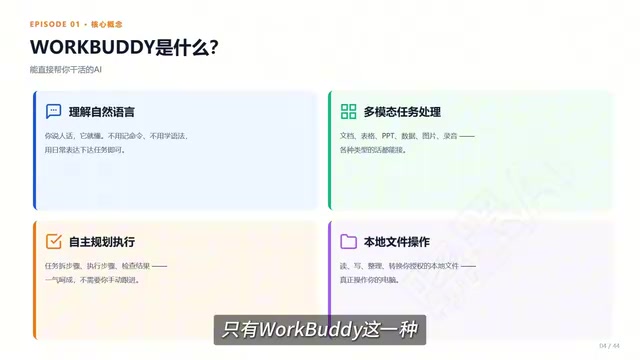
Simply put, WorkBuddy can be understood as a domestic alternative to Codex. The interface and operation logic are basically the same, but it's friendlier to users in China: no complicated configuration is needed, the device requirements are low, you get credits upon registration, and you can claim an allowance every day—enough for light users.
More importantly, it directly adapts to commonly used office software in China. Work that used to require switching back and forth between multiple applications—organizing materials, generating documents, analyzing spreadsheets, completing repetitive operations—can now all be handed over to it for unified processing.
According to the tutorial, the accompanying course is divided into four modules: Introduction, Case Studies, Advanced, and Industry Applications, with 28 knowledge points in total. It also includes a blue book covering installation instructions, case breakdowns, custom moments, and industry applications, plus 12 commonly used CQs.
Codex is a set of AI programming and automation toolchains launched by OpenAI. It originally emerged as a competitor to GitHub Copilot, capable of understanding natural language instructions, generating and modifying code, and also supporting the invocation of local tools to execute tasks under authorization. Its core capability lies in an "agentic" workflow: the user describes the goal, and Codex autonomously breaks down the steps, calling the terminal or editor to complete the operations. However, Codex has certain requirements for network environment, account system, and English interface, so users in China face barriers to using it directly. The so-called "domestic alternative" refers to products that benchmark against Codex in interaction logic and functional positioning but are localized for China's network, payment, and office ecosystem. Understanding this helps you judge the boundaries of WorkBuddy's capabilities—what it inherits is the "instruction-to-execution" agent paradigm, not mere chat Q&A.
The Difference from Traditional AI: From Suggestions to Execution
Traditional large models excel at Q&A, analysis, and offering suggestions, but the execution step still needs to be done by the user. An AI Agent, within the scope of user confirmation and authorization, drives the task through to completion.
The file modification mentioned in the tutorial is just a very small case. The same goes for PPT creation—after providing requirements, the AI can help complete a full presentation with animations. Such assistants are not limited to WorkBuddy; Codex and other agents capable of invoking tools to execute workflows belong to a similar direction. The criterion is simple: see whether it can directly help you get hands-on.
Why You Should Start with WorkBuddy
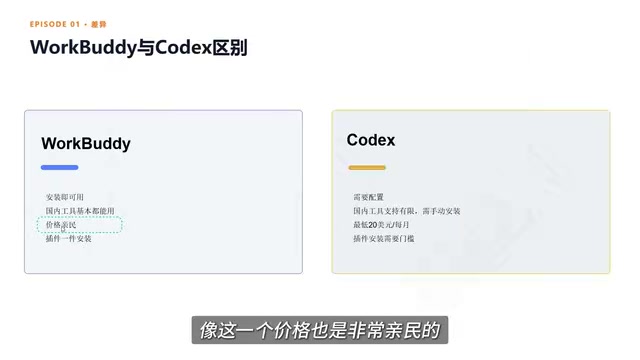
Faced with the many AI Agent tools on the market, beginners can easily fall into choice paralysis. The tutorial offers a comparison from four dimensions:
Ease of Onboarding
With WorkBuddy, you open a browser, search for the product name, and complete the download and installation deployment—the whole process is intuitive. Tools like Codex offer more freedom, but usually require understanding code, configuring environments, and invoking workflows, placing higher demands on technical foundations.
Compatibility with Domestic Office Scenarios
WorkBuddy has a built-in connector feature, which is essentially an entry point that authorizes the AI to use a certain software or service. For example, after connecting and authorizing with WeCom, it can help reply to messages and also organize chat records into documents. This allows AI to not only know how to do things but also participate in the entire process within the permitted scope.
Connectors are a type of standardized authorization interface in the AI Agent ecosystem, functioning like issuing an AI a "limited-permission access card." After the user authorizes through OAuth or similar means, the Agent can read or write data from an external service within the agreed scope—for example, reading chat records from WeCom, creating schedules in a calendar, or writing content to cloud documents. The significance of connectors lies in extending AI from "only able to converse" to "able to operate real systems," while reducing the risk of misoperation through granular permission control. Compared with traditional API calls, connectors are usually pre-built by the platform and ready to use out of the box; users can complete authorization binding without writing code, which is also the key mechanism that enables WorkBuddy to quickly connect with domestic office software.
Usage Cost
WorkBuddy gives credits upon registration and offers a daily claimable allowance, which is enough for light users to cover daily experience and basic tasks. Some overseas products require subscription payments, and their value only shines when usage is heavy.
Plugin and Skill Ecosystem
WorkBuddy has a built-in Chinese Skill marketplace where common capabilities can be installed with one click. A Skill can be understood as an already-trained professional tool or work capability. The platform also offers "expert" roles—equivalent to digital employees for different positions. For example, when you need to build a process, you can directly find the corresponding senior development engineer and invoke them with one click.
Skill in the context of AI Agents refers to a set of encapsulated prompts, tool invocation logic, and knowledge resources—understandable as a "pre-trained professional workflow." Unlike ordinary plugins, Skills often come with clear role settings and operating specifications. Once installed, the Agent can complete a certain type of task according to the established process, such as generating weekly reports, organizing meeting minutes, or doing data pivots. The value of the Chinese Skill marketplace lies in lowering the barrier to acquiring capabilities—users don't have to write complex prompts or workflows themselves; one-click installation lets them reuse solutions validated by others. "Expert roles" further personify Skills, packaging the responsibilities, tone, and output standards of a certain position into a callable digital employee, allowing non-technical users to use AI intuitively, as if "asking a person to do something."
Getting Started Advice: Act First, Then Go Deeper
The tutorial author's advice is straightforward: once you have the materials, read and do at the same time—don't let the tool just sit in your bookmarks. For users with zero foundation, the course design progresses step by step from basic operations to real office scenarios. No coding is required, and no prior exposure to AI is needed; by following along and practicing, you can gradually hand repetitive, time-consuming work over to AI.
Start from installation and get the tool working in the simplest, most direct way—this itself is the most effective way to build an understanding of AI Agent capabilities.
One-line Summary
WorkBuddy is a domestic alternative to Codex—an AI Agent that can directly operate your computer to complete tasks, not just offer suggestions.
Paragraph Summary
The article explains the essential difference between AI Agents and traditional large models: the latter only provide suggestions, while the former can, within the scope of authorization, directly operate the computer and invoke tools to drive tasks through to completion. WorkBuddy is positioned as a domestic alternative to Codex, with similar interface logic but friendlier to users in China—no complex configuration, credits upon registration, a daily claimable allowance, and compatibility with domestic office software such as WeCom through connectors. The article compares WorkBuddy with tools like Codex across four dimensions: ease of onboarding, compatibility with office scenarios, usage cost, and plugin and Skill ecosystem, noting that its built-in Chinese Skill marketplace and expert roles significantly lower the barrier for beginners. Finally, it offers getting-started advice: once you have the materials, read and do at the same time, start hands-on practice from installation, and gradually hand repetitive, time-consuming work over to AI.
Related articles

Fifty Years Studying Power: Robert Caro's Writing and Insights on Power
Robert Caro reflects on 50 years studying power: Lyndon Johnson's persuasion and leverage, Robert Moses's transformation from idealist to ruthless builder, the dilemmas of large-scale construction, and his methods of compressing themes and solitary focus in biography writing.

Can a $20,000 Robot Do Your Chores? The Test Results Are Surprising
A YouTube test video shows how a $20,000 robot responds to commands like washing dishes, turning off lights, taking out trash, and feeding the dog. This article analyzes its real capability boundaries, the state of voice interaction technology, and how far household robots are from mainstream adoption.

The Complete Guide to Running AI Models Locally: Inference Engines and Tool Stack Explained
A systematic breakdown of the complete local LLM tool stack: from PyTorch and GGML compute libraries to llama.cpp, vLLM, SGLang inference engines and Ollama, LM Studio wrapper layers, with benchmark data on performance differences and selection logic.