Turn Screenshots into Web Code in Seconds: Anyone Can Write HTML with AI

Drop a screenshot into AI to auto-generate HTML/CSS; the coding barrier shifts from writing code to writing prompts and making judgments.
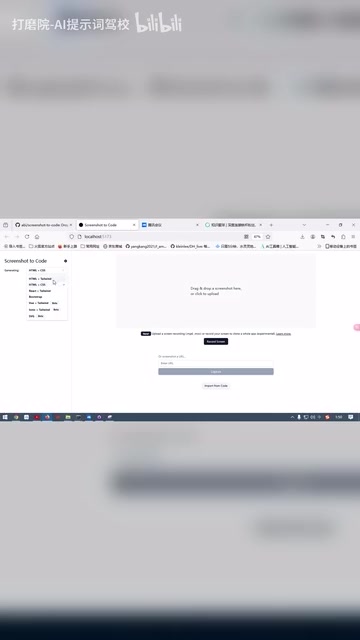
A Bilibili creator demonstrates a screenshot-to-code tool: select the code type on the left, drag a webpage screenshot into the right, and AI automatically scans and generates HTML/CSS code without any manual typing. The tool also previews app cloning from recorded video, upgrading input from static interfaces to interaction flows. Generated results support iterative modification, which is key to practicality. The article notes that AI does not eliminate the programming barrier but shifts it from "writing code" to "making requests" and "making judgments," with prompting becoming a new foundational skill. Such tools best suit product managers, designers, operations people without front-end resources, and developers needing quick drafts.
Hand a screenshot of a webpage to AI, and within seconds it starts writing HTML and CSS on its own—this isn't a special effect from a demo video, but a tool capability you can use right now. A Bilibili creator fully demonstrated this process in "AI Efficiency in Action" and offered a thought-provoking judgment: in the AI era, knowing how to code may no longer be the barrier—knowing how to write prompts might be.
How exactly do you use this tool
The tool interface demonstrated by the creator isn't complicated: on the left is the code type selection area, and on the right is the input area. On the left, you can choose which type of code AI should generate. Because the creator is more familiar with HTML and CSS and finds it easier to troubleshoot issues, they directly selected the webpage code option.
The core operation on the right is drag-and-drop: drag a screenshot into it as reference material for AI. The creator had prepared a screenshot of their own community homepage in advance. After placing it in, they moved their hands away from the keyboard, and AI began scanning the image and writing code on its own. Not a single line of code was typed manually throughout the process.
The clever part of this interaction design is that it lowers the "input cost." In the past, when asking AI to write code, you had to describe the layout, colors, and spacing in words—and if the description wasn't clear, the result would go off track. Now you just provide an image, and the visual information itself becomes the most precise requirements document.

Screenshot-to-Code is a rapidly developing direction in multimodal AI applications in recent years. Its technical foundation is built on the cross-modal understanding capabilities of vision-language models (such as GPT-4V, Claude 3, etc.). The core process of such tools is usually divided into two steps: first, the vision model parses the layout structure, colors, fonts, spacing, and other visual elements in the screenshot, and then maps this information into HTML tags and CSS style rules. Early implementations relied on OCR and behavior cloning, with limited accuracy; the new generation of tools, leveraging large models' code generation capabilities, can directly output semantic structural code. Currently, representative open-source projects in this direction include abi/screenshot-to-code, etc., which support output for multiple front-end frameworks and allow users to iteratively modify generated results through conversation.
More than screenshots: the imaginative space of cloning apps from video
In addition to screenshot-to-code, the creator mentioned that the author of this tool is also releasing new features, including cloning an app by recording a video. The creator said this part will be shared separately in a later review and did not demonstrate it in detail this time.
From screenshots to video, the dimension of input information is upgrading. Screenshots can only capture static interface snapshots, while video can record interaction flows, transition animations, and state changes. If the ability to clone apps from video matures, it means AI can not only replicate "what it looks like" but also understand "how it moves." For people doing product prototypes, competitive analysis, and interface replication, this is a direction worth watching. Of course, for now it is only a feature preview, and the actual effect needs to be verified through review.

After generation, you can still iterate
One easily overlooked but crucial detail in the demo is that after AI generates a result, you can still perform secondary iterations based on that result.
This determines the upper limit of the tool's practicality. Generating perfect code in one shot is almost impossible; in real development, tweaking and adjusting is the norm. If the generated result cannot be further modified through conversation, then it is just a toy; if it can be iterated on, it comes closer to being part of the workflow. The creator also emphasized that this capability "is very" important in the AI era—although the original quote is cut off here, the meaning is clear: iteration capability affects the actual user experience more than one-shot accuracy.
The technical prerequisite for secondary iteration is "context retention"—the tool needs to pass the already generated code as conversation history to the large model, so that the model can make incremental modifications based on understanding the existing code structure rather than regenerating from scratch. This is essentially the same as the "multi-turn conversation" mechanism of conversational AI such as ChatGPT, but in code scenarios it places higher demands on context window length and code understanding precision. In actual use, secondary iteration usually adopts a "local modification" strategy: the user points out the specific problem area (such as "the navigation bar spacing is too large"), and the model only changes the corresponding code snippet, avoiding damage to other parts that are already correct. This capability directly determines whether the tool can be integrated into real development workflows—no matter how high the success rate of one-shot generation is, it cannot cover requirement changes and detail adjustments.
Can people with zero foundation really write code now
This is the core proposition of the entire demo. The creator's exact words were: in the future, people without a programming code foundation can also possess such programming ability.

Objectively speaking, this statement needs to be understood in parts. The tool does significantly lower the barrier to "producing runnable webpage code"—you don't need to remember tag syntax or hand-write flex layouts; AI does the translation work for you. But there is still a gap between "possessing programming ability" and "being able to generate code": how to troubleshoot when the code doesn't run, whether the generated structure is reasonable, and how to maintain it afterward—these still require basic understanding. The creator themselves chose HTML/CSS because they are "more familiar with it and it's easier to troubleshoot," which precisely shows that foundational knowledge still has value in AI collaboration; its role has simply changed from "writing it yourself" to "being able to understand, judge, and correct errors."
So a more accurate statement might be: AI has not eliminated the barrier to programming; it has moved the barrier from "writing code" to "making requests" and "making judgments." Prompting ability has become a new foundational skill, and the creator's judgment on this point is very accurate.
Prompt Engineering refers to the methodology of carefully designing input text to guide AI models toward producing more accurate and expected results. In code generation scenarios, prompting ability is reflected in: whether you can accurately describe the boundaries of requirements, whether you can point out specific problems in the generated result, and whether you can express modification intentions in a way the model can understand. For example, saying "make it look better" is far less effective than saying "change the navigation bar background to dark gray #333, change the text to white, and adjust the height to 60px." This is also why the creator emphasizes that prompting is a new foundational skill in the AI era—it is essentially a kind of "precise expression ability," highly connected to the way of thinking in programming where pseudocode or comments are used to describe logic. People who master structured expression will gain a significant efficiency advantage in AI collaboration.
Who should start using it first
From the demo, the most direct beneficiaries of such tools are three types of people: first, product managers and designers, who can quickly turn design drafts into clickable prototypes; second, operations people and entrepreneurs who don't understand front-end but need pages, saving the communication cost of outsourcing; third, front-end developers themselves, who can use screenshot generation to create drafts of repetitive pages and leave their energy for complex logic.
As for the tool's specific name and more parameters, the original demo did not fully explain them. If you are interested, you can follow the later review mentioned by the creator. The direction is already clear: using visual input to drive code generation is moving from concept to everyday tool.
Related articles

Private Key Set to 4? CA's Elementary Mistake Leaves TLS Exposed
CA eMudra set private keys to tiny values like 4, making TLS certificates brute-forceable. A Computerphile video demonstrates the full process from extracting public keys to forging certificates, and explores the fragility of the PKI trust chain.

How Gen Turns Data into Decisions with ChatGPT Work
In an OpenAI user case, business leader Gen shares how ChatGPT Work turns data into decisions: within hours of launch, teams can judge whether integrations and onboarding flows work, shifting decision iteration from hundreds of trial-and-error attempts to a fast feedback loop.

ChatGPT vs. Claude In-Depth Comparison: Strong at Coding but Weak at Research — How to Bridge the Gap?
A user considers switching from ChatGPT to Claude, finding Claude stronger at coding but shallower at research. We analyze the differences and share tips to make Claude's research deeper.