Ubuntu 26.04.1 LTS Released: What Desktop Users Need to Know

Ubuntu 26.04.1 LTS arrives as the first point release, bundling fixes and driver updates for a safer desktop upgrade.
Canonical has released Ubuntu 26.04.1 LTS, the first point release of this long-term support version. In Ubuntu's release convention, the ".1" release incorporates months of real-world bug fixes, security patches, and updated hardware driver support — making it significantly more stable than the initial launch and widely considered the "safe to upgrade" signal. The LTS version offers 5 years of security maintenance (extendable to 10 years via Ubuntu Pro), making it ideal for enterprise workstations, servers, and stability-focused desktop users. The article recommends backing up data and confirming hardware compatibility before upgrading, and choosing between an in-place upgrade or fresh install based on system complexity.
Ubuntu 26.04.1 LTS Released
Canonical has officially released Ubuntu 26.04.1 LTS for desktop users, marking an important milestone in the long-term support (LTS) series. For individuals and enterprise environments that rely on stability, the .1 point release is typically the most compelling moment to upgrade.
Note: This article is based on a release announcement posted on Hacker News, where original details were limited. The following draws on the established release conventions of Ubuntu LTS versions to help readers understand the significance of this update and what to consider before upgrading.
Why the .1 Release Is Worth Upgrading To
In Ubuntu's release cadence, the initial LTS release is followed by several months of real-world testing. The first point release (.1) then consolidates the bug fixes, security patches, and updated hardware support accumulated during that period.
This makes Ubuntu 26.04.1 more mature than the initial release: kernel and driver compatibility is improved, early stability issues are resolved, and the installation image ships with the latest cumulative updates already included. For users who held off on the initial release, the .1 version is widely regarded as the "safe to migrate" signal.
What Long-Term Support Actually Means
LTS releases offer years of standard security maintenance, making them the preferred choice for servers, development workstations, and desktop environments where stability is a priority. Unlike regular releases that iterate every six months, LTS users can avoid frequent major upgrades and run on a stable foundation for the long haul.
For enterprise users, this is especially valuable: a longer support lifecycle means lower operational overhead and more predictable upgrade planning. Canonical also offers extended security maintenance through subscription services like Ubuntu Pro for users who need it.
The standard support period for Ubuntu LTS is 5 years (through April 2031), covering security updates and critical bug fixes. Through Ubuntu Pro — free for personal use on up to 5 devices — the support period can be extended to 10 years, covering a broader set of packages (known as Extended Security Maintenance, or ESM). By contrast, regular Ubuntu releases like 25.10 carry only a 9-month support window, suited for users who want the latest features but not appropriate for long-term production use. Canonical currently positions Ubuntu 24.04 LTS (Noble Numbat) as the previous LTS baseline, with 26.04 serving as the starting point for the next five-year cycle. Users on 24.04 can migrate via the official upgrade path.
Recommendations Before Upgrading
Before migrating from an older release to Ubuntu 26.04.1, a few things are worth keeping in mind:
- Back up your data: Every system upgrade carries risk — important files should be backed up beforehand.
- Check hardware compatibility: Even though the
.1release improves driver support, it's still worth verifying that critical peripherals work as expected. - Wait for community feedback: Monitor forums and platforms like Hacker News for user reports on potential upgrade issues.
- Fresh install vs. in-place upgrade: For systems with complex configurations, a fresh install is sometimes cleaner and more reliable than upgrading in place.
In-place upgrades can be performed using the do-release-upgrade command; Ubuntu will prompt users when a new LTS version is detected. The tool handles package dependency changes automatically, but conflicts can arise if you have a complex software source setup, numerous third-party PPAs, or a system that hasn't been maintained in a while. A fresh install avoids legacy configuration residue but requires reconfiguring your user environment and application data. Server users are advised to validate the upgrade process in a test environment before applying it to production systems.
Conclusion
The release of Ubuntu 26.04.1 LTS gives desktop users a battle-tested, stable option. As the first point release in the LTS series, it brings improvements in stability, security, and hardware compatibility — making it an ideal moment to upgrade or migrate.
Since the original source material for this article was limited in detail, refer to Canonical's official release notes for specifics on feature changes, system requirements, and known issues.
Related articles
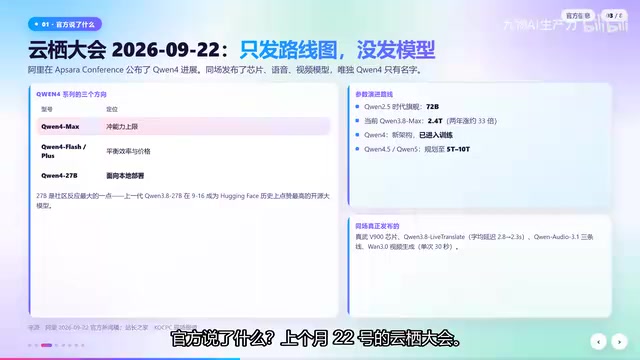
Qwen4 Architecture Preview Open-Sourced: 125B Parameters, 512 Experts, Designed for VRAM-Constrained Hardware
Qwen4 isn't released yet, but its architecture is previewed via open-source Qwen3.8 Flash Next: 125B params, 6B activated per token, 512 experts, 262K context, built for VRAM-limited hardware. This article covers official confirmations, key config.json metrics, and local deployment tests on 24G memory.
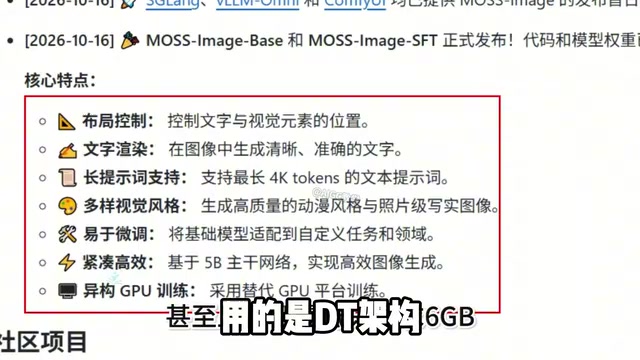
Run 8K Images on 6GB VRAM! Hands-On Test of Fudan's Open-Source MOSS-Image Model
Fudan OpenMouse team and Shanghai MOSS Intelligence open-source MOSS-Image, a 500M-parameter DT architecture text-to-image model that runs locally on 6GB VRAM with precise text rendering, structured layout control, and 4K Token prompt support—ideal for e-commerce posters and local deployment by individual creators.
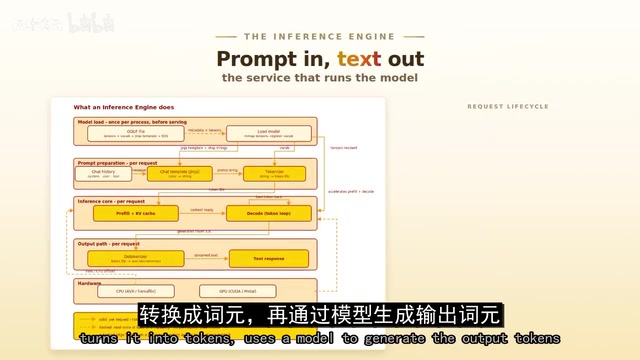
Overseas Blogger Tests Local Deployment of 100B-Parameter MoE Model: Key Lessons on Quantization and Tool Calling
Overseas blogger tests local deployment of Alibaba's Qwen 3.8 Flash Next 100B MoE model on a Strix Halo mini PC and CUDA workstation, revealing how quantization precision affects tool-calling success and the real-world performance of the Strata and GUFO inference engines.