Vibe Coding for Beginners: A Six-Step Path to Your First Product

A six-step beginner's roadmap to Vibe Coding — from AI tools and prompting to shipping your first real product.
This article covers the core lessons from a ~50-minute Bilibili tutorial on Vibe Coding — a development approach where you describe requirements to an AI through conversation instead of writing code manually. It identifies three common beginner pitfalls (poor tool knowledge, weak prompts, and chaotic environments) and proposes a six-step learning path: master the basics, learn to write prompts, build a small project, explore advanced techniques, tackle a larger project, and develop a personal methodology. The central argument is that while Vibe Coding lowers the coding barrier, it shifts the real skill requirement toward clear communication, problem decomposition, and project management.
What Is Vibe Coding?
If you've been following the AI space lately, you've probably heard the term "Vibe Coding." It refers to a way of building software where, instead of writing code line by line, you describe what you want to an AI through conversation — and let it generate, revise, and debug the code for you — until you have a working product.
This approach has turned "anyone can build without knowing how to code" from a tagline into something genuinely achievable. But as this Bilibili tutorial emphasizes, the heart of Vibe Coding isn't about mastering any particular AI coding tool. It's about learning to use AI to actually build things and get work done. Tools are just the means. Turning an idea into a real product is the point.
The Three Mistakes Beginners Almost Always Make
A lot of people give up on AI-assisted coding before they ever get started. The tutorial identifies three common failure patterns:
- Not knowing how to use AI tools: No idea where to begin, overwhelmed by configurations and unfamiliar interfaces.
- Getting poor results from AI: Vague requirements lead to outputs that miss the mark entirely.
- AI making a mess of your machine: Executing random commands and modifying files leaves the environment in chaos.
These might look like technical problems, but they all point to the same root cause: beginners lack a clear, structured onboarding process. Fumbling around without a framework just leads to repeated frustration. Before you write a single line of code, getting your methodology straight matters more than rushing to dive in.
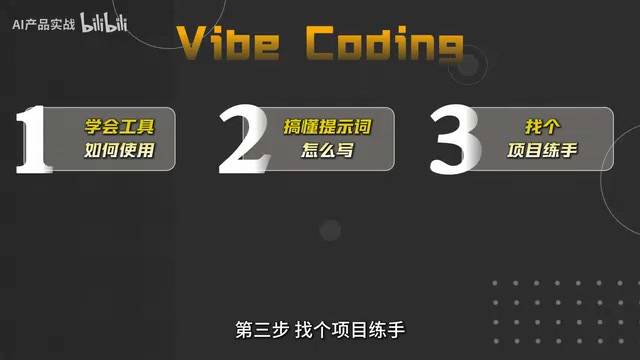
A Six-Step Vibe Coding Path from Zero to One
The most valuable part of this roughly 50-minute video is how it breaks Vibe Coding down into six progressive steps — a practical roadmap that's perfect for complete beginners.
Step 1: Learn the Basics of Your AI Coding Tool
Start by solving the "I don't know how to use this" problem. Understand how your AI coding tool works, what it can do, and where its limits are. This is the foundation everything else builds on. You don't need to understand what's happening under the hood — just get comfortable enough to run with it.
Step 2: Learn How to Write Prompts
This is the single biggest factor in the quality of what you get back. When AI produces bad results, it's almost never because the AI isn't capable enough — it's because the prompt wasn't clear. Learning to describe your requirements in structured, precise language is what lets AI actually understand what you want.
Step 3: Build a Small Practice Project
You can't learn this by watching. Pick a small but complete project and actually build it, putting the tool skills and prompting techniques from the first two steps into real use. Hands-on practice is how you build the kind of intuition that sticks.
Step 4: Explore More Advanced Techniques
Once you have the basics down, it's time to level up. This includes things like breaking complex requirements into smaller pieces, getting AI to collaborate on tasks step by step, and iterating through debugging cycles. These more advanced patterns meaningfully improve both your development speed and the quality of what you ship.
Step 5: Take On a Larger Project
Graduate from practice projects to something more substantial — a relatively complete, real-world build that puts the entire workflow through its paces. This is the real test of what you've learned, and the step where you truly cross the line into "I built a product."
Step 6: Develop Your Own Vibe Coding Methodology
Finally, take everything you've learned from real projects and turn it into a personal system. Codify what works, cut what doesn't, and build a repeatable, efficient way of working that's yours.
Why "Methodology First, Then Action" Actually Matters
The tutorial keeps coming back to one core idea: you don't need to become a programmer first, but you do need to get your methodology straight before you let AI start writing code.
The reasoning is simple but easy to overlook. Vibe Coding lowers the barrier to coding, but it doesn't lower the barrier to doing something well. The more powerful the tool, the more it demands a clear sense of purpose and process from the person using it. If you just let AI make random edits without direction, you end up in chaos — and somehow get less done, not more.
In other words, the real skill gap in Vibe Coding has shifted from "can you write code" to "can you clearly articulate requirements, decompose problems, and manage a project." That's exactly why this six-step framework puts prompt writing and hands-on project work at the center.
Final Thoughts
For anyone who wants to get into AI-assisted development with no prior coding experience, this tutorial lays out a clear and practical path: build the methodology first, then work through it step by step, and eventually ship a complete project on your own.
Vibe Coding is putting the ability to build software into the hands of more and more ordinary people. But even the smartest tools need someone to steer them. Instead of worrying about whether AI will replace programmers, you're better off just building your first real product — because real learning always happens in practice.
Related articles

Mistral Large 4 Open Weights: Trillion-Parameter MoE, Sharp Gains in Terminal Coding
Mistral releases full weights for Large 4: a 1T-parameter MoE activating 49B per pass, terminal coding up from 28% to 41%, 1M-token context, three reasoning tiers, $0.7 per million input tokens, and a modified MIT license for commercial fine-tuning.

Vibe Coding in Practice: How a Finance Graduate Built a $1K/Month Interview Assistant with Zero Code and AI
A real livestream with a finance-to-dev creator breaks down how Vibe Coding uses ChatGPT for planning, Claude for coding, and Firebase for backend to build an AI interview assistant with zero handwritten code, plus its pricing, security checks, and real barriers.
Lean's Creator on the Future of AI and…
Lean's Creator on the Future of AI and Formal Verification
Lean theorem prover creator Leo de Moura discusses the future of AI and formal verification on Hacker News, analyzing how Lean can serve as a trusted verification layer for AI reasoning and AI's dual impact on the barriers and scaling challenges of formal verification.