What Is WorkBuddy? A Complete Beginner's Guide to Tencent's AI Office Desktop Assistant

Tencent's free AI desktop agent WorkBuddy actually operates your computer to complete multi-step office tasks — not just give advice.
WorkBuddy is a free AI office desktop agent from Tencent that combines advising with doing: unlike Q&A tools like ChatGPT, it directly reads and writes local files, executes multi-step tasks, runs scheduled background jobs, and accepts remote commands via WeChat. Built from an AI brain, computer-operating hands, and an automation engine, it can also connect to Tencent Docs, WeCom, and databases via MCP, turning a fixed-function tool into an on-demand capability platform. No VPN or special hardware required — ideal for complex workplace tasks involving batch file processing and multi-step automation.
The Core Pain Point WorkBuddy Addresses
Monday morning: you open your laptop, sort through client data, reply to your manager, coordinate with teammates — and by the time the day is over, you realize nothing truly important actually got done. This pattern of burning time on routine tasks that AI could handle instead is exactly the problem WorkBuddyAd was built to solve.
According to a tutorial by a Bilibili content creator, WorkBuddy is an AI agent desktop tool launched by Tencent, officially positioned as an "all-scenario workplace AI assistant." It requires no VPN, isn't picky about hardware specs, is currently completely free, and runs on any ordinary office computer. More importantly, it can directly read and write WPS spreadsheets, DingTalk messages, and Feishu documents. The creator describes it as a "domestic alternative to Codex" — with a nearly identical interface and interaction logic, but better suited to the Chinese workplace environment.
The Fundamental Difference from Ordinary AI Tools
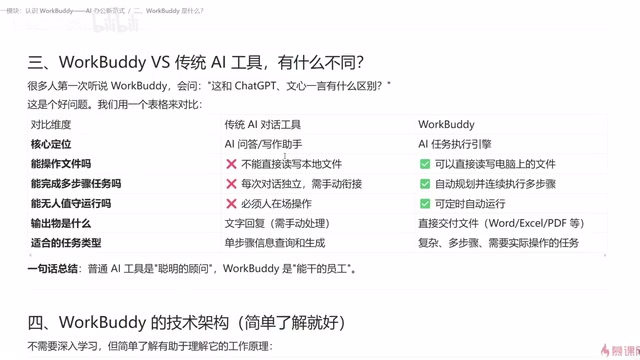
Understanding WorkBuddy comes down to distinguishing it from question-and-answer tools like ChatGPT, Doubao, or Tongyi Qianwen.
The tutorial uses an HR scenario to illustrate this: suppose you have 80 candidate résumé PDFs and need to compile them into a table — containing name, education, years of experience, core skills, and salary expectations — before the end of the day. With a traditional AI tool, the best you'll get is a generated Python script along with instructions on what tools to use and how to proceed step by step. But the actual execution still falls entirely on you.
With WorkBuddy, you simply issue a command: "Read all candidate résumé PDFs in a given directory, extract name, education, years of experience, core skills, and salary expectations, generate an Excel summary, and save it to a specified folder." It understands the request, reads the local data, and automatically produces the file. All you need to do is grab a cup of water and come back to verify the results.
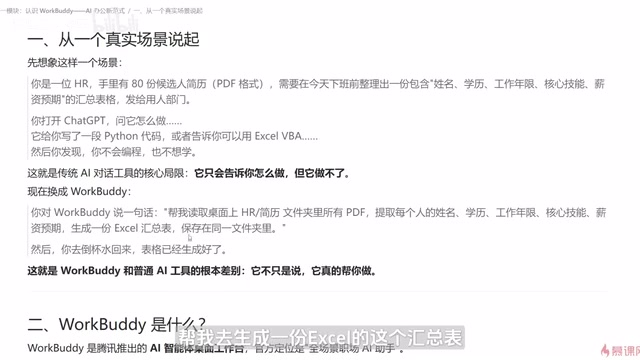
Using the creator's analogy: an ordinary AI tool is a "smart consultant" that tells you what to do, while WorkBuddy is a "capable employee who also has hands and feet" — it doesn't just advise, it actually gets things done.
WorkBuddy's Technical Architecture
Architecturally, WorkBuddy can be broken down into three components: an AI brain, a pair of computer-operating hands, and an automation engine.
- AI Brain: Understands requirements and plans how to execute them
- Operating Hands: Reads local files and works with Word, Excel, PDF, images, and other file types
- Automation Engine: Locks repeatable actions into scheduled tasks — for example, automatically compiling and sending a weekly report every week
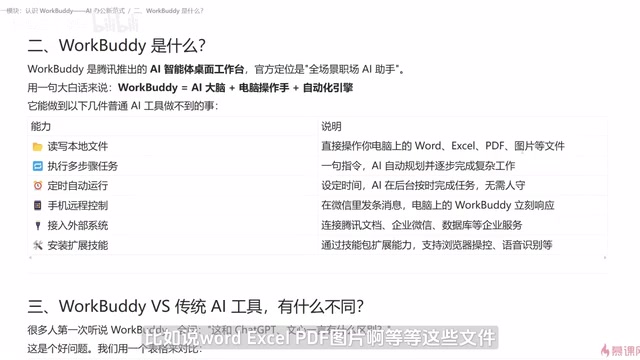
It handles several things ordinary AI simply cannot: reading local files, executing multi-step tasks, running automatically in the background via scheduled tasks, and accepting remote commands from a mobile device. The tutorial notes that as long as WorkBuddy is running on your computer, you can send instructions remotely through a WeChat client or mini program — and results can either be saved on the computer or pushed directly to your phone.
Extended Capabilities: MCP and Skill Packages
WorkBuddy's capabilities can be expanded further. Through MCP (think of it as a connector for linking external systems), it can integrate with Tencent Docs, WeCom, and even databases — dramatically widening the range of tasks it can handle once those external data sources are connected.
It also supports installing additional skill packages that, for example, let it browse and capture screenshots in a browser, or condense an audio recording into a written summary. This extensible design transforms it from a fixed-function tool into a platform where capabilities can be assembled on demand.
For anyone who has used similar Agent products, WorkBuddy's approach will feel familiar — its core loop is: understand the requirement, auto-plan the approach, execute step by step, and redesign the path if a problem is encountered along the way.
MCP (Model Context Protocol) is an open standard proposed by Anthropic in late 2024, designed to establish a unified communication interface between AI models and external tools or data sources. Think of it as the "USB port" of the AI world — any external system that follows this protocol can connect to an AI agent in a standardized way, without requiring a custom-built connector for each system. In WorkBuddy's context, MCP enables it to read Tencent Docs content, query WeCom contact information, or access database records just as easily as it handles local files — significantly lowering the technical barrier to integrating enterprise systems. Today's leading AI frameworks, including Claude and Cursor, have already adopted MCP support, which means skill packages built on MCP carry strong cross-platform reuse potential.
Learning Path
The tutorial outlines three stages — foundational, intermediate, and hands-on — which serve as a useful framework for systematically learning WorkBuddy:
Foundations
Start with core concepts: understand the basic principles behind large language models, get familiar with mainstream AI agent products, and learn the essentials of prompt engineering and workflow design.
Intermediate
Systematically study AI agents, multi-step workflows, RAG knowledge bases, and WorkBuddy private deployment. Also get introduced to mainstream visual development frameworks — leveling up from "knowing how to use it" to "knowing how to modify and build with it."
RAG (Retrieval-Augmented Generation) is a concept worth focusing on in the intermediate stage. The core idea: before generating a response, the system first retrieves the most relevant document fragments from an external knowledge base and feeds them to the model as context. This grounds the model's answers in real, private enterprise data rather than relying solely on knowledge baked in during training. For workplace scenarios, this means you can build a private knowledge base from your company's internal product manuals, contract templates, and historical project documents — allowing WorkBuddy to reference these proprietary materials when answering business questions or generating files. The result is meaningfully higher accuracy and compliance, while keeping sensitive information off public cloud servers.
Hands-On Projects
Complete practical, deployable projects such as automated bulk processing of office files, intelligent customer service Q&A, and real-time market data analysis.
A Note on When to Use It
It's worth keeping in mind that not every task calls for WorkBuddy. For simple, single-step information lookups and responses, a standard conversational AI tool is more than sufficient. WorkBuddy's value is concentrated in complex tasks that involve reading and writing local files, multi-step automation, or scheduled background execution. Learning to judge "which scenarios actually call for it" matters more than jumping in blindly.
As a free, domestically developed AI office Agent, WorkBuddy brings together the ability to advise and the ability to act. For professionals bogged down by repetitive office tasks, it offers a genuinely worthwhile path toward doing more with less effort.
Related articles
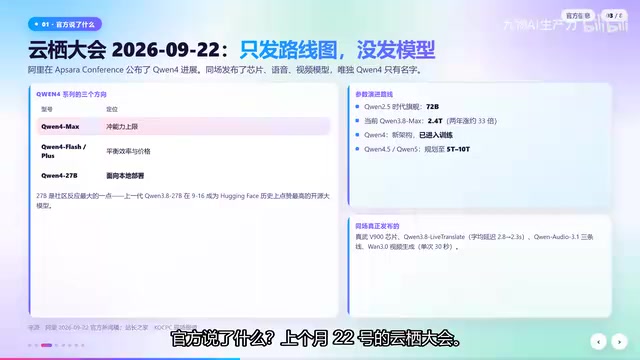
Qwen4 Architecture Preview Open-Sourced: 125B Parameters, 512 Experts, Designed for VRAM-Constrained Hardware
Qwen4 isn't released yet, but its architecture is previewed via open-source Qwen3.8 Flash Next: 125B params, 6B activated per token, 512 experts, 262K context, built for VRAM-limited hardware. This article covers official confirmations, key config.json metrics, and local deployment tests on 24G memory.
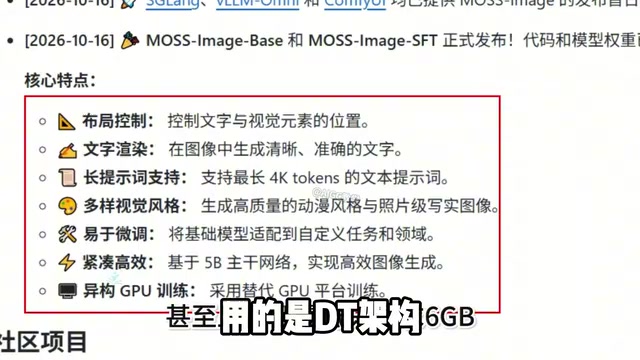
Run 8K Images on 6GB VRAM! Hands-On Test of Fudan's Open-Source MOSS-Image Model
Fudan OpenMouse team and Shanghai MOSS Intelligence open-source MOSS-Image, a 500M-parameter DT architecture text-to-image model that runs locally on 6GB VRAM with precise text rendering, structured layout control, and 4K Token prompt support—ideal for e-commerce posters and local deployment by individual creators.
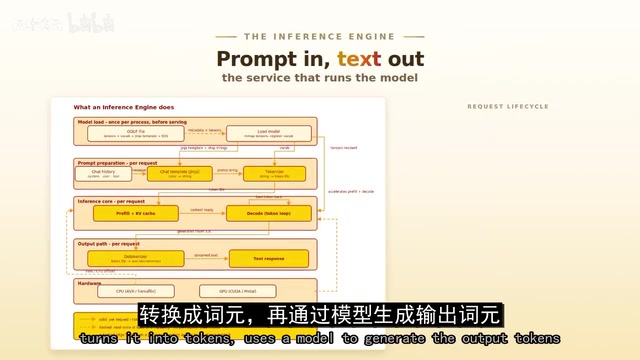
Overseas Blogger Tests Local Deployment of 100B-Parameter MoE Model: Key Lessons on Quantization and Tool Calling
Overseas blogger tests local deployment of Alibaba's Qwen 3.8 Flash Next 100B MoE model on a Strix Halo mini PC and CUDA workstation, revealing how quantization precision affects tool-calling success and the real-world performance of the Strata and GUFO inference engines.