WhatsApp Wear OS Standalone App Architecture Migration and UI Refresh in Practice

WhatsApp shares Wear OS app practices in architecture, notifications, UI, and updates after migrating from Rust to Android shared codebase.
WhatsApp detailed migrating its Wear OS app from a Rust portable client to the Android shared codebase to eliminate duplicate implementations and leverage Android's background management. They used dependency injection optional/multibindings for modular builds, with tests to catch silent feature loss. Notifications were fixed to avoid duplicate vibrations and support direct reply. UI migration to Material 3 addressed transformation and caching issues. A 90-day expiration led to multi-stage update reminders.
Title
WhatsApp Wear OS Standalone App Architecture Migration and UI Refresh in Practice
Meta Description
WhatsApp team shares Wear OS standalone app development experience: migrating from Rust to Android shared codebase, using dependency injection for modularization, solving notification duplication and UI transformation issues, and making app updates part of the product.
Article Content
Running a standalone app on a smartwatch is far more complex than shrinking a phone interface. The WhatsApp team recently shared their complete journey of migrating from a Rust portable client to an Android shared codebase and rebuilding the Wear OS experience on that foundation. The sharing by two engineers, Martin and Subhaag, reveals the unique challenges and solutions of standalone watch apps in architecture, notifications, UI, and update mechanisms.
Why Abandon the Rust Portable Client?
WhatsApp's first appearance on Wear OS relied on a compact portable client written in Rust. This approach allowed the team to quickly enter production, but the cost was that it became WhatsApp's second independent implementation. This meant every protocol, encryption logic, and feature had to be built twice, and the watch app was always playing catch-up.
Even trickier was background management. The portable client needed to handle threads, timers, and sockets itself, which should originally be managed by the Android system. Android has strict rules for background execution: entering Doze mode loses network, execution time is limited after the process is cached, and services, Jobs, or push notifications must be relied upon to break through the restrictions. The watch app had to manually integrate these mechanisms, while the team's Android core library had already handled all of this and was thoroughly tested on billions of devices.
The migration goal was clear: retain business logic, remove UI. What remained was a headless library exposing Kotlin Flows as the API to the UI layer. But with such a massive app, it was impossible to complete the decomposition in one go—some modules mixed UI with infrastructure, and some depended on features not needed on the watch. The team therefore advanced on two parallel paths: continuous modularization, and stripping or overriding parts that could not be removed temporarily.
Doze mode is a low-power mode introduced in Android 6.0: when the device is not charging and the screen is off for a period, the system defers background CPU and network activity to extend battery life. Wear OS devices have smaller batteries, and Doze trigger thresholds are usually more aggressive, posing a direct challenge to watch apps that need to maintain real-time message push. To continue working under Doze, apps must use high-priority Firebase Cloud Messaging messages, foreground services, or precise alarms, but these mechanisms are strictly limited by the system. WhatsApp's portable client, managing sockets and timers itself, had to adapt to these rules one by one, while the Android core library had already encapsulated these mechanisms into abstractions validated at scale—an important motivation for the team's decision to migrate back to the shared codebase.
Trade-offs in Modularization and Dependency Injection
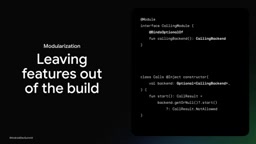
To exclude code from the build, simple conditional statements are not enough because they cannot truly remove code. The team relied heavily on optional bindings and multibindings in dependency injection (DI). With optional bindings, a dependency can be declared as nullable, such as calling the backend; if the watch build includes a module that provides the implementation, the injected backend exists and calls are valid; if the module is omitted, the injected value is null, and the API can return not allowed. Multibindings work on the same principle but for collections—a set of message handlers can be declared as a multibinding, and each feature module adds its own handler via into set. If payments are not supported, the entire payment module can be absent from the build, and the injected collection naturally will not contain the corresponding handler.
This decoupling is a double-edged sword. With direct references, removing a module breaks the build; with optional or multibindings, nothing references the module, the build passes, and the feature quietly disappears or falls back to default behavior. The team once fell into this trap: a refactor moved a feature into a separate module, but neither the phone app nor the watch app included it, resulting in voice message duration displaying as zero seconds. The solution was to add tests—comparing the multibinding sets of key interfaces between the phone app and the watch app to ensure the correct implementations are always bound.
"Optional bindings" and "multibindings" in dependency injection are two declaration methods provided by frameworks such as Dagger/Hilt. Optional bindings allow a dependency to be declared as nullable, injecting null when the corresponding module is not included in the build, so the caller can determine whether the feature is available. Multibindings are used to aggregate multiple implementations into a collection; for example, @IntoSet can collect handlers contributed by each feature module into the same Set<MessageHandler>. These two mechanisms allow the build system to truly remove unused modules and their code, rather than masking features with runtime conditional branches, thereby reducing installation package size and attack surface. But the cost is that module absence cannot be detected at compile time, so additional tests or static checks are needed to ensure the completeness of the binding set.
Priority Battles in Manifests and Resources
Reusing modules saves effort, but everything declared by the module is merged into the manifest file. The phone's launch Activity adds an extra app icon, and unnecessary content providers also start with the app. The manifest merger tool provides the tools:node="remove" attribute to remove components, and after removal, the shrinker can also remove the code. If code still needs to read that Activity, an activity alias can be used to redirect to a new class. But note that these attributes only apply to lower-priority manifests, and the merge order determines whether something is removed.
Resources follow the same logic. Reuse brings free phone strings, but some phone-oriented features cannot be implemented on the watch. For example, the encryption notice at the beginning of each chat ends with a "Learn more" link on the phone, but on the watch there is nothing behind the link. The team declared the same key in the watch's higher-priority module, replacing the string with "Learn more on your phone," and resource merging prioritizes the watch version. They also built a checking tool to ensure overrides are explicitly listed, otherwise the build fails.
Notifications: From Duplicate Vibrations to Silent Updates
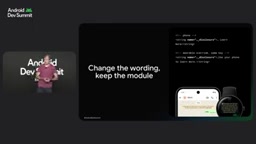
By default, Wear OS bridges or mirrors phone notifications. This works well, but only if the phone stays connected. WhatsApp wants to operate independently, so the app publishes its own notifications. But if bridging remains enabled, every message vibrates twice. Disabling bridging seems simple, but the static manifest flag takes effect from installation, before the user logs in—if the user installs but does not log in, they would suddenly lose all notifications.
The team set it at runtime through the bridge manager: disable bridging on login, re-enable on logout. But there is no API to read the value back, and they observed that the watch would lose this setting. So they rewrote it when the watch leaves the charger or the app updates.
Another notification pain point was duplicate alerts. Previously, events that should have silently updated notifications—such as avatar updates, media downloads, and read receipts—were all alerting the user. After the fix, the watch vibrates only once when a new message arrives, and other non-alert events silently refresh the notification. The team emphasized that when notifications are one of the core user journeys, you must ensure every alert truly deserves the user's attention.
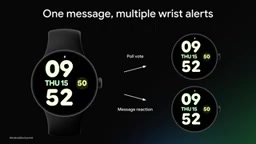
Now, WhatsApp's Wear OS notifications also support direct reply. Using Android's notification actions and remote input API, users can type directly, use voice, or tap quick replies. After a successful send, the chat is marked as read and the notification is cleared; on failure, a one-tap retry is offered. The team views this capability as a complete end-to-end workflow, not just a simple button.
Wear OS's notification bridging mechanism by default mirrors phone notifications to the watch, provided the phone and watch remain connected via Bluetooth or Wi-Fi. Bridging is managed by a system-level service, and apps can request to disable or enable bridging at runtime via NotificationBridgeManager, but this API only provides write capability and no corresponding read interface to confirm the current state. In addition, some OEM devices bind the bridging state to notification permissions, and permission resets may cause bridging to be unexpectedly disabled. Therefore, the WhatsApp team chose to rewrite the bridging state at key points such as login, logout, when the watch leaves the charger, and app updates, to compensate for the system's lack of state readback and persistence guarantees.
UI Migration: More Than a Skin Change
With shared infrastructure in place, the team turned its attention to making WhatsApp truly feel at home on the wrist. The first step was migrating to Material 3. On a circular screen, every pixel is precious, and Material 3 provides the right components and design foundation. But design system migration is never just visual migration; it is behavioral migration. Old and new code need to coexist behind a switch, and screens that visually match Figma still suffer from broken basic gestures such as scrolling and swipe-to-go-back.
Dynamic screens make things more complicated. Rows move when messages arrive, and bubble shapes vary. The team encountered two typical problems. First, the bubble card's transformation was applied twice—after the parent card applied the transformation, it was passed to the child bubble, causing the child bubble to undergo a double transformation. The fix was to apply the transformation only once at the parent card level, ensuring "one transformation applies to one item." Second, a small faded bubble appeared in the center of the screen where it should have been full size. The reason was that the size setting was cached by remember, which also cached the old position; when a new message arrived and moved the old bubble up, the transformation was still based on the old position. After removing the remember call and calculating the transformation each time based on the bubble's latest position, the problem was resolved. When rows move, transformations must move with them.
remember in Jetpack Compose is used to cache calculation results between recompositions to avoid repeated calculations. But when the cached value depends on external mutable state (for example, bubble position changes due to message list changes), remember retains the old value, causing the UI to disconnect from the actual position. In dynamic lists, the bubble's transformation matrix needs to be calculated in real time based on the latest layout coordinates; if position or size is cached, subsequent animations and transformations will be based on stale data. The correct approach is not to use remember for position-related derived state, or to use remember with the correct key parameter to ensure the cache is invalidated when state changes. This principle was directly reflected in WhatsApp's fix for the bubble misalignment issue.
Logout Security and Update Reach
Logout seems simple but hides risks. When unlinking the watch from the account, users expect messages to disappear along with it. The team needs to delete messages, keys, and settings, but background threads may still be writing, causing SQL exceptions or even writing to a newly created database. Android provides an API to clear app user data, which clears data and stops the app, but also resets permissions. On some OEM devices, notification bridging is bound to notification permissions, and using this API would also lose phone notifications.
The team's solution was to stop the process themselves: build a minimal service and helper process that does not include dependency injection or WorkManager, so it does not start other parts of the app. After logout, this service kills all other processes in the app before deleting data. Because the clear app user data API is not used, permissions are preserved, and notification bridging can be re-enabled.
Finally, the team reminded of an easily overlooked product issue: every WhatsApp app version has a built-in 90-day expiration. Users may be stuck on an old version while the new version has not yet been pushed to the watch, causing the app to stop working and active user numbers to plummet. To address this, they made updates themselves part of the product: starting reminders 15 days before the app expires, and repeating reminders at 7, 5, 3, 2, and 1 days remaining, with users able to ignore or jump to the Play Store to update. As they summarized, a developer's job does not end with releasing an update; it is not complete until users actually receive it.
One-line Summary
WhatsApp shares Wear OS app practices in architecture, notifications, UI, and updates after migrating from a Rust client back to the Android shared codebase.
Paragraph Summary
The WhatsApp team detailed the journey of migrating the Wear OS app from an independent Rust portable client to the Android shared codebase. The core motivation was to eliminate protocol and feature duplication caused by a second independent implementation and to leverage Android's mature background management mechanisms. The team used optional bindings and multibindings in dependency injection to build feature modules on demand, but decoupling also brought the risk of silent feature loss, requiring tests comparing binding sets as a safeguard. At the notification level, they dynamically toggled notification bridging to avoid duplicate vibrations, distinguished alerts from silent update events, and treated direct reply as an end-to-end workflow. During the UI migration to Material 3, the team solved issues of duplicate transformation application and misalignment caused by position caching. Finally, for the app's built-in 90-day expiration mechanism, they designed multi-stage update reminders to ensure users actually receive new versions.
Related articles

Anthropic IPO Explained: Fuel for the AI Boom or the Spark for a Bubble?
Anthropic files for an IPO under ticker ANT. Breaking down the prospectus: 80% of revenue from usage-based pricing, $72B of an $80.7B net loss being non-cash charges, 900% net revenue retention, and how past IPOs like SpaceX performed on day one and over three years — answering the AI bubble question.

Will AI Kill the Research Paper? Mathematicians Offer a New Answer
Mathematicians on the Lex Fridman podcast discuss whether AI will kill research papers—from journal review pressure to Lean formal verification, GitHub open source fatigue to Mathlib's crowdsourcing model, exploring the evolution of academic contributions and the future of mathematical knowledge verification.

Enterprise LLM Development: From RAG to Multi-Agent in Practice
A course breakdown of enterprise LLM application development: from prompt engineering and RAG to multi-agent engineering practice and FDE project delivery, helping developers understand why Agent technology is a key focus for enterprise deployment and learn systematically to avoid detours.