WorkBuddy Complete Workflow Guide: Automation + Assistant in Practice

WorkBuddy tutorial: string experts, skills, and connectors into a reusable automated production line.
This article is a beginner's tutorial for Tencent WorkBuddy, noting it's not a general-purpose chatbot but an automated delivery platform for office work, code development, and creative design. It covers the interface and workspace concept, the "Allow Full Access" authorization toggle's impact on local automation, remote computer control via WeChat/QQ/DingTalk/Feishu, and the division of labor among experts, skills, and connectors (MCP). Scheduled tasks and the knowledge base automate processes and tap proprietary knowledge. True mastery means combining features into reusable workflows.
WorkBuddy is an AI workflow tool launched by Tencent. It is positioned not as an ordinary chatbot, but as an automated delivery platform covering office work, development, and creative design. This tutorial moves from interface layout to workflow construction, with the core goal of helping users understand: features are only the starting point — only by stringing features into a reusable line does one truly master the tool.
Interface Layout and Three Target Audiences
WorkBuddyAd's interface design tells users plainly "who it's for." Tencent divides users into three categories: everyday office work (white-collar workers handling documents, spreadsheets, slides, and data analysis), code development (programmers building websites, mini-programs, and Agents), and creative design (visual posters and other image content). This classification also explains its capability boundaries — it's not a general-purpose chat tool, but a production environment organized around deliverables.
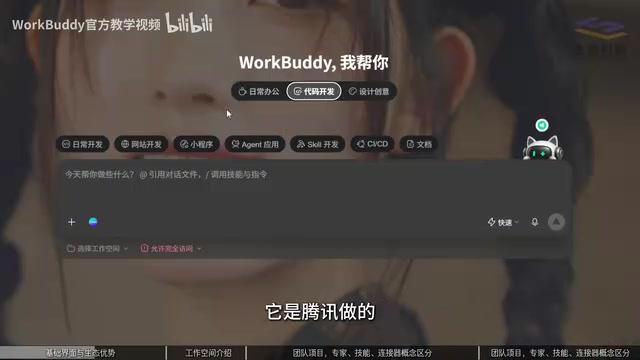
As a Tencent product, WorkBuddy has an ecosystem advantage in mini-program development, with a high degree of integration with the WeChat ecosystem, Tencent Cloud, and other underlying services. For teams that need to quickly produce mini-programs or connect to Tencent Cloud resources, this is a starting point other tools struggle to replicate.
On the operational side, the barrier to AI software lies not in the operations themselves, but in understanding a few new concepts. The sidebar toggle and workspace selection are both "understand once, benefit long-term" designs: choosing a workspace means all files generated during the task will be placed in the specified directory, making subsequent management and reuse easier.
Permission Control: What "Allow Full Access" Really Means
There is an easily overlooked but highly consequential option in the interface — "Allow Full Access." Its essence is authorizing WorkBuddy to operate your computer. When enabled, the tool can directly read and write local files and invoke local software; when disabled, some capabilities are restricted.
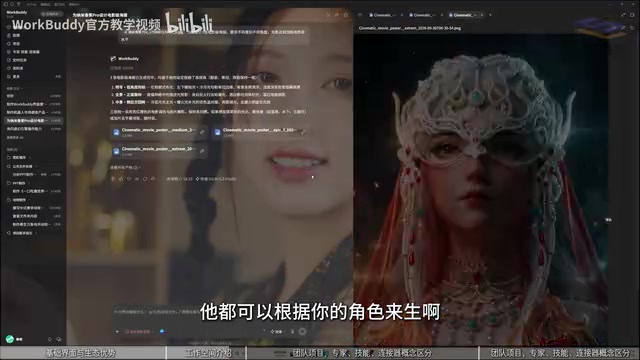
This toggle determines the feasibility of two types of workflows: pure cloud tasks are unaffected, but automated processes involving local file processing and local software invocation must rely on this permission. The tutorial recommends users adjust it dynamically based on task sensitivity rather than enabling it permanently all at once.
Assistant: Remotely Driving Your Computer via WeChat and QQ
The "Assistant" solves the problem of "not being in front of the computer." By conversing with WorkBuddy through channels like WeChat, QQ, DingTalk, Feishu, and WeCom, users can issue commands from their phones and have the computer execute tasks — for example, asking WorkBuddy to send over a file from the computer.
This mode is close to Open Cloud's remote collaboration form: the chat window is the console, and messages are commands. For users who are frequently on the go but need to retrieve local materials on short notice, the Assistant function turns "having to stay by the computer" into an optional state. The tutorial also mentions that for more complex tasks you can choose stronger advanced models, while simple tasks need no extra configuration.
The technical prototype behind "role agents" is usually called an Agent, and its fundamental difference from ordinary conversational AI lies in "autonomy." An ordinary chatbot is only responsible for question-and-answer, with output ending at text; an agent, however, possesses a closed loop of goal decomposition, tool invocation, multi-step execution, and result feedback — it can decide on its own which software to open first, which skill to invoke, and how to retry with a different approach upon failure. In WorkBuddy, experts, assistants, and scheduled tasks are essentially all agents in different encapsulation forms: experts inject domain identity and judgment preferences into the agent, the assistant gives it an entry point for receiving remote commands, and scheduled tasks give it a trigger. Understanding this makes clear why the tutorial emphasizes "stringing features into a line": an agent's value grows non-linearly with the number of callable tools and the quality of their orchestration.
Experts, Skills, Connectors: The Division of Labor Among the Three
There are three high-frequency concepts in WorkBuddy's feature system, and the tutorial uses a vivid analogy to distinguish them:
- Experts (role agents): Built-in prompts and identity settings that turn the AI into a "little expert" in a certain domain. They mainly optimize the AI's "brain," improving the quality of judgment and suggestions, and lean toward generative, advisory output.
- Skills: Fixed, reusable methods of operation, equivalent to giving the AI "hands and feet" so it can actually do work. Skills mostly target software operations on the local computer and cover a wide range, from document processing to invoking various tools.
- Connectors (MCP): Connection protocols for cloud data and external applications. When data isn't local but in the cloud (such as cloud documents), MCP extends the AI's operational scope.
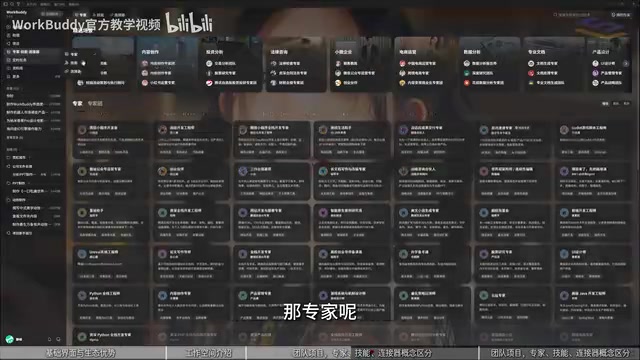
The reason all three exist points to "ecosystem": external applications let AI connect through open MCP while precisely controlling the scope of what's opened — only data you're willing to give the AI access to is opened, and what you're not willing to share is unreachable. This is both capability expansion and permission boundary.
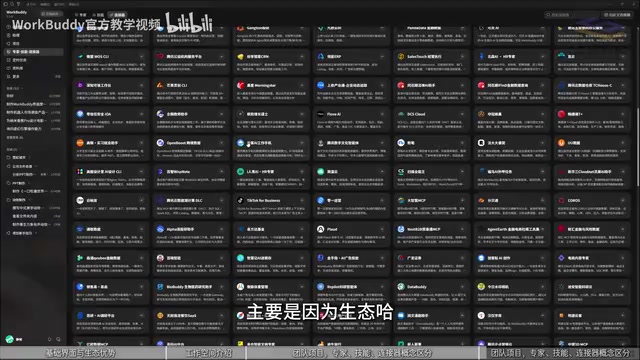
MCP (Model Context Protocol) is an open protocol that standardizes how AI models connect to external tools and data sources. You can think of MCP as the "USB interface standard" of the AI world: in the past, every AI tool connecting to every external application required separate custom development, which was costly and hard to reuse; with a unified protocol, any service supporting MCP only needs to expose standard interfaces and the AI can invoke it on demand. For users, the direct significance of MCP is "teaching a man to fish" rather than "giving him a fish" — a connector doesn't hard-code a piece of software's functions into WorkBuddy, but lets the AI dynamically obtain data and operational capabilities from cloud documents, databases, and business systems at runtime, while the service provider precisely decides which interfaces to open and which data to shield, forming a permission boundary at the protocol level.
Scheduled Tasks and Knowledge Base: Letting Workflows Run Automatically
Scheduled tasks let WorkBuddy automatically perform operations at specified times, such as opening a piece of software on schedule and executing preset prompts. The tutorial recommends no complex configuration for simple tasks, and attaching stronger models only for complex ones.
The knowledge base is a "knowledge add-on": proprietary materials (such as datasets in biomedicine) are placed in advance, and the AI reads them directly each time it executes a task rather than relying on broad web search. The difference from web search is that the data is already filtered by you and exclusive to you, with higher accuracy and relevance.
RAG (Retrieval-Augmented Generation) is the key background for understanding how the knowledge base works. A large model's own knowledge comes from training data, which suffers from lag and "hallucination" issues; RAG's approach is to first retrieve relevant snippets from a specified knowledge base before each answer, then feed those snippets as context to the model to generate a result. The knowledge base is essentially a private knowledge source preset for WorkBuddy: proprietary materials are chunked and indexed, retrieved on demand during task execution, and the model answers based on your data rather than broad web information. This explains its difference from web search — web search recalls public internet content of varying quality, while RAG recalls your filtered, structured exclusive materials, with higher accuracy and relevance, and also avoids the risk of sending sensitive data out to public web search.
From Features to Workflow: The Real Learning Path
The tutorial repeatedly emphasizes one point: most people only learn a few isolated features but don't know how to string them into a line. The hands-on portion of the course uses an AI short drama to walk through the full seven-chapter process, and the same process can be reused in other scenarios for ad videos, websites, calligraphy and ink painting, and other outputs.
This means WorkBuddy's value lies not in how strong any single feature is, but in combining conversations, skills, experts, connectors, scheduled tasks, and the knowledge base into a transferable production line. The sign of mastering this line is not "knowing how to use a certain button," but "being able to build a workflow for a different task too."
One-line Summary
WorkBuddy tutorial: string experts, skills, and connectors into a reusable automated production line.
Paragraph Summary
This article is a beginner's tutorial for Tencent WorkBuddy, noting that it is not a general-purpose chatbot but an automated delivery platform for three audiences: everyday office work, code development, and creative design. It walks through the interface layout and workspace concept, the decisive impact of the "Allow Full Access" computer operation authorization toggle on local automation, the Assistant feature that remotely drives your computer via WeChat/QQ/DingTalk/Feishu, and the division of labor among experts, skills, and connectors (MCP) — experts optimize judgment, skills grant execution power, and connectors extend cloud data boundaries. Scheduled tasks and the knowledge base let processes run automatically and tap into proprietary knowledge. The tutorial ultimately emphasizes that true mastery is not about knowing how to use a certain button, but about combining features into a workflow that can be reused for different tasks.
Related articles

Gemini 4 Carbon Tops Global Rankings as AI Productivity and Open-Source Ecosystems Surge
Google DeepMind's Gemini 4 Carbon tops global benchmarks, built for complex agents and system security. ByteDance launches Doubao Work integrated with Feishu, Anthropic's AI autonomously breaches 5 system-level attack chains, and ModelBest and Fudan open-source on-device multimodal and image generation models.

Overseas Creator Breaks Down N8n AI Agent Business Playbook: From Tooling to Monetization
An overseas creator breaks down the N8n AI agent business playbook: comparing Zapier, Make, and N8n, detailing four monetizable automation categories—lead capture, WhatsApp follow-up, booking, and content pipelines—plus agency pricing and a sales playbook.

Empacer: The Voice-First AI Assistant for Small Business Owners That Topped Product Hunt
Empacer is a voice-first AI assistant for small business owners: three-question setup, voice requests turned into customer replies, social posts, and invoices—all owner-approved. It won #1 Product of the Day on Product Hunt with 231 upvotes and 47 comments.