Zero-Background Vibe Coding in Practice: Build Your Own Software with Trae
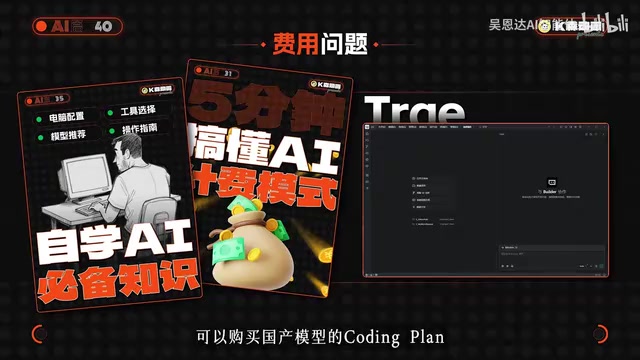
Bilibili creator RK shares the full process of building software with Vibe Coding from zero background, from tool selection to capability progression, showing how ordinary people can use natural language to drive AI to complete programming tasks.
Based on a video by Bilibili creator RK, this article breaks down the full process of how an ordinary person can build software with Vibe Coding from 0 to 1. It first clarifies that programming isn't exclusive to programmers—natural language can drive an Agent to operate a computer. It then recommends Trae's free quota and low-cost Coding Plan to lower the cost of trying. Next, it shows capability upgrades through three steps: operating the computer in plain language, getting AI to write reusable tools, and understanding CRUD data operations. The creator uses rewriting a vocabulary tool in two days as an example to confirm efficiency gains. Finally, it points out that Vibe Coding's boundary lies in interacting with network data, and emphasizes that the ability to articulate requirements clearly is more valuable than writing code.
Vibe Coding has been popping up frequently in tech communities lately, heralding a new programming paradigm: directing AI to write code in plain language. But many people are still stuck at the first step—not knowing what tools to use, what they can do, or how much it costs. In a zero-background hands-on video, Bilibili creator RK answers these three questions through a complete cognitive path. This article is based on that video's content, combined with the actual usage logic of AI programming tools, to break down the full process of how an ordinary person can build software with Vibe Coding from 0 to 1.
What Exactly Is Vibe Coding, and Why Can Ordinary People Use It Too
The video opens by puncturing a cognitive misconception: programming sounds like a programmer's business, something for building commercial projects, unrelated to ordinary people. That logic held up two years ago, but in the Agent era, what Vibe Coding can do under the drive of large models has far exceeded "writing code" itself.
The underlying explanation the creator gives is key: operating a computer seems like clicking a mouse and typing on a keyboard on the surface, but every action is transformed into lines of code at the system's底层 (底层 meaning underlying) level, and the computer recognizes the code before executing it. So in theory, as long as you can write the corresponding code, you can get the computer to automate all kinds of tasks. Previously this was a programmer's exclusive skill—if an ordinary person wanted to write code that operates the computer, even just creating a new folder on the desktop, they'd have to spend time learning programming tools, configuring environments, and mastering syntax. Now, giving instructions directly to an Agent in natural language has dramatically lowered the barrier.
This logical chain is the skeleton of the entire video: from "getting AI to help you operate the computer," to "getting AI to help you write tools," to "getting AI to help you do data interaction"—each step expands the boundaries of your understanding of what Agents can do.
Agent (智能体) is the key concept for understanding Vibe Coding. Unlike a chatbot that only passively answers questions, an Agent can perceive its environment, call tools, and execute multi-step operations, forming a closed loop. For example, when you say "help me create a new folder on the desktop," the Agent parses your intent, generates the corresponding system command or script, and then actually executes it. Trae is exactly such an Agent tool—it translates natural language instructions into executable action sequences, enabling people without a programming background to drive the computer to complete tasks.
Tool Selection and Cost: Trae's Free Quota Is Enough, Coding Plan Costs One Milk Tea
Before diving into what can be done, the creator first gives conclusions on tools and cost. Trae, the Agent tool under ByteDance, has a free usage quota, which is definitely enough for beginners to experience Vibe Coding. If you use it well, you can buy a Coding Plan for a domestic model—the cheapest version costs only one milk tea per month and is absolutely enough for daily work.
This pricing strategy is worth noting: it pushes the cost of trying to an extremely low level, which is precisely the prerequisite for Vibe Coding to move from a "programmer's toy" to an "ordinary person's efficiency tool." The creator emphasizes that this episode has no ads throughout, so this conclusion is closer to actual usage experience than commercial promotion. For zero-background users, running through a minimal closed loop with the free quota first and then deciding whether to pay is the safer path.
From Creating Folders to Automation Tools: Three Steps of Capability Upgrade
Step One: Operate the Computer in Plain Language
The first example the creator demonstrates is extremely simple: tell Trae "help me create a folder named KC Animation on the desktop," and it's done in the blink of an eye. He mocks himself that this example is too rudimentary and doesn't count as programming, but this is exactly the starting point for building confidence—the first time you feel that natural language can directly drive computer actions.
Step Two: Get AI to Write a Reusable Tool
Upgrade a bit: suppose there's a repetitive task you often need to do, such as merging two spreadsheets into one. If you let the Agent do it every time, you'd have to repeatedly describe "merge spreadsheet A and spreadsheet B on my desktop, and you must create a spreadsheet C." That works, but it's annoying. So you can switch your thinking: ask Trae to help write a tool—as long as you launch this tool, it can automatically merge the two spreadsheets.
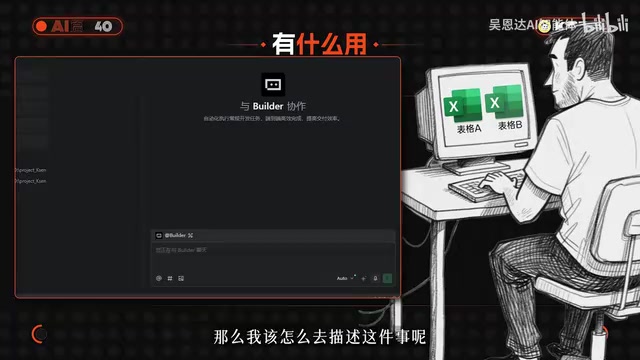
The creator honestly points out two difficulties: where the tool lives, and how to let the tool know which two spreadsheets to merge. He doesn't expand on the details in the video, but suggests using a tool like Doubao to ask and clarify. This approach itself conveys an important signal: Vibe Coding isn't about making you an encyclopedia, but about teaching you to use AI to solve problems. Following this line of thought, you'll naturally wonder whether spreadsheets can be generated automatically, whether merged results can be automatically emailed to the boss, and whether AI can help review data errors—and as you research, your understanding of computers and Agent tools will deepen continuously.
Reusable tools are essentially about solidifying the requirements you repeatedly describe into an executable program. In Vibe Coding, you don't need to write code manually—you just describe the tool's functions and inputs/outputs to the AI, and the AI generates a script or small application. The difficulty lies in how the tool knows which files to process—this usually requires specifying file paths or letting users choose through an interface. The creator's suggestion to consult tools like Doubao for further advice is exactly an embodiment of using AI to solve specific implementation problems.
Step Three: Understand Data Interaction—CRUD
Once you can handle computer operation instructions, you can further study data interaction. The creator gives a very down-to-earth example: you have a spreadsheet storing hundreds of customer records; when you meet a new customer you need to add them, when you confirm no further contact you need to delete them, when a phone number changes you need to replace the old one, and when you want to know how many customers are in Hangzhou you need to filter. These are the four basic data operations: Create, Delete, Update, and Read.

An Agent can do all these actions layer by layer, but you'd have to re-describe the program every time. A smarter approach is to write an interface to operate this data. If you don't know how to write an interface, that's fine—just directly tell the Agent "help me write a simple tool that can perform CRUD operations on this spreadsheet," and it can be done in minutes. The creator makes a key conceptual mapping here: the customer information table can be understood as a database, while the interface is just a shell for operating the data.
CRUD refers to the four basic data operations: Create, Read, Update, and Delete. Almost all data management scenarios can be reduced to these four types of operations. The creator compares the customer information table to a database and notes that the interface is just a shell for operating the data, which helps beginners understand the relationship between data and interface. In Vibe Coding, you only need to describe these operations in natural language, and AI can generate the corresponding interface and backend logic, letting you manage data without learning database languages.
A Real Case: Rewriting a Vocabulary Tool in Two Days for His Daughter
The creator shares a vocabulary memorization tool he wrote years ago when he taught himself programming to memorize words. The logic is simple: use an Excel spreadsheet as a database and write an interface to operate the data—the troublesome part is the word memorization logic and display logic in between. He recalls spending several months learning and writing at the time before finishing it.

Now with AI tools, he optimized the previous logic and rewrote a web version in just two days. It's currently being used by his daughter with very good results. Next, he plans to continue developing other memorization modules to help his daughter spread various memorization tasks evenly across each day. The value of this case lies in the comparison: for the same requirement, what used to take months of learning cost can now be delivered in two days. This isn't to say programming is no longer important, but that the path from "idea to software" has been dramatically shortened.
From Local to Network: Where Are the Boundaries of Vibe Coding
After mastering local data interaction capabilities, you can try interacting with data on the network—in the creator's words, "the sky's the limit, the sea's the width for fish to leap." This step means what you can do is no longer just desktop gadgets, but applications connected to external data. The video doesn't expand on specific cases, but this directional judgment is important: the upper limit of Vibe Coding's capabilities depends on your understanding of "where data is and how it flows," not on your mastery of syntax.
At the end, the creator specifically corrects a cognitive bias: Vibe Coding absolutely must not be narrowly understood as developing commercial products. With AI's support, it can truly greatly improve your own efficiency and capability ceiling. Many opportunities that change destinies appear in the process of trying things out.
Action Advice for Zero-Background Beginners
Combining the video content, we can put together an executable starting path: first use Trae's free quota to run through the minimal instruction at the "create a new folder" level, building the intuition of driving a computer with natural language; then find a repetitive task that actually exists in your life and have AI write it into a reusable tool; next, try to understand the data spreadsheets at hand from a CRUD perspective and have AI generate an operation interface; finally, connect local tools with network data. The whole process doesn't require learning programming syntax first, but it does require a clear description of "what problem you want to solve." This is precisely the new capability requirement Vibe Coding places on ordinary people: the ability to articulate requirements clearly is more valuable than the ability to write code.
Related articles
When AI Starts Blogging: Scott Aaronso…
When AI Starts Blogging: Scott Aaronson's Kitchen Wine Experiment
Scott Aaronson shares a kitchen wine AI writing experiment on his blog, sparking Hacker News debate. This analysis explores the authenticity gap in AI-generated blog content, transparency disputes, and implications for content creators.

Amazon Loses Recall Case: Liability for 400,000 Dangerous Products Established
A U.S. court ruled Amazon is a distributor, not a logistics provider, and must recall over 400,000 dangerous products. This analysis examines the ruling's impact on platform liability boundaries and e-commerce compliance.
Google Familiar Faces Comes to Walmart's Budget Cameras
Google Familiar Faces facial recognition now supports Walmart's Onn outdoor and floodlight cameras at $35 and $77, but requires a Google Home Premium subscription.