Beginner's Guide to Claude Code and Codex: AI Coding Agent Plugins Explained

A beginner's guide to Claude Code and Codex, two AI coding agent plugins for VSCode and Cursor.
This guide explains Claude Code (by Anthropic) and Codex (by OpenAI), two AI coding agent plugins that go beyond simple code completion. Learn how they differ from regular AI assistants, how to install them in VSCode and Cursor, and when to use them. Both are flexible agent frameworks that support multiple LLMs and can autonomously read projects, write code, modify files, and execute commands.
From Hand-Written Code to AI-Assisted Driving: The Value of IDE Plugins
In the previous installment, we learned that an IDE (Integrated Development Environment) is a programmer's workbench. But having a workbench alone isn't enough — you also need the right tools. Today we're introducing Claude Code and Codex, two AI coding agent plugins that can upgrade your workbench from "manual transmission" to "automatic."
For those new to AI-assisted programming, understanding the positioning of these two tools is crucial: they're not simple code completion tools — they are AI agents capable of independently completing programming tasks. The term "Agent" is one of the core concepts in today's AI landscape. Unlike traditional AI chat tools, agents possess a complete "perceive-plan-execute" loop. They don't just understand your instructions — they can autonomously break down tasks, invoke tools, execute operations, and adjust based on results. In a programming context, this means an agent can work like a junior developer: reading project code, devising a modification plan, writing the code, and running tests to verify — all without step-by-step human guidance. This leap from "passive answering" to "proactive execution" is the fundamental difference between Claude Code/Codex and earlier code completion tools (like early versions of GitHub Copilot).
What Is Claude Code?
Claude Code is an AI coding agent developed by Anthropic. Anthropic was founded in 2021 by siblings Dario Amodei and Daniela Amodei, former OpenAI Research VP and colleagues, as an AI safety company with "responsible AI development" at its core. The company created the Claude series of large language models. Claude Code is Anthropic's key product for extending Claude's model capabilities into the developer workflow, officially released in 2025. Anthropic has invested heavily in AI safety research, and its "Constitutional AI" training methodology has had significant influence in the industry, giving the Claude series unique advantages in code generation safety and reliability.
There's a common misconception worth clearing up here: Claude Code is not limited to using only Claude models. It's essentially an agent framework where you can configure other LLMs like GLM, Kimi, and more. This extensibility reflects an important trend in the current AI tool ecosystem: the decoupling of the frontend interaction layer from the backend model layer. The term "framework" means it provides a complete set of tool-calling protocols, file operation interfaces, and task orchestration logic, while the actual "thinking" can be delegated to different large language models. It's similar to the relationship between a browser and a search engine — Chrome can use Google Search, but you can also switch to Bing. This architectural design lets developers choose the most suitable model for different tasks: for example, using Claude for complex reasoning tasks and GLM for Chinese-language development needs.
How Claude Code Differs from Regular AI Assistants
A regular AI assistant works like a "walkie-talkie" — you ask it how to modify code, it tells you the approach, and then you make the changes yourself. Claude Code is completely different. It can:
- Read your entire project: Understand your project structure and code logic
- Write code autonomously: Generate code directly based on your requirements
- Modify files: Perform additions, deletions, and edits in existing files
- Execute commands: Run necessary commands in the terminal
Behind "reading the entire project" and "understanding project context" lies a key technical concept: the Context Window. A large language model's context window determines how much information it can "see" at once. Early models had context windows of only a few thousand tokens (roughly a few pages of text), while modern models like Claude 3.5 support 200K-token context windows, and GPT-4o supports 128K tokens. Even so, the codebase of large projects often far exceeds context window limits. Therefore, agent frameworks use technologies like RAG (Retrieval-Augmented Generation), code indexing, and AST (Abstract Syntax Tree) analysis to intelligently select the most relevant code snippets for the current task and feed them to the model, enabling effective understanding of large projects.

To put it simply: a regular AI assistant is a "walkie-talkie," while Claude Code is a true "programming assistant" — you don't have to lift a finger; it does the work for you.
What Is Codex?
Codex is an AI coding agent from OpenAI with capabilities similar to Claude Code. It also has the full ability to read projects, write code, modify files, and execute commands.
The name Codex has a history worth knowing. The original Codex was a code generation model released by OpenAI in 2021 — it was the core engine behind GitHub Copilot, fine-tuned from GPT-3, capable of converting natural language descriptions into code. In 2025, OpenAI revived the Codex brand with an entirely new AI coding agent product whose capabilities far surpass the original code completion — it can now understand full project context and autonomously execute multi-step programming tasks. This upgrade reflects the entire AI coding field's paradigm shift from "assisted completion" to "autonomous programming."
Like Claude Code, Codex is also not limited to GPT models — you can configure other models as needed. Both share the same core positioning: transforming AI from an "advisor" into an "executor."
How to Install and Use Them
Installing AI Coding Plugins in VSCode
If you're using VSCode, you can only write code manually by default. To enable AI-assisted programming, you need to:
- Search for Claude Code or Codex in the Extension Marketplace
- Install the plugin
- Configure the AI model you want to use
- Start AI-assisted programming
The IDE plugin ecosystem is a critical piece of modern software development infrastructure. Taking VSCode as an example, its Extension Marketplace hosts over 50,000 plugins covering code formatting, version control, container management, database operations, and much more. AI coding plugins are the fastest-growing category in this ecosystem. Technically, plugins work by integrating third-party functionality seamlessly into the development environment through API interfaces provided by the IDE. Once installed as plugins, Claude Code and Codex can directly access the IDE's file system, terminal, editor, and other core components — this is the technical foundation that enables them to "directly operate on your project." This architecture also means developers can gain AI-enhanced capabilities without leaving their familiar work environment.
Using AI Agents in Cursor
Cursor comes with a built-in AI coding agent that works out of the box. But if you don't want to use the default AI capabilities, you can install Claude Code or Codex as replacements.
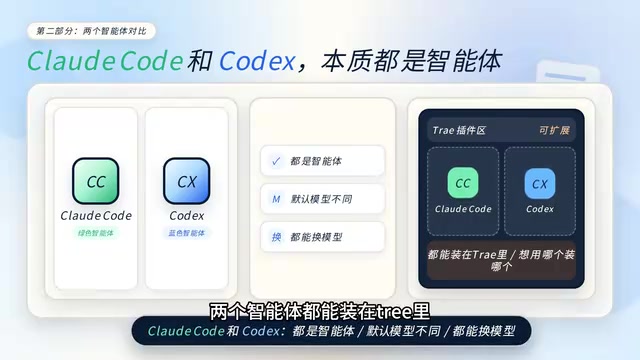
Both agents can be installed directly in Cursor without opening a separate terminal — just install and use. Although they default to different models, both can be switched to whatever model you prefer. It's like having two assistants at your workbench, each capable of switching to a different brain.
When Should You Use These Plugins?
This is a question many beginners care about. Here's a simple guideline:

For Smaller Projects: Built-in AI Is Sufficient
The IDE's built-in AI features are more than enough. For writing a simple script or building a small utility, Cursor's native AI capabilities can handle the job perfectly. Built-in AI typically uses a lightweight interaction mode with fast response times, making it highly efficient for single-file or few-file editing tasks.
For Larger Projects: Agent Plugins Are More Efficient
When a project involves complex changes across multiple files, the advantages of Claude Code or Codex become apparent. They can understand the entire project context, make cross-file modifications, and work far more efficiently than manually adjusting files one by one. For example, when you need to refactor a feature module spanning a dozen files, an agent can understand the dependency relationships across all related files at once, plan a unified modification strategy, and execute changes in batch — rather than requiring you to describe your needs in each file individually. This cross-file coordination capability is the core advantage of the agent architecture over simple conversational AI.
Choosing Between Them
Don't overthink which one to pick — try both and go with whichever feels right. The two tools have similar core capabilities, with differences mainly in default models and interaction details. Additionally, the IDE's plugin marketplace has many more auxiliary tools worth exploring — plugins are essentially tools for your workbench. Install them when you need them, skip them when you don't.
Summary
For AI programming beginners, understanding Claude Code and Codex comes down to three key points:
- They are agents, not chatbots — they can directly operate on your project, not just offer suggestions. Agents possess a complete capability chain of perceiving the environment, planning tasks, and executing operations. This marks a milestone in AI programming's evolution from "assistance" to "collaboration."
- They are frameworks, not tied to specific models — you can flexibly switch between different AI brains. This decoupled design ensures you can always use the model best suited for your current task, without being locked into a single vendor.
- They are tools — use them as needed — use built-in AI for small projects, and agent plugins for large ones. A tool's value lies in matching the scenario. There's no need to use a sledgehammer to crack a nut, but when facing complex engineering challenges, a powerful agent can save you enormous amounts of time.
Once you've grasped the concepts of IDEs and agent plugins, you have the foundational understanding for AI-assisted programming. The next step is to get hands-on and experience the productivity boost that AI programming brings in real projects.
Related articles
Core Insights from Andrew Ng's Prompt Engineering Course: From Fundamentals to Practice
Deep dive into Andrew Ng's ChatGPT Prompt Engineering course: Base vs. Instruction Tuned LLMs, two core prompting principles, and practical developer methodologies.
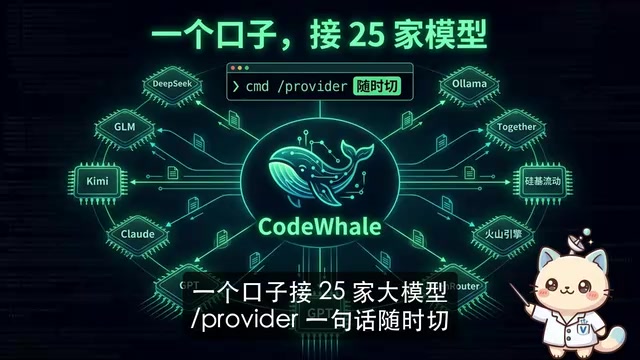
Codewell Hands-On Review: Is This Terminal AI Coding Assistant with Nearly 40K GitHub Stars Actually Worth It?
Hands-on review of Codewell (formerly DeepSeek2E), the open-source terminal AI coding assistant with nearly 40K GitHub stars. Supports 25 LLM providers, local models at zero cost, and MIT license.

Microsoft Copilot Cowork Introduces DeepSeek: Multi-Model Architecture and Enterprise AI Agent Strategy Explained
Microsoft Copilot Cowork launches with multi-model architecture, considering DeepSeek V4 as a low-cost option. Deep dive into usage-based pricing, WebIQ search, and Microsoft's enterprise AI agent strategy.