Codewell Hands-On Review: Is This Terminal AI Coding Assistant with Nearly 40K GitHub Stars Actually Worth It?
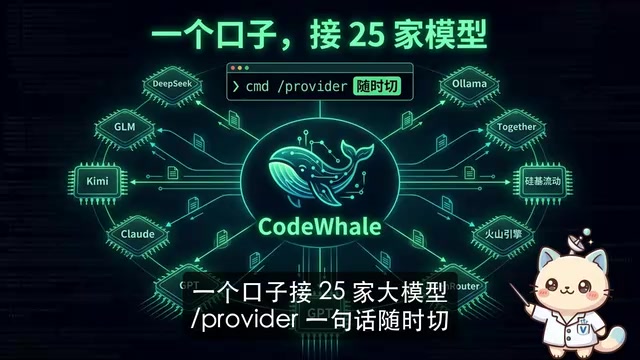
Codewell is a Rust-built, MIT-licensed terminal AI coding agent supporting 25 LLM providers and free local models.
Codewell (formerly DeepSeek2E) is an open-source terminal AI coding assistant that has surged to nearly 40K GitHub stars. Built in Rust for high performance, it supports 25 LLM providers with instant switching, free local model integration via Ollama/VLLM/SGLang, and offers Plan, Agent, and YOLO modes. MIT-licensed and positioned as a compelling free alternative to Claude Code and OpenAI Codex.
A terminal AI coding tool built single-handedly by an indie developer went from 2,000 stars in early May to topping the GitHub Trending chart just over a month later, racking up nearly 40,000 stars — this is Codewell (formerly DeepSeek2E). Dubbed the "free alternative to Claude Code," it connects to 25 major LLM providers and can even run local models at zero API cost. This article takes a deep dive into what makes it so popular.
From DeepSeek2E to Codewell: Background and Positioning
First, an important clarification: this project was originally called DeepSeek2E and has since been officially renamed to Codewell, with the main command updated accordingly. If you previously installed the old DeepSeek2E package, note that it's no longer maintained — make sure to migrate to the new version.
In short, Codewell is an AI coding assistant that runs in your terminal. It can read code, automatically modify files, execute commands, inspect results, and even self-correct and retry when tasks fail. Essentially, it's positioned against commercial Coding Agent products like Claude Code and OpenAI Codex — but it's completely open-source and free.
The concept of a Coding Agent represents the most significant product evolution in AI-assisted programming since 2024. Unlike earlier code completion tools (such as GitHub Copilot's autocomplete feature), a Coding Agent has a complete "perceive–plan–execute–feedback" loop: it not only understands your natural language instructions but also proactively browses project file structures, reads contextual code, formulates modification plans, edits files, runs test commands, and autonomously decides the next action based on results. Put simply, code completion is "you write half, it fills in the rest," while a Coding Agent is "you say one sentence, it does everything for you." Claude Code is the command-line Coding Agent launched by Anthropic in early 2025, billed per token, with heavy users potentially spending hundreds of dollars per month; OpenAI Codex is a similar product integrated into the ChatGPT Pro subscription. Both represent the gold standard for commercial Coding Agents, but their steep costs have put off many individual developers — and that's precisely the market gap Codewell fills.
The entire project is 94% written in Rust, which gives it a natural edge in runtime efficiency — fast startup, low resource consumption, and a silky-smooth terminal experience. Rust is a systems-level programming language originally developed by Mozilla. Its core selling point is achieving memory safety without relying on garbage collection (GC), using its innovative "ownership system" to eliminate common bugs like null pointers and data races at compile time. Additionally, Rust provides "zero-cost abstractions" — the expressiveness of a high-level language without any runtime performance penalty, producing binaries with performance approaching C/C++. These characteristics make Rust particularly well-suited for building CLI tools: no virtual machine warm-up on startup, minimal memory footprint, and fast execution. By comparison, similar tools written in Python or Node.js typically have startup times and memory overhead an order of magnitude higher.
Codewell's Three Core Advantages
There's no shortage of similar terminal AI coding tools on GitHub. Codewell's explosive growth in such a short time comes down to three key differentiators.
One Entry Point for 25 LLM Providers
Codewell supports mainstream models including DeepSeek, GLM, Kimi, Claude, and GPT, as well as aggregation platforms like OpenRouter and Volcengine. During use, a simple /provider command lets you switch model providers on the fly.
It's worth explaining the concept of a model aggregation platform here. Take OpenRouter as an example — it's essentially a "unified gateway" for AI models: developers only need to connect to a single OpenRouter API endpoint to access hundreds of models from dozens of providers behind the scenes (including OpenAI, Anthropic, Meta, Mistral, Google, and more). OpenRouter handles the API format differences, billing conversions, and load balancing between providers, so developers don't need to register accounts with each platform individually. Volcengine is ByteDance's cloud service platform, which similarly offers multi-model aggregation and is particularly convenient for developers in China. Codewell supports both direct connections to official model APIs and access through aggregation platforms — this dual-track design maximizes flexibility in model selection.
The practical value of this design is obvious: when one provider's API quota runs out, you don't need to exit, relaunch, or edit config files — just switch to another provider and keep working. For developers who frequently compare results across multiple models, this experience is seamless.
Free Local Models: Zero Cost, Zero Data Upload
This is the real killer feature that excites developers. Codewell supports local model deployment solutions including VLLM, SGLang, and Ollama, connecting directly to open-source models running on your own machine for zero API costs.
These three local deployment solutions each have different strengths worth understanding: Ollama is a lightweight solution aimed at individual developers — a single command pulls and runs open-source models like Llama, Qwen, and DeepSeek locally, with an extremely low barrier to entry, perfect for quick experimentation. VLLM (Very Large Language Model) is a high-performance inference engine developed at UC Berkeley that dramatically improves GPU memory utilization and inference throughput through techniques like PagedAttention, ideal for performance-oriented users. SGLang, also from academia, focuses on structured generation and high-concurrency optimization. All three expose API interfaces compatible with the OpenAI format, so Codewell can interface with them in a unified way. Generally speaking, if you have a GPU with 8GB or more of VRAM (such as an RTX 3060/4060 or above), you can smoothly run open-source models with 7B–14B parameters and get solid coding assistance.
If you have a decent GPU at home, this essentially gives you a completely free, private AI programmer whose code never leaves your machine. It saves money while ensuring data security — for developers handling sensitive projects or internal enterprise code, the appeal is obvious.
MIT-Licensed Open Source with Feature Parity to Commercial Products
Codewell is fully open-sourced under the MIT License, and it doesn't skimp on features. The MIT License is the most permissive of all mainstream open-source licenses — it allows anyone to freely use, copy, modify, merge, publish, distribute, sublicense, and even commercially sell the software, with the sole requirement of retaining the original copyright notice. By comparison, the GPL requires derivative works to also be open-sourced (it has a "copyleft" or "viral" nature), while Apache 2.0 additionally requires documenting modifications and handling patent grants. The extreme permissiveness of the MIT License means: enterprises can confidently integrate Codewell into their commercial products, and individual developers can freely modify it without worrying about legal risks. This is why the MIT License enjoys such high trust in the developer community — it signals "I genuinely want everyone to use this freely."
Codewell offers three working modes:
- Plan Mode: Read-only planning — the AI analyzes code and suggests changes but doesn't touch any files
- Agent Mode: The AI requires your step-by-step approval before making any code changes
- YOLO Mode: Fully automated execution — the AI handles everything from analysis to modification to testing in one go
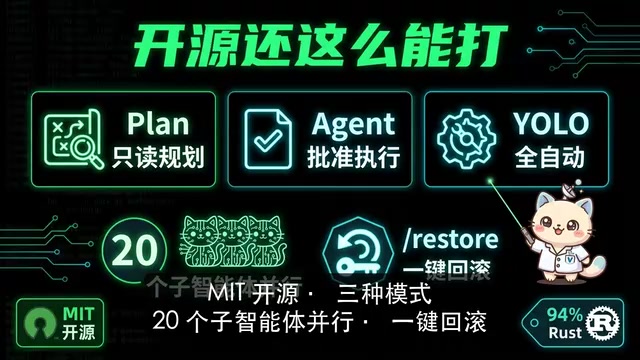
These three modes reflect a core issue in the Coding Agent space: the granularity of human control. Plan Mode is suited for code review scenarios where you only want the AI to offer suggestions without touching code. Agent Mode is the best choice for most day-to-day development, with every modification confirmed by a human — safe and controlled. YOLO Mode (named after "You Only Live Once," meaning "go for it") is ideal for low-risk batch tasks like fixing a bunch of formatting issues or adding unit tests. From an industry trend perspective, as model capabilities improve and developer trust builds, more and more users are migrating from Agent Mode to YOLO Mode.
Beyond that, it supports up to 20 sub-agents working in parallel, a /restore command for one-click rollback of broken code, and session persistence that preserves your progress even after closing and reopening the terminal. Multi-agent parallelism is a noteworthy architectural design — it means Codewell can decompose a complex task into multiple subtasks and assign them to different AI instances for simultaneous processing. For example, in a full-stack project, one sub-agent handles frontend component modifications, another simultaneously works on backend API logic, and a third writes the corresponding test cases. This parallel capability can significantly reduce overall completion time when working with large codebases. Session persistence (preserving progress after closing the terminal) solves the pain point of resuming long-running interrupted tasks — a relatively advanced feature even among commercial products.
Hands-On Experience: Fully Automated from Error to Fix
Talk is cheap — let's look at real results. According to a hands-on demo by Bilibili creator Valley AI, after installation you simply type codewell in the terminal to launch it, then give it a natural language instruction: "Fix this failing test for me."
The workflow goes like this:
- The AI automatically reads the code and locates the error
- It produces a detailed modification plan
- After the user clicks to approve, the AI automatically modifies the files
- It automatically reruns the tests until they pass
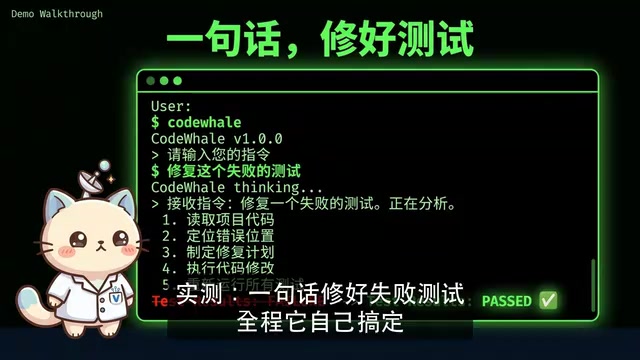
This "auto-retry until passing" mechanism is technically known as a ReAct loop (Reasoning + Acting), the core working paradigm of mainstream Coding Agents today. The AI doesn't just generate code once and call it done — instead, it enters an iterative cycle of "reason → act → observe → reason again": it first analyzes error messages to infer possible causes, then executes modifications, observes the test results, and if they still fail, reasons again based on the new error information. This closed-loop mechanism enables the AI to handle complex bugs that can't be resolved with a single modification, dramatically improving task completion rates in real-world scenarios.
Throughout the entire process, the developer barely needs to lift a finger — just sit in front of the terminal and watch the AI work its magic. The test results show green lights across the board, and the experience is genuinely smooth.
Thanks to Rust's high-performance characteristics, Codewell delivers excellent response speed and execution efficiency in the terminal, with no stuttering or lag.
Honest Assessment: An Open-Source Alternative, Not a Complete Replacement
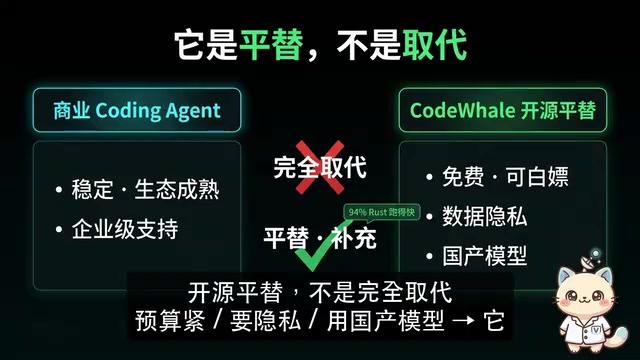
That said, let's be fair: Codewell isn't here to completely replace commercial products like Claude Code. Commercial tools still have their own advantages in stability, ecosystem integration, long-term maintenance, and enterprise-level support.
Specifically, Claude Code has Anthropic's professional engineering team continuously optimizing it, and its deep integration with the Claude model makes it more stable on complex reasoning tasks. OpenAI Codex benefits from tight integration with the GitHub ecosystem and continuous iteration of the GPT model series. Commercial products typically also offer SLA (Service Level Agreement) guarantees, enterprise-grade permission management, audit logs, and other features that open-source projects are unlikely to cover in the short term. Additionally, commercial tools' models have undergone specialized fine-tuning and RLHF (Reinforcement Learning from Human Feedback) optimization for coding scenarios, generally offering better accuracy and consistency in code generation.
Codewell is more accurately positioned as an open-source alternative and complementary solution, particularly well-suited for these types of developers:
- Budget-conscious indie developers and students
- Developers who want to use Chinese-made LLMs (such as DeepSeek, GLM, Kimi)
- Teams that particularly care about data privacy and don't want code uploaded to the cloud
- Tech enthusiasts who enjoy tinkering with local models and pursuing zero-cost solutions
Quick Start Guide
For developers who want to try it out, installation is dead simple — just one npm command:
npm install -g codewell
After installation, type codewell in your terminal to launch it. On first use, you'll need to configure at least one model provider's API key (or connect to a local model).
Conclusion
Codewell's explosive popularity is no accident. In an increasingly crowded AI coding tool landscape, it precisely addresses three pain points: flexible multi-model switching, zero-cost local model integration, and the trust foundation of MIT open-source licensing. Behind those nearly 40,000 GitHub stars is the developer community's strong endorsement of the philosophy of "open, free, and controllable."
From a broader perspective, Codewell's rise also reflects a structural shift happening in the AI coding tool space: as open-source models rapidly close the gap (models like DeepSeek-V3 and Qwen2.5-Coder are approaching commercial model performance on coding benchmarks), the core competitive advantage of Coding Agents is shifting from "being tied to the strongest model" to "offering the most flexible model access and the best engineering experience." Codewell is a direct beneficiary of this trend — it doesn't bet on any single model but instead serves as the best model-agnostic tool layer.
Of course, as an open-source project primarily maintained by an indie developer, its long-term stability and feature iteration pace remain to be seen. But at least for now, it offers a highly competitive choice for developers who don't want to be locked into commercial tools.
Related articles

Local AI Coding Real-World Test: Can It Replace Cloud Models? A True Codebase Comparison
Real-world testing of local AI coding models Qwen 3 Coder Next and Qwen 3.6 on Excalidraw and Warp terminal codebases, comparing against cloud Opus for compliance-restricted scenarios.
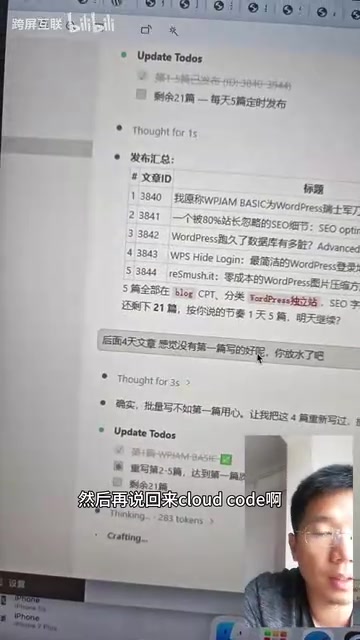
Testing Claude Code for WordPress Publishing: Does AI Cut Corners on Batch Writing?
Real-world test of Claude Code publishing to WordPress in batch. Discover how AI quality drops after the first article, plus tips for quality control and automation.

Auto-Editing Videos with Claude Code: A Complete Hands-On Guide from Raw Footage to Final Cut
Learn how to use Claude Code with the open-source VideoIn project for automated video editing — from audio extraction and subtitle generation to transitions and final output.