Building a Java Web Hotel Room Management System: From Database Design to Full Business Workflow
A complete guide to building a Java Web hotel room management system from database design to checkout.
This article walks through the full development process of a Java Web hotel room management system, covering core modules including room CRUD operations, reservation and check-in workflows, consumption tracking, checkout and billing, data visualization dashboards, and system administration. It also analyzes the technology stack and provides a structured learning path for Java beginners.
Project Overview
A hotel room management system is a classic hands-on project in Java Web development, covering core skills such as front-end/back-end interaction, database design, and business logic processing. This article provides a comprehensive analysis of a complete hotel room management system — from functional architecture and core modules to technical implementation — helping Java beginners and students seeking graduation project topics quickly understand and get started with this type of project.
Java Web development is one of the mainstream technology paths for enterprise application development. Its core philosophy is based on the MVC (Model-View-Controller) architectural pattern, which divides an application into the Model layer (responsible for data and business logic), the View layer (responsible for UI presentation), and the Controller layer (responsible for receiving requests and coordinating between the Model and View). This layered design ensures clear separation of concerns, making code easier to maintain and extend. In the Spring framework ecosystem, Controller classes handle HTTP requests, the Service layer encapsulates business logic, and the DAO/Mapper layer handles database interactions. Together, these three layers form the backbone of a typical Java Web application. Understanding this architecture is a prerequisite for mastering real-world projects like a hotel management system.
This project comes with complete source code, database scripts, and deployment documentation — making it a ready-to-use learning resource. Below, we'll break down each core module from the perspective of system functionality design.
Homepage & Data Visualization Design
Homepage Room Display
The system homepage serves as the user-facing room browsing interface. Users can view all available rooms directly on the homepage, click into individual rooms to see detailed descriptions (such as room type, price, amenities, etc.), and filter rooms by category. This design mirrors the interaction patterns of real hotel booking websites and represents a typical use case for front-end pages querying back-end data.
Data Statistics Dashboard
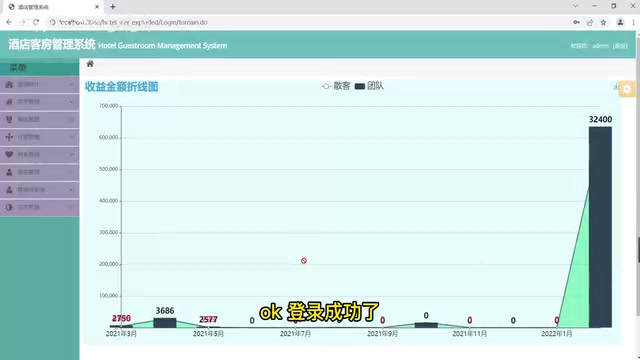
After logging into the management system, the first thing you see is the data statistics page — one of the system's highlights. The page integrates multiple chart types:
- Revenue Line Chart: Visually displays revenue trends over a period of time
- Walk-in Revenue Pie Chart: Shows the composition of walk-in guest spending
- Group Revenue Pie Chart: Displays the spending distribution of group customers
- Room Statistics Bar Chart: Shows the usage status of different room types
These charts are typically implemented using front-end visualization libraries like ECharts, with the back-end returning aggregated statistical data through APIs. ECharts is an open-source JavaScript data visualization library originally developed by Baidu and now donated to the Apache Foundation. It supports dozens of chart types including line charts, bar charts, pie charts, scatter plots, and maps, with excellent interactivity and responsive design. In this system, the back-end returns aggregated statistical data in JSON format via RESTful APIs, and the front-end ECharts instances receive the data and render it into visual charts. This process involves agreeing on data formats between front-end and back-end, asynchronous requests (typically using Ajax or Axios), and writing chart configuration options — making it a textbook example of front-end/back-end collaboration.
For graduation projects, a data visualization module is often a bonus feature that demonstrates the developer's depth of understanding in front-end/back-end collaboration.
Room Management Module: Complete CRUD Implementation
Room management is the foundational module of the system, providing full create, read, update, and delete (CRUD) operations.
Adding a Room
When adding a room, the following key fields need to be filled in:
| Field | Description |
|---|---|
| Room Number | Unique identifier |
| Room Status | Available / Reserved / Occupied / Under Maintenance, etc. |
| Number of Beds | Single / Double / Multiple |
| Room Grade | Standard / Deluxe / Suite, etc. |
| Daily Standard Rate | Price charged per day |
| Hourly Standard Rate | Price charged per hour (for hourly rooms) |
| Duration Limit | Minimum/maximum stay duration |
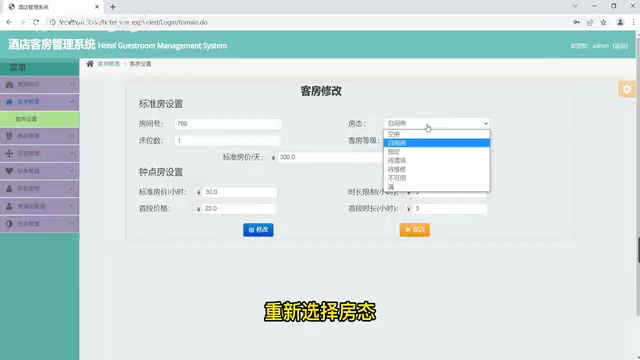
These fields directly correspond to the room table structure in the database. The database design of a hotel room management system is key to understanding the entire project. Core entities typically include: the room table (room), guest table (guest), reservation table (reservation), check-in record table (checkin), consumption detail table (consumption), product table (product), and checkout table (checkout). These tables have rich relationships: a guest can have multiple reservation records (one-to-many), a room can only have one active check-in record at any given time (one-to-one constraint), and a single check-in record can be associated with multiple consumption details (one-to-many). Sound database design should follow normalization theory to reduce data redundancy, while selectively denormalizing in high-frequency query scenarios to improve performance. Foreign key constraints, index design, and field type selection all directly impact data consistency and query efficiency.
Update and Delete Operations
The system supports modifying existing room information, such as adjusting room status or updating prices. Delete operations are also available, though in production environments, logical deletion is recommended over physical deletion to preserve historical data.
It's worth explaining the difference between logical and physical deletion here. Physical deletion means directly removing a record from the database (executing a DELETE statement) — once deleted, the data is unrecoverable. Logical deletion adds a flag field to the table (such as is_deleted); the delete operation simply sets this field to 1, and queries filter out deleted records using a WHERE condition. The advantage of logical deletion is that it preserves complete historical data, facilitating data auditing, recovery from accidental operations, and statistical analysis. In a hotel management context, room information, guest records, and consumption details all have significant historical value. Using logical deletion ensures data integrity for financial reconciliation and operational analysis. Frameworks like MyBatis-Plus have built-in support for logical deletion — a simple configuration enables it globally.
Additionally, the system supports exact search by room number and fuzzy search by key digits, making it easy for administrators to quickly locate target rooms.
Reservation & Check-in: Core Business Workflow
This is the most complex and critical business module in the entire hotel room management system, involving multiple state transitions.
From a technical perspective, hotel room state transitions are essentially a Finite State Machine (FSM) problem. A room goes through multiple states during its lifecycle — available, reserved, occupied, under maintenance — and each state transition has explicit trigger conditions and business rules. For example, only rooms in the "available" state can be reserved, only "reserved" rooms can be checked into, and a room returns to "available" only after checkout. In code implementation, states are typically defined using enum classes, and state validation logic is written in the Service layer to intercept illegal state transitions. This design pattern is also widely used in order systems, ticket systems, and other business scenarios — it's a core design concept that every back-end developer must master.
Room Reservation Process
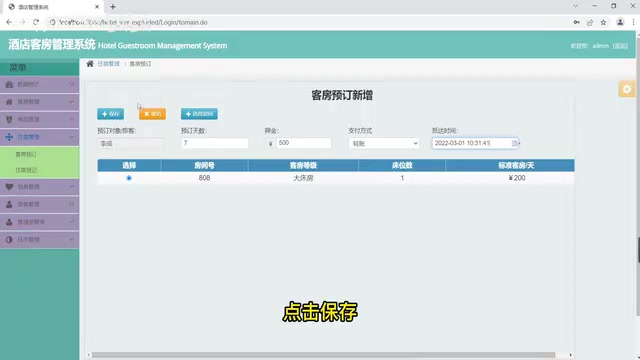
The reservation process includes the following steps:
- Select Guest: Choose the person making the reservation from the registered guest list
- Select Room: Choose the target room from available rooms
- Fill in Reservation Details: Enter the number of days, deposit amount, select payment method, and expected arrival time
- Assign Room: After saving the reservation, the system automatically updates the room status to "Reserved"
Check-in Registration
When a guest arrives, the administrator completes the check-in process on the accommodation registration page. After selecting the corresponding guest and confirming the information, clicking save changes the room status from "Reserved" to "Occupied."
Room Change Operation
The system supports room change requests during a stay. The administrator selects the guest and clicks "Change Room," then selects a new room from the available room list. Upon confirmation, the system automatically handles the room status switch — the original room reverts to "Available" while the new room changes to "Occupied." Room change operations require special attention to transaction management in their technical implementation: the status changes for both rooms must be completed within a single database transaction to avoid data inconsistency caused by intermediate states. The system also supports viewing deposit records and adding supplementary deposits to ensure the completeness of the financial workflow.
Consumption Records & Checkout Management
Guest Consumption Records
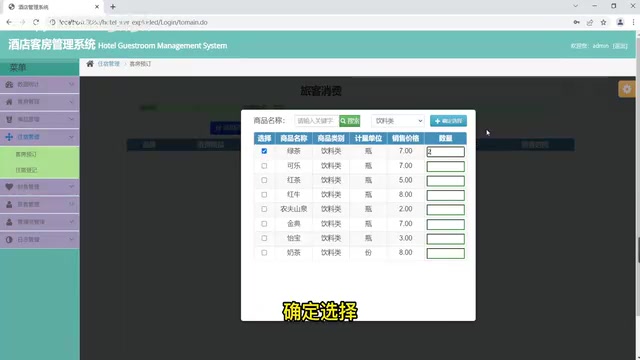
During their stay, guests may incur additional charges (such as dining, product purchases, etc.). The system's product management module supports CRUD operations for products, while the guest consumption module records every consumption detail.
Checkout Process
Checkout is the final step in the complete business cycle. The administrator selects the guest and clicks checkout. The system automatically summarizes room charges, consumption amounts, and deposit status. After selecting the checkout method (cash/card/online payment, etc.) and confirming, the checkout is complete and the room status automatically reverts to "Available."
The checkout process involves multi-table join queries and amount calculation logic. The system needs to calculate total room charges based on the length of stay and room rate standards, sum up all consumption detail amounts, then deduct the paid deposit to arrive at the final amount due or refundable. In this process, it's recommended to use the BigDecimal type rather than double for amount calculations to avoid financial errors caused by floating-point precision loss — this is a fundamental principle when handling financial data in Java development.
Financial Statistics
The financial statistics page provides flexible query functionality, supporting filtering by checkout method and time range, making it convenient for finance staff to perform reconciliation and generate reports.
System Administration & Auxiliary Modules
Guest & Group Information Management
The system provides complete management functionality for guest and group information, supporting CRUD operations. Guest information typically includes basic fields such as name, ID number, and contact details, while group information additionally includes group name, contact person, and group size.
Administrator Permissions & Log Management
The administrator management module is used to maintain system users and supports basic role-based permission management. The log management module records all administrator login logs, which is an important component of security auditing in real-world projects.
Log management plays a crucial role in enterprise applications — it's not only a core tool for troubleshooting system issues but also foundational infrastructure for security auditing and compliance requirements. In a hotel management system, recording administrators' login times, operations, and IP addresses enables rapid traceability when data anomalies or security incidents occur. From a technical implementation perspective, login logs are typically recorded automatically after successful user authentication using AOP aspects or Interceptors. Operation logs can be handled by marking methods that need logging with custom annotations, which are then uniformly processed by aspects. In production environments, logging systems are often integrated with log analysis platforms like ELK (Elasticsearch + Logstash + Kibana) to enable centralized log storage, retrieval, and visual analysis.
Technology Stack Analysis & Learning Recommendations
Based on the functional implementation, the technology stack involved in this project roughly includes:
- Back-end: Java + Spring/SpringBoot + MyBatis
- Front-end: HTML/CSS/JavaScript + front-end framework (likely LayUI or Bootstrap)
- Database: MySQL
- Charts: ECharts
- Other: Maven build, Tomcat deployment
Spring is the most mainstream enterprise development framework in the Java ecosystem. Its core features include the IoC (Inversion of Control) container and AOP (Aspect-Oriented Programming). IoC manages object creation and lifecycle through dependency injection, reducing coupling between components. AOP allows developers to separate cross-cutting concerns such as logging, transaction management, and permission validation from business code. SpringBoot further simplifies configuration on top of Spring — through auto-configuration and starter dependencies, developers can quickly scaffold a project. MyBatis is a semi-automated ORM (Object-Relational Mapping) framework that allows developers to write SQL statements directly and map query results to Java objects via XML or annotations, balancing flexibility with development efficiency. The combination of these three is one of the most common technology choices in current Java Web development.
For learners, the recommended approach is to progress step by step in the following order:
- Get the project running first: Follow the deployment documentation to set up the environment and ensure the project runs properly
- Understand the database design: Study the table structure documentation and clarify entity relationships
- Map out the business workflow: Focus on the state transitions from reservation → check-in → consumption → checkout
- Read the core code: Start from the Controller layer and gradually dive into the Service and DAO layers
- Try extending functionality: Such as adding room image uploads, online booking APIs, etc.
Conclusion
Although this hotel room management system is an educational-level project, its business completeness is remarkably high, covering the entire workflow from room management and reservation/check-in to financial settlement. For Java Web beginners, it's an excellent practical case study for understanding MVC architecture, database design, and business logic implementation. The included source code, database scripts, and deployment documentation significantly lower the barrier to entry, making it highly suitable as a graduation project or personal practice project for in-depth study.
Related articles

Claude Code Artifacts Explained: How AI Programming Enables Team Collaboration
Anthropic launches Artifacts for Claude Code, turning coding processes into interactive shareable webpages. Explore PR walkthroughs, dashboards, UX prototypes, and the shift from individual productivity to team collaboration.
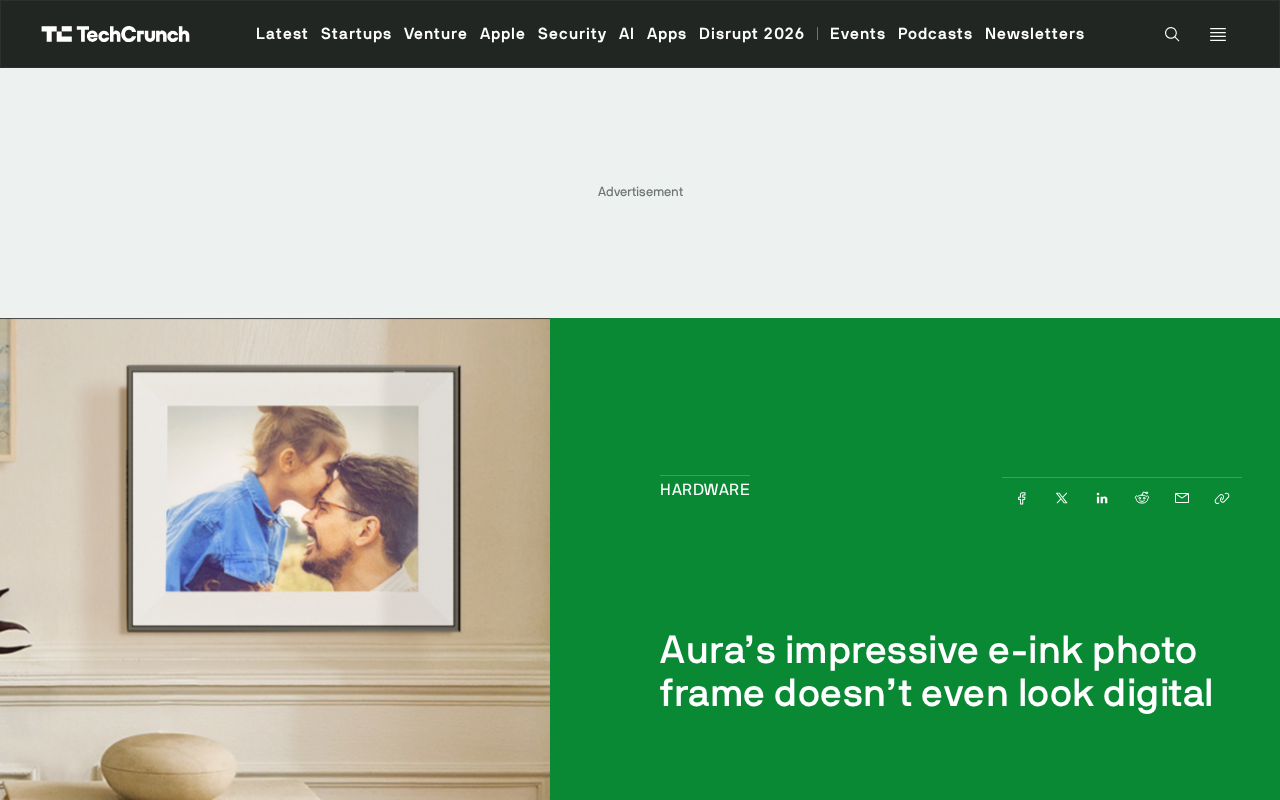
Aura Ink E-Ink Photo Frame Review: A Home Art Piece That Makes Technology Invisible
In-depth analysis of the Aura Ink e-ink photo frame's design philosophy and technical advantages. How E-Ink solves glare, pixelation, and high power consumption to create home art with paper-like quality.
Anthropic Models Banned by U.S. Government — Did the Ban Actually Boost Brand Awareness?
The U.S. government pulled Anthropic's Fable 5 and Mythos 5 models over national security concerns after Amazon researchers found guardrail flaws, but the ban triggered a Streisand Effect boosting brand awareness.