Building a Travel Route Planning Mini-Program with AI in One Day: A Full Workflow from Design to Launch

A step-by-step guide to building a travel planning Mini-Program in one day using AI tools.
This article walks through how a developer used Modao AI for UI design, Cursor for code generation, and standard dev tools to build and launch a complete AI-powered travel route planning WeChat Mini-Program in a single day. It covers the full workflow from design to deployment, discusses the strengths and limitations of AI-assisted development, and explores what this means for the future of software building.
Introduction
What can you build with AI tools in a single day? Bilibili creator "AI的皮变" delivered an impressive answer — a fully functional AI-powered travel route planning WeChat Mini-Program, complete with route generation, editing, a community plaza for sharing, and a comment system. The entire process, from UI design to code generation to launch, was almost entirely AI-driven.
This case study clearly demonstrates the real capability boundaries of AI-assisted development today: it doesn't replace developers, but compresses what would normally be a multi-week project into a single day. Let's break down the complete implementation workflow.
Tool Chain Selection: Three AI Tools Working in Concert
The tool combination used in this project is highly representative of the current mainstream approach to AI full-stack development:
- Modao AI: Handles UI design, rapidly generating UI prototypes from natural language descriptions
- Cursor: An AI coding tool that generates front-end and back-end code based on design mockups and prompts
- Supporting development tools: HBuilder (front-end debugging), IDEA (back-end debugging), WeChat Developer Tools (Mini-Program preview)
Modao is a leading product prototyping tool in China, similar to Figma or Sketch internationally. Its AI feature allows users to describe product requirements in natural language and automatically generates complete UI prototypes including page layouts, interaction logic, and visual styles. This capability relies on large language models' understanding of design patterns — the AI has learned from vast numbers of existing app and Mini-Program interfaces, enabling it to map text descriptions into well-structured interfaces. Compared to traditional prototyping where designers draw pixel by pixel, AI prototyping tools compress this process from hours to minutes.
Cursor is a deeply customized AI coding IDE built on VS Code. Its core strength is the deep integration of large language models (such as Claude and GPT-4) into the code editing workflow. Unlike simple code completion, Cursor supports a "Composer" mode — developers can describe entire feature requirements in natural language, and the AI will simultaneously create or modify multiple files, generating complete project structures. It understands project context, including existing code, configuration files, and external reference files (like the HTML mockups in this case), enabling it to generate new code consistent with the existing architecture. This "global awareness" capability is what distinguishes it from inline completion tools like GitHub Copilot.
Interestingly, while AI handled most of the coding work, setting up the development environment remained a prerequisite. Without basic development environments like Node.js and Java already configured, manual setup is still required. This illustrates that AI development tools are currently better suited for people with some technical foundation, rather than complete beginners.
Three Steps: The Complete Workflow from Design to Launch
Step 1: Generate UI Design with Modao AI
In Modao AI, the creator entered a remarkably concise prompt: "Build a Mini-Program that uses AI to generate travel routes, with a community plaza for sharing routes." From this single sentence alone, Modao AI generated a complete interface design spanning multiple functional pages.
The generated interface could be previewed directly in the browser, and the overall design quality was quite impressive. After confirming satisfaction with the result, the design was exported as an HTML file to serve as a reference for subsequent coding.

The creator also acknowledged that achieving more professional results would require more refined prompts. But for an MVP (Minimum Viable Product), a simple description is sufficient to kick off the project. MVP (Minimum Viable Product) is a core concept in lean startup methodology, systematically articulated by Eric Ries in The Lean Startup. The core idea is: build a product version with minimal resources that can validate core hypotheses, quickly put it on the market to gather real user feedback, and then decide whether to continue investing. Before AI tools, even an MVP required weeks of development time, meaning the cost of validating an idea was still significant. The emergence of AI development tool chains has reduced MVP construction costs by an order of magnitude, making "validate one idea per day" a real possibility — fundamentally changing the pace of trial and error in product innovation.
Step 2: Generate Front-End and Back-End Code with Cursor
This is the most critical phase of the entire workflow. After placing the exported HTML design files into the project directory, prompts were written in Cursor referencing the design files, instructing the AI to generate the complete codebase.
Cursor generated two projects in one go:
- Front-end project: A UniApp project for the WeChat Mini-Program
- Back-end project: Server-side code providing API endpoints
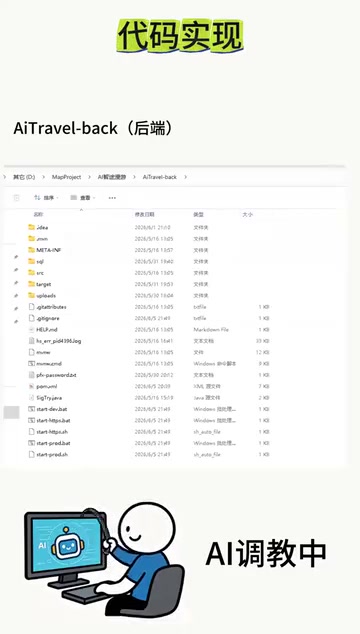
The choice of the UniApp framework is worth elaborating on. UniApp is a cross-platform development framework by DCloud that uses Vue.js syntax to write a single codebase that can be compiled into WeChat Mini-Programs, Alipay Mini-Programs, H5 web pages, and iOS and Android apps simultaneously. For the WeChat Mini-Program development in this case, UniApp's advantages lie in its mature ecosystem, rich component library, and deep integration with the HBuilder development tool. The AI's choice to generate a UniApp project rather than native WeChat Mini-Program code was likely because UniApp's code structure is more standardized and better matches common patterns in AI training data, while also leaving open the possibility of multi-platform deployment in the future.
The front end was previewed and debugged in real-time through HBuilder linked to WeChat Developer Tools, while the back end was debugged and packaged in IDEA. There's one crucial step here — multiple rounds of iterative refinement. The initial code generated by AI is never perfect; developers need to continuously raise modification requests, letting the AI progressively optimize until the functionality meets expectations.
This process of "iterative refinement" perfectly illustrates the essence of AI-assisted development: humans define requirements and judge quality, while AI handles rapid execution and iteration. From a technical perspective, this is essentially a form of Prompt Engineering tailored for code generation scenarios. Unlike single-turn conversations, AI interaction in code development is a continuous dialogue: developers need to observe the AI's output, identify issues, and then describe modification requirements in precise language. This requires two key skills — the ability to read code and assess its correctness, and the ability to translate technical problems into natural language instructions the AI can understand. A new skill paradigm is emerging in the industry: not "knowing how to write code," but "knowing how to guide AI to write code."
Step 3: Deployment and Launch
Once code debugging was complete, the launch phase began:
- Register a Mini-Program account on the WeChat Official Accounts Platform
- Submit the front-end code for review
- Officially publish after review approval
- Package and deploy the back-end code to a server
- Configure domain names and other necessary operations
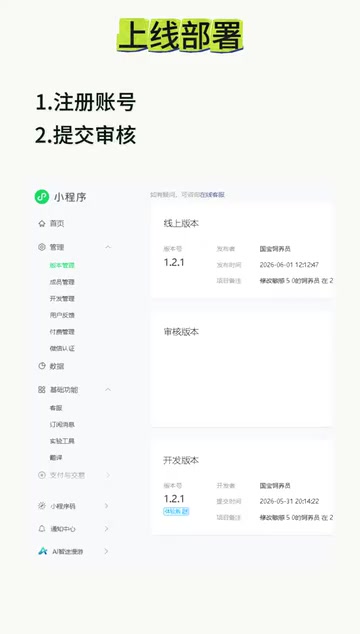
The WeChat Mini-Program launch process involves multiple steps: first, you need to complete entity verification (personal or business) on the WeChat Official Accounts Platform to obtain an AppID; then upload the code as a beta version through WeChat Developer Tools; after submission for review, the WeChat team conducts manual or automated review of the Mini-Program's content compliance, functional completeness, and user experience, typically taking 1-7 business days. Back-end deployment requires a server with a public IP address, and the domain must have completed ICP filing and be configured with an HTTPS certificate, since WeChat Mini-Programs mandate that all network requests use the HTTPS protocol. These operational steps still require manual handling and represent the "last mile" that AI tool chains have yet to fully cover.
The final launched Mini-Program featured complete functionality: AI travel route planning, route editing, publishing routes to the community plaza, and a comment and reply system.
Deep Dive: Capabilities and Limitations of AI Development
While this case is exciting, we need to take a clear-eyed look at several key issues:
The efficiency gains are real. A Mini-Program with front-end and back-end components, AI feature integration, and social interaction would traditionally take 1-2 weeks to develop. With the AI tool chain, it was compressed to a single day — an order-of-magnitude improvement in efficiency.
The barrier has been lowered but hasn't disappeared. The entire process still requires developers to understand front-end and back-end architecture, know how to configure development environments, be able to assess code quality, and provide effective modification instructions. AI lowers the coding barrier, not the engineering comprehension barrier.
"Iterative refinement" is a hidden cost. The video simplified the process, but the actual back-and-forth debugging and modifications likely consumed a significant amount of time. Learning how to efficiently communicate requirements to AI is itself a skill that needs to be developed.
Code quality and maintainability are questionable. While AI-generated code can quickly implement features, its architectural design, error handling, security measures, and performance optimization often fall short of what an experienced developer would produce by hand. For the MVP validation stage, this isn't a problem, but if the product needs long-term iterative maintenance, AI-generated code may require large-scale refactoring. This is why current AI development tools are better suited for prototype validation and rapid experimentation, rather than building core systems that need long-term operation.
Conclusion
This project demonstrates a clear AI full-stack development paradigm: Modao AI for interface design → Cursor for code generation → Manual debugging and optimization → Platform deployment and launch. For developers looking to quickly validate product ideas and build MVPs, this tool chain already offers considerable practical value.
More importantly, it signals a shift: AI development tools are evolving from "helping write code" to "helping build products." When design, coding, and debugging can all be AI-augmented, individual developers' output capacity is approaching that of small teams. The profound implication of this change is that it may reshape the talent structure of the software industry — in the future, the most competitive individuals may not be those who write the best code, but those who are best at defining problems, breaking down requirements, and efficiently orchestrating AI tool chains.
Key Takeaways
Related articles

DeepSWE Benchmark Deep Dive: Exposing SWE-Bench Flaws and the True Coding Ability Rankings
Deep dive into how DeepSWE exposes SWE-Bench Pro's data contamination and cheating issues. GPT-5.5 leads at 70%, open-source models lag far behind. Covers results, cost comparisons, and practical developer advice.
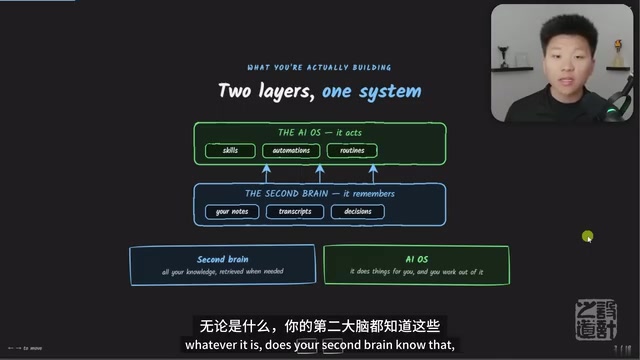
Guide to Building a Second Brain with Claude AI: The Four-C Framework for Your Personal AI Operating System
Learn how to build an AI second brain with Claude using the Four-C Framework (Context, Connection, Capability, Cadence) to create a personal AI operating system with practical examples.
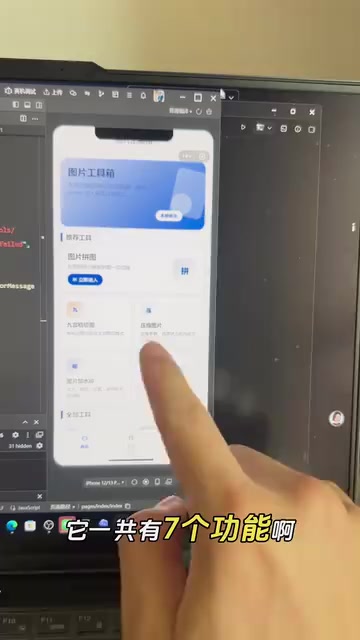
Zero-Code Mini Program Development with Codex: Building 7 Features in 5 Days — A Hands-On Story
A creator used OpenAI Codex to build an image editing mini program with 7 features in 5 days — zero coding. Learn about Codex's AI capabilities and tips for getting started.