Free Claude Code and Codex for Chinese Developers: CC Switch Configuration Guide
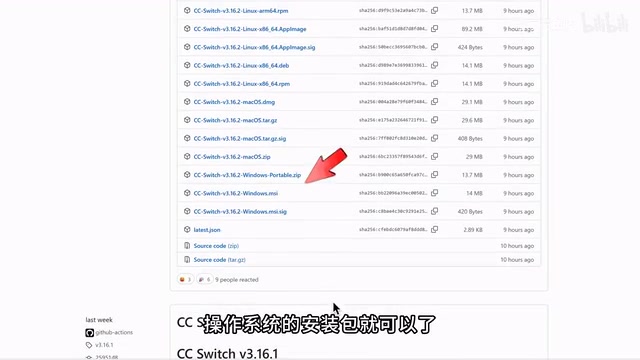
CC Switch lets Chinese developers use Claude Code and Codex for free by connecting them to domestic LLM APIs.
CC Switch is a free open-source configuration manager that enables Chinese developers to use Claude Code and OpenAI Codex by connecting these tools to accessible domestic LLM APIs like DeepSeek. It provides a visual interface for editing configuration files and includes a local routing feature to handle API format compatibility issues between different model providers.
For developers in China, Claude Code and OpenAI Codex — two top-tier AI programming tools — have always had an awkward barrier: they require overseas subscription accounts. Recently, a free open-source tool called CC Switch offers a convenient alternative path, allowing domestic users to smoothly experience the powerful capabilities of these tools.
What is CC Switch
CC Switch is an open-source AI tool configuration manager. Its core function is straightforward — through a visual interface, it helps you modify the underlying configuration files of Claude Code, Codex, and other AI tools to connect them to large model APIs you can access.
It's worth providing some background on Claude Code and Codex here. Claude Code is Anthropic's command-line AI programming assistant, built on the Claude series of large models. It can directly understand the context of an entire code repository in the terminal, performing file read/write operations, running commands, and more. OpenAI Codex is a similar tool from OpenAI, whose lineage traces back to the Codex model behind GitHub Copilot, and has now evolved into a programming agent with autonomous execution capabilities. Both fall under the "Agentic Coding" category — they don't just generate code snippets, but can understand tasks, plan steps, and invoke tool chains to complete complex engineering tasks like a junior developer. It's precisely because of these powerful capabilities that they've become tools coveted by developers worldwide.
In other words, CC Switch isn't some black magic — it's essentially a configuration file editor. But it simplifies what would otherwise be a tedious process of manually editing JSON and consulting API documentation into a few click-and-select operations. For users unfamiliar with command-line configuration, this tool genuinely lowers the barrier to entry.
Complete Steps for Connecting Claude Code to Domestic Models
Installation and Basic Configuration
First, install Claude Code via the official command. Under normal circumstances, launching it requires logging in with an overseas subscription account — otherwise you'll get stuck at the authentication step.
The configuration process using CC Switch is as follows:
- Download CC Switch: Go to the project's GitHub page and find the installation package for your operating system
- Select the tool: Open it and choose Claude Code
- Add a model provider: Using DeepSeek as an example, select it and fill in your API Key
- Obtain an API Key: Go to DeepSeek's API platform and create one
- Select a model: CC Switch has pre-configured parameters for connecting to various large models, requiring virtually no manual modification, and even supports enabling a 1-million-token context window
Regarding DeepSeek, it's one of China's leading AI companies. Its open platform provides API services for multiple models including DeepSeek-V3 and DeepSeek-R1. DeepSeek's API uses an OpenAI-compatible interface format, making it relatively easy to connect with various third-party tools. Its API charges by token usage, with pricing that has clear advantages over overseas services. Notably, DeepSeek-R1 performs excellently on multiple code benchmarks, approaching Claude and GPT-4 level code generation capabilities in certain scenarios, making it a popular choice for domestic developers connecting AI programming tools.
The Essence of Configuration Files
After completing the setup, you'll see the configuration file content generated by CC Switch. There's a key point to understand here: CC Switch doesn't perform any "cracking" operation — it simply helps you visually edit Claude Code's configuration file, specifying the model's API address and key.
From a technical perspective, modern AI tools typically communicate with large models via REST APIs. The core configuration includes three elements: API Endpoint (service address), API Key (authentication credential), and model name. Claude Code's configuration file is usually stored in JSON format in the user directory, defining all parameters for model invocation. Manually modifying these configurations requires understanding the request format differences between various APIs (such as differences in request headers and parameter naming between OpenAI format and Anthropic format), as well as correctly setting up authentication methods and other details — which does present a barrier for non-backend developers. What CC Switch does is encapsulate these details into graphical form operations.
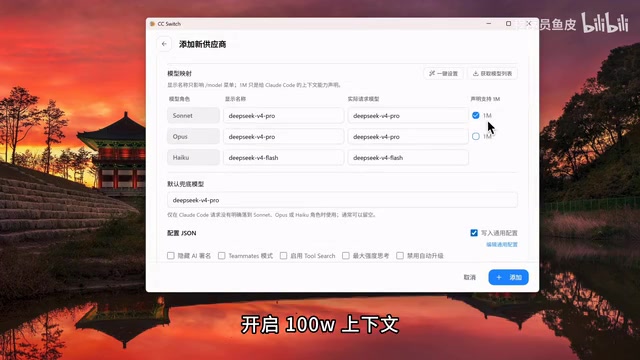
After saving the model configuration and clicking enable, reopen Claude Code and it will work normally. At this point, Claude Code serves as the interaction interface and tool framework, while actually calling the domestic model you configured.
Configuring Codex to Connect with Domestic Models
The configuration approach for Codex is similar to Claude Code, but there's one key difference to note.
API Format Compatibility Issues
Codex and domestic models like DeepSeek use different API request formats. Direct connection will result in request parsing failures.
Specifically, while different large model providers offer similar functionality, their request and response JSON structures differ. For example, OpenAI-style APIs use a "messages" array with "role/content" structure, while Anthropic's API differs in parameter naming, streaming output (Server-Sent Events) format, and other aspects. As an OpenAI product, Codex's internal request format may include proprietary extension fields or special calling conventions that require adaptation when forwarded to third-party models.
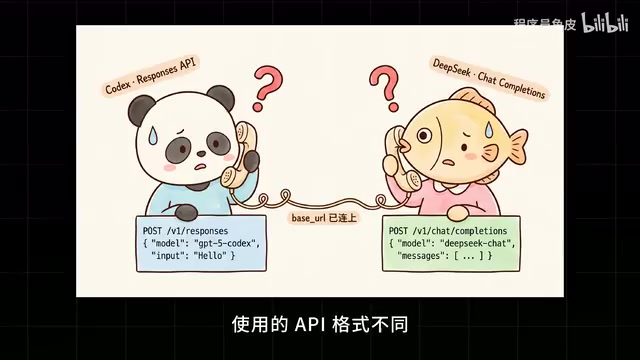
The solution is to use CC Switch's local routing feature. This feature is essentially a lightweight API translation proxy deployed locally, responsible for automatically converting the request format sent by Codex into a format recognizable by the target model.
From a technical standpoint, the Local Router is essentially a lightweight HTTP proxy server running on your machine. It listens for requests from AI tools, converts them in real-time from one API format to another before forwarding them to the target model service, then reverse-converts the response back. This "API gateway" pattern is widely used in the open-source community — similar projects include LiteLLM, One API, and others, all dedicated to solving interoperability issues between different large model APIs. CC Switch has built this capability into the tool, eliminating the need for users to deploy a proxy service separately.
Specific Steps
- In CC Switch, select the Codex tool, add a model provider, and complete the configuration
- In routing settings, enable local routing and select the corresponding Codex model
- Restart Codex and choose to log in using an API Key
- Enter the API Key to access the main interface and start using it
Since you're using your own API quota with pay-per-use billing, there's no risk of account suspension.
What's the Actual Experience Like After Replacing Models
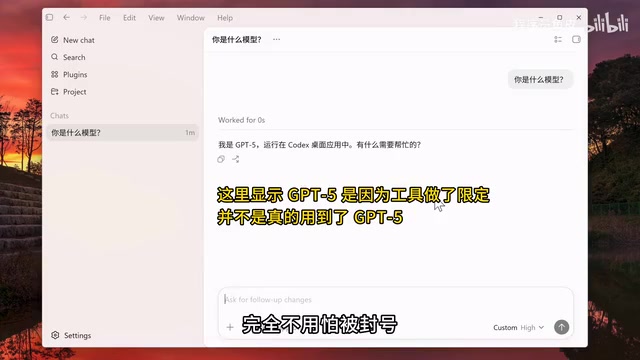
Some might question: does connecting unofficial models to foreign AI tools actually make sense? This question deserves serious discussion.
From a practical standpoint, the actual effectiveness of AI programming tools depends on two factors: model capability and tool capability. Claude Code and Codex are popular not just because of the powerful models behind them, but because they've done extensive engineering optimization in code understanding, project-level context management, tool invocation, and more. Even when connecting the same model, different tool frameworks can produce significantly different experiences.
Looking deeper, the value of AI programming tools can be decomposed into a "tool layer" and a "model layer." The tool layer includes code indexing and retrieval (such as AST-based code understanding), project-level context window management (determining how much code the model can "see"), tool call orchestration (Tool Use, enabling the model to execute shell commands, read/write files, search codebases), and prompt engineering optimized for programming scenarios (System Prompt). The model layer determines the upper limit of reasoning capability — including code generation accuracy, depth of logical reasoning, and understanding of complex requirements. Anthropic and OpenAI have done extensive joint optimization at the tool layer for their own models. For example, Claude Code's system prompts and tool calling protocols are specifically designed for Claude model response characteristics, and replacing the model will diminish the effectiveness of these optimizations. However, the engineering value of the tool layer itself — project indexing, file operations, command execution capabilities — still exists, which is the core reason why these tools remain worth using even after model replacement.
From a learning perspective, mastering the workflows and usage methods of these mainstream AI programming tools is inherently valuable. When access conditions become more convenient in the future, you'll already have accumulated sufficient experience to seamlessly switch to official models for the best experience.
Limitations of This Approach
Of course, this approach has obvious limitations:
- Model capability differences: Claude Code paired with Claude's native model will inevitably outperform other models on code tasks — many tool-side optimizations are customized for their own models
- Feature compatibility: Some advanced features may depend on specific model capabilities and may not work fully after model replacement. For example, formatted output for certain tool calls, intermediate state management of multi-step reasoning chains, and similar features may behave abnormally on non-native models
- Latency and stability: Forwarding through a local router may add some response latency. Additionally, the local routing service itself needs to remain running — if it exits unexpectedly, the tool won't be able to call the model properly
Overall, CC Switch provides Chinese developers with a low-cost path to experience mainstream AI programming tools. It's not a perfect solution, but under current conditions, it's genuinely a pragmatic choice.
Key Takeaways
Related articles
AI Agent Core Architecture Breakdown: From Concept to Enterprise-Grade Intelligent Agent Development
Deep dive into AI Agent architecture: perception, brain, and action modules. Covers RAG memory systems, tool calling mechanisms, Chain of Thought reasoning, and enterprise agent development roadmap.
Hands-On Tutorial: Build an AI Agent from Scratch with 200 Lines of Python
Build an AI Agent from scratch with 200 lines of Python, covering prompts, memory, tool calling, RAG, and Skills — a practical guide for developers.
Anthropic Reverses Controversial Policy of Secretly Throttling AI Researchers Using Claude
Anthropic reverses its controversial policy of secretly throttling Claude Fable/Mythos responses to frontier LLM development requests after community backlash, raising critical questions about AI transparency.