How to Fix WeChat Mini Program Errors: A 3-Step AI Auto-Fix Method

A 3-step method to auto-fix WeChat Mini Program errors using AI IDEs — no coding required.
Encountering errors while building WeChat Mini Programs with no-code AI tools? This article introduces a simple 3-step debugging workflow: save the complete error logs from the console, feed them to an AI IDE like Cursor or Windsurf for automatic analysis and repair, then recompile to verify the fix. No coding knowledge needed — just repeat until all errors are resolved.
Introduction
When developing WeChat Mini Programs with no-code AI programming, encountering errors is completely normal. But many beginners panic the moment they see a console full of red error messages — they can't understand any of it, let alone know where to start fixing things.
The truth is, you don't need to understand the error messages at all. This article shares an incredibly simple debugging technique: using an AI IDE to automatically fix Mini Program errors, without writing a single line of code.
The Problem: What to Do When Your Mini Program Throws Errors
Let's look at a real-world example. This is a WeChat Mini Program with simultaneous interpretation capabilities that enables real-time AI conversations. During development and debugging, the console was flooded with error messages.
Mini Programs with simultaneous interpretation and AI conversation features typically involve a complex tech stack: the frontend needs to call WeChat's RecorderManager for real-time audio capture, send the audio stream to a backend speech recognition service (such as WeChat's simultaneous interpretation plugin, iFlytek Speech API, or Whisper model) via WebSocket or HTTP requests, pass the recognition results through a large language model (like GPT, Claude, etc.) to generate responses, and finally play them back through text-to-speech (TTS). This pipeline involves audio processing, network communication, asynchronous callbacks, API authentication, and many other components — an issue at any point in the chain will throw errors in the console, which is why these projects tend to produce numerous and varied error messages.
For no-code developers, these error messages might as well be written in hieroglyphics. Traditional debugging requires you to read error logs line by line, locate the problematic code, understand the root cause, and manually fix it — a barrier that's simply too high for non-programmers.
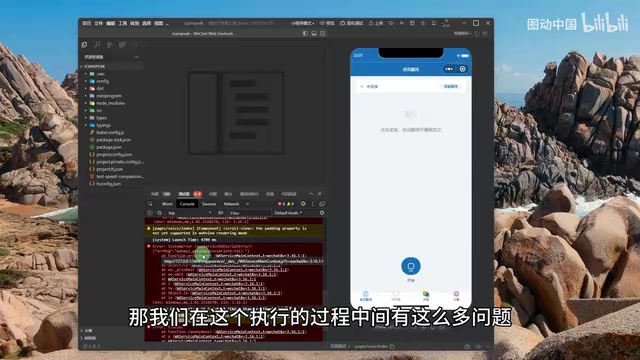
But if you think about it differently and hand these "hieroglyphics" over to AI, the problem becomes much simpler.
The Core Solution: 3-Step AI Auto-Fix Method
The entire fix workflow has just three steps, and anyone can do it.
Step 1: Save the Error Logs
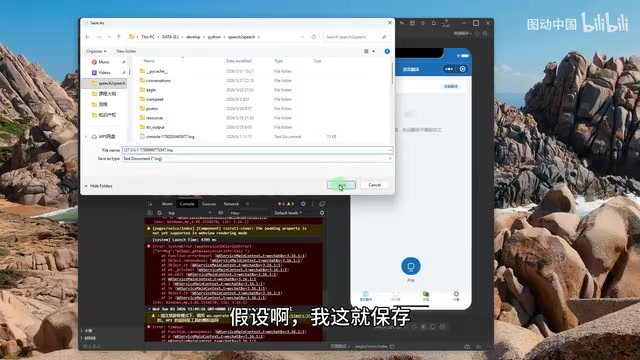
In the WeChat Developer Tools console, click the "Save" button to save all error logs. Choose your current Mini Program project directory as the save location.
It's worth briefly understanding WeChat Developer Tools here. It's the official IDE provided by WeChat for Mini Program development, featuring three core modules: a code editor, simulator, and debugger. The Console is the heart of the debugger, where all runtime information is output. Console error logs can generally be categorized into several types: syntax errors (non-standard code writing, such as missing brackets or typos), runtime errors (exceptions during code execution, such as accessing non-existent variables or object properties), network request errors (API call failures, request timeouts, authentication failures, etc.), and framework warnings (prompts from the WeChat Mini Program framework about non-standard usage). Each error typically contains three key pieces of information: error type, error description, and error location (filename and line number) — these are exactly what AI relies on to pinpoint problems.
Key point: Always save the complete logs — don't just capture a portion. Complete error context information allows AI to locate problems more accurately. Some errors have causal relationships — a single underlying error can trigger a cascade of higher-level errors. If you only capture the downstream "symptoms" while missing the upstream "root cause," the AI's fix might only address the surface issue without solving the real problem.
Step 2: Hand It Over to the AI IDE for Auto-Fix
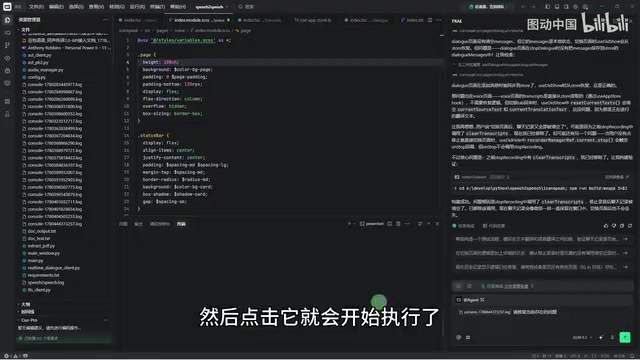
Open your AI programming IDE (such as Cursor, Windsurf, etc.) and drag the saved log file into the editor.
Cursor and Windsurf are AI-native code editors that have emerged in recent years, with their core capabilities powered by deeply integrated large language models (LLMs). Unlike traditional IDEs, these tools don't just offer syntax highlighting and auto-completion — more importantly, they have project-level code comprehension. When you open a project folder, the AI indexes the entire project's file structure, code logic, and dependencies, building a complete contextual understanding. This is why we save the log file to the project directory: when the AI reads the error logs, it can simultaneously "see" the complete source code of the files mentioned in the errors, enabling precise problem identification and targeted fix generation. If the logs are saved outside the project, the AI can only see the error descriptions without the corresponding source code, significantly reducing fix accuracy.
Then enter a simple instruction:
"Please fix the current issues"
Click execute, and the AI will automatically analyze the error logs, locate the problematic code, and generate a fix. The entire process is fully automated — you don't need to do anything else.
Step 3: Recompile and Verify
After the AI completes its fixes, go back to WeChat Developer Tools and click the "Compile" button to re-run the Mini Program. If the problem is resolved, the program runs normally; if there are remaining errors, repeat the steps above for another round.
Why This Method Works
The logic behind this debugging method is clear:
- Making error information transferable — Saving log files converts runtime errors into text that AI can read
- Giving AI complete context — With the log file in the project directory, the AI IDE can see both the error messages and the source code simultaneously, enabling more precise analysis
- Automating the fix process — A single natural language instruction triggers the AI's code repair capabilities
From a broader perspective, this method actually represents a significant leap in the no-code development paradigm. Early no-code/low-code platforms (such as WeChat's Weida, Tencent Cloud's low-code tools, etc.) primarily lowered the development barrier through visual drag-and-drop components, but whenever runtime errors occurred, users still had to go back to the code level to troubleshoot — this became the "last mile" problem of no-code development. The emergence of AI programming tools fills exactly this gap: they can not only help you generate code but also help you understand and fix problems in the code, truly achieving end-to-end no-code coverage from development to debugging.
This approach is especially suitable for the following scenarios:
- No-code developers encountering technical errors they can't understand
- Too many error messages, making manual troubleshooting one by one too inefficient
- Projects in rapid iteration phases that require frequent debugging
Practical Tips and Considerations
While the method is simple, there are a few things worth noting in practice:
- Multiple rounds of debugging are normal: AI may not fix everything in one pass — two or three rounds is perfectly normal, so don't rush. There's a technical reason behind this: errors in a program often form dependency chains — Error A might cause Errors B and C, while Error B might mask the existence of Error D. After AI fixes Error A, Errors B and C may disappear, but the previously hidden Error D surfaces in the new compilation logs. Additionally, a single AI fix might introduce new edge cases that need to be addressed in the next iteration. It's like peeling an onion — each round of fixes gets closer to the final correct state, and two to three iterations is a perfectly normal pace.
- Save complete logs: Incomplete error information will affect the AI's diagnostic accuracy
- Verify after each round: Always recompile after AI fixes to confirm the problem is actually resolved before moving on
- Take a look at what changed: While you don't need to write code yourself, briefly reviewing the AI's changes can help you gradually build development experience. AI IDEs typically display changes in a diff view (code difference comparison), with green indicating added code and red indicating deleted code. Even if you can't understand the specific syntax, you'll gradually develop an intuition for "what kind of fix corresponds to what kind of error" — this is extremely valuable for your long-term no-code development journey.
Conclusion
Debugging in no-code AI programming doesn't require deep programming expertise. Master the simple workflow of "Save logs → Hand to AI → Recompile," and you can handle most errors encountered during WeChat Mini Program development.
As AI programming tools like Cursor and Windsurf continue to evolve, this human-AI collaborative development model will become increasingly mature, enabling more creators without technical backgrounds to independently build Mini Programs.
Key Takeaways
Related articles
DeepSWE Benchmark Deep Dive: Exposing SWE-Bench Flaws and the True Coding Ability Rankings
Deep dive into how DeepSWE exposes SWE-Bench Pro's data contamination and cheating issues. GPT-5.5 leads at 70%, open-source models lag far behind. Covers results, cost comparisons, and practical developer advice.
Guide to Building a Second Brain with Claude AI: The Four-C Framework for Your Personal AI Operating System
Learn how to build an AI second brain with Claude using the Four-C Framework (Context, Connection, Capability, Cadence) to create a personal AI operating system with practical examples.
Zero-Code Mini Program Development with Codex: Building 7 Features in 5 Days — A Hands-On Story
A creator used OpenAI Codex to build an image editing mini program with 7 features in 5 days — zero coding. Learn about Codex's AI capabilities and tips for getting started.