How to Write Prompts: Four Elements, Three Techniques, and Three Pitfalls Explained

A complete guide to writing effective AI prompts: four elements, three techniques, and three pitfalls.
This article breaks down effective prompt writing into a clear framework: four essential elements (Role, Task, Requirements, Format), three power techniques (few-shot examples, chain-of-thought reasoning, hallucination prevention), and three common pitfalls to avoid (overloading tasks, unnecessary pleasantries, rewriting from scratch). Master these principles to dramatically improve your AI output quality.
Same AI, So Why Do Others Get Better Results Than You?
Using the same AI tools like DeepSeek or Doubao, some people get impressively accurate results while others feel like AI can't do anything right and never gives relevant answers. What's the difference? Most of the time, it comes down to how you talk to it — in other words, how you write your prompts.
A prompt is how you give instructions to AI. What you say directly determines what it does. The reason behind this is closely tied to how large language models work — models behind tools like DeepSeek and Doubao are essentially probability prediction systems trained on massive amounts of text data. Given preceding text, they predict the most likely next word. Your prompt serves as the "starting point" for this prediction process, and different starting points lead the model down completely different paths through probability space. This explains why the same model can produce vastly different results with different prompts. Prompt Engineering has become a dedicated technical discipline, with organizations like OpenAI and Google DeepMind publishing systematic best practice guides.
Bilibili creator Maidong covered the core methodology of prompt writing thoroughly in a single video: Four Elements + Three Techniques + Three Pitfalls. This article organizes that framework systematically to help you quickly master the art of communicating effectively with AI.
The Four Elements of a Prompt: Explain It Like You're Assigning Work to an Intern
Imagine you're assigning a task to a brand-new intern. You wouldn't just toss out "go handle that thing." You'd tell them what to do, what the specific requirements are, and what the deliverable should look like. Writing prompts for AI works exactly the same way — a good prompt generally contains four components: Role, Task, Requirements, and Format.
Element 1: Role — Tell the AI Who It Is
Start by telling the AI what role it's playing. For example, "You are an elementary school Chinese language teacher with ten years of experience."
Don't underestimate this single sentence. Adding a role immediately changes the depth, tone, and word choice of the AI's response. Having a Chinese language teacher help revise an essay versus having a programmer do it produces completely different results.
Role setting works because large language models were exposed to massive amounts of text from different identities and scenarios during training. When you say "You are an elementary school Chinese language teacher with ten years of experience," the model activates knowledge distributions related to education, language arts teaching, and children's cognitive levels. Subsequent generated content automatically skews in that direction. This is technically known as "conditional generation" — the role description acts as a powerful constraint, helping the model filter out the most relevant subset of knowledge from its vast parameter space. The more specific the role description (adding years of experience, area of expertise, work context), the better the constraint works.
Element 2: Task — Clearly State What Needs to Be Done
This is about what exactly you want the AI to do — be clear and specific. "Help me write something" is too vague; the AI doesn't know what you want. "Help me write a weekly work report for this week" is much clearer. The more precise the task description, the more focused the AI's output.
Element 3: Requirements — Spell Out the Details and Conditions
Many people skip this part, but including it makes a huge difference. Who's the audience? What style? What tone? Are there any constraints? State them all here. For example, "This is for my direct supervisor. Emphasize project progress. Don't write a bland play-by-play." The more details you provide, the less the AI has to guess, and the more accurate the output.
Element 4: Format — Define What the Output Should Look Like
What form do you want the final output to take — a continuous paragraph or bullet points? Roughly how many words? Should it be divided into sections?
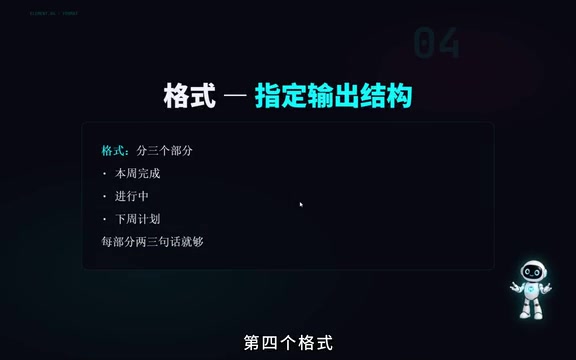
For example, "Divide it into three sections: Completed This Week, In Progress, and Next Week's Plan. Two to three sentences per section is enough."
Good Prompt vs. Bad Prompt Comparison
| Bad Version | Good Version |
|---|---|
| Help me write a weekly report | You are a project manager at an internet company. Help me write a weekly work report for this week. It's for my direct supervisor. Emphasize project progress and issues encountered. Divide it into three sections: "Completed This Week, In Progress, Next Week's Plan." Keep each section to three sentences or fewer. |
With Role, Task, Requirements, and Format all covered, the AI's output will naturally be much more accurate.
Three Practical Prompt Techniques: Take Your AI Output Quality to the Next Level
Technique 1: Give It an Example (Few-shot Prompting)
If you want a specific style, instead of trying to describe it in words, just give the AI an example. For instance, if you need headlines, say "Write five more in the style of the following example," then paste in one you like.
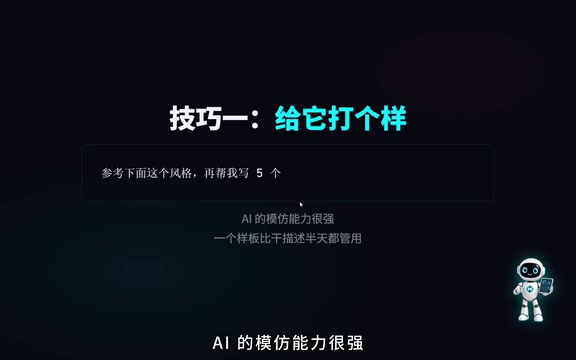
AI is excellent at imitation. One good example is more effective than lengthy descriptions.
Few-shot Prompting was systematically introduced in the GPT-3 paper Language Models are Few-Shot Learners (2020, Brown et al.). The research found that by providing just a few examples in the prompt (typically 1-5), the model could quickly "understand" the task pattern and produce high-quality imitative output — without any retraining. Related approaches include Zero-shot (asking directly without examples) and One-shot (providing just one example). In practice, the quality of examples matters more than quantity — one precise, well-chosen example often outperforms five mediocre ones. This technique is especially effective for style imitation, format standardization, and domain-specific writing.
Technique 2: Make It Think Before Answering (Chain-of-Thought)
For slightly complex problems, add a line like "Please analyze this step by step, then give me your conclusion."
Why does this work? Because AI fundamentally generates text one word at a time. When you ask it to write out its thinking process, it's essentially drafting its work first, making the final answer much more reliable.
Chain-of-Thought was formally proposed by Google researcher Jason Wei and colleagues in a 2022 paper. They discovered that simply adding "Let's think step by step" to a prompt could improve model accuracy on math reasoning and logical analysis tasks by 20%-50%. The principle is this: since large language models generate text token by token, when required to output intermediate reasoning steps first, those steps become context for subsequent generation — essentially providing the model with "working memory." This idea later evolved into more advanced reasoning strategies like Tree-of-Thought and Self-Consistency sampling. Reasoning models like DeepSeek-R1 have even internalized chain-of-thought as default behavior, making "think first, answer second" an automatic process.
Technique 3: Give It an Exit Ramp (Preventing AI Hallucination)
AI has a well-known problem called "hallucination" — it will fabricate answers even when it doesn't know. How do you reduce this? Add something like this to your prompt: "If you're not sure, just say you don't know. Don't guess." With this instruction, the AI is more willing to honestly admit uncertainty rather than confidently making things up.
AI Hallucination is one of the most closely watched safety issues with current large language models. Its root cause lies in the generation mechanism: the model isn't "looking up facts" but rather predicting "what text would be most plausible here." When the model lacks sufficient training data on a topic, or when the question itself is ambiguous, it still generates fluent, confident-sounding text — because "fluency" and "correctness" aren't fully equivalent in the model's optimization objectives. Hallucination is especially dangerous in fields like healthcare, law, and finance where accuracy is critical. Beyond adding "say you don't know if you're unsure" instructions in prompts, the industry is also using RLHF (Reinforcement Learning from Human Feedback), factual retrieval augmentation, and other technical approaches to systematically mitigate this problem.
Three Common Prompt Pitfalls: See How Many You've Fallen Into
Pitfall 1: Cramming Too Many Tasks at Once
Writing a weekly report, drafting an email, AND translating — all stuffed into a single message. The AI easily loses focus and drops the ball on some tasks.
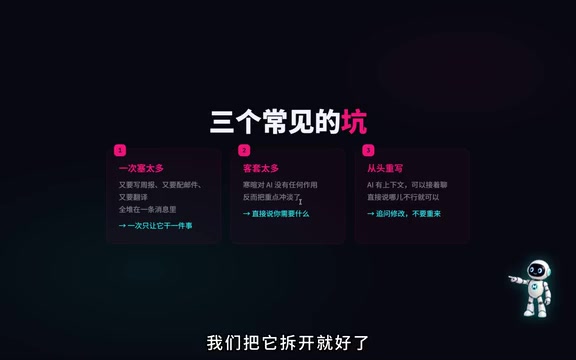
The fix is simple: Break it up. Have the AI do one thing at a time. Issue each task independently, and the quality will be much better.
Pitfall 2: Too Many Pleasantries That Dilute the Point
"Hi there, could you do me a small favor, please?" These niceties are completely useless to AI and only dilute your key message. Just state what you need directly. AI doesn't need you to be polite.
This involves a technical concept: tokens. A token is the basic unit that large language models use to process text. In Chinese, one character typically corresponds to 1-2 tokens; in English, one word is roughly 1-1.5 tokens. Every model has a context window limit — for example, early GPT-3.5 had a 4K token window (about 3,000 words), while mainstream models today have expanded to 128K or even longer. The context window determines how much content the model can "see" in a single conversation. Tokens wasted on pleasantries not only consume precious context space but can also scatter the model's attention — research shows that when input content is too long, the model's attention to information in the middle decreases, a phenomenon known as "Lost in the Middle." So every token should be used to convey useful information.
Pitfall 3: Rewriting the Entire Prompt When Unsatisfied
This is completely unnecessary. AI has contextual memory — it can continue the conversation. If the first attempt isn't right, just tell it what's wrong: "The second paragraph is too wordy — condense it to two sentences" or "Make the tone more formal." Iterating round by round is far more efficient than rewriting the entire prompt from scratch.
Summary: The Core of Prompt Writing in One Sentence
Clearly articulate what's in your head to the AI.
However you'd explain your needs clearly to a person, do the same with AI. Remember the four-element framework (Role + Task + Requirements + Format), leverage the three techniques (examples, chain-of-thought, exit ramps), avoid the three pitfalls (don't overload, don't be chatty, don't start over), and your AI experience will improve dramatically.
That said, even the best prompts have a ceiling — no matter how smart AI is, it doesn't know your company's internal documents or the files on your computer. How do you let AI use your own knowledge base? That's where advanced topics like RAG (Retrieval-Augmented Generation) come in. RAG is one of the hottest technical architectures in enterprise AI applications today. Its core idea is: before the model generates an answer, it first retrieves relevant content snippets from external knowledge bases (such as company documents, databases, or web pages), then feeds those snippets as context to the model. This way, the model no longer relies solely on knowledge learned during training but can answer questions based on the latest, private, domain-specific materials — effectively mitigating knowledge staleness and hallucination issues. It's well worth keeping an eye on.
Tools will change, but methodology matters more. Once you've mastered the underlying logic of communicating with AI, you'll be able to get up to speed quickly no matter how models evolve in the future.
Related articles

Ubisoft Co-Founder Claude Guillemot Dies in Plane Crash at Age 69
Ubisoft co-founder Claude Guillemot has died in a plane crash at age 69. He co-founded Ubisoft with his four brothers, creating iconic IPs like Assassin's Creed and Far Cry.
DeepSeek Researcher Summarizes 10 Rules for Using AI Agents
A DeepSeek researcher shares 10 universal rules for using AI agents, covering the shift from execution to judgment, memory file systems, human-AI collaboration boundaries, and more.
Agent Harness: A New AI Agent Paradigm from Prompt Engineering to Execution Environment Orchestration
Deep dive into Agent Harness Engineering: how loop execution and context isolation overcome the bottlenecks of prompt and context engineering in modern AI coding agents like Cursor.