PeakCode Open-Source AI Coding Tool: An All-in-One Solution Combining Claude Code and Codex
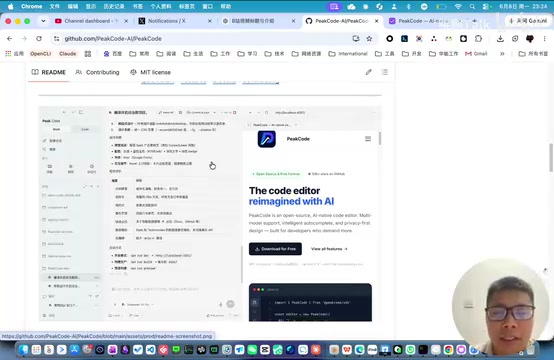
PeakCode is an open-source AI coding tool merging Claude Code's engineering power with Codex's product experience.
PeakCode is an open-source AI coding tool by Chinese developers that combines Claude Code's engineering capabilities with OpenAI Codex's polished UX. Built on T3 Code with Node.js and Python, it supports both Web and desktop modes, features a plugin system with planned Computer Use integration, deep Git workflow management including Worktree support, and automated Agent capabilities for PR review and project management. Currently in early open-source stage, it targets developers seeking a comprehensive AI programming solution.
PeakCode Project Overview: A Homegrown Open-Source AI Coding Tool
PeakCode is an AI coding tool open-sourced by Chinese developers, positioning itself as a competitor to mainstream AI coding products like Cursor, Kilo Code, and Cline. In the current competitive landscape of AI coding tools, Cursor is a deeply customized AI code editor built on VS Code, renowned for its smooth code completion and inline editing experience, and has become the benchmark for paid AI coding tools. Kilo Code and Cline, on the other hand, exist as VS Code extensions — open-source AI coding assistants that leverage large language model APIs to enable code generation, file editing, and terminal operations. Cline, in particular, has gained widespread attention in the open-source community for its powerful autonomous Agent capabilities. By choosing to compete with all of these products simultaneously, PeakCode signals its ambition to cover the full spectrum from lightweight coding assistance to heavy-duty engineering development.
The project is built as a secondary development on top of T3 Code, an open-source AI coding tool framework that provides developers with a foundational Agent interaction architecture and tool-calling capabilities. In the open-source ecosystem, forking and enhancing existing projects is a common and efficient strategy — it allows developers to skip the foundational architecture phase and focus directly on implementing differentiating features. PeakCode's core goal is to merge Claude Code's engineering capabilities with OpenAI Codex's product experience into a unified platform.
Two key products deserve special explanation here: Claude Code is Anthropic's command-line AI coding tool that uses the terminal as its primary interaction interface, capable of directly reading and writing files, executing commands, and managing Git operations. Its greatest strength lies in deep engineering comprehension and excellent handling of large codebases, and many professional developers consider it the most powerful AI coding Agent available today. OpenAI Codex is OpenAI's cloud-based asynchronous coding Agent, offering a polished Web interface and task management system that supports submitting coding tasks to cloud sandboxes for asynchronous execution, with exceptionally well-designed user experience. PeakCode aims to take the best of both worlds — Claude Code's hardcore engineering power and Codex's elegant product experience.
The author states that after thoroughly reading and studying Claude Code's source code, they decided to fully reproduce its engineering capabilities in Python while drawing inspiration from Codex's excellent interface design and interaction experience, ultimately creating this comprehensive AI coding tool.
PeakCode Core Features and Detailed Functionality
Multi-Mode Runtime Support
PeakCode is built on Node.js and supports two runtime modes:
- Web Interface Mode: Launched via
run dev web, suitable for users who need to control remote server development from a browser - Desktop Application Mode: Launched via terminal, with planned support for macOS, Linux, and Windows
This flexible deployment approach means that whether you're developing locally or managing remote servers, PeakCode can adapt to your workflow. Web mode is particularly important for remote development scenarios — when developers need AI-assisted coding on cloud servers or remote workstations, they simply start PeakCode's Web service on the server and access the full development environment through any browser, without installing additional desktop clients. This philosophy aligns with remote development solutions like VS Code Server and code-server.
Session and Code Modes
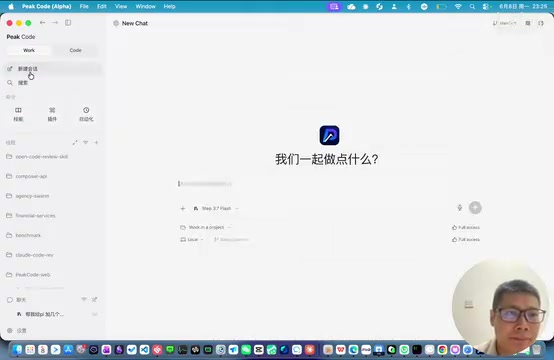
The tool features two core built-in modes: "Session" and "Code." In Code mode, users can enter a Claude Code-like programming environment that supports multi-window split operations, completing multiple development tasks within a single interface. Multi-window splitting is a standard capability in professional development tools, allowing developers to observe and operate across multiple contexts simultaneously — for example, having AI refactor backend code in one window while synchronously adjusting frontend API calls in another. This parallel workflow can significantly boost development efficiency for complex projects. Additionally, it can also function as a general-purpose Agent, similar to conversational AI products like Lobechat. Lobechat is an open-source AI chat platform widely used by Chinese developers, supporting multi-model integration and plugin extensions. PeakCode's Session mode draws on this general conversational capability, making it useful beyond coding scenarios for tasks like documentation writing and technical research.
Plugin System and Automation Capabilities
PeakCode has planned a comprehensive plugin ecosystem and automation capabilities:
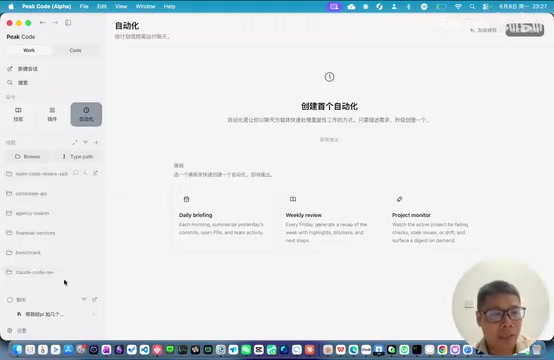
- Plugin System: Plans to integrate various plugins from Claude Code, including browser connectivity and Computer Use functionality. Computer Use is a breakthrough capability introduced by Anthropic that allows AI models to operate computer graphical interfaces just like humans — by taking screenshots to "see" the current interface state, then generating mouse clicks, keyboard inputs, and other operation commands to interact with applications. The significance of this technology is that it enables AI Agents to operate traditional software that lacks API interfaces, dramatically expanding the boundaries of automation. If PeakCode successfully integrates Computer Use, developers will be able to have AI automatically perform browser testing, GUI application debugging, and other tasks that were previously difficult to automate.
- Skills Library: Encapsulates and integrates local skills files to enhance AI's contextual understanding. Skills files are essentially predefined prompt templates and tool usage specifications that tell the AI how to act in specific scenarios — for example, "when a user requests React component refactoring, prioritize functional components and Hooks patterns." This mechanism is similar to Cursor's Rules files or Claude Code's CLAUDE.md. By encoding team coding standards and best practices as Skills, AI output can better align with project requirements.
- Automated Tasks: Similar to Codex's scheduled task functionality, supporting:
- Scheduled scanning of trending GitHub projects
- Automatic pulling of Issues and PRs from open-source projects
- AI-powered automatic analysis, merging, committing, or closing of PRs
This means PeakCode is not just a coding assistant but an AI Agent capable of autonomously completing project management work. This automated PR review and management capability holds extremely high practical value in maintaining large open-source projects — maintainers may face dozens or even hundreds of PRs daily, and an AI Agent can perform preliminary code reviews, conflict detection, and quality assessments, freeing human maintainers from repetitive review work.
Deep Git Workflow Integration
The project deeply integrates Git workflow management:
- Multi-branch code management support
- Visual commit history viewing
- Worktree switching functionality
- One-click project opening in Cursor or other editors
- Visual interface for commits, merges, and other operations
Git Worktree is a feature worth special attention. Worktree is an advanced Git feature that allows developers to simultaneously check out multiple branches from the same repository into different directories, each serving as an independent workspace. Traditional branch switching requires stashing or committing current changes first, but Worktree completely eliminates this limitation — you can develop new features in one directory while fixing urgent bugs in another, with no interference between them. In AI coding scenarios, Worktree's value becomes even more pronounced: you can have an AI Agent execute code modification tasks in an isolated Worktree while your main working directory remains completely unaffected, providing a natural isolation mechanism for parallelized AI-assisted development.
Interface Design and User Experience
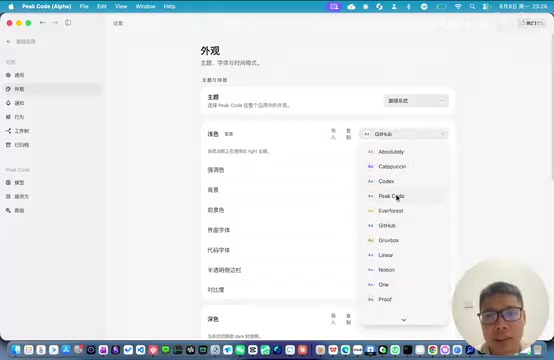
PeakCode has invested considerable effort in interface design. The project supports Chinese-English bilingual switching and offers multiple theme styles:
- Codex style (default)
- Claude Code style
- GitHub style
- And more optional themes
The overall interface layout is clean, with well-organized functional areas, and the search function supports retrieval across historical conversations. From the demos, the UI completion level is already quite high. Multi-theme support may seem like a purely aesthetic choice, but it actually reflects the product's respect for different user groups' usage habits — hardcore developers accustomed to Claude Code's terminal style and users who prefer Codex's modern interface can both find a comfortable visual environment. This kind of detail polishing is often the key factor determining user retention.
PeakCode Technical Architecture Analysis
From the author's introduction, the following technical highlights can be extracted:
- Base Framework: Secondary development based on T3 Code, Node.js tech stack
- Core Capabilities: Reproducing Claude Code's engineering capabilities, primarily through Python-based optimization
- Product Form: Electron desktop application + Web application dual form
- Build & Release: Automated packaging and compilation using GitHub Actions
- MCP Support: Based on the project's positioning, it supports Model Context Protocol
Electron is a cross-platform desktop application framework developed by GitHub that bundles the Chromium browser engine with the Node.js runtime, enabling developers to build native desktop applications using web technologies (HTML, CSS, JavaScript). Well-known applications like VS Code, Slack, and Discord are all built on Electron. The advantage of PeakCode's Electron + Web dual-form architecture lies in code reuse — core UI components and business logic only need to be written once to run simultaneously in both the desktop client and browser, significantly reducing multi-platform maintenance costs.
GitHub Actions is GitHub's continuous integration/continuous deployment (CI/CD) service that allows developers to define automated workflows through YAML configuration files. For Electron applications, cross-platform packaging is a tedious task — requiring separate installer generation for macOS (.dmg), Windows (.exe), and Linux (.AppImage/.deb). GitHub Actions can simultaneously run build environments for multiple operating systems in the cloud, automatically completing compilation, signing, and release processes, which is especially important for open-source projects maintained by individual developers or small teams.
MCP (Model Context Protocol) is an open standard protocol introduced by Anthropic in late 2024, designed to establish a unified communication interface between AI models and external tools and data sources. Before MCP, every AI tool needed to write separate integration code for each external service, resulting in massive duplication of effort. MCP defines standardized "tool" and "resource" description formats, enabling any MCP-compatible AI client to plug-and-play connect with any MCP server. MCP is currently supported by mainstream AI tools including Cursor, Claude Desktop, and Cline, forming a rapidly growing plugin ecosystem. PeakCode's MCP support means users can directly reuse thousands of existing MCP plugins in the community — from database queries and API calls to document retrieval — without waiting for the PeakCode team to develop integrations one by one.
The author specifically mentioned "primarily pushing development through Python" and has made engineering optimizations at the Python level, with plans to continue iterating in this direction. This Node.js + Python hybrid architecture is not uncommon in AI tools — Node.js handles the frontend interface and application framework layer, while Python handles compute-intensive tasks like AI inference and code analysis, with the two collaborating through inter-process communication. Python has an unmatched library support advantage in the AI/ML ecosystem, making the choice to reproduce Claude Code's engineering capabilities at the Python level a pragmatic technical decision.
Project Status and Future Outlook
PeakCode is currently in its early open-source stage:
- The code was just open-sourced, with only a single main branch
- Release versions are being packaged via GitHub Actions
- The official website is live but still being refined
- No external contributors have participated yet
The author candidly admits "I've been really too exhausted lately to keep going," and therefore chose to open-source the project, hoping community developers will contribute code. This kind of honesty actually resonates well within the open-source community. From the perspective of open-source project development patterns, the most critical challenge in the early stage isn't the technology itself, but whether an active contributor community can be established. Successful open-source projects typically need comprehensive contribution guidelines (CONTRIBUTING.md), clear Issue labeling systems, beginner-friendly tasks (good first issue), and timely PR review feedback. If PeakCode invests effort in these community operations aspects, it will significantly increase the probability of attracting external contributors.
Conclusion: Is PeakCode Worth Watching?
PeakCode has no small ambition — it attempts to integrate Claude Code's powerful engineering capabilities, Codex's excellent product experience, and automated Agent intelligent management capabilities into a single open-source project. If the project can sustain iteration and attract enough community contributors, it has the potential to become an important option for Chinese developers in the AI coding tool space.
It's worth noting that the AI coding tool market is currently in a period of rapid reshuffling. On one hand, commercial products like Cursor and Windsurf continue to increase their investment; on the other hand, open-source projects like Cline, Continue, and Aider are also thriving. As a latecomer, PeakCode's differentiating advantages lie in its deep understanding of Chinese developers' needs (such as Chinese language support and domestic model compatibility) and its product philosophy of merging the strengths of multiple top-tier products. However, it also faces the common sustainability challenges of open-source projects — the energy bottleneck of a single maintainer, keeping in sync with upstream projects, and the gap between feature planning and actual delivery.
For developers who want to deeply understand AI coding tool architecture design, PeakCode's source code itself serves as excellent learning material — it demonstrates how to organize Agent frameworks, tool calling, Git integration, plugin systems, and other modules together to build a complete AI coding product. Those interested can search for PeakCode on GitHub to follow and try it out.
Related articles
Claude Code Workflow in Practice: From Requirement Grilling to AFK Agent Auto-Coding
A detailed walkthrough of building real features with Claude Code: Grill Me requirement interrogation, auto-generated PRDs, AFK agent coding, and QA iteration loops with DDD and TDD strategies.

A Gen-Z Woman Making $1.5M/Month: Deconstructing the Growth Methodology Behind AI Apps
Gen-Z indie dev Nicole built 4 hit AI apps earning $1.5M/mo. Deep dive into her industrialized UGC engine, traffic testing system, and minimalist tech stack.

Replit's AI Loops Workflow Explained: Multi-Agent Collaboration Replaces Prompt Engineering
Deep dive into Replit's AI Loops workflow: how orchestrators, parallel agents, and Computer Use Verifiers build automated closed-loop systems through multi-agent collaboration.