Straight from the Creator of Claude Code: Practical Tips for Using AI Coding Assistants Effectively
Claude Code's creator shares practical tips from beginner Q&A to expert parallel workflows.
Boris, the creator of Claude Code, shared advanced usage tips at an Anthropic tech talk. Key insights include starting with code Q&A instead of writing code, using "plan first" prompts for complex tasks, leveraging CLAUDE.md hierarchies for context management, integrating team tools via MCP, and running parallel sessions with Git Worktrees. He also predicted developers may move beyond IDEs entirely as AI models improve.
Boris, the creator of Claude Code, spent 30 minutes at an Anthropic tech talk walking through the advanced usage of this AI coding tool. From beginner basics to expert-level parallel workflows, these hands-on tips from the tool's creator are well worth studying for every developer.
What Claude Code Is: A Whole New Programming Paradigm
Boris opened by clearly distinguishing Claude Code from traditional code completion tools at a fundamental level. Traditional AI coding assistants focus on completing code line by line, whereas Claude Code is fully agentic — it can build complete features, write entire functions and files, and fix multiple bugs simultaneously.
"Fully agentic" is a key concept in current AI application architecture, and it's fundamentally different from the traditional "copilot" model. In copilot mode, AI serves as a human assistant where every action requires human confirmation and triggering. In agentic mode, AI can autonomously plan task steps, invoke tools, evaluate intermediate results, and decide on next actions, forming a complete "perceive-plan-execute-feedback" loop. The core challenge of this architecture is that the model needs strong enough reasoning capabilities to decompose complex tasks, reliable tool-calling abilities to interact with external environments, and self-correction capabilities to handle unexpected situations during execution. Claude Code achieves this autonomy by leveraging breakthroughs in Claude's long-chain reasoning and tool-use capabilities.
More importantly, Claude Code doesn't require you to change your existing workflow. Whether you use VS Code, Xcode, JetBrains, or Vim/Emacs, it works seamlessly alongside them. It runs in the terminal and supports local environments, remote SSH, Tmux, and more. Boris mentioned that some people at Anthropic are fiercely loyal to their IDEs — "you couldn't pry it from their cold, dead hands" — but they still use Claude Code because it's IDE-agnostic.
First Steps for Beginners: Start by Asking Questions
Boris's first core piece of advice was surprisingly simple: don't write code first — ask questions first.
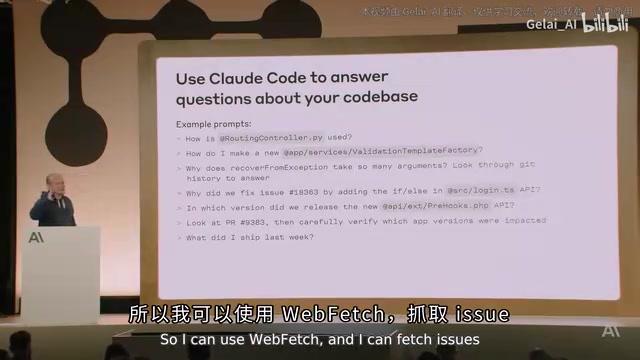
This is also the first lesson in Anthropic's technical onboarding for new employees. After downloading Claude Code, new hires immediately start asking it questions about the codebase. Technical onboarding that used to take two to three weeks now takes just two to three days.
Types of questions you can ask include:
- "How is this code being used?"
- "How do I instantiate this class?"
- "Why does this function have 15 parameters? Why are they named this way?" (Claude Code will automatically look through Git history to answer)
- "What did I commit this week?" (Boris uses this every Monday for standup)
Interestingly, Claude Code doesn't perform any indexing. Your code stays entirely local — it's never uploaded to any remote database and is never used for model training. Download and go, no waiting for indexing to finish. This stands in stark contrast to many other AI coding tools — tools like Cursor and Codeium typically need to build a code index when you first open a project (converting code into vector embeddings stored in a local or cloud database) for fast retrieval of relevant code snippets later. Claude Code's decision to skip indexing means it relies entirely on the model's own reasoning capabilities and real-time file search, grep, and other tools to understand the codebase. This offers stronger privacy protection but also places higher demands on the model's code comprehension abilities.
The Right Way to Edit Code: Plan First, Then Build
Claude Code's toolset is actually quite lean: file editing, Bash command execution, and file search. It automatically combines these tools to complete tasks.
But Boris repeatedly emphasized one key pattern: have it think before it writes code.
He observed a common mistake: users directly asking it to implement a massive 3,000-line feature. Sometimes it nails it on the first try, but often the result is completely off the mark. The solution is simple — add a line to your prompt: "make a plan before you write code." The principle behind this technique is closely related to Chain-of-Thought prompting: when you ask a model to output its reasoning process before giving a final answer, accuracy improves significantly. For complex programming tasks, "plan first" effectively forces the model to decompose the task — breaking a vague, large requirement into clear, small steps, each with well-defined inputs and expected outputs, dramatically reducing the probability that the final result diverges from expectations.
Another frequently used prompt pattern is: think, commit, push, PR. Claude Code is smart enough to understand this means: think through the approach, create a commit, push to a branch, and create a Pull Request. It will automatically check Git logs to determine the commit format.
Advanced Techniques: Integrating Team Tools and Iterative Workflows
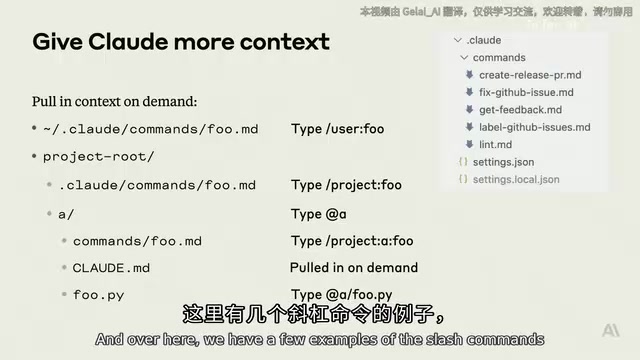
Where Claude Code really shines is in connecting to your team's existing tools. There are two approaches:
- Bash tools: Tell Claude to use a specific CLI tool — you can even have it learn the usage on its own via
--help - MCP tools: Add an MCP server, and Claude Code will automatically learn to use it
MCP (Model Context Protocol) is a standardized protocol open-sourced by Anthropic in late 2024, designed to solve the connection problem between AI models and external tools and data sources. Before MCP, every AI application had to write custom integration code for each external service, resulting in massive duplication of effort. MCP defines a unified client-server communication standard: MCP servers expose tools, resources, and prompt templates, while MCP clients (like Claude Code) discover and invoke these capabilities through the standard protocol. This is similar to HTTP in the web world — with a unified standard, any client can communicate with any server. There are already numerous community-developed MCP servers covering common development scenarios like GitHub, Slack, databases, and browser automation.
Boris particularly recommended an advanced workflow: give Claude a way to verify its own results:
- Write unit tests and let it validate its own work
- Use Puppeteer to take screenshots and compare UI results
- Use iOS Simulator screenshots to check mobile interfaces
When Claude can see its own output, it will autonomously iterate and improve, leading to significantly better results. Puppeteer is a Node.js library developed by Google that provides programmatic control over Chrome/Chromium browsers, enabling page navigation, element clicking, form filling, screenshots, and more. In Claude Code's workflow, Puppeteer acts as "AI's eyes": after Claude modifies frontend code, it can use Puppeteer to launch a browser, load the page, and capture a screenshot, then feed that screenshot as visual feedback into the next round of conversation. This creates an automated "code-preview-fix" loop, allowing AI to verify UI results through visual inspection just like a human developer, rather than merely inferring rendering results from code logic. Anthropic's internal Web/Apps repository shares a Puppeteer MCP server so all engineers can benefit from automated screenshot-driven iteration.
Context Management: The CLAUDE.md Hierarchy
Give Claude more context, and it makes smarter decisions. The core mechanism is the CLAUDE.md file:
- CLAUDE.md in the project root: Automatically loaded into every session; should be committed to version control and shared with the team
- Local CLAUDE.md: For personal use only, not committed to the repository
- Nested directory CLAUDE.md files: Loaded on demand when Claude is working in a specific directory
- Enterprise-level policies: Company-wide configurations pushed down uniformly
CLAUDE.md typically contains: commonly used Bash commands, MCP tool descriptions, architectural decisions, key file references, code style guides, and more. Boris emphasized keeping it short — too long and it wastes the context window.
The context window is one of the core constraints of large language models, referring to the maximum number of tokens the model can process in a single inference pass. Claude's context window is 200K tokens — already very large, but still a scarce resource when working with large codebases. Every system prompt, user message, tool call result, and model response consumes context space. This is why Boris stresses keeping CLAUDE.md concise: if the config file is too long, it continuously occupies precious context space in every session, squeezing out capacity for actual code analysis and reasoning. The hierarchical design of CLAUDE.md (global loading from the root directory, on-demand loading from subdirectories) is an elegant engineering response to this constraint — ensuring that only the context truly needed for the current task gets loaded.
Permission management also supports hierarchical configuration: you can auto-approve certain commands at the enterprise level or block dangerous operations (such as prohibiting access to certain URLs).
Shortcuts and Hidden Features Every Power User Should Know
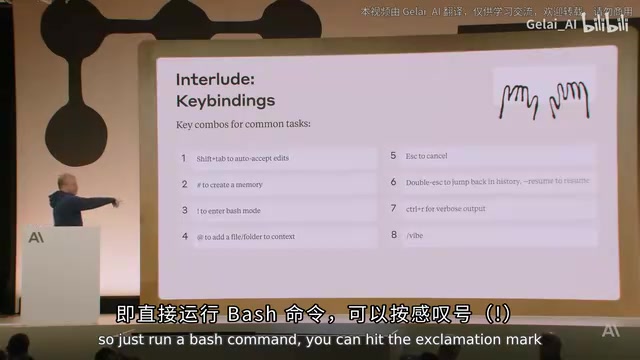
The terminal interface is inherently minimalist, and the following shortcuts are easy to overlook:
| Key | Function |
|---|---|
| Shift+Tab | Toggle auto-accept edit mode |
| # | Have Claude remember a rule (writes to CLAUDE.md) |
| ! | Quickly execute a Bash command and include it in context |
| @ | Mention a file/folder to bring it into context |
| Escape | Safely interrupt at any time (won't break the session) |
| Escape×2 | Jump back in history |
| Ctrl+R | View full output |
Voice input deserves special mention: enable Dictation in macOS Accessibility settings, and you can talk directly to Claude Code, describing your requirements as if chatting with a colleague. The value of this interaction mode lies in lowering the psychological barrier of "prompt engineering" — many developers unconsciously try to phrase things in a way "the machine can understand" when typing, which often strips away critical requirement details. Voice input encourages natural language descriptions, which tend to provide richer contextual information.
SDK and Parallel Work: Expert-Level Usage
Claude Code's -p flag exposes a full CLI SDK, usable like any Unix tool:
claude -p "analyze this log" --allowedTools bash --output-format json
Pipe operations are supported: git status | claude -p "summarize changes" | jq .result
This design follows the Unix philosophy's core principles of "do one thing well" and "programs should be composable." By supporting standard input/output and JSON format, Claude Code can be embedded into arbitrary shell scripts and automation pipelines just like classic Unix tools such as grep, awk, and sed. This allows Claude Code to integrate into CI pipelines, incident response workflows, log analysis, and more — not just interactive coding conversations.
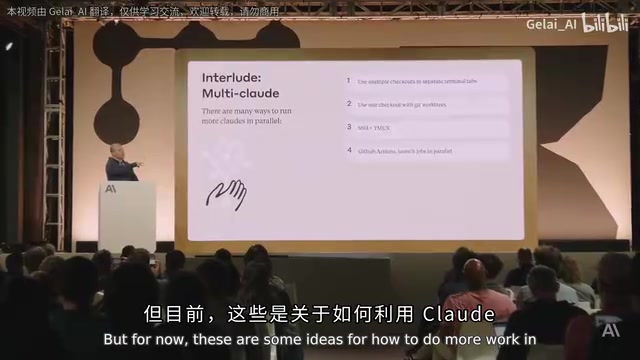
True power users run multiple Claude Code sessions in parallel, achieving isolation through SSH tunnels, Tmux windows, multiple checkouts of the same repo, or Git Worktrees. Git Worktrees is a feature introduced in Git 2.5 that allows creating multiple working directories from the same repository, each checking out a different branch. Compared to cloning multiple times, worktrees share the same .git directory and object database, consuming less disk space and enabling more efficient cross-branch operations. This feature is especially important for parallel AI coding workflows: each Claude Code session can work in an independent worktree, modifying files, running tests, and creating commits without interfering with each other — avoiding conflicts that arise when multiple AI agents modify the same file simultaneously. Boris admitted he's a "regular user" who typically runs just one session, but he's observed that heavy users both inside and outside Anthropic make extensive use of parallel sessions.
Why the Terminal and Not an IDE?
During Q&A, someone asked why they didn't build an IDE plugin. Boris gave two reasons:
- Engineers at Anthropic use a wide variety of IDEs — the terminal is the lowest common denominator
- More importantly — "We see up close how fast models are improving. By the end of the year, people might not be using IDEs anymore"
This is a bold prediction: over-investing in the UI layer might quickly become wasted effort. Claude Code's embrace of the terminal is a bet on the future shape of AI-powered programming. There's a deeper logic behind this judgment: when AI agents become smart enough, the developer's role shifts from "the person who writes code" to "the person who describes intent and reviews results." Under this paradigm, IDE features designed for manual human coding — syntax highlighting, autocomplete, breakpoint debugging, file tree navigation — all become less important. What developers truly need is an efficient "conversation-and-review" interface, and the terminal happens to be the most minimal form of exactly that.
Key Takeaways
Related articles
Fed Up with Every AI Coding Assistant, a Veteran Game Developer Built His Own Coding Agent
Veteran game dev Mario tried every AI coding tool including Claude Code, found them all lacking, and built Pi — a minimalist, extensible coding agent framework centered on developer control.
Complete Guide to LangChain 0.3: Module Architecture & Core Development in Practice
A deep dive into LangChain 0.3's module architecture, message abstraction, prompt templates, output parsers, LCEL chains, LangSmith tracing, and LangGraph for mastering LLM application development.

OpenAI Stargate Michigan Data Center Breaks Ground: A Deep Dive into the 1GW Super Computing Facility
OpenAI's Stargate project breaks ground in Michigan, building a 1GW super data center with closed-loop cooling, thousands of union jobs, and $40M in free Codex credits for students.