Vibe Coding in Action: Building a Mac Screen Recorder with AI — Without Writing a Single Line of Code
Vibe Coding in Action: Building a Mac …
Vibe Coding enables a non-programmer to build a professional Mac screen recorder using only AI conversation.
A Bilibili creator used Vibe Coding — programming entirely through AI conversation — to build a fully functional Mac screen recording tool from scratch without writing any code. The tool features edge-snapping area selection, camera picture-in-picture, multiple aspect ratio switching, and other professional capabilities. This case proves that AI has dramatically lowered the development barrier, but success still hinges on clear requirement articulation and product thinking. Vibe Coding is ideal for personal tools and rapid prototyping, and future competitiveness will increasingly depend on user insight rather than coding skills.
Introduction: Vibe Coding Lets Anyone Build Tools
"Vibe Coding" — a concept that's been popping up frequently in developer circles lately — is built on a core idea: build software entirely through AI conversation, without writing a single line of code. The term was formally coined by OpenAI co-founder Andrej Karpathy in early 2025, describing a brand-new programming paradigm where developers fully immerse themselves in the "vibe," describe their requirements in natural language, and let AI generate and fix the code — barely reading any code details themselves. This represents a qualitative shift in AI-assisted programming, from "productivity booster" to "replacement role." It sounds like a fantasy, but people are already using it to build real, usable products.
A creator on Bilibili (China's YouTube-like platform) recently shared their results: they built a fully functional Mac screen recording tool entirely through Vibe Coding. The tool not only handles everyday screen recording needs but also includes detailed features typically found only in commercial recording software. Most importantly, the entire process involved zero hand-written code.
This raises an important question: where exactly are the boundaries of Vibe Coding? Can it truly replace traditional development?
Why Build Your Own Screen Recorder?
The creator's motivation was refreshingly simple: save money and have full customization freedom.
Existing screen recording tools either require paid subscriptions (OBS Studio is free but notoriously complex to configure, while tools like Screen Studio come with hefty price tags), or they're bloated with features that don't quite fit personal needs. For a content creator, screen recording is a high-frequency task — having a tool built entirely around your own workflow delivers obvious efficiency gains.
It's worth noting that developing a screen recording tool on macOS is no trivial task. It typically requires calling Apple's ScreenCaptureKit (a next-generation screen capture framework introduced in macOS 12.3+) or the older AVFoundation framework. Features like camera picture-in-picture and audio level monitoring also require integrating AVCaptureSession. These APIs have steep learning curves and present a high barrier for non-professional developers — which is precisely why AI code generation shines in scenarios like this. Vibe Coding offers exactly this possibility: you don't need to be a programmer; you just need to clearly know what features you want, then let AI build them for you.
Feature Breakdown: How Capable Is This AI-Built Screen Recorder?
Smart Recording Area Selection
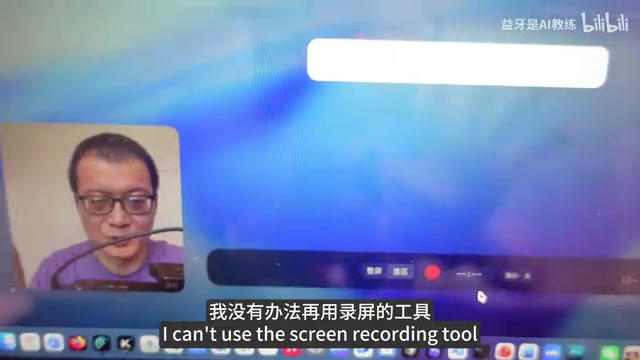
Upon launching the tool, the first thing you see is a freely adjustable recording area selection frame. Users can drag the borders to select the desired screen region, and the frame features edge-snapping behavior during drag-and-drop — a seemingly minor detail that dramatically improves the user experience, showing that the AI considered interaction fluidity during implementation. The default recording area ratio is 16:9, matching the requirements of most video platforms.
Once the area is selected, pressing Enter confirms it — simple and intuitive.
Flexible Camera Picture-in-Picture
After confirming the recording area, a camera preview window appears in the bottom-left corner, defaulting to a square shape. This window can be freely dragged to any position on the screen, allowing creators to adjust placement based on their content layout.
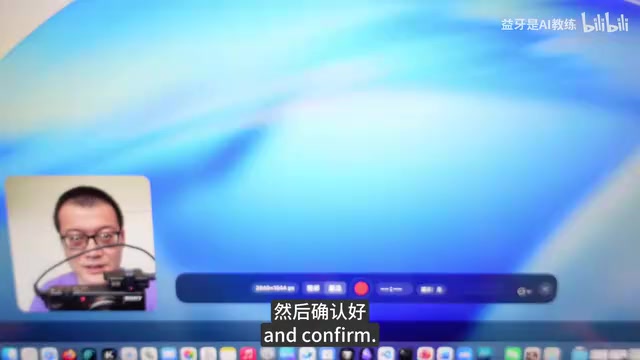
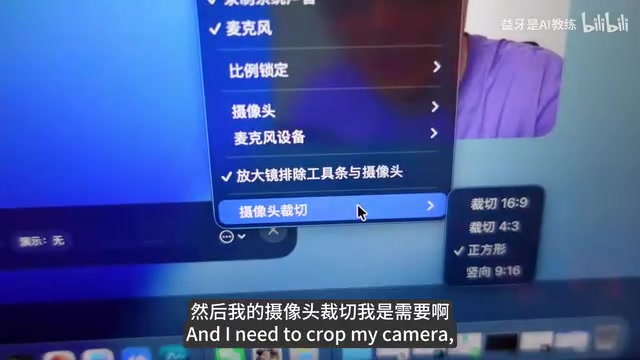
Even more thoughtfully, the camera feed supports multiple aspect ratio options: square, 16:9, 4:3, and even 9:16 portrait mode. When switching to 9:16, the camera view automatically scales to fit. This is incredibly practical for creators who produce both landscape and portrait content simultaneously.
There's also a clever design touch: double-clicking the camera window fills the entire recording area, and double-clicking again shrinks it back to its original size. This means if you want to start your video with a full-screen face-to-camera intro, you can do it right during recording — no post-production cropping needed.
Comprehensive Recording Settings
All core settings are consolidated in the bottom-right corner of the interface:
- Quality selection: Adjust output quality based on your needs
- Audio controls: Independently toggle system audio and microphone
- Recording aspect ratio: Linked to the area selection
- Device selection: Specify which camera and microphone to use
These settings cover the most common screen recording needs — neither overly complex nor missing any critical features.
Recording and Export Experience
After clicking the record button, the interface displays a real-time timer and audio level indicator bars, keeping users informed of the recording status at all times. When finished, pressing Enter stops the recording, and the tool automatically opens the just-recorded video file, eliminating the need to manually locate the file.
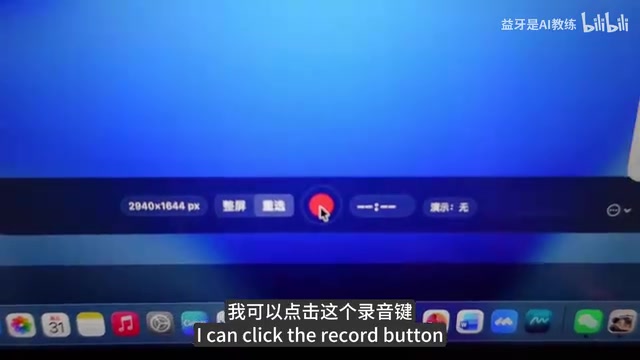
The entire workflow from launch to export is remarkably short, reflecting a "custom-built for myself" design philosophy.
Insights from Vibe Coding: The Barrier Is Lowering, but Thinking Still Matters
Has the Technical Barrier Really Disappeared?
Based on this case study, Vibe Coding has indeed dramatically lowered the technical barrier to software development. The idea that someone who can't write code could build a desktop application with edge snapping, picture-in-picture, and multi-device management would have been unimaginable just a few years ago.
But here's something you might have overlooked: "not writing code" doesn't mean "not needing to think." The creator was able to build this tool because they had an extremely clear understanding of their requirements: the recording area needs to be adjustable, the camera needs aspect ratio switching, double-click should toggle fullscreen... The ability to organize and articulate these requirements is essentially product design capability.
What Scenarios Is Vibe Coding Best Suited For?
From what we can see so far, Vibe Coding works best in these scenarios:
- Personal utility applications: Clear requirements, focused functionality, and the user is the developer themselves
- Rapid prototype validation: Use AI to build an MVP (Minimum Viable Product) first, then validate whether the idea is feasible. MVP is a core concept in lean startup methodology, and its essence lies in building a product version that validates core assumptions at minimal cost. Vibe Coding is a natural fit for this approach — AI can generate a functional prototype in hours, compressing a traditional development cycle of weeks into less than a day
- Filling niche needs: When no existing tool perfectly matches your requirements, build a custom one yourself
For large-scale systems, high-concurrency services, and complex business logic, Vibe Coding still falls short.
Conclusion
This screen recording tool currently supports Mac only, and the creator is evaluating whether to release it as a paid product. Setting the tool itself aside, the greatest value of this case study lies in proving one thing: with AI's help, the distance between "idea" and "product" is being dramatically compressed.
For content creators, product managers, designers, and others without technical backgrounds, Vibe Coding opens a new door. You no longer need to wait for development schedules, and you no longer need to learn a programming language just for one small feature — you just need to know clearly enough what you want, then tell AI.
Of course, this also means that future competitiveness will increasingly be reflected in insight into user needs and product thinking, rather than pure coding ability. This is perhaps the most profound lesson Vibe Coding has to offer.
Related articles
 Product Reviews
Qoder vs Cursor Real-World Comparison: Which $20/Month AI IDE Is Better?
Hands-on comparison of Qoder vs Cursor AI IDEs: Agent autonomy, human interaction count, and architecture decisions. Qoder needed only 2 interactions vs Cursor's 8.
 Product Reviews
Cursor Cloud Agent Demo: Eliminating Bottlenecks Across the Entire Software Development Lifecycle
Deep analysis of Cursor's Cloud Agent demo showing how cloud VMs, automated test artifacts, and a full-chain control plane systematically eliminate human bottlenecks across the software development lifecycle.
 Product Reviews
Cursor 3.0 Deep Dive: Multi-Agent Parallelism, Design Mode, and Best-of-N Model Comparison
Cursor 3.0 evolves from an AI coding assistant into an Agent fleet command center. Explore multi-agent parallelism, Design Mode, and Best-of-N model comparison.