3 AI Tools That Generate Code As You Type: Copilot, Cursor, and Winsurf

A comparison of the form differences and selection logic of Copilot, Cursor, and Winsurf.
Based on a breakdown by Future Files, the article compares three mainstream AI coding tools: GitHub Copilot is a completion plugin for existing editors with 2,000 free completions per month and the lowest migration cost but limited capabilities; Cursor is an AI-native editor with a limited free plan, offering fuller context understanding but requiring a workflow migration; Winsurf is also an AI editor, using a free daily quota suited to irregular users. The author stresses choosing by usage frequency and willingness to pay rather than feature lists, notes that AI completion quality depends on code context, and advises treating tools as accelerators, not replacements.
Why "generating code as you type" is changing the way we program
In traditional programming, you need to work out the logic in your head first, then type it out line by line. A new class of AI tools is reversing that order: you only need to input your intent, and code gets completed in real time—or even generated wholesale—as you hit the keys. According to a breakdown by the YouTube channel Future Files, three tools currently deliver this experience most completely: GitHub Copilot, Cursor, and Winsurf. They represent three distinct product forms: a code completion plugin, an AI-native editor, and an AI editor with a free quota. Understanding their differences matters more than blindly installing whatever is trending.
GitHub Copilot: The most mature "complete-as-you-type" solution
Copilot's positioning is crystal clear—it isn't an editor, but a completion layer embedded in your existing development environment. You write code as usual, and it offers suggestions at the cursor. The video mentions that Copilot offers a free quota of 2,000 completions per month. That number defines its target users: light users, students, or developers who want to validate the results before deciding whether to pay.
Its advantage is low migration cost. You don't need to switch editors or change your workflow—just install the plugin and go. The trade-off is that it only handles "completion," not "modification"—for heavier tasks like refactoring, debugging, and cross-file understanding, Copilot's capabilities are relatively limited. For those already using VS Code or the JetBrains suite, this is the lowest-friction starting point.
Cursor: Putting AI at the core of the editor
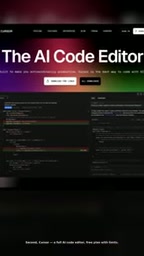
Cursor takes a different path: it is itself a complete AI code editor. The video describes it as "a full AI code editor" and offers a limited free plan. This means AI isn't an add-on but a foundational capability of the editor—code generation, conversational modifications, and context understanding all happen within a single interface.
The trade-offs of this form are obvious. The upside is that AI can access fuller project context, making interactions more coherent; the downside is that you need to migrate to a new editor and readjust to different shortcuts and interface layouts. For developers willing to pay a one-time migration cost for efficiency, Cursor's ceiling is higher.
AI-native editors differ from ordinary editors with AI plugins at the architectural level. Plugin-based solutions (like Copilot) access the current file content and cursor position through the extension API provided by the IDE, and the context they can obtain is usually limited to open files or a limited index range. AI-native editors, by contrast, treat the language model as a first-class citizen from the ground up—they can build a code index of the entire project, track cross-file symbol references, and carry multi-turn modification intent within a conversation. This gives them a coherence that plugins struggle to match on tasks like refactoring, cross-file renaming, and generating new modules from natural-language descriptions. The cost is that such editors are often built on open-source cores like VS Code, requiring extra maintenance for version tracking and plugin compatibility.
Winsurf: Lowering the barrier to entry with a daily quota
The third tool, Winsurf, is also an AI editor, but its free strategy is different—the video mentions it offers a "free daily quota." Compared with Cursor's "free plan with limitations," a quota that resets daily is better suited to high-frequency but lightweight usage: writing a few code snippets and doing a few small refactors each day is well within the quota.
The free strategies of the three tools actually reveal their respective user strategies: Copilot uses completion counts to capture light users, Cursor uses feature limits to drive paid conversion, and Winsurf uses a daily quota to build usage habits. When choosing, it's worth looking first at your own usage frequency and willingness to pay, rather than just comparing feature lists.
How to choose among the three: by scenario, not by reputation
The video author's core advice is to "stop wasting time researching which AI tool to use" and instead use a comparison table to choose directly by task type. This approach is worth adopting, because the differences among the three tools are essentially differences in scenarios:
- Don't want to switch editors and just want to try completion: Choose Copilot. 2,000 completions per month is enough to validate the value.
- Willing to migrate and want a complete AI workflow: Choose Cursor. The context capabilities of an AI-native editor are more complete.
- Irregular usage frequency and want to start at zero cost: Choose Winsurf. The daily quota resets each day, so nothing is wasted if you don't use it.

The onboarding cost is also lower than you might think. The video puts it plainly: search for the tool name, open the official website, register an account—done. The real barrier isn't installation, but whether you're willing to change the old habit of "think it through first, then type code" and accept the new rhythm of "writing while letting AI complete."
The real value and limits of these tools
"Code that writes itself" sounds like magic, but the actual experience is closer to "efficient pair programming." The quality of AI completion depends heavily on context—codebases with clear project structure, consistent naming, and thorough comments see noticeably higher completion accuracy; conversely, messy code makes suggestions unreliable.
Another easily overlooked point is the review cost. As generation speed increases, the proportion of time developers spend reading and verifying AI-generated code rises. The tool types on the keyboard for you, but it doesn't take responsibility for correctness. Treating these three tools as accelerators rather than replacements is the right mindset.

The video ends by mentioning a subscription to Future Files for more AI tool content. The value of such information streams lies in quickly building a map of tools, but the specific choice still needs to be judged in light of your own tech stack and usage habits. All three tools offer free entry points, and the cost of a round of hands-on testing is far lower than the time spent repeatedly watching reviews.
Context windows are the technical lever for understanding differences in completion quality. A language model can only process a limited number of tokens at a time, and the tool must decide which code snippets to feed into the model: only the current file, or also relevant imports and type definitions, or the most similar snippets retrieved from the entire codebase. When project structure is clear, the retrieved context is highly relevant to the current task, and suggestion accuracy is naturally higher; when code is messy and naming is arbitrary, retrieval results are noisy, and the model easily produces completions that look plausible but are actually wrong. This also explains why the same tool can deliver very different experiences across different codebases—the tool is the same, but the quality of the context fed to the model differs.
One-line Summary
A comparison of the form differences and selection logic of three AI programming tools: Copilot, Cursor, and Winsurf.
Paragraph Summary
Based on a breakdown by Future Files, the article compares the product forms of three mainstream AI programming tools: GitHub Copilot is a completion plugin embedded in existing editors, offering 2,000 free completions per month, with the lowest migration cost but capabilities limited to completion; Cursor is an AI-native editor offering a limited free plan, with more complete context understanding but requiring a workflow migration; Winsurf is also an AI editor, adopting a free daily quota suited to users with irregular usage frequency. The author emphasizes choosing by usage frequency and willingness to pay rather than feature lists, and notes that AI completion quality depends on code context quality—as generation speed rises, the share of review cost increases, so tools should be treated as accelerators rather than replacements.
Related articles

Java4Shell Vulnerability Analysis: Has Java's Memory Safety Myth Been Shattered?
Computerphile breaks down the Java4Shell vulnerability: OpenJDK's native Base64 decoder mishandles AVX-512 mask calculation, causing out-of-bounds writes and RCE. Covers root cause, Base64 padding mechanics, AI-assisted discovery debate, and fixes.

Controversial US Surveillance Law Section 702 Nears Expiration: Congress Races to Renew
FISA Section 702 surveillance authority is nearing expiration. Congress is urgently pushing reauthorization, possibly attaching it to the NDAA. This article analyzes the controversies, legislative strategy, and future outlook.

iFood Manages 15,000 Repositories with Coding Agents: An Architectural Lesson at 4 Cents per Run
How iFood scaled coding agents to 15,000 repositories with its Remote Agents Platform: REST API-driven, GPT-5.6 Luna selection, structured output acceptance, $0.04 per run, security fixes doubled.