4 Habits That Are Stealing Your Claude Code Quota (With a Diagnostic Prompt)

Four unintentional habits multiply Claude Code quota consumption—with a self-check prompt included.
Fast Claude Code quota drain often stems from usage patterns, not question count. Since every request sends full conversation history, accumulated context gets re-billed each time. Four habits—vague requirements, pasted verbose logs, careless sub-agents, and all-day sessions—drive up consumption, each with a concrete fix, plus a prompt that scans seven days of logs to find your top three.
Claude Code's usage limits often catch people off guard. You might feel like you haven't sent many messages, yet your quota is dropping fast. The problem usually isn't how much you use—it's how you use it. A few inconspicuous habits cause every request to carry a large amount of redundant content, multiplying your consumption.
A creator on YouTube summarized the four habits that burn through quota the fastest, along with a prompt that automatically identifies your personal "energy hogs." The key to understanding this logic lies in Claude Code's billing mechanism: every request sends the entire conversation history along with it, so anything that accumulates in the conversation gets re-billed in every subsequent message.

Habit 1: Vague Requirements
"Help me improve this codebase" is the quintessential quota-burning phrase. This kind of instruction triggers a broad code scan—the model needs to read a large number of files just to figure out where to start.
The more quota-efficient approach is to narrow the scope to specific functions and specific files. Naming "optimize the parseConfig function in config.ts" dramatically reduces the amount of content the model reads. This isn't about making the model dumber—it's about preventing it from rummaging through your entire project just to locate the problem. The more precise the scope, the more controllable the consumption.
Before responding, Claude Code goes through an "exploration" phase: it first needs to locate relevant code using tools like Glob, Grep, and Read before it can start making changes. Vague instructions are expensive because the model can't determine a termination condition for exploration—it can only repeatedly read files to build an overall understanding of the codebase, and all the returned content from these tool calls enters the context and gets re-billed in every subsequent message. Naming specific files essentially gives the exploration a boundary, downgrading "full-repo search" to "targeted reads."
Habit 2: Pasting Verbose Test or Build Output Directly
Dumping dozens of pages of test logs or build output is another easily overlooked consumption point. According to Anthropic's documentation, you can use a hook to keep only the error lines from logs, compressing the input from tens of thousands of tokens down to the hundreds.

The value of this approach isn't just saving money. Streamlined logs make it easier for the model to focus on the real problem, reducing the chance of it "getting lost" in a sea of irrelevant output. For scenarios that require repeated debugging, using a hook as a pre-filter is practically mandatory.
A Hook is a mechanism Claude Code provides for automatically executing scripts before and after tool calls—think of it as an "interception layer" around model requests. In logging scenarios, a common approach is to configure a PostToolUse hook that runs a filtering script after test or build commands finish (for example, grepping to keep only lines starting with ERROR or FAIL, or using tail -n 50 to truncate), then feeds the processed result into the context. Since hooks execute locally and don't go through the model, the filtering itself produces no token consumption—yet it determines how much content the model ultimately "sees." This is also why it's more reliable than asking the model to ignore irrelevant output after the fact.
Habit 3: Casually Spawning Sub-Agents
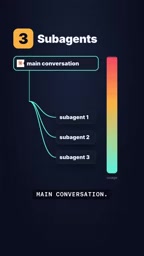
Sub-agents sound like a powerful feature, but each sub-agent independently initiates its own requests outside the main conversation. In other words, every sub-agent you spawn stacks new usage on top of the main session's consumption.
This doesn't mean you should avoid sub-agents entirely—it means using them deliberately. Setting clear, convergent task boundaries for sub-agents is far more economical than letting them explore freely. Asking yourself "does this task really need a standalone agent?" before launching one often saves a considerable amount of quota.
The independent request mechanism of sub-agents deserves further explanation: the main agent can spawn sub-agents while planning tasks, and each sub-agent has its own context window and independent billing chain. The files it reads, the tools it calls, and the intermediate results it produces during execution do not share the already-billed content of the main session. This means sub-agent consumption is fully incremental, rather than "carved out" of the main session's context. Therefore, sub-agents are better suited for tasks with clear boundaries that can be independently closed out, and where the main agent doesn't need to be aware of the full reasoning process. If a task only requires one or two tool calls, completing it directly in the main session is usually more economical.
Habit 4: Keeping One Session Open All Day
This is the most insidious habit. Even if you're just asking an unrelated question in a session that's been open all day, that request still carries the entire conversation history and gets billed for it.
The fix is straightforward: when switching to an unrelated topic, use a slash command to start a new session. Break long sessions up by task instead of letting them accumulate indefinitely. The longer the conversation history, the higher the "base cost" of each individual message—this is the root cause that many people overlook when their usage suddenly spikes.
One Prompt to Find Your Personal Top Three
Knowing the general habits isn't enough—everyone's usage patterns differ. The prompt shown in the video scans your session logs from the last seven days, identifies the three habits consuming the most, and generates a rule for each one—only writing them to claude.md or agents.md after you confirm.

What's commendable about this design is the "ask before changing" approach—it won't touch your config files without permission. The complete prompt appears on screen in the video; pause to copy it.
Why These Habits Are Worth Correcting
What all four habits have in common is that none of them directly increase your "number of questions"—yet by inflating the context size of individual requests, they indirectly drive up consumption. Claude Code's entire-conversation billing mechanism means that context management itself is a form of cost control.
Rather than passively waiting after your quota runs out, it's better to codify these rules into your configuration so every interaction is more precise. For heavy users, the quota savings from these habit adjustments often deliver more immediate results than switching to a cheaper plan.
One-line Summary
Four unintentional usage habits multiply your Claude Code quota consumption—with a self-check prompt included.
Paragraph Summary
The article points out that the root cause of fast Claude Code quota consumption often isn't the number of questions, but how you use it. Since every request sends the full conversation history, anything accumulated in context gets re-billed in subsequent messages. The author summarizes four quota-burning habits: vague requirements triggering broad code scans; pasting verbose test or build logs directly; casually spawning sub-agents that stack independent requests; and keeping one session open all day so even unrelated questions are billed against the entire history. For each, countermeasures are given: narrowing scope, using hooks to filter logs, setting sub-agent boundaries, and starting new sessions when switching topics—plus a prompt that scans the last seven days of logs to identify your personal top three energy-draining habits and generate corrective rules.
Related articles
Agents vs. Workflows: Core Concepts of LangGraph Workflow Orchestration
Based on Bilibili creator Lao Xiao's LangGraph tutorial, this article explains the essential differences between workflows and agents: who owns orchestration, how to choose for complex business, the three core components of StateGraph, and the build process, helping developers choose the right architecture.

LangGraph Workflows and Agents: A New Approach to Enterprise AI Orchestration
What is the core difference between LangGraph workflows and agents? This article explains the three elements of the state graph (state, nodes, edges), explores how workflows orchestrate complex AI business, and discusses coordination strategies in LangChain 1.0 enterprise applications.

Claude Code Token-Saving Guide: Say Goodbye to Weekly Limit Anxiety
Claude Code weekly limit running low? Learn to use /usage to pinpoint consumption, /clear between tasks, lower /effort, skip 7x agent teams, and Graphify code maps to cut tokens up to 70x.