5 Hands-On AI Projects to Build a Job-Ready AI Engineer Portfolio

Five free AI engineering projects to build a standout portfolio, emphasizing deep testing and honest documentation.
The article tackles the homogeneity of AI engineering portfolios by proposing five free projects that showcase real engineering thinking: a systematically evaluated RAG system, a local small-model benchmark comparison, an MCP server, careful fine-tuning, and a cost & latency dashboard. Each emphasizes proper testing, documenting attempts, noting hardware/software versions, and honestly stating shortcomings. Two or three deep projects beat five shallow ones, and hiring managers value portfolios that show decision-making and handling of constraints.
Why Does Your AI Project Portfolio Keep Getting Ignored?
If you're trying to break into AI engineering, you may have noticed something: the projects listed on countless resumes look strikingly similar—a chatbot, a RAG-based PDF Q&A tool, a thin API wrapper course project. According to analysis from a YouTube channel, hiring managers have seen the same patterns over and over, and these projects tend to blend into the background rather than stand out.
What truly sets you apart isn't how complex your project is, but that each project pushes you to make the right decisions, hit real constraints, and actually fix them—just like in real work. But to be clear: these are solid learning projects, not a guaranteed-hire formula. Their value lies in proper testing, documenting your attempts, noting hardware and software versions, and being honest about each project's shortcomings. That habit alone puts you ahead of most portfolios.
Below are five projects, each targeting a key competency in AI engineering, and all completely free.
Project 1: A RAG System—Testing Matters More Than the Demo
Retrieval-Augmented Generation (RAG) is everywhere, so this isn't some hidden gem. But what separates a solid RAG project from a copy-pasted tutorial comes down to one habit: testing it the same way every time, rather than just showing a few good answers.
Pick a real document set—company help articles, legal archives, or open-source project docs. Build a simple pipeline: chunk, embed, retrieve relevant snippets, and have the model generate answers based only on the retrieved context. But that alone won't impress anyone. Here's the crucial next step: write about 50 questions based on the documents with known correct answers to form a fixed test set. Note that a 50-question sample is still small; if time allows, group by difficulty or expand the set so a single lucky or unlucky answer doesn't swing the score dramatically.
Run the baseline pipeline and see how it scores. Then change one variable at a time: replace fixed chunking with semantic chunking; add keyword search alongside vector search (embeddings are great at understanding semantics but often miss product codes or legal clauses that require exact matching); add a reranking step so the best snippets float to the top before reaching the model.
Understand that RAG system accuracy isn't a single number. Did retrieval pull the right documents? Did reranking put the best snippet first? Is the final answer correct? Is the answer grounded in the retrieved content? Did the model confidently make something up? These are related but distinct metrics and should be tracked separately. The tool Ragas is commonly used to automatically score faithfulness and relevance, but it's not an official industry standard, and scores vary with the judging model. Treat it as a useful signal and spot-check some answers yourself.
Go further: wire the test set into a script that runs automatically on every code push and fails the build if scores fall below a threshold. This gives you a glimpse into how production teams work, which is rarely seen in portfolio projects. Useful tools include Chroma (for storing embeddings), sentence-transformers or Cohere's reranker, and Ragas as an evaluation starting point—all free.
Project 2: Local Small-Model Comparison—Real Benchmarks, Not Vibes
Start with a question: when hosted APIs from OpenAI and Anthropic are within reach, why would anyone run small models on their own laptop? Many companies can't send certain data to external systems—medical records, financial data, legal documents, internal code—plus data residency rules, making external APIs simply infeasible. Latency and predictable costs matter too. Most junior candidates never seriously consider these constraints, and showing that you can is valuable in itself.
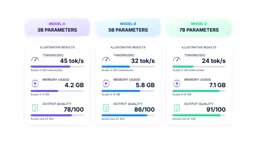
First step: install Ollama or LM Studio—an easy way to run open-source models locally on Windows, macOS, or Linux. Choose a relatively small model, say around 3.2B to 7B parameters, and build a basic interface around it. But be careful: this range is not a strict definition of "small." How much memory a model needs depends heavily on quantization level, context window length, and runtime settings. Be specific when writing up the project: note the exact model version, quantization format, context window, hardware, and batch size. That detail makes the benchmark credible rather than just a claim.
The real project is the comparison. Choose two or three models in that range, run the same questions on the same hardware. Measure tokens per second, memory usage, and then judge output quality on the same 30 test prompts. Write it up with a comparison table. Choosing the right model for given constraints is a decision every AI team faces regularly, and doing it with real numbers rather than gut feeling is exactly the kind of thinking that stands out.
Go further: enforce structured output. Have the model return valid JSON every time, validate it with Pydantic, and build a retry step for unclean returns. The "constrain-validate-retry" pattern appears frequently in real systems but is rarely seen in student portfolios.
Quantization is the process of converting model weights from high-precision floating point (e.g., FP16) to lower-precision formats (e.g., INT8, INT4), which significantly reduces a model's memory footprint and storage requirements, typically trading a slight quality loss for faster inference and lower hardware barriers. Common quantization methods include GPTQ, AWQ, and the GGUF format, with different quantization levels (such as Q4_K_M, Q5_K_M) offering different trade-offs between precision and efficiency. When running small models locally, the quantization level directly affects required VRAM, tokens per second, and output quality, so benchmark reports must clearly record the quantization format and level—otherwise results from different environments can't be compared. Context window length also affects memory allocation, because the key-value cache (KV Cache) grows linearly with sequence length, consuming additional VRAM.
Project 3: Build an MCP Server for a Tool You Actually Use
This project is underrated mainly because people use this kind of tool every day but have never built one. Model Context Protocol (MCP) is a standard that lets AI models call specific tools to interact with external systems—like querying a database or accessing logged-in apps such as GitHub or Notion. Note: it's not impossible to answer these questions without MCP; you could write scripts or use GitHub's own API. What MCP provides is a standardized, model-callable way to expose these tools, letting the AI decide when and how to use them, rather than you hardcoding each workflow.
Choose something you actually use. For example, if you have 15 repositories and want to ask in natural language, "how many open issues are there across all my repos?" Build an MCP server that gives the model these specific tools: list repos, fetch issues, maybe post a comment. Start read-only. Any operation that could change or delete data should come after an explicit confirmation step, in line with general MCP security guidelines—validate inputs, control access, rate-limit, sanitize outputs, log activity.
Once the basics work, test it seriously. Draft about 50 real requests and track how often the model picks the right tool, how often it picks the wrong one, and how often calls fail entirely. If you want to go deeper, check parameter correctness, how authentication and communication failures are handled, resistance to prompt injection hidden in retrieved data, and whether information leaks across users or repositories. Then write down what you found and how you fixed it. This project tells hiring managers you genuinely understand the layer beneath the chat interface, not just how to write good prompts.

Prompt injection is an attack on LLM applications: an attacker hides malicious instructions in text the model will read (such as user input, retrieved documents, or data returned by tools), inducing the model to deviate from its original task and perform unintended actions—for example, leaking sensitive information or calling dangerous tools. In MCP server scenarios, the risk is especially acute because the model can proactively call tools to access external systems. Defenses include sanitizing and escaping tool-returned content, restricting tool permissions (such as read-only), requiring user confirmation before sensitive operations, and structurally validating model output. When testing, deliberately craft documents or user inputs containing hidden instructions, observe whether the model executes them, and document your fixes.
Project 4: Careful Fine-Tuning—Only Where It's Worth It
Be honest: fine-tuning mainly changes a model's behavior on a specific narrow task. It can encode new information, but it's usually not the best choice for frequently changing or sensitive knowledge—retrieval or databases are generally better suited. It won't make a model smarter in a general sense. Careless work can make it worse by overfitting or causing the model to forget things it was previously good at.
So before touching a training script, prove the gap exists. Pick a narrow task, like extracting structured fields from messy text, or improving the model's reliability at selecting the right tool and filling in the right parameters. Test the base model with the best prompts and carefully document its shortcomings. Then assemble a clean training set. How many examples you need depends on the task: a narrow task might show real improvement with a few hundred good examples, while a broader task could need thousands or more. There's no single magic number, so focus on label quality and consistency first.
Use LoRA or QLoRA for the actual fine-tuning. Both update only a small set of additional parameters rather than the whole model, significantly lowering memory and storage requirements compared to full fine-tuning. But be careful with hardware claims: LoRA or QLoRA can make fine-tuning a suitably sized model on a single consumer GPU realistic, but this depends on model size, quantization, sequence length, batch size, and available VRAM. Smaller models may fine-tune comfortably on a typical GPU, while larger models may need more memory or slower GPU-offloading setups.
Evaluate on a held-out test set with concrete metrics—exact match or field-level accuracy for extraction tasks, JSON validity rate, or accuracy at choosing the right tool and parameters. Show before-and-after side by side. A comparison with real numbers is one of the clearest signals of engineering maturity.
Go further: you can add a small preference-tuning stage using DPO (Direct Preference Optimization), showing the model pairs of responses and teaching it which one is preferred. Current tooling includes Hugging Face libraries that support combining DPO with LoRA. This isn't required, but it shows awareness of techniques actively used in the field today.
LoRA (Low-Rank Adaptation) fine-tunes a model by injecting small low-rank matrices alongside the original model weights, updating only these added parameters during training, which drastically reduces trainable parameter count and memory requirements. QLoRA builds on LoRA by further quantizing the base model to 4-bit, making it possible to fine-tune larger models on a single consumer GPU while maintaining performance close to full fine-tuning. Key parameters include rank, alpha, target modules, and dropout, which affect fine-tuning effectiveness and resource consumption. DPO (Direct Preference Optimization) is an alignment method that uses paired preference data (a chosen response and a rejected response) to optimize the model directly, without training a reward model—simpler and more stable than traditional RLHF. Combining DPO with LoRA enables preference tuning under limited resources.
Project 5: Cost and Latency Dashboard—Almost Nobody Builds It, But It's the Most Convincing
This is the project almost nobody builds, yet it often best demonstrates how you think. Take any of the four projects above and add a monitoring layer on top. Start by understanding the mindset shift: building the system is only part of the job; the rest is knowing whether it's working, why it broke, and how fast you can find out.
Instrument every request that goes through the pipeline, so for any single query you can see what was retrieved, what prompt was sent, what was executed, and how many tokens were used. Track this properly over time. Measure latency using percentiles like P50, P90, and P95, not just averages—averages hide the worst moments. If possible, break it down further into retrieval time versus generation time plus time to first token, since these point to different bottlenecks. Also track error and timeout rates along with token counts.
On cost, be careful with your framing. For hosted APIs from OpenAI or Anthropic, you can calculate real costs fairly precisely from token counts based on the provider's current pricing; but for locally run models, there's no clean per-request dollar figure, so estimate electricity and hardware costs and clearly label them as estimates rather than exact values.
The goal is simple: if someone asks "what went wrong last Tuesday," you should be able to pull up the dashboard, point to the exact moment things started degrading, and explain why. That's a very different story from just saying "the demo works," and it's the kind of project that sparks genuinely interesting follow-up questions in interviews—because it shows you're thinking about the whole system, not just the model in the middle.
Percentile latency (such as P50, P90, P95) is a statistical measure of a system's response-time distribution. P50 (the median) means 50% of requests have latency below that value; P90 means 90% of requests are below it, and so on. Compared to averages, percentiles better reveal long-tail latency—the impact of a few very slow requests on user experience. In AI systems, retrieval and generation stages can have different latency distributions, so breaking down measurements (retrieval time, generation time, time to first token) helps locate bottlenecks. Time to first token is a key metric in streaming generation scenarios, directly affecting perceived responsiveness. Tracking error and timeout rates is equally important; together with latency, they form a complete picture of system reliability.
Conclusion: Depth Over Quantity
The five projects are: a RAG system tested against a real fixed evaluation set; a local model comparison with real benchmarks and clear hardware details; an MCP server tested against real tool-use scenarios; a fine-tuning project with properly demonstrated gaps and honest hardware expectations; and a cost and latency dashboard layered on top of any one of them.
You don't need to do all five. Two or three projects built with real depth, honestly tested, and clearly documented make a stronger impression than five shallow ones. What matters most isn't whether the project runs perfectly, but whether you can explain why you made those choices, what actually broke along the way, and what your numbers really mean. Build real things, test them properly, and be honest about what you find. If you go deep on any one of these, your portfolio will shine brighter than the rest.
According to the YouTube channel's perspective, these projects work because they simulate real-world decisions and constraints, rather than being complex for complexity's sake. Analysis from multiple independent sources also notes that hiring managers value portfolios demonstrating the engineering thought process over superficially polished demos.
One-line Summary
Five free AI engineering projects to help you build a standout portfolio, emphasizing deep testing and honest documentation.
Paragraph Summary
The article addresses the homogenization of AI engineering job-seeker portfolios by proposing five free projects that demonstrate real engineering thinking: a systematically evaluated RAG system, a local small-model comparison benchmark, an MCP server build, careful fine-tuning, and a cost and latency dashboard. Each project emphasizes proper testing, documenting attempts, noting hardware and software versions, and honestly stating shortcomings. The article notes that two or three deeply built projects are more persuasive than five shallow ones, and that hiring managers value portfolios showing decision-making processes and handling of constraints.
Related articles

Anthropic's IPO Crisis: Why $16.8B in Revenue Can't Buy a High Valuation
Anthropic posted $16.8B in Q3 revenue with 85% gross margin yet faces a cut to its IPO valuation. A deep dive into halved growth, the token price war, circular financing, and the clash between safety ideals and capital reality.

Anthropic Races Toward the Largest IPO in History: Can a $100 Billion Raise Ignite the AI Investment Boom?
Anthropic may file its prospectus as early as October 23, aiming to raise up to $100 billion at a valuation of up to $2 trillion, potentially the largest IPO ever. Q3 revenue hit $16.8 billion, up nearly 50% quarter over quarter, with adjusted profitability, but slowing growth has led some investors to cut valuation to $1.5 trillion. The IPO is a key test of whether the AI investment boom can continue.

Bessemer Partner on Anthropic IPO: The Public's First Direct Investment in AI Software
Bessemer partner Byron Theta on the Anthropic IPO: why it's called the moment everyone's been waiting for, the $650M four-round investment, the LP liquidity bind, and expectations of a 2027 IPO wave—plus open-source model pricing pressure, existential risk disclosures, and what the founders' 50.1% voting structure means for ordinary investors.