A Practical Guide to GPT-6: How to Get AI to Actually Deliver Results — Without Breaking the Bank

Five steps to make GPT-6 actually deliver results in real engineering tasks while controlling costs.
Based on OpenAI's official GPT-6 series guide, this article uses a broken webpage button as a running example to break down five key steps for getting AI Agents to reliably complete engineering tasks. The core framework: choose the right model (Luna, GPT-6.iso, or Astra) and tune reasoning effort; clearly define symptoms, scope, and acceptance criteria while setting decision boundaries for autonomous vs. human-confirmed actions; use prompt caching to cut redundant API processing costs; and leverage async tools to keep work moving during wait times. Success is measured by completion rate, time, and cost per task.
Starting with a Broken Button
OpenAI recently published a practical guide for the GPT-6 series, centered on one core question: now that you have access to GPT-6, how do you actually get it to finish the job — while keeping time and cost under control? Bilibili creator Ali used a concrete scenario to break this down: getting AI to fix a webpage button that does nothing when clicked. This deceptively simple task turns out to be a perfect thread to pull on, connecting model selection, task definition, and cost control into one cohesive workflow.
Rather than discussing large model capabilities in the abstract, let's look at what actually moves the needle in real engineering tasks — turning AI from "sounds impressive" to "actually ships results." Here's a walkthrough of the five key steps from the guide.
Step 1: Match the Right Model to the Task
The GPT-6 series isn't a single model — it's a family of members with different roles. Luna is suited for focused, repetitive work like extracting fields from invoices or classifying requests — structured tasks with clear targets. GPT-6.iso handles complex programming, research, and computer-use tasks. Astra takes on the most demanding reasoning challenges.
Before choosing a model, clarify what the task actually requires: is it purely about organizing information, or does it involve investigating a root cause, modifying code, and then verifying the fix? Fixing a button is clearly not simple information retrieval — it's a full loop of reproduction, diagnosis, repair, and validation.
Beyond model choice, there's another parameter worth tuning: reasoning effort. Think of it as how much "thinking budget" you're allowing the model to spend on this task. Rewriting a line of copy rarely needs deep analysis, but a button that fails intermittently and touches multiple modules might justify cranking the reasoning effort up. After adjusting, check whether the output actually improves — then decide whether the added time and cost is worth it. This is a tradeoff that needs real-world testing, not a setting where higher is always better.
Reasoning Effort is a relatively new control dimension in large language models. At its core, it lets developers or users decide how many "internal thinking steps" the model takes before producing a response. Models like OpenAI's o-series perform chain-of-thought reasoning before their final output — the higher the reasoning effort, the more intermediate steps the model explores, typically yielding better answers at the cost of higher latency and token consumption. At the API level, this is usually exposed as the reasoning_effort field, with settings like low, medium, and high. For highly structured tasks with deterministic answers, low effort is usually sufficient. For multi-step debugging, causal inference, or cross-module impact analysis, higher effort tends to pay off. Note that reasoning tokens are typically not billed as output tokens, but they do incur compute costs — so weigh this against your quality requirements and budget.
Step 2: Define What "Done" Actually Means
"Fix the button for me" leaves far too much unsaid: which page? How do you reproduce it? Does the task end when the code is changed, or when you've opened the browser and confirmed it works?
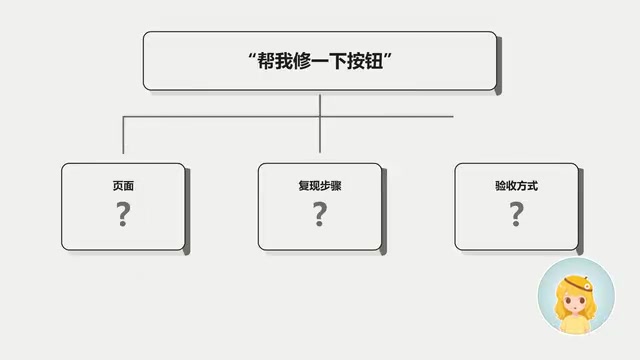
A better instruction looks like this: "The submit button on the checkout page does nothing when clicked. Please reproduce the issue, identify the root cause, fix the code, then verify using the original steps to trigger it — and tell me what you changed, what you confirmed, and what you didn't check." This single instruction provides the symptom, scope of work, and acceptance criteria all at once. The model now knows the task isn't done until verification is complete.
That said, the guide notes a practical shift: most Agent harnesses now have acceptance flows built in by default. In many cases, you just need to describe the problem clearly — you don't have to hand-write acceptance criteria every time.
Define the Decision Boundary
Next, establish what the model is allowed to do on its own. For example: reading files, modifying local code, and running relevant tests can all proceed autonomously — but deploying to production or modifying production data requires human confirmation. This way the model keeps moving through routine steps and only pauses at critical decision points.
Long-lived rules like these can be stored in a project description for repeated use, and recurring workflows can be organized into "skills."
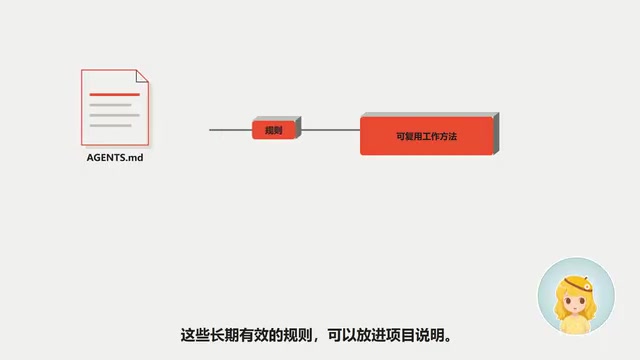
But the more skills and documentation you add, the more context they consume. The official recommendation is to be precise about when each piece applies and load details on demand: read migration specs only when modifying database schema; read deployment docs only when preparing to deploy. There's no need for the model to read through an entire project upfront. Rules exist to help the model find relevant information and make good judgment calls for the current task — not to pile on everything at once.
Step 3: Use Prompt Caching to Eliminate Redundant Processing
If you're building an application on the API, each request likely carries the same project specs, reference documents, and tool definitions. Since this content appears repeatedly, it's a prime candidate for prompt caching.
Caching reuses the model's already-processed output for identical prompt prefixes. The pattern is simple: put stable content first, and variable content — like "which button to fix this time" — at the end. Subsequent requests that hit the cache skip reprocessing that fixed portion, reducing costs.
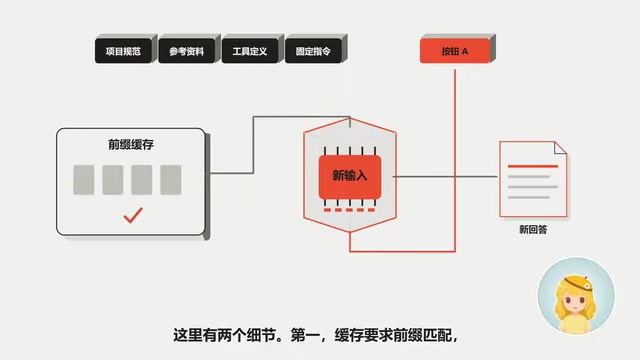
Two important details: first, caching requires exact prefix matching — any change to earlier content breaks the cache for everything that follows. Second, caching only saves on the processing cost of the matching portion; the model still has to handle new content and generate a new response. How much you actually save depends on your real usage patterns — there's no universal answer.
Prompt Caching is a mechanism offered by OpenAI and other model providers to speed up inference and reduce costs. When the prompt prefix in an API request exactly matches a previous request, the server can reuse the already-computed KV Cache (key-value cache), skipping re-encoding of those tokens — which shortens time-to-first-token and lowers billing costs. OpenAI typically charges a discounted rate for cache-hit input tokens. This mechanism is especially valuable when: system prompts are long and static, each request includes large reference documents, or tool definitions (Function Calling Schema) remain unchanged. The key caveat: cache hits depend on strict prefix matching — changing even a single character in the system prompt invalidates the cache for everything that follows. Designing your prompt structure thoughtfully — placing the most stable content first, variable user instructions last — is the essential engineering practice for maximizing cache utilization.
Step 4: Keep Work Moving During Wait Times
Suppose a set of tests takes a few minutes to run after a fix. By integrating async tools via the API, the application can run tests in the background while the model continues making progress on independent work — for example, summarizing the code changes already made and explaining the root cause, then appending the verification results once the tests finish.
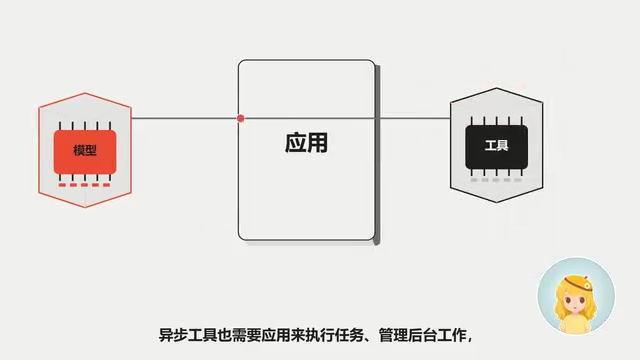
The key is understanding dependencies: summarizing changes doesn't require test results, but declaring the fix successful absolutely does. Async tools still require the application layer to execute tasks, manage background work, and route results back to the model. Only when developers wire up this layer correctly can the model actually use the waiting time productively — rather than sitting idle.
Async Tool Use is an important pattern in AI Agent architectures for improving throughput efficiency. In synchronous mode, the model must wait for each external tool call (e.g., running tests, querying a database) to return before continuing. In async mode, the application layer can submit time-consuming operations to run in the background while the model continues processing subtasks that don't depend on those results. This requires developers to implement task queues, state management, and callback mechanisms at the application layer — typically using message queues like Redis or Celery, or webhooks for coordination. From an architectural perspective, the model itself has no awareness of asynchrony — it simply receives tool results at some point in time. All the concurrency scheduling logic lives in the orchestration layer. For scenarios like button fixes that require running a test suite, well-designed async execution can compress total task completion time from "the sum of all serial waits" to roughly "the duration of the longest single step" — with significant implications for both cost and user experience in large-scale Agent applications.
How to Tell If This Workflow Is Actually Working
The method isn't complicated: pick a representative batch of real tasks, and track three things — how many were completed successfully, how long each took, and what each successful completion cost.
Back to the button: when handing off results, you should be able to see the fixed behavior along with the evidence behind it — which cases were verified, and which weren't yet covered. That information is what lets you judge whether the result is acceptable.
The guide offers one practical habit to build: before assigning any task, write down three sentences:
- What result do I need?
- What actions can you take on your own?
- What evidence do I need to see before this counts as done?
With those three sentences in place, you have a testable target for every adjustment — whether that's the model, reasoning effort, or tool setup. This may be the most straightforward and most important methodology in the entire guide: define your goal and acceptance criteria first, then optimize.
Related articles

Microsoft Fabric Database Agent in Action: From Reactive Firefighting to Intelligent Detective
A deep dive into the Microsoft Fabric Database Agent: how to enable it, supported monitoring scenarios, a blocking-issue demo, and the roadmap from reactive to autonomous operations.

Zendesk Uses ChatGPT Enterprise to Build a Sales Agent with 1,000 Daily Active Users
Zendesk opened ChatGPT Enterprise to all employees, who built about 600 apps themselves, including a sales expansion agent with about 1,000 daily active users. This article analyzes how it turns internal data into sales opportunities and its "don't wait" implementation strategy.

Google Releases Gemini 4 Carbon: Its Strongest Model Yet, Debuting with a Cybersecurity Focus
Google releases Gemini 4 Carbon, calling it its strongest model, with a cybersecurity focus. It tops the third-party composite ranking at 59 points but leads by only one or two. This article analyzes its security test results, staged rollout, token pricing, and the divergence between self-reported and third-party tests on hallucinations.