After Claude Design Shut Down, We Rebuilt an Interactive Design Space by Hand

After Claude Design shut down, a creator used a Claude conversation to directly generate a clickable interactive design demo, validating a simulation-first workflow.
After Claude Design shut down, a YouTube creator didn't wait for an official replacement but had Claude rebuild a clickable, interactive design space demo in a conversation. The process was synchronous and observable: the user gave natural language instructions, the model generated a complete demo, and the user immediately tested interactions—asking to enlarge the title, and the interface responded in real time. The article distills an emerging simulation-first workflow that compresses design feedback cycles, empowers non-engineering roles, and makes simulation a standard pre-implementation step—while noting gaps remain around data persistence, edge cases, and performance.
The shutdown of Claude Design caught many designers and developers who relied on it for rapid prototyping off guard. Rather than waiting for an official replacement, a YouTube creator had Claude rebuild a clickable, interactive design space demo directly within a conversation. This transcript reveals a trend worth watching: using AI to generate runnable prototypes is moving from concept to everyday practice.

From "Letting the Model Write Code" to "Letting the Model Build Products"
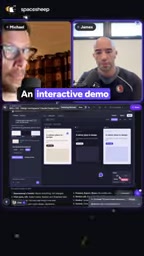
The core action in the video is the user giving Claude a direct instruction: implement an interactive demo of this design space so we can click around and use it. This isn't asking the model to complete a function—it's asking it to produce a complete demo with a UI, interactions, and real-time feedback.
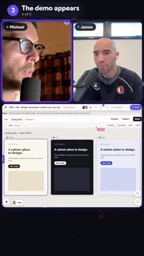
Once Claude gets to work, the user waits for the result in real time. The line in the screenshot—"so claude is now working on that we should get very soon"—shows that the entire generation process is synchronous and observable. Minutes later the demo appears, and the user's first reaction is "wow so it generated as a demo of the actual thing," immediately followed by testing the interaction—asking to make the title bigger, and the interface responds right away.
This cycle of "request—wait for generation—click and try" shifts the focus of AI coding from code correctness toward product perceptibility.
Conversational programming environment refers to a programming interface where natural language dialogue is the primary mode of interaction. Users don't need to switch between an editor and a terminal; instead, they describe requirements, observe model output, and request modifications directly in a chat window. Unlike traditional code completion or snippet generation, these environments have several characteristics: the model can see the full project context, can iterate on the same artifact across multiple consecutive turns, and typically has built-in preview or run capabilities so generated results are immediately visible. Claude's Artifacts, ChatGPT's Canvas, and various AI-native IDEs all fall into this category. The "edit in the conversation, click in the browser" mentioned in the article is a typical manifestation of this environment compressing generation, preview, and validation into a single interface.
Fidelity is a common concept in prototyping, used to measure how closely a prototype approximates the final product. Low-fidelity prototypes are usually just wireframes or static mockups, used to quickly align on information structure; high-fidelity prototypes approach the real interface, including real layouts, real copy, and even real interactions. When the article says "this level of fidelity is already sufficient," it means the clickable demo sits in the mid-to-high fidelity range—it doesn't yet have backend logic or real data, but it's enough for people to judge whether interactions flow smoothly and whether the layout is reasonable. Choosing fidelity is essentially a trade-off between cost and validation effectiveness: too high slows iteration, too low fails to expose real problems.
The "Simulation-First" Workflow in the Design Space
One key line in the video: if we want to build something, we can always create a simulation in the space and see it before actually implementing it. This points to an emerging collaboration model—first build a clickable fake, then decide whether to build the real thing.
In traditional workflows, prototypes either require drawing static mockups in design tools or hand-coding interactions on the front end, both of which are costly. The demo Claude generates is only a simulation, yet it has real interactive capabilities: buttons can be clicked, layouts can be adjusted, copy can be changed. For evaluating design directions and aligning expectations with the team, this level of fidelity is sufficient.
From the screenshot, the generated demo can already display a comparison of multiple options in the interface ("compare all three"), showing that the model isn't just replicating a single page but understanding the structural relationships within the design space.

Interaction Validation: Is the Model's Demo Actually Usable?
After the demo appeared, the user didn't stop at "looks about right" but immediately ran a functional test: asking to increase the title font size, and the interface did indeed change. This detail matters—it distinguishes "an image AI drew" from "a runnable interface AI wrote."
The user's subsequent reaction was "it actually works," with a tone of surprise. That surprise itself shows that at this stage, public expectations for AI-generated interactive prototypes remain low. And when the model can reliably produce clickable demos, designers' validation costs drop significantly: no waiting for development schedules, no setting up environments—just edit in the conversation and click in the browser.
You may not have noticed: throughout the entire process, the user didn't write a single line of code or open any design software. All interaction was done through natural language.
What This Means: The Prototyping Barrier Is Being Leveled
At the end of the video, the creator gives this direction high praise, believing something remarkable could emerge from it. From this transcript, the practical value can be seen on three levels:
First, the feedback cycle for design decisions is compressed. Between an idea and a clickable prototype lies only a single round of conversation.
Second, non-engineering roles gain building capability. Anyone who can clearly describe the interaction logic can have the model turn that logic into something clickable.
Third, simulation becomes a standard step before implementation. Run through it in the space first, confirm there are no issues, then move into formal development, reducing rework.
Claude Design's shutdown took away a tool, but this conversation shows that the capability itself hasn't disappeared—it has simply migrated into more general-purpose conversational programming environments. For teams accustomed to building with AI assistance, the real asset isn't any particular product but the working habit of "having the model build something clickable at any moment."
Of course, there's still a gap between a demo and a product: data persistence, edge case handling, performance optimization—these can't be solved in a single conversation. But as a validation tool during the design phase, this path has already been proven out.
One-line Summary
After Claude Design shut down, a creator used a Claude conversation to directly generate a clickable interactive design demo, validating a new simulation-first workflow.
Paragraph Summary
After Claude Design shut down, a YouTube creator didn't wait for an official replacement but had Claude rebuild a clickable, interactive design space demo directly in a conversation. The entire process was synchronous and observable: the user gave natural language instructions, the model generated a complete demo, and the user immediately tested the interaction—asking to increase the title font size, and the interface responded in real time. From this, the article distills an emerging workflow: simulation-first, i.e., building a clickable fake before formal implementation to validate design directions and team expectations. This model compresses the feedback cycle for design decisions, gives non-engineering roles building capability, and makes simulation a standard step before implementation. The article also notes that a gap remains between demo and product—data persistence, edge case handling, and performance optimization fall outside what a single conversation can cover.
Related articles

Who Will Become the Next 'Face' of the AI Industry? A Vergecast Deep Dive
The Vergecast podcast discusses who will become the next face of the AI industry, ruling out Dario, Altman, Zuckerberg, Musk, Pichai, and Nadella, and arguing Jensen Huang remains the representative for now, though the industry urgently needs a new face from a model or product company.

Nvidia's Circular Financing: The Bubble Concerns Behind Chip-Collateralized Loans
The Vergecast podcast examines Nvidia's circular financing: customers borrow to buy chips, chips serve as collateral, but next-gen chips rapidly devalue that collateral—planting financial risk. Jensen Huang's forceful style masks bubble concerns.

PCMag Pay-to-Play Awards Controversy: The Gray Industry Chain Behind Tech Media Awards
PCMag awarded paint.net's developer a Readers' Choice Award but demanded $10,000 to link to or cite it. This article traces the incident and exposes the gray industry chain and traffic crisis behind pay-to-play tech media awards and paid coverage.