AI Agent in Practice: How WorkBuddy Lets AI Work for You

WorkBuddy uses a WeChat assistant to let your phone remotely direct your local computer to execute tasks, demonstrating a lightweight path to AI Agent adoption.
Based on a hands-on video by a training instructor on Bilibili, this article breaks down WorkBuddy's WeChat assistant feature. The core logic is using WeChat as the task submission entry point: after QR code connection, users can send commands from their phone, and a local computer that stays powered on executes tasks like file lookups, spreadsheet organization, and invoice recognition, then returns results. Setup is simple, with no plugin installation required. Typical scenarios include remote student information queries and invoice recognition; the advantage is that data stays off the cloud with low privacy risk, while limitations include dependence on the computer staying online and success rates affected by the local environment. The article argues that this approach—reusing communication tools and executing locally—provides a low-cost AI Agent solution for individuals and small teams.
AI Agents are moving from concept to real-world application. A hands-on demo by a training instructor on Bilibili shows how WorkBuddy uses its WeChat assistant feature to let AI actually execute tasks on your behalf. Based on that video, this article breaks down the setup process, core capabilities, and real-world use cases.
From Chatting to Doing: The Core Logic of the Assistant Feature
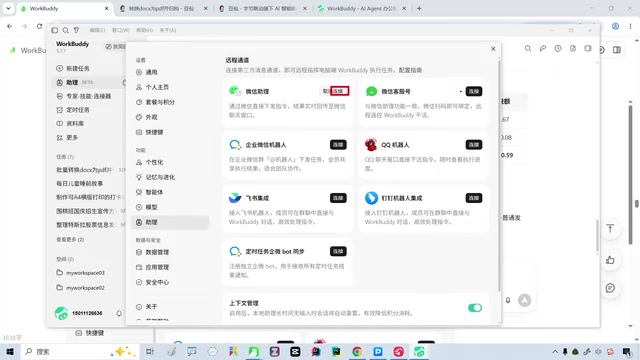
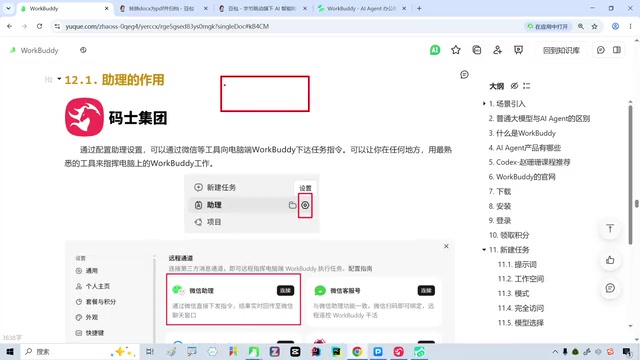
WorkBuddyAd's "Assistant" module is essentially about giving the AI a communication entry point you're already familiar with. In the video, the creator chooses to set up the WeChat assistant. After connecting via QR code scan, users can send tasks directly to WorkBuddy from within WeChat. This means you don't need to open your computer or log into specific software—as long as your phone can send a WeChat message, you can remotely direct AI to operate files on your local computer.
The creator emphasizes that WorkBuddy on the computer must remain powered on and running for tasks to be received and executed. This reveals a key prerequisite: an AI Agent's ability to "do work" is built on the local environment being continuously available, rather than being fully cloud-based.
AI Agent refers to an AI system capable of perceiving its environment, planning autonomously, and executing multi-step tasks to achieve goals—distinct from chatbots that merely respond passively. Its core capabilities typically include task decomposition, tool invocation (such as reading and writing files, calling APIs), and state memory. WorkBuddy's assistant feature is a lightweight implementation of an Agent: users issue goals in natural language, and the Agent breaks down steps, operates files in the local environment, and returns results. Understanding this concept helps grasp the shift described in this article from "chat partner to execution assistant"—what matters isn't how powerful the model is, but whether it can close the loop and actually "take action."
Setup Process: Connect with a Scan
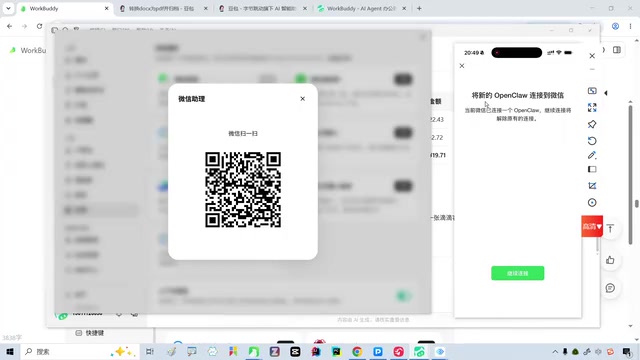
The setup process isn't complicated. In WorkBuddy's assistant settings, select "WeChat Assistant," and the system generates a connection link or QR code. After the user confirms by scanning with WeChat, a channel is established between the phone and the local computer. In the video, the creator demonstrates the entire QR code connection process. Once connected, the WeChat conversation window becomes the task submission entry point.
One detail: the creator had already configured the assistant before, and the interface shows a connected status. For first-time users, simply click the link and follow the prompts to scan and complete the binding. The entire process requires no additional plugin installation, lowering the barrier to entry.
Real Scenarios: Remote Table Lookup and Invoice Recognition
The creator illustrates WorkBuddy's practical value with two scenarios. The first is student follow-up: as a training institution instructor, he frequently needs to record student progress, leave requests, and other information, which accumulates in local spreadsheets. One day he wasn't at work and had no computer at hand, but a parent called to ask about their child's status. He sent an instruction to WorkBuddy via WeChat to find the local document and compile the student information. The computer received the task, executed it automatically, and returned the results.
The second scenario is invoice recognition. The creator once asked WorkBuddy to recognize the content of invoice images, organize the data, and return the results. Based on the demo, the returned organized results were "decent." What these two scenarios share is that the tasks involve local file operations, and the user cannot directly access the computer. WorkBuddy serves as a "remote execution agent."
Capability Boundaries and Prerequisites
From the demo, WorkBuddy's assistant feature supports both text and voice commands. Users can send tasks via WeChat, and the AI executes them on the local computer and returns results. But it's not omnipotent: the computer must be powered on and WorkBuddy running for tasks to be received. Additionally, the creator mentions in the video that specific operations depend on local environment configuration, and success rates may vary across different tasks.
Another detail: the creator used screen mirroring software during the demo to show phone operations, illustrating that the entire interaction chain is "phone issues command—computer executes—results returned." This model suits scenarios requiring access to local sensitive data (such as student information and invoices), because data doesn't need to be uploaded to third-party clouds, reducing privacy risks.
The trade-off between local and cloud execution is key to understanding this type of Agent. Cloud Agents upload tasks and data to servers for processing, offering elastic compute and no dependence on the terminal being online—but sensitive data leaving the device raises compliance and privacy concerns. Local Agents run on the user's own computer, keeping data on-device, which suits handling sensitive content like student information and invoices—at the cost of being limited by local compute, environment configuration, and the requirement to stay online. WorkBuddy's choice of the local route is essentially trading availability for privacy and data sovereignty, which also explains why "the computer must be powered on" is a hard prerequisite.
Implications for AI Agent Adoption
WorkBuddy's case shows that AI Agent adoption doesn't necessarily require complex cloud architecture. By reusing communication tools users are already familiar with (WeChat, WeCom, QQ), it lowers the barrier to entry; by executing locally, it safeguards data privacy; and through task-based interaction, it transforms AI from a "chat partner" into an "execution assistant." This approach is particularly friendly to individual users and small teams—no need to build additional systems to let AI intervene in daily workflows.
Of course, its limitations are obvious: it depends on the local computer being continuously online, and task complexity is constrained by local environment configuration. But for lightweight tasks like "remote lookups, spreadsheet organization, and receipt recognition," WorkBuddy offers a low-cost automation solution.
Related articles

Zero-Cost Local Jarvis: Open-Source Voice Cloning and Task Automation in Practice
AI Workshop shows how to build a zero-cost local Jarvis with Ollama and Voice Studio: local model switching, open-source voice cloning, file retrieval, and tool-calling tests, with setup steps and hardware trade-offs.

Mistral Large 4 Released: 1T-Parameter MoE Tops Western Open-Source Leaderboard
Mistral releases its flagship Mistral Large 4: a 1T-parameter MoE architecture activating only 49B parameters at inference, trained from scratch on 3,800 Grace Blackwell GPUs, topping the Western open-weight leaderboard with third-party endorsements in law, finance, and cybersecurity.

Mistral Large 4 Review: Can Europe's Strongest Open-Source Model Challenge the US and China?
Mistral Large 4 (L-Charm) review: trillion-parameter MoE, standout cybersecurity benchmarks but behind Kimi K3 in software engineering, 3,800 GPUs, a key step for European sovereign AI.