AI Manga Series for Beginners: A Six-Step Production Workflow from Script to Final Cut

A complete AI manga workflow breakdown: how to go from script to finished video efficiently enough to make it profitable.
A Bilibili creator breaks down how to systematize AI manga production for real monetization. The core insight: success hinges not on knowing how, but on working fast and consistently. The six-step workflow begins with scripting — using a three-part prompting formula (assign identity, define task, fix format) and a two-step script strategy (story script first, then storyboard script) to minimize revision costs. Key pitfalls for AI image generation are also covered: always specify duration, and keep visual descriptions objective and literal.
For ordinary people looking to earn money with AI, AI manga series are emerging as a genuinely viable opportunity. A Bilibili creator specializing in AI manga has broken down the complete workflow — from scriptwriting and character design to storyboards, video, voiceover, and editing — using a fully worked example. This article focuses on the first lesson in that series: how to use AI to quickly write a logically coherent story script and storyboard script ready for production.
The Business Logic of AI Manga: Efficiency Determines Profit
The creator shared a real experience: landing an ¥8,000 order for a 10-episode AI manga series, completing it without quitting their day job or assembling a team — just two to three hours each evening after work. But they were honest about the early days: a clip of a few dozen seconds could take two full days — swapping faces on characters, continuity errors in storyboards, uncontrolled character movement, redrawing a single shot more than ten times. When all was said and done, the hourly rate was worse than a part-time gig.
The real turning point came from rebuilding the production workflow. The core insight the creator distilled is blunt: knowing how to do it is just the entry ticket — doing it fast is where the profit lives, and stable, repeatable, scalable output is what turns this into sustainable income. Anything that can be standardized shouldn't be repeated from scratch. Anything that can be batched shouldn't be done one at a time. Anything AI can handle shouldn't be done by hand. Only when content that used to take two days could be pushed forward in a single evening did they feel confident enough to take on orders consistently.
This logic is especially valuable for newcomers: most people get stuck not because they lack tools, but because no one has shown them how the entire workflow connects.
The Six Core Steps of AI Animation Production
A complete AI animated short is broken down into six interlocking stages:
- Generate an original story script with AI
- Write a professional storyboard script
- Batch-generate storyboard images from the script
- Animate static images into video
- Add background music, sound effects, and record character voiceovers
- Edit and refine in post-production to produce the final cut
The creator emphasizes that the overall logic of AI animation closely mirrors traditional animation — the biggest difference is that mature AI tools allow a single person to handle the entire production independently, even with no animation background, no screenwriting experience, and no knowledge of cinematography. The full tutorial series advances step by step with roughly 14-minute hands-on demonstrations per episode. This article focuses on Step One: the story script and storyboard script.
The Universal AI Prompting Formula: Three Elements That Control Output Quality
Many people get poor results when using AI for scriptwriting. The root cause isn't that the AI isn't smart enough — it's that the prompting approach is wrong. The creator's universal formula comes down to three points: assign an identity to the AI, define the core task clearly, and lock in the output format.
Step One: Give the AI a Dedicated Identity
This is the most commonly overlooked step — and the most critical. The angle, depth of expertise, and language style of the AI's output depend entirely on the role you assign it. Ask the exact same question — "what is an AI manga series?" — and the results are night and day. Tell the AI to play a "professional AI manga director," and the response covers form, production, and content across three structured dimensions, tightly organized and information-dense. Switch to a "veteran storytelling performer," and the output becomes conversational, witty, and accessible. The same question yields fundamentally different answers depending on the identity assigned.
In the field of Prompt Engineering, this technique is known as Role Prompting. The underlying principle: large language models are trained on vast amounts of text spanning many professions and contexts. By specifying an identity, you effectively activate the distribution of knowledge in the model associated with that role, steering the output toward that role's depth of expertise, terminology density, and expression style. This is why the same question answered by a "professional screenwriter" versus a "storytelling performer" differs so fundamentally in information density and language style — not because the AI is switching between different models, but because the prompt guides it down a different generation path. In practice, the more specific and focused the identity, the less variance in output. A vague prompt like "you are an expert" performs far worse than "you are a vertical-format animation screenwriter with ten years of experience focused on short-video platforms."
Step Two: Define the Specific Task
No complex technique required here — the key is directness, specificity, and zero ambiguity. The most common mistake is vague phrasing, such as simply writing "a short script." That kind of imprecise instruction yields generic, perfunctory content. The right approach is to tell the AI exactly what you want, enabling it to focus precisely without drifting.
Step Three: Enforce a Fixed Output Format
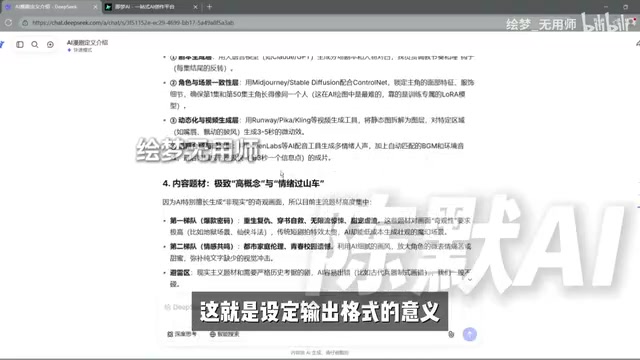
Without a defined format, AI output tends to be disorganized and hard to skim, requiring significant cleanup afterward. The creator's demonstration asked the AI to structure its response across four dimensions — "core concept, core technology, content themes, monetization methods" — using subheadings followed by body text. The result was a clean, well-organized, scannable response.
Story Script vs. Storyboard Script: Script First, Then Storyboard
Before generating anything, it's essential to distinguish between two concepts. A story script is essentially a concise short story — its job is to tell the plot well. It carries no technical production parameters and reads like a short piece of fiction, letting the creator quickly grasp character relationships, narrative arc, and overall direction. A storyboard script, by contrast, is a professional production document used for filming and creation — essentially a manufacturing specification. It explicitly annotates shot numbers, duration, framing (shot type), and shooting details, serving as the foundational reference for actual production.
The practical workflow has two steps: first, assign the AI the identity of "an experienced professional film screenwriter" and generate a short story script within three minutes on the theme of ancient-style fantasy (古风仙侠); then, leveraging the AI's contextual memory, follow up directly with the request to generate a storyboard script — no need to reassign the identity.
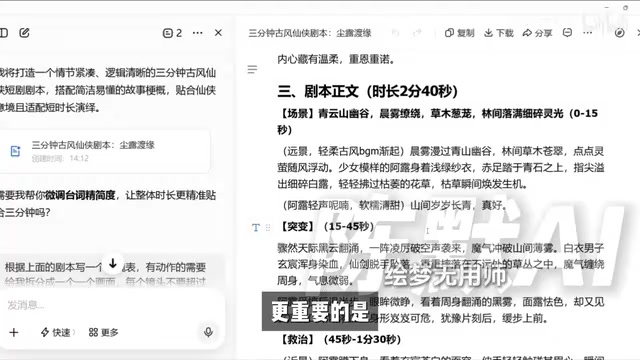
Why add the extra step of generating a story script? The answer is cost of revision. Storyboard scripts are dense with parameters and details — they're not well-suited for quickly auditing the plot. A streamlined story script lets the creator read through it quickly, grasp the character setup and logic, and fix any plot holes directly in the script. Once the narrative is solid, you ask the AI to generate the storyboard script. This is more than ten times more efficient than trying to revise a complex storyboard script directly, and it represents the optimal workflow for producing AI short films.
The storyboard script (also called a shooting script or production script) originated in the traditional film and television industry as a detailed shot-by-shot planning document used by directors and cinematography teams before actual filming begins. A standard storyboard script typically includes: shot number, shot type (e.g., wide shot / medium shot / close-up / extreme close-up), camera movement (push in, pull out, pan, track), description of on-screen content, dialogue or narration, duration, and sound effect annotations. In AI animation production, the storyboard script functions as the prototype for AI image generation prompts — the shot types, character descriptions, and scene environment details are directly converted into prompts for image generation tools such as Midjourney or Stable Diffusion. The more standardized and precisely described the storyboard script, the higher the consistency and accuracy when batch-generating images later, and the lower the rate of rework.
Two Critical Details for AI Image Generation Compatibility
The creator specifically highlights two pitfalls that directly determine how accurately the AI generates images downstream.
The first is time length constraints. Everyday AI animated shorts are typically one to two minutes long. The prompt must specify a time range (e.g., under three minutes); otherwise, the AI tends to generate content that is too long and paced too slowly.
The second is keeping visual descriptions objective and straightforward. When writing the script, you should be as specific as possible about shot type, scene, image quality, and character appearance and clothing — while avoiding ornate or lyrical language. For example, writing "eyes cold and sharp as a drawn blade" will most likely cause the AI to generate an actual blade, not a character's expression. Literary, novel-style descriptions mislead AI image generators; only clean, direct language keeps the output on target.
The technical reason behind this lies in how image generation models parse text. Current mainstream text-to-image models are trained on image-text pairs, making them far better at recognizing concrete visual descriptors than abstract emotions or metaphors. With a phrase like "like a drawn blade," the model prioritizes the most direct visual element — "blade" — and generates accordingly. The professional approach is to decompose all descriptions into objective, visually reproducible elements. For instance, rewrite "cold, sharp eyes" as "close-up of character's face, eyes slightly narrowed, gaze directed at the camera, expression stern" — specifying subject, shot type, and state clearly so the model has concrete cues to work from. This approach closely mirrors standard scene description conventions in traditional film scripts and is one of the core principles of optimizing AI image generation prompts.
Summary
This lesson's key points center on three areas: the universal prompting formula for AI script generation (assign an identity, define the task, fix the output format); the distinction and role of story scripts versus storyboard scripts; and the two-step strategy of writing the story script before generating the storyboard script to minimize revision costs, along with tips for avoiding pitfalls in AI image generation. This is just the opening chapter of the full AI animation production workflow. The next major challenge is batch-generating compliant storyboard images from the script — involving character design and visual detail optimization, which is also the most time-intensive stage of the entire pipeline.
For ordinary people looking to break into AI manga creation, the value of this process-oriented thinking may well be worth mastering before any single tool.
Related articles

Last Week Tonight Exposé: The Dangerous Ties Between Politicians and White Supremacy
Last Week Tonight investigates Georgia Senate candidate Mike Collins and Florida candidate Marshall Rawson, exposing their multiple ties to white supremacists and the Republican Party's silent response.
AI Buzz Weekly: GPT-6.5 Leak, New Claude Model, and MiniMax's Cost-Effectiveness
This week's AI buzz roundup: suspected GPT-6.5 leak, Microsoft configs showing GPT-6.1 Tera, Anthropic's new model that can identify entire classes of bugs, disappointing early Gemini 4 Carbon results, and MiniMax M3.1 Flash beating Claude Opus 5 and GPT-5.6 Sol in benchmarks at extremely low cost.

AI Briefing: Gemini 4 Carbon Released, Ant Open-Sources Ling-3.1
AI Briefing: Google releases Gemini 4 Carbon qubit model, claiming to surpass Opus 5.5 with half-price tokens; Ant open-sources Ling-3.1-1019 for real-task Personal Agents; domestic AI drug discovery succeeds in 18 of 19 projects, hitting all 6 GPCR targets; zero-revenue company valued at $20B raises another $1B; Sichuan convenience store robot sales fail.