@ai-sdk/tui 1.0.167 Released: Minor Update to AI SDK Terminal UI
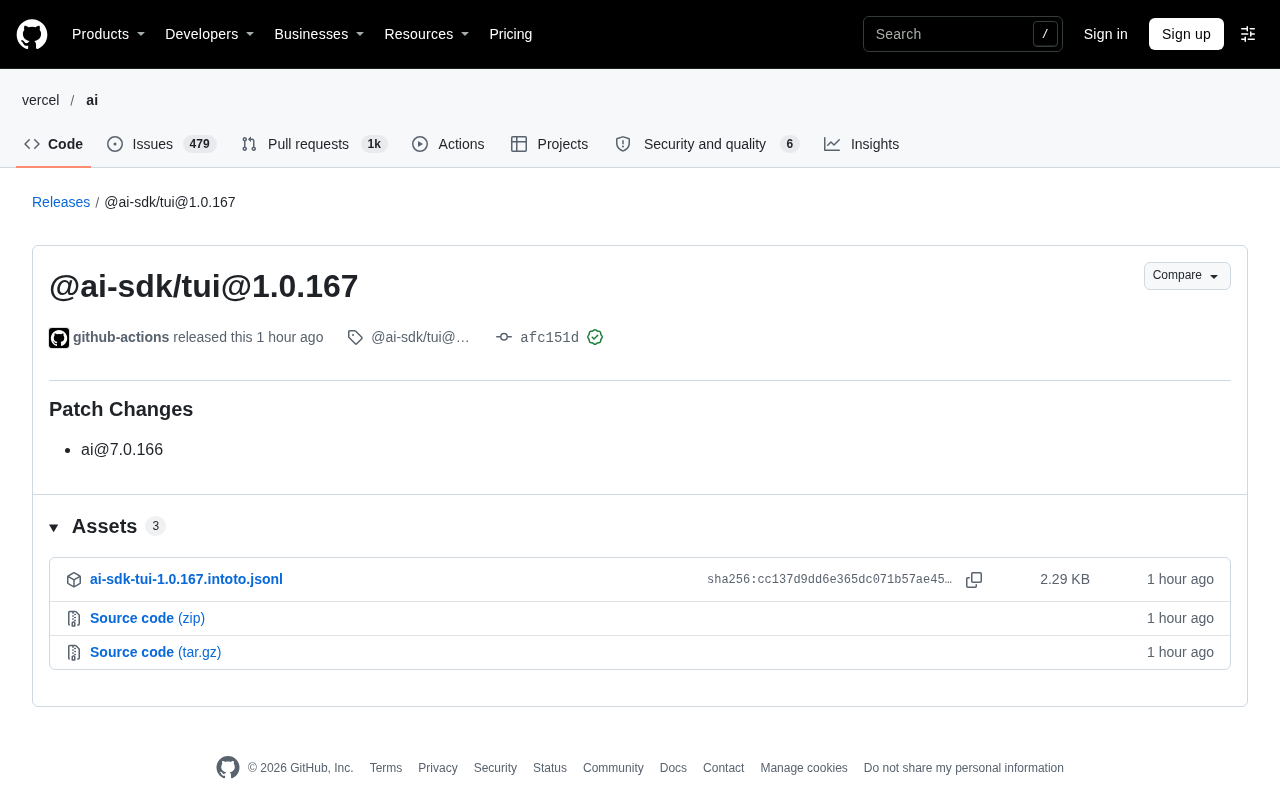
AI SDK terminal component @ai-sdk/tui releases patch 1.0.167, syncing the ai@7.0.166 dependency.
The article covers the 1.0.167 release of @ai-sdk/tui, the terminal interface component in the AI SDK ecosystem. It's a patch update whose core change is syncing the underlying ai@7.0.166 dependency, with no breaking changes, published automatically by GitHub Actions with a verified signature. It also explains the value of TUI components for building AI interaction interfaces in command-line environments: lightweight, runnable directly on servers, easy to integrate with existing CLI toolchains, and suited to quickly building local AI chat prototypes or adding interactive capabilities to internal tools. On upgrading, it advises checking whether the project's ai package version is compatible with 7.0.166 and running a simple smoke test to confirm rendering and input work; if the old version is stable, you can hold off, since a patch version's value lies mainly in long-term dependency health.
The terminal interface component in the AI SDK ecosystem, @ai-sdk/tui, has released version 1.0.167. This is a patch release that primarily syncs the version of the underlying ai package and introduces no breaking changes.
Key Information About This Release
According to the GitHub Releases page, this version was automatically published by github-actions. The update is listed as "Patch Changes" and includes dependency change notes for ai@7.0.166. The commit carries a GitHub verified signature, indicating the release process went through automated verification.
For developers already using @ai-sdk/tui, this is a low-risk version to upgrade to. A patch-level version increment typically means bug fixes or dependency alignment rather than a feature refactor.
Automated releases via GitHub Actions and signed commits: github-actions is GitHub's built-in CI/CD service, which can automatically run tests, bump version numbers, generate release notes, and create a Release after code is merged — this is why the version shows as automatically published with no human maintainer attribution. A verified signature on a commit refers to Git commit signing (such as GPG or Sigstore), used to prove that the commit was genuinely produced by a trusted identity or automated process, preventing the repository from being impersonated or tampered with. For users, these two points mean the release pipeline is standardized and traceable, reducing the risk of introducing tampered artifacts.
Why the Terminal Interface Component Is Worth Watching
In the AI SDK ecosystem, the TUI (Terminal User Interface) component targets scenarios where you build AI interaction interfaces in a command-line environment. Compared to web frontends, terminal interfaces have the advantage of being lightweight, able to run directly in server environments, and easy to integrate with existing CLI toolchains.
This type of component suits teams that need to quickly build local AI chat prototypes or add interactive AI capabilities to internal tools. Its release cadence typically follows the main SDK's version progression, so tracking version number changes helps maintain dependency consistency.
The difference between TUI and CLI: Although a TUI (Terminal User Interface) runs in the terminal, it differs from a traditional CLI (Command-Line Interface). A CLI typically takes a one-off command and outputs text results; a TUI takes over the terminal's screen buffer, maintaining a continuously refreshing interactive interface that supports cursor positioning, colors, borders, scroll regions, and even keyboard switching between multiple panels. For AI chat scenarios, a TUI can achieve character-by-character rendering of real-time streaming output, a separate window for multi-turn conversation history, and a distinct input area, whereas a pure CLI can only print each turn's results sequentially. @ai-sdk/tui provides exactly this kind of rendering and input interaction wrapper.
The patch number in semantic versioning: Under semantic versioning (SemVer) conventions, a version number takes the form major.minor.patch. An increment in the patch number indicates backward-compatible bug fixes and dependency alignment, an increment in the minor number indicates backward-compatible new features, and only a major version increment may contain breaking changes. The change here goes from within 1.0.x to 1.0.167, which is a change in the third segment, so it can be judged a low-risk upgrade; the "Patch Changes" in the release notes is also the standard marker that tools like Changesets use for patch-level changes.
Upgrade Recommendations and Caveats
When upgrading to version 1.0.167, it's advisable to also check whether the ai package version in your project is compatible with 7.0.166. Since the update notes only mention dependency syncing and list no specific behavioral changes, after upgrading you can confirm that terminal rendering and input interaction work properly with a simple smoke test.
If your project is locked to an older version and runs stably, you can also hold off on upgrading. The value of a patch version is more about long-term dependency health than urgent fixes.
Summary
@ai-sdk/tui 1.0.167 is a routine patch release whose core change is syncing ai@7.0.166. For developers who care about the AI SDK terminal experience, keeping up with versions is a reasonable maintenance habit, but there's no need to invest extra migration effort for this.
Related articles

Seven Years of Evolution: How Far Has the Foldable Come From the First Generation?
From the first foldable to today's latest models, what has seven years changed? Shallower creases, higher brightness, thinner bodies, and smoother software migration—has the foldable crossed the chasm from enthusiasts to ordinary users? This article discusses the question based on a video comparison.

When Did Humans Start Eating Salt? A 10,000-Year History of Salt
When did humans start eating salt? From salt use at the dawn of agriculture 11,000 years ago to ancient seawater evaporation and rock salt mining, and on to the salt trade, salt taxes, and Gandhi's Salt March, this article traces salt's key role in human civilization.
Microsoft Paza Research: How African Language Speech Recognition Breaks Through Architecture and Data Bottlenecks
Microsoft's Paza research evaluates 53 speech models across 39 African languages, revealing architecture choice matters more than pre-training coverage, 200-300 hours is the practical data threshold, and language typology deeply influences recognition performance.