AI Web Novel Writing from Scratch: A Complete Guide to Downloading General Agents and Drag-and-Drop Toolkit Import

Demonstrates the complete workflow of downloading four general Agents, drag-and-drop toolkit import, and model configuration
The article fills in the missing toolkit placement issue from the previous video, fully breaking down the general Agent workflow for AI web novel writing. It first introduces four parallel optional general Agents—Doubao, Workbody, DeepSeekHonest, and Codex—and how to download them; then clarifies that dragging the toolkit directly into the dialog box imports it without unzipping or configuring paths; next explains sending one sentence to let the Agent unzip and explain usage, plus switching to full permissions; finally, for model configuration challenges, proposes using another Agent to fill in API parameters. All four Agents share the same workspace viewing logic, reducing the entry barrier to four steps overall.
In the previous video, I showed how to use a writing toolkit to complete a web novel from scratch. Many followers said the previous episode didn't clearly explain where exactly the toolkit should go. This episode fills that gap specifically, breaking down the complete process of downloading general Agents, importing the toolkit, and configuring models.
Four General Agents Covering Different Preferences
The current demo page shows four general Agents: Doubao in the top left, Workbody at the bottom, DeepSeekHonest in the middle, and Codex on the right. Each corresponds to a different model ecosystem and interaction style, so users can choose based on their habits.
The download method isn't complicated. Take Workbody as an example: type Workbody in the search box, click Download Now, and select the corresponding version. DeepSeekHonest and Doubao follow the same process. After downloading, double-click to open and you'll enter their respective work interfaces.
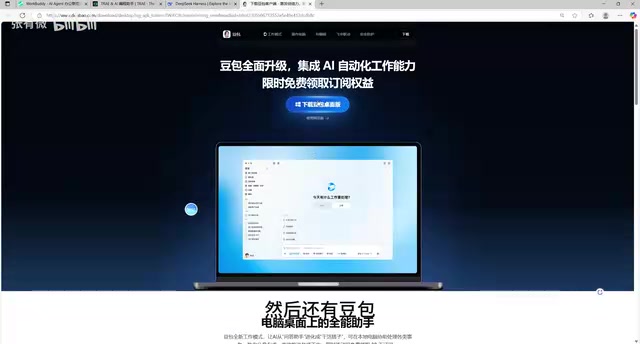
The key point here is that the four Agents are parallel options, not all mandatory to install. You can absolutely keep just one or two based on the models and scenarios you commonly use.
General Agent refers to an AI assistant that isn't customized for a single task but completes various operations (file management, content generation, code execution, etc.) through natural language dialogue. The opposite is a specialized Agent, which only serves fixed scenarios. A general Agent's core capabilities include understanding instructions, calling tools, and reading/writing local files—which is why it can handle open-ended tasks like "unzip the toolkit and explain how to use it." Doubao, Workbody, DeepSeekHonest, and Codex in this article belong to this category, differing mainly in the model ecosystem and interaction interface behind them.
Toolkit Drag-and-Drop Import: The Location Is the Dialog Box
The biggest omission in the previous video was not explaining where the toolkit should be dragged. The answer is straightforward: drag the downloaded toolkit file into the Agent's dialog box.
In the demo, I selected a version I was optimizing that day, dragged it directly into the dialog box, and dragged in several toolkits one after another. After dragging them in, the remaining operations are exactly the same as in the previous video.
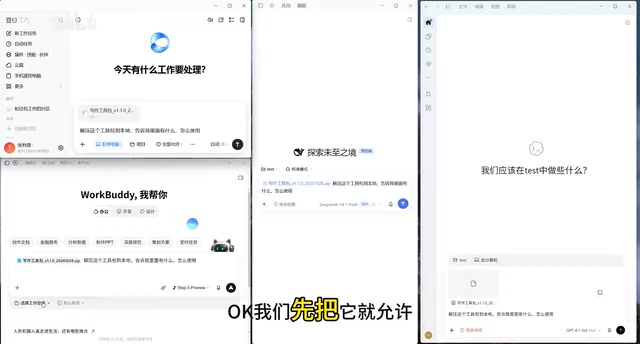
The advantage of this drag-and-drop import is its extremely low barrier to entry—no need to understand file system structures, manually unzip, or configure paths. For users unfamiliar with command-line operations, this is the friendliest approach.
One Sentence to Let the Agent Unzip and Use the Toolkit Itself
After dragging in the toolkit, you just need to send one sentence: have it unzip this toolkit, tell me what's inside, and how to use it. Copy and send this sentence to the Agent—you can use this template to ask about any toolkit you don't know how to use.
After sending, remember to change permissions to full permissions, because the Agent needs permission to edit files. If you have security concerns, you can also choose not to enable full permissions—this is for users to weigh themselves.
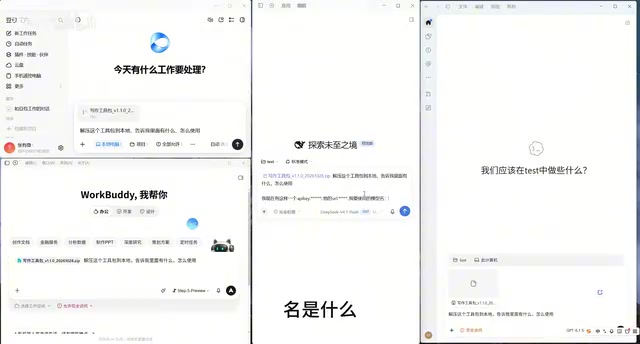
This step reflects the core value of a general Agent: it doesn't just execute fixed instructions; it can proactively interpret toolkit contents and provide usage instructions. Users don't need to read documentation in advance—the Agent completes the understanding and explanation for you.
Full permissions (also called fully automatic or high-privilege mode) means allowing the Agent to read, write, modify, and even execute files within the working directory without asking the user for confirmation before each operation. When enabled, the Agent can automatically unzip toolkits, edit documents, and create folders—making the process smoother. But it also means the Agent's mistakes will directly affect real files. If you choose not to enable full permissions, the Agent requires manual approval for each step—safer but less efficient. For toolkits from trusted sources, enabling full permissions is usually recommended for a smoother experience.
Model Configuration: If You Don't Know How to Fill It In, Let Another Agent Do It
Different Agents support different models. The previous video demonstrated DeepSeekHonest's configuration method: in settings, click Models, add a model provider, select Custom API, and fill in the corresponding information.
The problem is that many users don't know how to fill in these fields. The solution is again to use the Agent itself: open another general Agent, send it the API key, URL, the model name you want to use, and the API documentation URL, and let it help you complete the configuration.
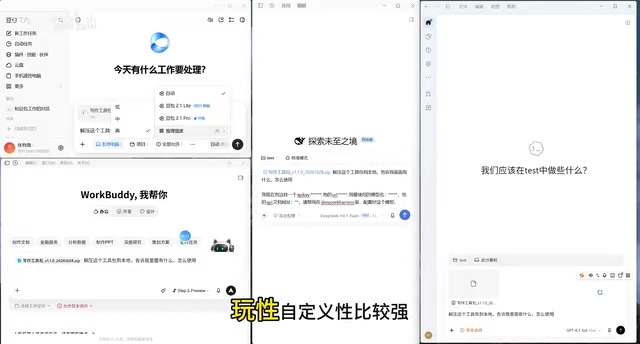
The demo uses an aggregated API service, which can be called after configuration is complete. If you find it troublesome, you can also directly use the Agent's built-in model. Doubao and Codex follow the official configuration path, while DeepSeekHonest was chosen for the demo because of its greater flexibility and customizability.
After configuration, click send, and the remaining process is exactly the same as in the previous video. The Agent will start responding; enlarge the window and you'll see it prompts that you need to configure your own API—just ask it directly and you'll get an answer.
Custom API and model providers means not relying on the Agent's built-in default model, but instead filling in the interface address (URL), key (API Key), and model name provided by a third-party service, so the Agent calls that service to complete inference. This approach is common with aggregated API platforms—a platform that brings together interfaces from multiple model vendors, so users only need one set of keys to switch between different models. Compared to official built-in models, custom APIs offer more flexible model selection and potentially lower prices, at the cost of needing to obtain and correctly fill in the parameters yourself—wrong fields will cause the call to fail.
Viewing the Workspace: The Four Agents Operate with the Same Logic
After the toolkit is unzipped, open the project folder or view the workspace on the right side, and you'll see the unzipped files. Workbody, DeepSeekHonest, and Codex all follow the same operation logic: enter the workspace from the right panel, and the files are all visible at a glance.
This shows that the four general Agents have highly convergent interaction designs at the file management level—learn one, and the others can basically be migrated to seamlessly. For specific writing operation details, refer to the previous video; I won't repeat them here.
Overall, this process lowers the entry barrier for AI web novel writing to a very low level: download an Agent, drag in the toolkit, send one sentence to unzip, configure the model as needed—four steps and you're up and running. For users who want to try AI-assisted writing but are put off by technical details, drag-and-drop import and Agent self-explanation are the two features that truly lower the barrier.
Related articles

LLM Application Development: A High-Paying Career Guide for Ordinary People
LLM application development offers fresh graduates up to 35K/month, with SP offers reaching 600K. This article explains the core skills, how to break in, and how ordinary people can seize AI opportunities through learning by doing.

Say Goodbye to AI Influencer Faces: A Complete Guide to Creating Visual Assets for AI Comic Dramas from Scratch
Bilibili creator shares a full workflow for zero-basics AI comic drama visual assets: use Doubao Work skills with script-first, visual references, and real-person texture to escape AI influencer faces, then lock character and scene consistency with asset sheet layouts, weapon detail images, scene nine-grids, and cinematic color palettes.

The AI Production Pipeline Behind Great Videos: From Research to Agent Validation
AI video production isn't just a model race. This article breaks down a transferable four-step pipeline: researching professional workflows, organizing a skill checklist, configuring agents, and experimental validation—and explains how general-purpose LLMs like DeepSeek can replace paid tools to run the entire process.