Amazon Echo Show 16 Hands-On: 16-Inch Display Plus 8 Subwoofers, But the Software Experience Steals the Show

The Echo Show 16's hardware upgrades are interesting, but three software changes are what really set it apart.
Amazon announced the Echo Show 16 smart display, featuring a 16-inch screen with 8 subwoofers integrated behind it—a clear hardware investment. But the reviewer argues the real differentiator is software: Screen Styles pins the home screen to a single interface with no carousel or ads; a Favorites tab in the top-left corner consolidates calendars, smart home controls, and Alexa skills into a pull-down shortcut bar; and an all-new 3D home map lets you tap to control lights and door locks, integrates with external cameras for live feeds, and can be cast to Fire TV. All three features address long-standing smart display pain points. The main weakness is price: $500 for the base model, $570 for the Nano Matte version, with a $100 pre-order discount and December shipping. Whether it's worth the price will require long-term use to judge.
Amazon has just announced the Echo Show 16, a smart display featuring a 16-inch screen with 8 subwoofers tucked behind it. I got some early hands-on time with the device in New York this week, and my overall takeaway is this: the hardware upgrades are interesting, but the software is what really sets it apart.
Hardware Upgrades: Merging a Big Screen with Big Sound
The most obvious change with the Echo Show 16 is that 16-inch display. To preserve the overall aesthetic, Amazon integrated 8 subwoofers into a slim speaker enclosure behind the screen. The design intent is clear—position the smart display as a home entertainment hub as well. From my hands-on time, the large screen delivers a noticeably stronger visual impact than previous generations, and while a brief session isn't enough to fully evaluate the audio, the direction of the hardware investment is clear.
That said, hardware isn't the core of this update. As the reviewer put it, this is "a very fun hardware upgrade, but it's the software that makes the difference."
Software Feature 1: Screen Styles Pins Your Home Screen
The first feature that impressed me is Screen Styles, a brand-new home screen approach. It lets you pin the smart display to "a single screen"—no carousel, no ads.
That might sound like a minor tweak, but for long-time smart display users, the pain point is very real: the default carousel interface often switches away right when you need to check information, and ad pushes are the primary culprit for interrupting the experience. Screen Styles hands control back to the user, letting the screen truly stay on a fixed interface of your choosing.
Software Feature 2: Favorites Tab in the Top-Left Corner
The second feature is a new Favorites tab in the top-left corner of the screen. Tapping it pulls down a shortcut bar where you can place frequently used calendars, smart home controls, or any Alexa skills and apps for one-tap access.
The value of this design lies in reducing navigation depth. Previously, many functions required voice commands or multiple taps to reach; now high-frequency entry points are consolidated into a customizable pull-down bar, significantly shortening the interaction path.
Software Feature 3: 3D Home Map with Camera Integration
The third feature is my personal favorite: the all-new map view. You can create a map for your entire home and view it on the screen as a 3D digital model.
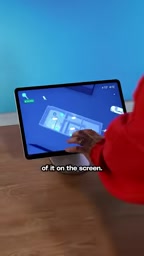
The interface interaction is quite smooth—zoom in and you can directly tap different lights, door locks, and other home elements to control them. Compared with previous versions, the key change here is the 3D visualization, plus support for zooming out to an exterior view of the house.
Even more practical is the integration with external cameras: if a camera detects someone approaching, a small person icon appears on the screen, and tapping it brings up the corresponding camera's live feed.
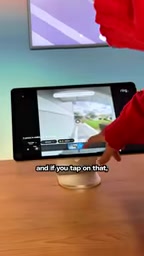
This feature turns the map view from "nice to look at" into "actually useful," solving the previous lack of practicality in map views. Additionally, this view can be cast to a Fire TV for display.
Alexa Skills is the third-party app ecosystem Amazon has built for its Alexa voice assistant, similar to apps on a phone. Developers can integrate various services through the Alexa Skills Kit—for example, checking the weather, playing music, controlling specific brands of smart home appliances, hailing a ride, or ordering food delivery. On screen-equipped devices like the Echo Show, skills can present card-style or full-screen visual interfaces in addition to voice interaction. When the Favorites tab supports "any Alexa skill and app," it means users can pin a direct entry point for a frequently used skill to the shortcut bar, rather than having to say the full voice command each time. The richness of the skill ecosystem directly determines how many everyday scenarios these smart displays can cover across both voice and touch interactions.
Fire TV is Amazon's streaming television service platform, built into its own Fire TV Stick and other hardware, and also licensed to some TV manufacturers. It belongs to the same Amazon device ecosystem as the Echo series, with shared accounts, content libraries, and some control functions. The mention that the map view can be cast to Fire TV means users can view their home's 3D layout and camera feeds on a big living room screen without having to lean in toward the smart display. This cross-device casting is a relatively seamless part of the Amazon ecosystem and a differentiating advantage over third-party smart home platforms.
Price Is the Clear Weak Spot
The improved software experience makes the Echo Show 16 interesting, but the price gives pause. The base model costs $500, and the Nano Matte display version is $570. Given the features it offers, this pricing is on the high side.
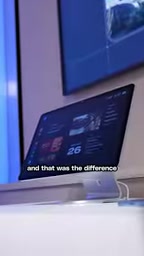
Pre-orders currently get a $100 discount, and the product ships in December. Whether it's truly worth the price will have to wait until it's been brought home for long-term use.
Nano Matte display is an anti-glare, low-reflection display surface treatment. By creating nanoscale microstructures on the screen surface, it scatters ambient light, thereby reducing specular reflection and fingerprint smudges. Compared with ordinary glossy screens, it looks softer near windows or in living rooms with complex lighting, and is easier on the eyes during extended viewing. This type of process typically increases manufacturing costs, so it's no surprise that the Nano Matte version costs $70 more than the base model. For users who place the device in well-lit locations, this upgrade has high practical value; but if it's placed in a corner with controllable lighting, the base model's glossy screen may actually be more pleasing in terms of color vibrancy.
Summary
The appeal of the Echo Show 16 isn't in the spec sheet—it's in three software changes: Screen Styles for pinning the home screen, the handy Favorites tab, and the 3D map view with camera integration. These features address long-standing pain points of smart displays. Hardware upgrades plus software catch-up is the right direction; but whether the $500 starting price will be accepted is the biggest question mark facing this product.
Related articles

Microsoft Fabric Database Agent in Action: From Reactive Firefighting to Intelligent Detective
A deep dive into the Microsoft Fabric Database Agent: how to enable it, supported monitoring scenarios, a blocking-issue demo, and the roadmap from reactive to autonomous operations.

Zendesk Uses ChatGPT Enterprise to Build a Sales Agent with 1,000 Daily Active Users
Zendesk opened ChatGPT Enterprise to all employees, who built about 600 apps themselves, including a sales expansion agent with about 1,000 daily active users. This article analyzes how it turns internal data into sales opportunities and its "don't wait" implementation strategy.

Google Releases Gemini 4 Carbon: Its Strongest Model Yet, Debuting with a Cybersecurity Focus
Google releases Gemini 4 Carbon, calling it its strongest model, with a cybersecurity focus. It tops the third-party composite ranking at 59 points but leads by only one or two. This article analyzes its security test results, staged rollout, token pricing, and the divergence between self-reported and third-party tests on hallucinations.