Any Video to Text: Paste a Link, Get a Transcript in Seconds — A New Chrome Extension Option

Any Video to Text is a Chrome extension that turns multi-platform videos into transcripts with a simple link paste.
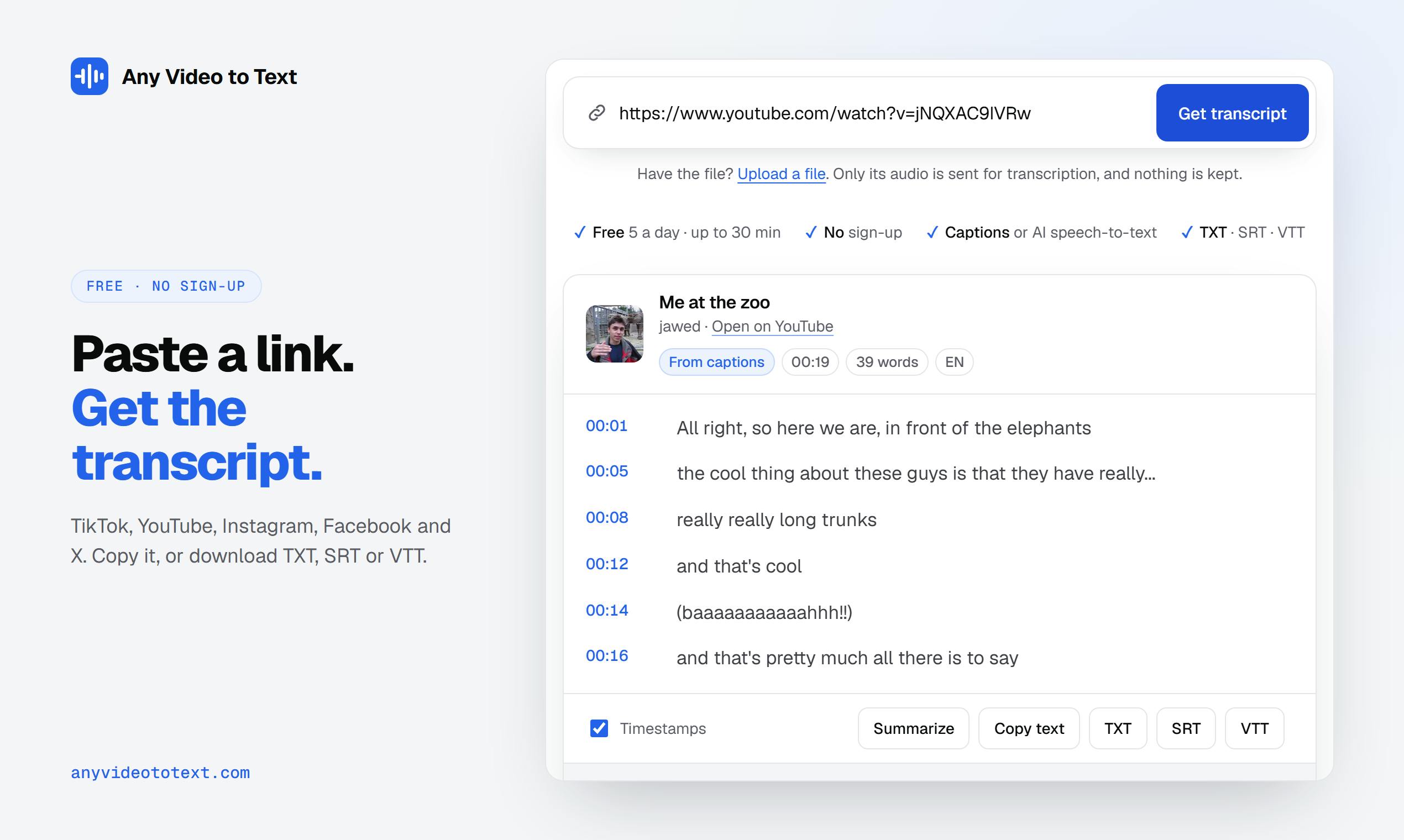
Any Video to Text is a Chrome extension with a minimalist workflow: paste a TikTok, YouTube, Instagram, Facebook, or X video link and get a transcript in seconds. It grabs subtitles when available and falls back to AI speech recognition otherwise, and also supports uploading MP3, M4A, WAV, MP4, and MOV files. Output can be copied, summarized, or downloaded as TXT, SRT, or VTT; interview and podcast content supports speaker labels, and cooking videos auto-generate structured recipe cards. It uses a free + credits model with 5 free uses per day and no registration; credits unlock 2-hour long videos and batch processing. Compared with full transcription workbenches like Otter and Descript, it targets zero-registration, use-and-go lightweight scenarios.
The need to convert video content into text has always existed, but tools are either expensive or cumbersome to use. A Chrome extension called Any Video to Text has appeared on Product Hunt, touting "paste a link, get a transcript in seconds," aiming to solve this pain point with a minimalist workflow.
Core Feature: One Link Does the Transcription
Any Video to Text works in a very straightforward way: copy a video link from TikTok, YouTube, Instagram, Facebook, or X, paste it into the tool, and get a transcript within seconds.
Its processing strategy has two layers: if the video already has subtitles, the tool grabs the subtitle content directly; if there are no subtitles, it automatically invokes AI speech recognition for transcription. This hybrid approach — "use subtitles when available, use ASR when not" — ensures both speed and coverage for videos without subtitles.
Beyond link-based transcription, the tool also supports uploading local files such as MP3, M4A, WAV, MP4, and MOV. For interviews and podcast-style content, it can also output speaker labels, making it easy to distinguish different speakers in a conversation.
ASR (Automatic Speech Recognition) is the technology that converts speech signals into text, with a core pipeline that includes acoustic modeling, language modeling, and decoding. Modern ASR mostly uses end-to-end deep learning architectures (such as Whisper and Conformer), taking audio waveforms directly as input and outputting text sequences, eliminating the complex intermediate steps of traditional HMM-GMM systems. Its accuracy depends heavily on audio quality, accent, speaking rate, and background noise: clear recordings can achieve over 95% recognition rates, while noisy environments or strong accents may cause significant degradation. When a video has no subtitles, Any Video to Text invokes exactly this kind of ASR capability — which is the technical foundation that lets it cover videos from any platform.
Output Formats and Standout Scenarios
After transcription is complete, users can directly copy the text, generate a summary, or download it in TXT, SRT, or VTT format. SRT and VTT are the standard subtitle file formats, which means the output can be used directly for video subtitle production, not just for reading as plain text.
A particularly distinctive feature is the "recipe card": for cooking videos, the tool automatically extracts ingredients and steps to generate a structured recipe card. This kind of customization for vertical content types is rarely seen in general-purpose transcription tools.
SRT and VTT are two mainstream subtitle file formats. SRT (SubRip Subtitle) has the simplest structure: each subtitle consists of a sequence number, a timecode, and text — with extremely broad compatibility, supported by virtually all players and editing software. VTT (Web Video Text Tracks) is the W3C web subtitle standard, adding style markup, positioning information, and metadata support on top of SRT, designed specifically for the HTML5 <track> element and commonly used in web video players. Both are plain text formats that can be edited directly with a text editor, so the tool outputting these two formats means transcription results can seamlessly enter subsequent subtitle production or video publishing workflows.
Pricing and Usage Threshold
Any Video to Text uses a free + credits model. Free users get 5 uses per day with no account registration required, lowering the barrier for first-time trials. Credits unlock 2-hour long videos and batch processing capabilities, suited for high-frequency or professional scenarios.
The Chrome extension form factor lets it be invoked anytime in the browser, without switching tabs or opening a standalone app. The product received 72 upvotes and 7 comments on Product Hunt, ranking #19 — a mid-sized product that drew attention on the day.
Chrome extensions are lightweight programs built on the Chromium browser extension system, declaring permissions and entry points via a manifest file; they can read information about the current tab, call browser APIs, and keep a persistent icon in the toolbar. Compared to standalone apps, the advantage of an extension is that there's no installation-and-switching overhead and it can directly access the page context the user is currently browsing — which is precisely the technical prerequisite for the "paste a link and transcribe" experience. The trade-off is that it's constrained by the browser sandbox; complex computation typically needs to rely on cloud services, so such tools often adopt a "light front-end interaction + heavy back-end processing" architecture.
How It Differs from Similar Tools
Video-to-text is not a new arena — tools like Otter and Descript have long been established. Any Video to Text's differentiator is the combination of "zero registration barrier + direct platform link conversion + subtitle file output," leaning more toward lightweight, use-and-go scenarios rather than a full transcription workbench.
For content creators who occasionally need to extract video scripts, operations staff who need to organize competitor video information, or listeners who want to quickly get podcast transcripts, the value of such a tool lies in eliminating the intermediate steps of downloading videos, uploading, and waiting.
Of course, 5 uses per day under the free tier is tight for heavy users, and long videos and batch capabilities require credits. AI speech recognition accuracy still fluctuates in noisy environments or with strong accents — a limitation shared by all ASR tools.
Who It's For
- Content creators: quickly extract the script structure of reference videos
- Podcast/interview listeners: get transcripts with speaker labels
- Video subtitle creators: download SRT/VTT files directly
- Cooking enthusiasts: extract recipe cards from food videos
If you only occasionally transcribe one or two videos, the free tier is basically enough; if you need to handle long videos or batch tasks, then consider investing in credits.
One-line Summary
Any Video to Text is a Chrome extension that turns videos from multiple platforms into transcripts by simply pasting a link.
Paragraph Summary
Any Video to Text is a Chrome extension built around a minimalist workflow: users paste a video link from TikTok, YouTube, Instagram, Facebook, or X and get a transcript within seconds. Its processing strategy: grab subtitles directly if available, otherwise invoke AI speech recognition for transcription; it also supports uploading local files such as MP3, M4A, WAV, MP4, and MOV. Output can be copied, summarized, or downloaded as TXT, SRT, or VTT; interview and podcast content supports speaker labels, and cooking videos can automatically generate structured recipe cards. Pricing uses a free + credits model: 5 free uses per day with no registration, and credits unlock 2-hour long videos and batch processing. Compared with full transcription workbenches like Otter and Descript, it leans more toward zero-registration, use-and-go lightweight scenarios.
Related articles

Open-Source AI Desktop Robot: Built with a Laptop + Android + Pico
Open-source AI desktop robot PAL9000: a MacBook runs MediaPipe vision and llama-cpp dialogue, an Android phone is the animated face, and a Raspberry Pi Pico W drives a 2-DOF pan-tilt head. Modular design, reproducible piece by piece, with a discussion of anthropomorphic design.

Why Did Your Backtest 'Beat' SOTA? The Weather Covariate Leakage Trap
A backtest showed Timestral's MASE dropping from 0.71 to 0.49, seemingly beating SOTA—but it was caused by weather covariate leakage. After correction, it was only 0.66. This article analyzes the leakage, the archived forecast dilemma, and provides a checklist for time series backtesting.
Ring Enters Robotics: Launching Home Security Drones and Enterprise Patrol Robots
Ring enters robotics with a home security drone and an enterprise rolling patrol robot. This article analyzes its product expansion logic, use cases, and practical challenges.