Auto-Generate n8n Workflows with Claude: AI-Driven Automation in Three Steps

Turn Claude into an n8n workflow generator by feeding it official docs and constraining output to JSON.
This article presents a practical method for using Claude to generate n8n automation workflows in three steps: create a Claude Project, import the official n8n GitHub skills library as a knowledge file, and instruct Claude via project settings to always output workflow JSON. Once configured, users simply describe their needs in natural language and receive ready-to-paste JSON for n8n. The article also cautions that AI-generated results need human verification, and the knowledge base must be kept in sync with n8n updates.
Let AI Write Your n8n Workflows
The automation tool n8n has become a go-to platform for developers and operations teams thanks to its visual node-based workflow builder. But for newcomers, manually connecting nodes, configuring parameters, and understanding each module's inputs and outputs can be a steep climb. A YouTube creator shared a clever approach: configure Claude as a dedicated n8n workflow generator, so AI can output importable workflow JSON directly — just describe what you need and get a finished result.
The core idea is straightforward — feed Claude the official n8n skills documentation as a knowledge base, then constrain its output format to turn it into an "n8n workflow generator." The entire setup takes just three steps. After that, you can describe your requirements in plain language, copy the generated JSON, paste it into n8n, and run it.

Three-Step Configuration
Step 1: Create a New Claude Project
Create a new Project in Claude. Claude's Project feature lets you bind dedicated knowledge files and custom instructions to a specific task — essentially giving the AI a specialized work environment where it maintains consistent context and behavior. This is the foundation for turning Claude into a "workflow expert."
Claude's Project feature, launched in 2024, delivers its core value by binding knowledge files and system prompts to a persistent session environment. Unlike ordinary conversations, knowledge files in a Project are automatically injected into context at the start of every conversation — no need to repeatedly paste materials. This means once you've completed the setup, all subsequent conversations run within the same knowledge framework, and Claude won't "forget" that it's an n8n workflow generator. The Project feature is currently available on Claude Pro and team plans; free users are not yet supported.
Step 2: Import the Official n8n Skills Library as Knowledge
Add the official n8n skills repository (from GitHub) as a knowledge file to your project. This step is the linchpin of the whole approach — by providing official skills documentation, Claude learns the actual structure, parameter specifications, and JSON format requirements for n8n nodes, rather than guessing. The more accurate the knowledge base, the more reliable the generated workflows.
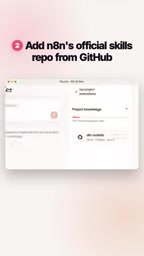
The n8n GitHub repository includes official skills documentation for "n8n-nodes-base," which details each node's input/output parameters, authentication methods, and JSON Schema definitions. Importing this as a knowledge base gives Claude a proper "manual" to work from, rather than relying on potentially outdated n8n knowledge from its training data. Since n8n is an actively developed open-source project, the official repository documentation is typically more current than what falls within Claude's training cutoff — making direct reference to the source docs the key strategy for ensuring generation quality. You can search GitHub for "n8n-io/n8n" and locate the corresponding skills or node documentation directory to download or copy the content.
Step 3: Constrain Output to Workflow JSON
In the project instructions, explicitly tell Claude to always respond in n8n workflow JSON format. This constraint ensures AI output can be directly recognized and imported by n8n, eliminating the hassle of repeated format adjustments. Once configured, Claude will return structured, executable workflow definitions with every response.
In Practice: Just Describe What You Need
Once configured, the experience is remarkably straightforward. Simply describe the process you want in plain English (or any language), such as "when a new email arrives, extract attachments and save them to cloud storage," and Claude will generate the corresponding workflow JSON. Copy that JSON, paste it directly onto the n8n canvas, and a runnable workflow is ready to go.

This workflow shifts the focus of building automation from "understanding the tool" to "describing the goal." For users unfamiliar with n8n's node ecosystem, it significantly lowers the barrier to entry. For experienced users, it's a rapid prototyping accelerator.
Value and Caveats
This approach reflects a growing trend: using large language models as a "translation layer" for specialized tools, converting human intent expressed in natural language into structured configurations that software can execute. It requires no plugins and no complex integrations — just Claude's Project feature and an official documentation file.

A word of caution: AI-generated workflow JSON still requires human verification. For complex flows, credential configurations, or edge cases, Claude may not produce a perfectly correct result on the first attempt. After pasting into n8n, it's worth checking each node individually and running tests. Additionally, the effectiveness of this method depends heavily on the quality and freshness of the imported knowledge base — when n8n's node specifications are updated, the knowledge file needs to be updated in sync, or the generated JSON may be incompatible with the latest version.
Overall, this is a low-cost, easily reproducible practical technique — well worth trying for anyone who wants to quickly build automated workflows without getting bogged down in node-level details.
Related articles

AI Comic Drama with WorkBuddy from Scratch: A Step-by-Step Skill Pack Installation Guide
Learn how to create AI comic dramas with WorkBuddy from scratch. This guide covers installation, Skill pack import and invocation, plus a script generation demo with manual revision tips to get you through the first step from script to storyboard.

WorkBuddy Agent Runs the Entire GEO Database Mining Pipeline with a Single Prompt
WorkBuddy agent automates GEO database mining: from data search and curation to batch correction, differential analysis, co-expression networks, feature gene screening, and immune infiltration—a single prompt generates a complete bioinformatics report, greatly lowering the barrier to bioinformatics analysis.

PC Memory Wasted? Hacker News Debates Centralized Data Centers
Hacker News users argue that personal computer memory is wasted and should be centralized in data centers, sparking debate on centralized vs. distributed computing resource allocation. This article analyzes the logic behind the claim, the costs of centralization, and new tensions in memory resource allocation in the AI era.