Bitmap Memory Optimization in Practice: 5 Strategies to Reduce App Memory Usage

Based on testing 500 apps, proposes the Reduce, Reuse, Recycle framework to tackle Bitmap memory leaks.
Android Developer Relations Engineer Phuong Lam, based on research across roughly 500 popular apps, systematically mapped out common patterns of Bitmap memory waste and fixes, proposing the "Reduce, Reuse, Recycle" framework. The article notes Bitmap memory usage is determined by decode dimensions and color depth, not file size—a few full-resolution images can occupy hundreds of MB. Testing identified 15+ categories of anti-patterns, all sharing the trait that decode dimensions far exceed display needs. The three-R framework covers controlling dimensions at the source, cache deduplication, and lifecycle-based release, and notes that multiple image loaders double cache overhead. Google Play has also set a memory quality threshold enforced from February 2027.
Bitmap is one of the most common memory hogs in Android apps. A single full-screen image, once decoded, occupies far more memory than text data of the same size, and most apps load dozens or even hundreds of images at once. In a Google I/O tech talk, Android Developer Relations Engineer Phuong Lam drew on empirical research across roughly 500 popular apps to systematically map out common patterns of Bitmap memory waste and practical fixes, and proposed an easy-to-remember framework: "Reduce, Reuse, Recycle."
Why Bitmap Deserves Dedicated Optimization
Phuong Lam used an intuitive comparison to illustrate the problem: on a roughly 2500×1400 display at 32-bit color depth, the memory a full-screen image occupies after decoding—converted into "words" on a 64-bit system—is equivalent to the space taken by thousands of words. Once an image is decoded into memory, its size is determined by dimensions and color depth, not by the file size of the JPEG or PNG—a few full-resolution images can easily consume hundreds of MB.
When memory is tight, the OS needs extra power to schedule memory, and the direct consequences are UI jank, the app being killed by the system, or OutOfMemory exceptions. This means Bitmap optimization isn't just a performance issue—it affects app stability and user retention. The good news is that most memory waste comes from avoidable common mistakes, and fixing them usually doesn't require sacrificing image quality.
How Bitmap memory is calculated: The memory a Bitmap occupies is not determined by the image file size, but by the amount of decoded pixel data. The formula is: width × height × bytes per pixel. For example, a 1080×1920 image under the ARGB_8888 configuration (4 bytes per pixel) occupies about 8.3MB; with RGB_565 (2 bytes per pixel), that halves to 4.15MB. This is why a JPEG of a few hundred KB can occupy tens of MB after decoding. Additionally, after Android 8.0 (API 26), Bitmap pixel data is stored in the native heap, but it still counts toward the app's overall memory usage and is affected by system memory scheduling. Understanding this is the key to seeing why controlling decode dimensions and color depth is central to optimization.
Google Play's New Quality Threshold
Google Play Console's Android vitals already provides memory-related quality metrics. The platform requires that an app's 90th-percentile memory usage in the background or visible foreground state not exceed a set threshold, otherwise the app's visibility in the store may be affected. The enforcement date for this requirement is February 2027, covering both apps and games.
Developers can break down memory data in Play Console by RAM tier, device form factor, screen density, and OS version to pinpoint memory bottlenecks on entry-level devices or specific versions. Phuong Lam recommends checking this metric regularly and completing improvements before the deadline.

Testing 500 Apps: 15 Categories of High-Frequency Anti-Patterns
The research team tested about 500 popular apps on 2GB Android Go devices, 4GB entry-level phones, 6–8GB mid-range phones, and 16GB large-screen foldables, covering the full path of launch, login, deep page browsing, and back navigation. They collected heap dumps and used tools to analyze memory allocations, ultimately identifying more than 15 categories of common issues.
Typical scenarios include: a product listing page using a two-column layout where each image is actually displayed at about 400×400 pixels, yet the app downloads 3000-pixel images from the server; a long-image carousel where large amounts of content off-screen are still loaded into memory; and zoomable images that load the full-resolution original before the user has even zoomed. What these problems share is that the image dimensions decoded into memory far exceed what is actually needed for display.

Reduce: Control Image Dimensions Entering Memory from the Source
The first category of strategies is to control dimensions at every link in the image loading chain. Prefer having the CDN perform cropping, scaling, rotation, and other operations at the HTTP request stage, so the device receives an image close to display size; if a CDN isn't available, do downsampling in code. With Coil, for example, you should pass the target width and height in the request rather than using the original dimensions, and pair it with a precision parameter to scale the image to the target size.
For long images, you can split them into tiles and load only the portion visible on screen, not loading or promptly unloading off-screen content—tests show this can save a considerable proportion of memory. For scenarios that support zooming to view details, a better approach is to first respond to user actions with the already-loaded low-resolution image, then once zooming stops, calculate the visible region from the coordinates and use Bitmap Region Decoder to decode only the high-resolution content of that region. Comic apps and map apps already have mature implementations to reference.
You can also add a layer of protection at the loading entry point: constrain request parameters with the window or screen dimensions as an upper bound, mechanically preventing images larger than the screen resolution from being loaded. Additionally, where conditions allow, using Bitmap.Config.HARDWARE to store images directly in GPU memory can also reduce memory pressure.
Downsampling: This refers to the technique of scaling down an image proportionally during the decoding stage. Android's BitmapFactory.Options provides the inSampleSize parameter, which is most efficient when its value is a power of 2—for example, setting it to 4 means width and height are each reduced to 1/4, and memory usage drops to 1/16. Modern image loading libraries (such as Coil and Glide) automatically calculate an appropriate inSampleSize based on the target View dimensions internally, but only if the caller passes in the target width and height. If not specified, the library may decode at the original dimensions, wasting memory. Therefore, always providing explicit dimension constraints when requesting images is a prerequisite for enabling downsampling.
Reuse: Caching and Deduplication
The second category of strategies focuses on reuse. When the same image appears repeatedly on the cart page and the checkout page, if the image loader has no cache key configured, two separate Bitmap objects will appear in memory. By passing a stable key for image loading, the same image can reuse an already-allocated Bitmap. Android Studio's Memory Profiler can help find duplicate Bitmaps, and you can also capture a heap dump via ADB and investigate with query statements.
A more insidious problem is the coexistence of multiple image loaders. Glide and Coil each by default reserve a certain proportion of heap memory as cache—two loaders mean double the overhead, and when cache pools aren't shared, the same image gets loaded twice. The ideal solution is to unify on one loader or a shared cache pool; when engineering changes are difficult, you can allocate budget proportions to each loader based on actual traffic, or simply divide evenly by the number of loaders, rather than letting every loader use default values.
Recycle: Shrink Memory with App State
The third category of strategies is timely release. Many apps don't properly handle the system's onTrimMemory callback. When the UI is hidden (after the user presses Home for a while), image caches should be proactively trimmed; when a background memory reclamation signal is received, memory should be released as much as possible. Proactively cooperating with the system's memory scheduling can significantly reduce the probability of the app being killed by the system.
Another anti-pattern is memory rising rather than falling after the app goes to the background: carousel animations and logic that periodically fetches new images don't stop with the lifecycle, and decoding of new images continues in the background. Developers should stop animations, image polling, and other work that doesn't need user attention in callbacks such as onPause, onStop, and onDestroyView.
onTrimMemory callback: This is a notification the Android system sends to the app when memory is tight, which developers can override in Application or ComponentCallbacks2. The level parameter in the callback indicates the degree of memory pressure—for example, TRIM_MEMORY_UI_HIDDEN means the UI is no longer visible and image caches should be released; TRIM_MEMORY_RUNNING_LOW means device memory is low and non-essential resources should be further cleaned up. Responding to this callback appropriately lets the app proactively yield memory while in the background, reducing the risk of being killed by the system while improving overall device smoothness.
Toolchain: From Online Metrics to Local Analysis
On the monitoring side, Play Console's Android vitals provides 90th-percentile memory data from real user populations, and the Reporting API allows programmatic access to these metrics. Local analysis can use ADB to capture heap dumps, simulate UI-hidden events, or use Android Studio Memory Profiler to visually inspect memory allocations.
AI capabilities such as Gemini in Android Studio are also being used to assist heap dump analysis, using SQL queries to locate Bitmap cache holders, determine whether images are loaded by Glide or Coil, and uncover potential memory leaks. Phuong Lam also shared prompt snippets for using an AI agent to automate collecting and analyzing memory data, but emphasized that AI makes mistakes, and foundational knowledge of how the OS allocates memory remains irreplaceable.
The Three-R Framework at a Glance
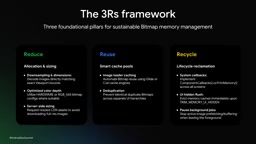
Reduce: Fetch images at display size, decode only the visible region, and make good use of hardware Bitmaps and low-color-depth configurations. Reuse: Establish caching strategies, avoid duplicate Bitmaps, and don't overuse multiple image loaders. Recycle: Let memory management follow app state—shrink when the UI is hidden, release when the system needs it, and stop unnecessary background resource consumption. Combined with continuous monitoring in Play Console, you can catch problems before they escalate into production incidents.
Phuong Lam noted in closing that memory optimization sounds like it involves OS and computer architecture with a high barrier to entry, but the strategies above are mostly low-cost, high-benefit changes worth every Android team checking against item by item.
One-line Summary
Based on testing 500 apps, proposes the Reduce, Reuse, Recycle framework to tackle Bitmap memory leaks.
Paragraph Summary
Android Developer Relations Engineer Phuong Lam, based on empirical research across roughly 500 popular apps, systematically mapped out common patterns of Bitmap memory waste and fixes, proposing the "Reduce, Reuse, Recycle" framework. The article notes that Bitmap memory usage is determined by decode dimensions and color depth, not file size—a few full-resolution images can occupy hundreds of MB. Testing identified more than 15 categories of high-frequency anti-patterns, whose core commonality is decode dimensions far exceeding display needs. The three-R framework corresponds to three main threads: controlling dimensions at the source, cache deduplication, and releasing with the lifecycle, and emphasizes that multiple coexisting image loaders double cache overhead. Additionally, Google Play has set a memory quality threshold that will be enforced starting February 2027, so developers need to optimize in advance.
Related articles

AI Comic Drama with WorkBuddy from Scratch: A Step-by-Step Skill Pack Installation Guide
Learn how to create AI comic dramas with WorkBuddy from scratch. This guide covers installation, Skill pack import and invocation, plus a script generation demo with manual revision tips to get you through the first step from script to storyboard.

WorkBuddy Agent Runs the Entire GEO Database Mining Pipeline with a Single Prompt
WorkBuddy agent automates GEO database mining: from data search and curation to batch correction, differential analysis, co-expression networks, feature gene screening, and immune infiltration—a single prompt generates a complete bioinformatics report, greatly lowering the barrier to bioinformatics analysis.

PC Memory Wasted? Hacker News Debates Centralized Data Centers
Hacker News users argue that personal computer memory is wasted and should be centralized in data centers, sparking debate on centralized vs. distributed computing resource allocation. This article analyzes the logic behind the claim, the costs of centralization, and new tensions in memory resource allocation in the AI era.