Build an AI Agent by Hand Without Frameworks: A Practical JavaScript Guide

Hand-write a 40-line Agent loop in pure JavaScript to reveal the essence of LLM + tools + loop + memory.
Based on a YouTube hands-on demo, this article implements a runnable AI Agent from scratch in pure JavaScript, running the Qwen 2.5 3B model on a local CPU. The core thesis: an Agent is essentially an LLM plus tools, a loop, and memory—no LangChain needed. It breaks down Function Calling's four-step mechanism, three real tools (weather, calculator, notes), and a ~40-line agent loop with error handling and a max-steps guardrail, then discusses when to use a framework.
Why Build an Agent by Hand?
Most AI Agent tutorials can't get around frameworks like LangChain or AutoGPT. But according to a hands-on demonstration from a YouTube tech channel, once you peel away the framework shell, the core of an Agent is nothing more than a few dozen lines of looping code. Based on that video's complete walkthrough, this article reconstructs a runnable Agent implemented in pure JavaScript—one that can call a real weather API, perform calculations, and read/write disk files on a local CPU.
The value of this experiment lies in demystification: Agent = LLM + Tools + Loop + Memory. No magic, no black box.
The Essential Difference Between an Agent and a Chatbot
A chatbot does one thing: text in, text out. Its knowledge boundary stops at the training data cutoff—it can't check today's weather, can't open local files, and may confidently give a wrong answer to an arithmetic problem.
An Agent adds three layers of structure around the model:
- Tools: a set of ordinary functions that the model can actively request to call
- Loop: the model calls tools, reads results, and decides the next step, forming a "think-act-observe" closed loop
- Memory: maintains a message list so context persists across multiple interactions
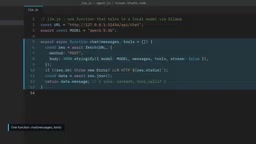
The video demonstrates a direct comparison: when asked "What's the temperature in Tokyo right now?", a chatbot honestly says it has no real-time data; the same question given to an Agent, it calls the OpenMeteo API and returns a real reading of 16.7°C. The model hasn't changed—what changed is the surrounding structure.
Model Selection: Why Use a Small Local Model
To make the demo "free and honest," the video author chose to run the 3B parameter version of Qwen 2.5 on CPU via Ollama. No API key, zero cost.
The trade-off is clear: the 3B model is slower than large cloud models and more error-prone. A real mistake appears in the video—the model guessed the calculator's input placeholders before it had the temperatures for Paris and Berlin, and was blocked by the tool's regex validation. This mistake wasn't hidden; instead, it became the best material for demonstrating error handling.
Key insight: Agent code is decoupled from the model. The same logic, swapped to a larger model, only gets smarter without changing a single line of architecture code.
The Four-Step Mechanism of Tool Calling
Function Calling is the joint of an Agent, and its flow can be broken into four steps:
- Describe the tools: each tool includes a name, description, and JSON Schema for its parameters
- Model requests: when a tool is needed, the model doesn't output text but returns a
tool_callsfield, e.g.get_weatherwith parametercity=Tokyo - Code execution: your program looks up the corresponding function and actually runs it
- Result return: send the return value back as a
role: toolmessage, and the model generates the final answer based on it
There is an iron rule here: the model never executes any code—it only requests. What actually happens is decided by your program. This boundary is the foundation of safe design.
JSON Schema is a standard format for describing JSON data structures, used in Function Calling to tell the model which parameters each tool accepts, their types, and whether they are required. For example, the Schema for get_weather declares city as a required string. The model generates tool_calls conforming to this format, and your code can validate before parsing. It is essentially the "interface contract" between tools and the model, and how well it's written directly affects whether the model can call correctly.
The tool_calls field is a structured output in the model response, mutually exclusive with ordinary text content. When the model decides to call a tool, message.content is empty and message.tool_calls is an array, each item containing id, function.name, and function.arguments (a JSON string). Your program needs to parse arguments, execute the corresponding function, and return the result as a message with role: tool and a matching tool_call_id, so the model can continue reasoning.
Implementation Essentials for Three Real Tools
Weather Tool: OpenMeteo's Two-Stage Call
OpenMeteo is free and requires no API key, but its forecast API only accepts latitude/longitude, not city names. So get_weather internally first calls the geocoding API to convert "Tokyo" into coordinates, then calls the forecast API to get temperature_2m and wind_speed_10m—these are OpenMeteo's field names for "temperature at 2 meters above ground" and "wind speed at 10 meters." If the city can't be found, it throws a clear error to avoid returning a fabricated temperature.
Calculator Tool: Validate First, Then Evaluate
LLMs' arithmetic is unreliable, so delegate calculation to real code. But there's a trap here: you're about to eval a string that came from the model. The safe approach is to first restrict the character set with a regex—only digits, spaces, decimal points, parentheses, and the four arithmetic operators are allowed; everything else is rejected, and only after passing is the evaluation executed.
The security risk of eval is that it executes arbitrary JavaScript code, and strings generated by the model are untrusted. An attacker could use prompt injection to make the model output process.exit() or file operation code. Regex whitelist validation (allowing only digits, operators, parentheses, decimal points, and spaces) can block the vast majority of malicious payloads, but a more robust approach is to use a dedicated expression parsing library (such as mathjs) or write a recursive descent parser to completely avoid executing arbitrary code. The whitelist approach demonstrated in the video is suitable for teaching; production environments should upgrade.
Notes Tool: Letting the Agent Produce Real Side Effects
Notes are stored in the notes.json file. loadNotes reads the file and returns an empty list if it doesn't exist; saveNote appends a timestamped entry and writes it back; readNotes returns all contents. The end of the video shows a file that actually exists on disk—the Agent has changed the world outside the chat window.
The Agent Loop: The Core in Forty Lines of Code
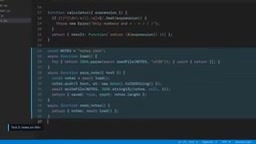
The loop logic lives in the ask function in agent.js. On each question, the user message is pushed into the memory array, then it enters an iteration of up to maxSteps rounds (default 6 steps):
- Call the model with the full history and tool schemas
- If the reply contains no
tool_calls, the model considers it can wrap up and returns the answer directly—this is the first stopping condition - If there are
tool_calls, execute the tools one by one, push the results back into memory as tool messages, and proceed to the next round - If steps are exhausted without convergence, return a clear message "Stopped, maximum steps reached"—this is the second stopping condition
The second stopping condition is crucial. Without it, a confused model could loop infinitely, which in paid-model scenarios translates directly into a bill.
Error Handling: Turning Failures into Model Input
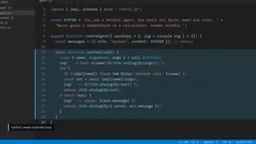
runTool wraps the execution process in try/catch. Nonexistent tool names, unfindable cities, invalid expressions, network failures—any exception won't crash the program but is returned to the model as an ordinary result with an error field. After reading the error reason, the model can retry with a different approach or explain the problem to the user. The nonexistent city case in the video validated this path: the model ultimately truthfully told the user "couldn't find that city, please check the spelling" instead of fabricating a temperature.
The maxSteps guardrail is the hard termination condition of the Agent loop, preventing the model from falling into a dead loop of "request tool → unsatisfactory result → request again." Each loop consumes one model call; if using a token-billed API, an infinite loop quickly accumulates cost. The default of 6 steps is an empirical value: most tasks converge within 2-3 steps, while complex tasks may need more. In practice, you can adjust dynamically based on task complexity and return a clear message when the limit is reached rather than failing silently.
Hands-On Test: Memory, Side Effects, and Guardrails
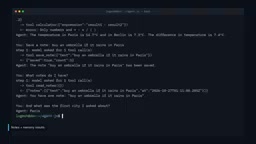
A continuous five-question conversation demonstrated the Agent's full capability surface:
- Calculation: "18.5×4+12" called the calculator and got 86, correct
- Multi-tool concurrency: the temperature difference between Paris and Berlin—the model requested three tools at once (Paris, Berlin, calculator), but the calculator received pre-guessed placeholders and was blocked by the regex. The model then completed the subtraction itself to get 7.4; the answer was correct but bypassed the tool—typical behavior of small models
- Memory: "Which city did I ask about first?" triggered no tools; the model directly scanned the message list and answered "Paris"
- Persistence: notes were actually written to disk with timestamps
When Should You Use a Framework?
The pure-code approach suits learning, small tools, and scenarios requiring full control. But when you need streaming output, automatic retries, multi-provider switching, multi-agent collaboration, long-running state management, or tracing and evaluation, the value of frameworks begins to show. Common choices in the JavaScript ecosystem include LangGraph.js, Vercel AI SDK, and OpenAI Agents SDK.
But no matter which you choose, you now know what's underneath: a model, a few tools, a loop, and a message list.
Paths for Going Deeper
The video offers several extension suggestions: write your own tool (exchange rate lookup, search API, private database); refine the system prompt and tool descriptions and observe how the model's choices change; swap in a larger model for comparison; and—always log every step to see clearly why the Agent made that decision.
That last rule is worth repeating: the model is responsible for requesting; the code is responsible for deciding.
One-line Summary
Build a 40-line Agent loop by hand in pure JavaScript, revealing the essence of LLM + tools + loop + memory.
Paragraph Summary
Based on a YouTube hands-on demo, the article implements a runnable AI Agent from scratch in pure JavaScript, running the Qwen 2.5 3B model on a local CPU. The core thesis is that an Agent is essentially an LLM plus tools, a loop, and memory—no frameworks like LangChain required. The article breaks down the four-step mechanism of Function Calling, implementation essentials for three real tools (weather, calculator, notes), and the roughly 40-line Agent loop with error handling and a max-steps guardrail. Hands-on tests demonstrate memory, multi-tool concurrency, and disk persistence, and it discusses when to use a framework. The final emphasis: the model only requests; the code decides.
Related articles

Zero-Cost Local Jarvis: Open-Source Voice Cloning and Task Automation in Practice
AI Workshop shows how to build a zero-cost local Jarvis with Ollama and Voice Studio: local model switching, open-source voice cloning, file retrieval, and tool-calling tests, with setup steps and hardware trade-offs.

Mistral Large 4 Released: 1T-Parameter MoE Tops Western Open-Source Leaderboard
Mistral releases its flagship Mistral Large 4: a 1T-parameter MoE architecture activating only 49B parameters at inference, trained from scratch on 3,800 Grace Blackwell GPUs, topping the Western open-weight leaderboard with third-party endorsements in law, finance, and cybersecurity.

Mistral Large 4 Review: Can Europe's Strongest Open-Source Model Challenge the US and China?
Mistral Large 4 (L-Charm) review: trillion-parameter MoE, standout cybersecurity benchmarks but behind Kimi K3 in software engineering, 3,800 GPUs, a key step for European sovereign AI.