Build an AI Assistant Without Code: Connecting Telegram and Google Calendar with n8n

Build a personal AI scheduling assistant in three steps by connecting Telegram and Google Calendar with n8n — no code needed.
This article explains how to use n8n, an open-source visual automation platform, to connect a Telegram bot with Google Calendar into a real-time schedule querying AI Agent — without writing any code. The build involves three steps: configuring a Telegram trigger, authorizing Google Calendar access, and linking the nodes into a complete loop. The demo confirms the bot reliably handles queries across different dates. The article also notes that while no-code automation significantly lowers the barrier to entry, reaching production quality requires more work on authentication, error handling, and natural language intent recognition via LLM nodes.
Want a Telegram bot that can look up your schedule in under a minute? With n8n, a visual automation tool, you can chain Telegram, Google Calendar, and AI capabilities into a complete workflow — no code required. This article breaks down the architecture and logic behind this AI Agent based on a hands-on demo.
n8n: The Core Hub for No-Code Automation
n8n is an open-source workflow automation platform that lets you connect services by dragging and dropping "nodes." Its key advantage is abstracting away the programming work — API calls, authentication handling, data parsing — into a visual configuration interface. For non-developers and individual users, this means you can combine chat tools, calendars, databases, and more like building blocks.
In this demo, the entire AI Agent is built on n8n. The creator's central pitch is "no code" — the whole thing runs on node configuration and account authorization, without writing a single line.
n8n's node library covers hundreds of popular services, including Slack, Notion, GitHub, MySQL, and more — with over 400 officially maintained integration nodes. It supports self-hosted deployment, so you can run the service on your own server or local machine, keeping data off third-party clouds — ideal for privacy-sensitive use cases. Compared to platforms like Zapier or Make (formerly Integromat), n8n's open-source nature means zero subscription fees, and you can embed custom JavaScript code inside nodes for added flexibility. Its core execution model is event-driven: a "trigger node" listens for external events (such as incoming messages, scheduled tasks, or webhook callbacks), and once fired, executes subsequent nodes in sequence. Each node's output becomes the next node's input, forming a data pipeline.
The Build Process: Trigger, Authorization, and Calendar Query
The entire workflow breaks down into three key steps.
Step 1: Configure the Telegram Trigger
The workflow starts with a Telegram Trigger node. You'll need to connect your Telegram account (via a Bot) to the trigger, copy the corresponding Chat ID, and configure the message response logic. Once set up, whenever you send a message to the bot in Telegram, n8n captures that message and kicks off the rest of the workflow.
Creating a Telegram Bot requires the official bot, @BotFather. Search for @BotFather in Telegram, send the /newbot command, and follow the prompts to set a name and username. BotFather will return an API Token — this is the credential used to authenticate the Telegram Trigger node in n8n, essentially the bot's "password," so keep it secure. The Chat ID is the unique identifier for each conversation (private chat or group), and can be retrieved by calling Telegram's getUpdates endpoint after sending a message to the bot, or by using third-party tools like @userinfobot. Once configured, n8n can monitor for messages via either polling or webhook. Webhook mode has lower latency but requires your n8n instance to have a publicly accessible URL.
Step 2: Authorize Google Calendar Access
To let the bot "read" your schedule, you need to grant the workflow access to Google Calendar. The demo mentions that to check calendar availability, you need to provide access authorization to the Calendar node. Once authorized, the workflow can read event data from your calendar in real time.
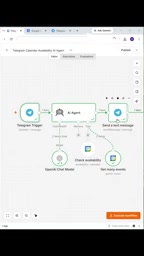
Step 3: Link the Message and Calendar Nodes
Connect the Telegram message node to the calendar query node, and specify the corresponding Chat so that incoming queries map to calendar operations. At this point, the full loop — "receive message → query calendar → return result" — is complete.
Live Demo: Seeing It in Action
Once configured, the creator clicks Execute to validate the workflow.
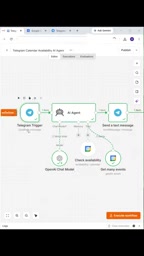
The demo first shows the current state of the calendar, then sends a query from Telegram. After the workflow is triggered, the nodes fetch the calendar data in sequence and send the result back as a message in the chat window.
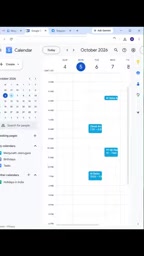
The creator also tests a query for a different day, and the bot successfully returns the schedule details for that date. Both queries succeed, demonstrating that the workflow can reliably handle different time parameters — not just a single scripted demo case.
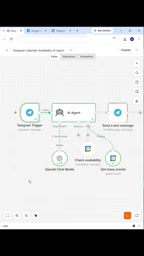
Value and Limitations of This Approach
On the value side, this kind of no-code AI Agent lowers the barrier for everyday users to get started with automation. Calendar queries are just the beginning — the same approach can extend to automatically creating meetings, sending reminders, or syncing multiple calendars. Using Telegram as the interaction layer means users can get their schedule without ever opening a calendar app, keeping friction extremely low.
That said, it's worth being clear-eyed about the limitations of this demo. The content leans toward a "quick start" concept showcase rather than a deep dive into specific node parameters, common pitfalls during authentication, or how to incorporate real AI semantic understanding (e.g., handling natural language queries). Building this into a reliable production-grade assistant would require more work on error handling, intent recognition, and permission security.
What "real AI semantic understanding" typically means is introducing a large language model (LLM) node into the workflow — for example, connecting to OpenAI's GPT or a locally deployed open-source model. The user asks in natural language (e.g., "Am I free next Tuesday afternoon?"), the LLM parses the intent and extracts key time parameters, then passes the structured data to the calendar query node. n8n natively supports LLM nodes for OpenAI, Anthropic, and others, and you can also connect to any OpenAI-compatible local model (like LLaMA running via Ollama) through an HTTP Request node. Introducing an LLM significantly improves fault tolerance and conversational naturalness, but also adds API call costs, response latency, and prompt engineering overhead — all factors to weigh carefully when moving from a demo-level setup to a production-grade solution.
Wrap-Up
Connecting Telegram and Google Calendar with n8n is a lightweight entry point into the world of no-code automation. It demonstrates how modern tooling is turning "build your own AI assistant" from a skill exclusive to developers into something anyone can try. If you're looking to get started with workflow automation, a small, concrete project like this — where you can see real results quickly — is a great place to begin.
Related articles

Tencent WorkBuddy Hands-On: How AI Agents Crush Traditional Chat Assistants
WorkBuddy vs Doubao tested: how AI Agents directly operate computers to convert PPT to PDF, archive files and more. Analysis of WorkBuddy's low barrier, domestic ecosystem, pricing and plugin marketplace, plus AI Agent selection advice.

Azure Cross-Tenant Attack Chain: Root Cause Analysis of Five Paths
Binary Security analyzes five full cross-tenant compromise paths in Azure, trending 271 points on HN. This article interprets their shared root cause perspective and offers defense recommendations for cloud tenant isolation and reflections on responsibility boundaries.

Recreating a Real Bubble Tea Station in Isaac Sim: Script-Driven Unitree G1 Brews Tea
Developers recreated a real self-service tea station in NVIDIA Isaac Sim, using scripts to drive a Unitree G1 through a five-step tea-brewing process, exploring whether physics simulation can be a source of synthetic robot demonstration data and discussing contact stability and imitation learning.