Building a Real-Time Voice Assistant Jarvis with Python: Full MCP Tool Integration

A developer builds an open-source real-time voice assistant with Python, Agora, and MCP that operates calendars, to-dos, and email.
The article introduces a reproducible real-time voice assistant project built by developer Mike. Using Agora as the voice engine for speech-to-text, TTS, and LLM scheduling, the Python backend integrates Google Calendar, Sheets, Notion to-dos, and IMAP email via MCP. The model, voice, and system prompt are customizable, and the frontend was redesigned with Claude Code. Testing revealed minor issues like format misalignment and a hardcoded title, but the project is open-source and extensible.
From Demo to Reproducible: A Voice Assistant That Manages Calendars, To-Dos, and Email
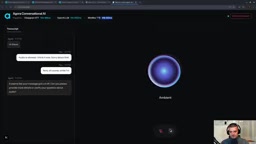
On YouTube, developer Mike showcased a real-time voice assistant he built himself—one that not only converses fluently but also directly operates Google Calendar, Google Sheets, Notion to-dos, and IMAP email. More importantly, the entire project is built with a Python backend and the Agora voice engine, with open-source code that is fully customizable. According to Mike's demo in the video, he successfully added calendar events, logged work hours, checked off Notion to-dos, and even read inbox emails via voice commands. This is not a toy demo but an extensible personal assistant framework.
Tech Stack Breakdown: Voice Engine, LLM, and MCP Toolchain
Agora as the Real-Time Voice Engine
The core of the project is the voice capability provided by Agora, which uniformly handles speech-to-text, text-to-speech, and LLM inference scheduling. Agora's Software-Defined Real-Time Network (SDRTN) selects optimal paths through more than 600 global nodes rather than routing over the public internet, enabling extremely low-latency real-time communication. Mike candidly noted in the video that Agora is a sponsor, but emphasized that its free tier includes 300 minutes of conversational AI time, which is enough for prototype validation.
SDRTN (Software-Defined Real-Time Network) is Agora's self-built global distributed network architecture. Unlike traditional RTC solutions that rely on the public internet, SDRTN deploys hundreds of edge nodes worldwide and dynamically selects optimal transmission paths through real-time network quality probing, thereby bypassing congestion points and jitter zones on the public internet. This architecture is critical for voice assistants: voice interaction is extremely sensitive to end-to-end latency, and typically anything over 300 milliseconds noticeably breaks the naturalness of conversation. SDRTN transmits media streams over a private backbone network, significantly reducing packet loss and jitter in cross-regional scenarios such as between China and the US or across Europe and Asia—this is the underlying technical support behind Agora's claimed low-latency experience.
Python Backend and the MCP Protocol
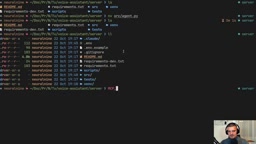
The backend uses Python, with the project initialized via the Python template of the Agora CLI. All tool integrations are based on MCP (Model Context Protocol)—a standard protocol that lets LLMs securely call external services. The project structure is clear: the server directory contains agent.py (model configuration) and server.py (FastAPI service), while the newly added tools.py is responsible for defining MCP tools.
MCP (Model Context Protocol) is an open protocol proposed by Anthropic in late 2024, aimed at standardizing how LLMs connect to external tools and data sources. Its core idea is similar to a "USB-C port for AI applications": the LLM acts as a client and communicates with MCP servers via a unified JSON-RPC message format, while servers encapsulate the invocation details of specific tools (such as querying a calendar or sending email). MCP servers can declare tool names, descriptions, and input parameter schemas, based on which the LLM decides when to call which tool and how to construct parameters. This decoupled design allows the same set of tools to be reused across different models and clients, and greatly reduces the development cost of integrating new services for LLMs—making it an important piece of infrastructure in today's agent toolchain ecosystem.
Tool Integration in Practice: From In-Memory To-Dos to Google Services
Getting the Minimal Loop Working First
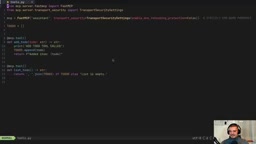
Mike suggests first implementing two in-memory MCP tools: add to-do and list to-dos. A service instance is created via the fastMCP class, with rebinding protection in the transport security settings disabled so that ngrok can expose the local service for Agora to call. He specifically warns: this is for demonstration only; production environments must use proper servers and MCP tools.
In MCP's transport security settings, DNS rebinding protection guards against a class of attacks: malicious web pages use DNS rebinding to make the browser access local services (such as an MCP server on localhost), thereby bypassing the same-origin policy. During local development, exposing a local port to the public internet via tools like ngrok changes the request's origin Host and may trigger this validation, causing calls to fail—hence it is temporarily disabled in the demo. In production, this protection should remain enabled, with security and availability balanced through configuring an allowed Host whitelist or deploying under a controlled domain, rather than simply turning off the protection.
Integrating Google Sheets and Calendar
After enabling the Sheets API and Calendar API in the GCP console, create a service account and download the JSON key. Share the spreadsheet and calendar with the service account email, and authenticate using the google-api-python-client and google-auth libraries. In the code, credentials are loaded via service_account.Credentials.from_service_account_file, and then the calendar and sheets clients are constructed.
A Google Service Account is a machine identity designed for non-human users, commonly used for server-to-server authentication. It has its own email address (in the form xxx@project-name.iam.gserviceaccount.com) and authenticates by signing with a downloaded JSON key file, without the OAuth user authorization redirect flow. When using a service account to access Google Sheets or Calendar, a key step is to explicitly share the target spreadsheet or calendar with the service account email; otherwise the API returns a 403 permission error. This approach suits backend automation scenarios but cannot act on behalf of end users, so if access to a user's private data is needed, the OAuth 2.0 authorization flow is still required.
Connecting Notion and IMAP
Notion is connected via the official client, requiring a connection to be added on the Notion page and an API token obtained. Email uses the standard IMAP protocol, connecting to the inbox and reading emails via imaplib. In the video, Mike demonstrated a failed tool call caused by not sharing the Notion page, followed by correcting the permissions—which precisely illustrates the typical debugging path for MCP tools.
Customizing the Model and Voice: Giving the Assistant Personality
The default configuration uses GPT-4o mini as the LLM and MiniMax TTS for speech synthesis. Mike felt the default model wasn't smart enough, so he switched to GPT-4.5.1 mini and changed the TTS model and voice ID, transforming the assistant from a female voice "Ada" to a male voice "Mike". The system prompt can also be modified—for example, requiring "extremely concise, answer in as few words as possible" to curb verbose responses.
Frontend Redesign: A Rapid Makeover with an AI Agent
Rather than writing frontend code by hand, Mike started a Claude Code session and asked it to "redesign the entire app, keep functionality unchanged, switch to an orange-and-black color scheme, brand it as Neural Nine Personal Assistant, with a minimalist, techy, pixel-art style". About 20 minutes later, the interface was completely transformed. This shows that when combined with a coding agent, the marginal cost of personalization is extremely low.
Testing and Troubleshooting: Performance in Real Scenarios
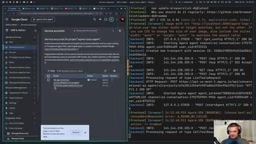
In the final test, the assistant accurately answered calendar events, added new meetings, logged time ranges in Sheets, checked off Notion to-dos, and read emails. But two issues surfaced: first, the format of Sheets entries was misaligned, requiring explicit column order in the prompt; second, the calendar event title displayed as "the title" because of a hardcoded string in the code. Mike admitted this was his own coding mistake rather than an architectural flaw.
Extensibility: Any Service with an API Can Be Integrated
The value of the entire project lies in its extensibility. As long as the target service provides an API or MCP server, it can be integrated in the same pattern—Slack, Linear, Evernote, and more. Mike emphasizes that once you understand how MCP tools are defined, the rest of the work can be fully delegated to a coding agent for batch completion. For developers who want to build a personal AI assistant, this is a low-cost starting point with a clear path.
One-line Summary
A developer builds an open-source real-time voice assistant with Python, Agora, and MCP that can operate calendars, to-dos, and email.
Paragraph Summary
The article introduces a reproducible real-time voice assistant project built by developer Mike. The project uses Agora as the voice engine to uniformly handle speech-to-text, text-to-speech, and LLM scheduling, with a Python backend that integrates Google Calendar, Google Sheets, Notion to-dos, and IMAP email into the LLM toolchain via the MCP protocol. Mike first gets a minimal loop working with in-memory to-do tools, then progressively integrates each external service, demonstrating configuration details such as service account authentication and page sharing. The model, TTS voice, and system prompt are all customizable, and the frontend was redesigned in about 20 minutes with Claude Code. In testing, the assistant is basically usable but exposed issues such as misaligned table formats and a hardcoded calendar title. The project is open-source and highly extensible—any service with an API can be integrated in the same pattern.
Related articles

The Ultimate Bilibili Guide to Codex: From Installation to Real-World Pitfall Avoidance
A breakdown of Bilibili's step-by-step Codex guide: from GPT account registration, desktop install paths, phone verification and 403 error troubleshooting, to the ".env" environment file fix for "reconnecting 5 times," plus the Plus membership quota system and Pro upgrade advice, with beginner tips.

AI+UE in Practice: A Full Record of MCP Connections and Packaging Troubleshooting
Bilibili creator Yongzhou's AI+UE course: connecting MCP plugins to Unreal Engine, the time and pitfalls of AI-created blueprint subclasses, linking project files in VS Code, and using AI to read logs and locate plugin conflicts when packaging fails.

Python for Absolute Beginners: A Must-Learn in the AI Era of 2026
A 2026 Python beginner tutorial covering core basics to hands-on projects, including variables, functions, OOP, web scraping, and data analysis. Learn why Python is a must-learn in the AI era and how it compares with Java in the job market.