Building an AI Content System with n8n: One Idea, a Month of Content

Build a five-stage n8n AI pipeline that turns one idea into 30 days of multi-channel content automatically.
This article breaks down an AI content production system built on the open-source automation tool n8n, centered on a five-stage pipeline: Idea → Draft → Visual → Review → Publish. The design philosophy is "architecture-first": models and platforms are swappable, but the pipeline structure stays stable. A model layering strategy balances quality and cost, while a human review gate with a feedback loop ensures the system learns your taste over time. Every approved piece is automatically multiplied across blogs, newsletters, and social channels — and because it's self-hosted on n8n, you own the entire system.
Imagine sipping your morning coffee, clicking a few "Approve" buttons, and watching a single idea automatically transform into 30 days of content across your blog, email newsletter, and social platforms. This isn't about some "magic prompt" or gimmick — it's a genuinely functional automated pipeline where AI handles the heavy lifting while you focus on the final call.
This article is based on a tutorial from the YouTube channel Next Workflow, breaking down how to build an end-to-end AI content system using the open-source automation tool n8n. The core insight isn't about how powerful any particular model is — it's about architectural design: when your pipeline is solid enough, you can swap out models, platforms, or content types at any time and the whole system keeps running.
The Five-Stage Pipeline: The Skeleton of a Content System
Every content system that actually works follows the same five stages at its core. Think of it like an assembly line in a factory — each station does one thing, passes the result to the next, and a finished product rolls off the line every day.
- Idea Engine: Input a topic
- Draft Generation: AI expands the topic into full content
- Visual Generation: Automatically produces on-brand images or graphics
- Human Review: You approve, revise, or reject
- Publish & Schedule: Content is automatically distributed to all channels on a preset schedule
The value of this structure lies in decoupling. Models will iterate, platform rules will change, and content formats will evolve — but as long as the pipeline's "joints" are clearly defined, any single stage can be replaced without affecting the whole. This is why the author repeatedly emphasizes: the real magic is the architecture, not the model.
Choosing the Right "Brain": A Model Layering Strategy
Model selection matters more than most people think. In the past, building these kinds of systems meant choosing between expensive flagship models or cheap ones that produced mediocre, robotic output.
According to the tutorial, with the arrival of new-generation models (the video mentions GPT-4.1, Claude Opus 4.5, etc.), this cost-vs-quality tradeoff has shifted. The author's practical recommendation is model layering:
- Primary creative work uses a powerful mid-tier model (like GPT-4.1 or Claude Opus 4.5) for heavy creative tasks like drafting;
- Lightweight tasks use cheaper, faster models for small jobs like headlines, summaries, and hashtags.
This division of labor keeps quality high while keeping token costs down — because content systems are inherently heavy token consumers, and a layering strategy directly determines long-term operational economics.
Prompts: Teaching the AI to Speak in Your Voice
The model is only half the equation; the prompt is the other half. Just throwing in "write me a post about productivity" will get you generic, forgettable content. The right approach is to build a system prompt — feed it your 3–5 best pieces of existing content as examples, explicitly define your audience, tone, and what to avoid. Save this prompt once, and every draft the pipeline produces going forward will sound like you, not a robot.
A System Prompt is a special layer in the conversation structure of large language models. In a typical Chat interface, messages come in three roles: system, user, and assistant. The system prompt is injected before the entire conversation begins, effectively giving the model a persistent "work persona" and behavioral guidelines — all subsequent user inputs are responded to within this framework. Unlike user prompts entered ad hoc each session, the system prompt is automatically included in every pipeline call without needing to be re-entered. This is precisely the mechanism that makes "voice cloning" possible: once you encode your writing style, audience definition, prohibited language, formatting requirements, and example pieces into the system prompt, the model will reference this "personality brief" when generating any draft, maintaining stylistic consistency across all pieces. In n8n's AI nodes, the system prompt typically corresponds to the "System Message" or "Instructions" field — configure it once and reuse it across the entire workflow.
Building the Workflow Node by Node in n8n
Now for the hands-on part — building the workflow in node order.
Trigger: Start with a Form, Keep Control
There are two trigger options. One is a scheduled trigger, where the workflow automatically wakes up every Monday morning and kicks off the pipeline. The other is a manual trigger connected to a simple form — you enter a topic idea, click submit.
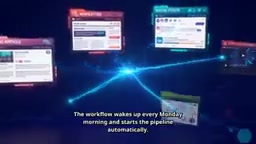
The author recommends beginners start with the form trigger, since it gives you more control during the learning phase. Switch to fully automated mode once you're comfortable.
Idea Engine and Draft Nodes: One Into Many
The idea engine is an AI agent node connected to your "brain model." It receives your topic and generates 5–10 content angles: a topic about time management can branch into an "how-to guide," "personal story," "myth-busting," "checklist," "quote graphic," and more — this is precisely the mechanism that turns one idea into 30 days of content. The draft node then calls your "voice prompt" for each angle to write a complete first draft.
Visual Node: Say Goodbye to Design Tools
The workflow sends the draft summary to an image model, which automatically generates on-brand visuals. You never have to open a design tool again.
n8n is an open-source workflow automation tool, similar in positioning to Zapier or Make (formerly Integromat), but with a key difference: it supports self-hosting. You can deploy n8n on your own server, VPS, or cloud account — all data, credentials, and workflow logic are stored in an environment you control, with no dependency on a third-party SaaS platform's continued operation. n8n uses a visual "node and wire" orchestration model: each node represents an operation (calling an API, reading/writing a database, sending an email, triggering an AI model, etc.), nodes pass JSON data between each other via connections, and logic branches, loops, and conditionals are all represented graphically. For the content automation scenario described in this article, n8n natively integrates with OpenAI, Anthropic, Google Sheets, Gmail, Slack, WordPress, and hundreds of other services — so you can directly chain AI nodes, storage nodes, and publishing nodes into a complete pipeline without writing any glue code yourself. The community edition is completely free; the cloud-hosted version charges per execution.
The Human Review Gate: The Most Important Stage in the Entire System
This is what the author considers the most critical node in the whole system — and the truth that most "AI gurus" won't tell you: fully automated content with zero human involvement will eventually look exactly like everyone else's.

The right approach is to move the human to the highest-value position: final approver. The review gate works like this:
- The workflow compiles all drafts each day into a single email or Slack message and sends it to you;
- You spend ten minutes quickly scanning — approve, revise, or reject;
- Approved content moves to the publishing stage; rejected content goes back to the draft node along with your feedback, so the AI learns what you don't like.
This feedback loop is the secret. After two or three weeks of use, the AI starts anticipating your taste, and the system gets smarter every day through continuous learning from a human expert — namely, you.
Also protect your voice with a style guide document — five rules written by you personally, like "never use buzzwords," "always end with a question," "keep sentences short." The author argues that this small document does more for quality than any model upgrade ever could.
The "feedback loop that lets the AI learn your taste" mentioned above is typically implemented in one of two ways in engineering terms. The first is prompt iteration: when you reject a draft, you attach specific feedback (e.g., "the tone here is too formal," "the examples aren't relatable enough"), and the workflow appends these notes to the system prompt or current call context so the model regenerates accordingly. After enough rejection cases accumulate, you can manually distill recurring feedback into the system prompt to make it permanent. The second is few-shot example updating: periodically add your approved, high-quality drafts to the "examples" section of your system prompt, giving the model increasingly precise reference material over time. Neither approach involves true model fine-tuning — instead, they use context engineering to dynamically adjust model behavior at inference time. The cost is minimal and the effect is immediate, making this approach especially well-suited for individual creators who want to iterate quickly at the tooling layer.
Publish & Schedule: One Piece of Content, Multi-Channel Amplification
Finally, the publishing stage — where everything you've built pays off. Add a scheduling node and connect it to your blog, email newsletter tool, and social accounts.

A long-form article can be published as a blog post on Monday, repurposed as an email newsletter on Wednesday, then broken into five short posts distributed throughout the week — one piece of work, multiplied across every channel. Set your publishing calendar once: long-form content every Monday and Thursday, short posts every weekday morning.
And here's the best part: because you're using n8n, you completely own the entire system. It runs on your own server or cloud account, with no monthly SaaS fees eating into your margins, and no platform that can change the rules overnight and break your workflow. You built the machine; the machine works for you.
Summary
The entire system can be distilled into five steps:
- Design the five-stage pipeline: Idea → Draft → Visual → Review → Publish;
- Pick a powerful mid-tier model as your "brain," and route lightweight tasks to cheaper models;
- Start building your n8n workflow with a form trigger to maintain control;
- Add a human review gate with a feedback loop to improve quality week over week;
- Connect all platforms and let the scheduler multiply every approved piece of content across all channels.
One idea goes in, 30 days of content comes out. For creators who want to scale their output without sacrificing their personal voice, this "architecture-first, human-AI collaboration" approach is well worth adopting.
Related articles

LangChain Retry Middleware Configuration: Practices and Selection Guide
Based on Reddit community discussion, this article analyzes LangChain ModelRetryMiddleware retry parameter configuration practices, covering the selection logic and alternatives for key options like max_retries, backoff_factor, and jitter.

Texas Senate Race in Trouble: Why Are Republicans Nervous?
Texas Senate race stirs Republican anxiety. Based on street interviews, this article analyzes the Democratic offensive in funding, organization, and running everywhere, and how Republicans are defending "Texas, Texas" amid the political pendulum effect.

Gemini Chat Now Generates and Edits Google Docs Directly, a New Breakthrough in Office Productivity
Google Gemini's chat interface now generates and edits PDF, Google Docs, Sheets, Slides, Markdown, TXT, and code files. Available to all users; web supports all formats, mobile only PDF for now.