Building Jarvis with Claude + MCP: Smart Home Access Without Hardware Modifications

Using Claude Code to auto-generate an MCP Server, bypassing smart speakers to directly control a Tuya bulb.
The article introduces a YouTube creator's solution for building a simplified Jarvis using Claude, MCP Server, and the Tuya platform. The core idea is to use natural language prompts to have Claude Code automatically generate an MCP server, connecting the local computer to the WiFi bulb without Alexa or Google Home relay. The setup has four steps. The creator notes that currently only a single bulb is connected, and whole-home adaptation, always-on local computer, and credential security remain production obstacles.
Building Jarvis with Claude + MCP: Smart Home Access Without Hardware Modifications
A YouTube creator demonstrated how to use Claude, MCP Server, and the Tuya smart platform to let AI directly control a smart light bulb at home—without relying on Alexa or Google Home. The core idea of the entire solution: use natural language to have Claude Code automatically generate an MCP server, establish communication between the local computer and the WiFi bulb, and finally add voice—and a simplified version of Jarvis is born.
Why Choose MCP Over Traditional Smart Speakers
The traditional smart home control chain is typically: voice assistant → cloud platform → device. Alexa and Google Home play the central hub role in this chain, but this also means you're locked into a specific ecosystem.
MCP (Model Context Protocol) offers another possibility. According to the video creator's explanation, MCP Server allows AI models to directly access home devices. You only need a single prompt to generate this server, thereby bypassing the middleman. AI is no longer just a tool that "answers questions"—it becomes an agent that can "execute actions."
The value of this approach: you don't need to purchase any additional hub hardware—a laptop plus a bulb that supports the Tuya platform is enough.
MCP (Model Context Protocol) is an open protocol proposed by Anthropic, designed to standardize the way AI models connect to external tools and data sources. It uses a client-server architecture: AI applications (such as Claude Desktop or Claude Code) act as clients and execute specific operations through tool interfaces exposed by MCP Server. Developers only need to implement a Server according to the protocol, and any AI model that supports MCP can call the functionality provided by that Server—without having to adapt separately for each AI platform. This design transforms "AI calling external tools" from customized integration into plug-and-play standardized connectivity, significantly lowering the development barrier and enabling AI to shift from passive responding to proactive execution.
Four-Step Setup Process in Detail
Step 1: Migrate the Bulb from the Original App to Smart Life
The video uses a Wipro smart bulb (most Wipro bulbs are based on the Tuya platform). The creator recommends first removing the bulb from the Wipro official app, then downloading the Smart Life App and reconfiguring it.
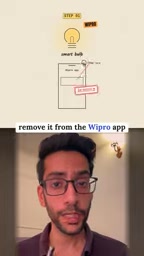
The key to this step is unified management platform. Tuya's Smart Life App itself is the universal entry point for the Tuya ecosystem, and the subsequent developer API is also based on the same system.
Tuya is a company that provides IoT cloud platform services. Many brands' smart devices (such as Wipro bulbs) actually use its modules and cloud services but use their own apps as the frontend. Smart Life is the official universal consumer app launched by Tuya, capable of unified management of all devices based on Tuya solutions. Migrating a device from the original app to Smart Life essentially means binding the device to Tuya's universal cloud account, thereby gaining access to Tuya's developer API. A Cloud Project on the developer platform needs to be associated with a Smart Life account in order to read the device list and issue control commands. Therefore, this step is not just an app change but a prerequisite for establishing the subsequent API chain.
Step 2: Register on the Tuya Developer Platform and Link the Claude Project
Go to the Tuya developer website to register an account, find the Cloud Project option, and bind the Smart Life App to that project. After binding is complete, your bulb will appear in the device list.
This step essentially opens a legitimate API access channel for AI, giving the subsequent MCP Server permission to call the device.
Step 3: Extract the API Key and Secret and Store Them in a JSON File
Copy the API Key and Secret from the Tuya developer backend and store them in a JSON file in a local folder.
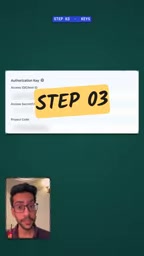
Sensitive credentials are not written directly in the code but referenced through a configuration file—this is a fairly standard practice.
Step 4: Have Claude Code Generate the MCP Server and Connect the Bulb
Tell Claude Code the path to the JSON file, then give the prompt: have it create an MCP Server and connect the bulb. Claude will automatically handle the rest—scanning the WiFi network, discovering the bulb, and pairing the bulb's local Key with the laptop.
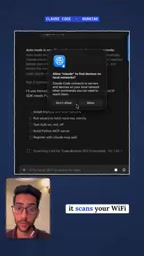
After successful pairing, the local computer can directly access the bulb, with Alexa and Google Home completely out of the chain.
The Local Key is an encryption credential used by Tuya devices for local area network communication, typically generated by the device during network configuration and stored in the device firmware. To directly control the bulb over the local network, the MCP Server needs to obtain this Key and complete pairing with the device before it can send encrypted commands. When generating the Server code, Claude Code automatically handles the WiFi scanning, device discovery, and Key extraction process. This local direct connection method does not rely on cloud platform relay, resulting in faster response—but it also means the control scope is limited to the same local network, and leakage of the local Key could lead to unauthorized control of the device. Therefore, credential management requires caution.
Results and Limitations: What a Single-Bulb Demo Means
The most intuitive scenario in the video demo: say "Wake up Jarvis," and the light turns on. The creator also demonstrated voice interaction where Jarvis "sets romantic mode."
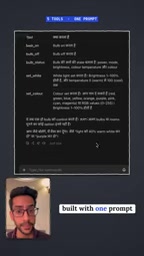
But it's important to view this calmly: currently only a single bulb is connected. The creator himself said "tomorrow I'll connect the other devices at home too." From a single device to whole-home intelligence, there are still engineering challenges to solve—device type adaptation, concurrent control, exception handling, and more.
Another hidden cost: the local computer must remain running for the MCP Server to work. This is fundamentally different from the 7×24 always-on experience of cloud-based voice assistants.
Implications for Developers
The most noteworthy aspect of this demo is not "using AI to turn on lights" itself, but rather the idea of using AI to generate the connection layer. In the past, connecting to a smart device required reading documentation, writing integration code, and debugging protocols; now a single prompt can accomplish most of it. MCP, as a protocol layer, is lowering the barrier to "AI calling external tools" to the level of natural language.
Of course, security boundaries also need to be considered. API Keys stored in local JSON, MCP Server running on a personal computer—this means the security of device control depends on your local machine's security posture. For production environments, credential management and access control remain unavoidable topics.
One-line Summary
Using Claude Code to automatically generate an MCP Server, bypassing smart speakers to directly control a Tuya bulb.
Paragraph Summary
The article introduces a YouTube creator's solution for building a simplified Jarvis using Claude, MCP Server, and the Tuya platform. The core idea is to use natural language prompts to have Claude Code automatically generate an MCP server, establishing communication between the local computer and the WiFi bulb without going through Alexa or Google Home. The setup has four steps: migrate the bulb to the Smart Life App, register on the Tuya developer platform and bind a cloud project, extract the API Key/Secret and store them in JSON, and have Claude automatically scan WiFi and pair the device. In the demo, voice commands can turn the light on/off and switch modes. The creator notes that currently only a single bulb is connected, and whole-home adaptation, keeping the local computer always on, and credential security remain obstacles to productionization.
Related articles

T3 Code: The Open-Source AI Coding Assistant's Comeback Story
T3 Code is an open-source AI coding assistant that unifies subscriptions like Codex and Claude, with powerful remote control and parallel task management.

Never Elected, Yet Ruled New York for 30 Years: The Ultimate Case Study in the Mechanics of Power
Robert Caro's biographies reveal how unelected Robert Moses ruled New York for 30 years through legal drafting and public authorities, and how Lyndon Johnson built leverage as a "powerless" Senate Majority Leader. Unpacking the underlying logic of accumulating and sustaining power.

The CPython 3.10 Recursion Trap and Synthetic Recovery in TokenGuard, an LLM Circuit Breaker
TokenGuard's author recounts a recursion crash caused by OrderedDict.pop in CPython 3.10 and introduces v0.3.0's Loop Nudge synthetic recovery, inline DLP scanning, and other new LLM agent circuit-breaker capabilities.