ChatInbox: Rebuilding Your Inbox Around Contacts

ChatInbox rebuilds the inbox around contacts, offering CRM-grade context and on-device AI.
ChatInbox is an email product with 75 upvotes on Product Hunt. Its core idea is to transform the inbox from a time-ordered "message stream" into a contact-organized "relationship stream," aggregating all emails, attachments, and reply status for the same contact into a single conversation thread and indicating whose turn it is to reply. It supports Gmail, Outlook, iCloud, and any IMAP account, automatically sorting newsletters and receipts into Feeds. AI capabilities are powered by Apple Intelligence, with drafting, summarization, and triage all performed on-device. The product natively supports Mac, iPhone, and iPad and has undergone three years of iteration, but platform coverage is limited, community feedback samples are limited, and user habit migration remains to be verified.
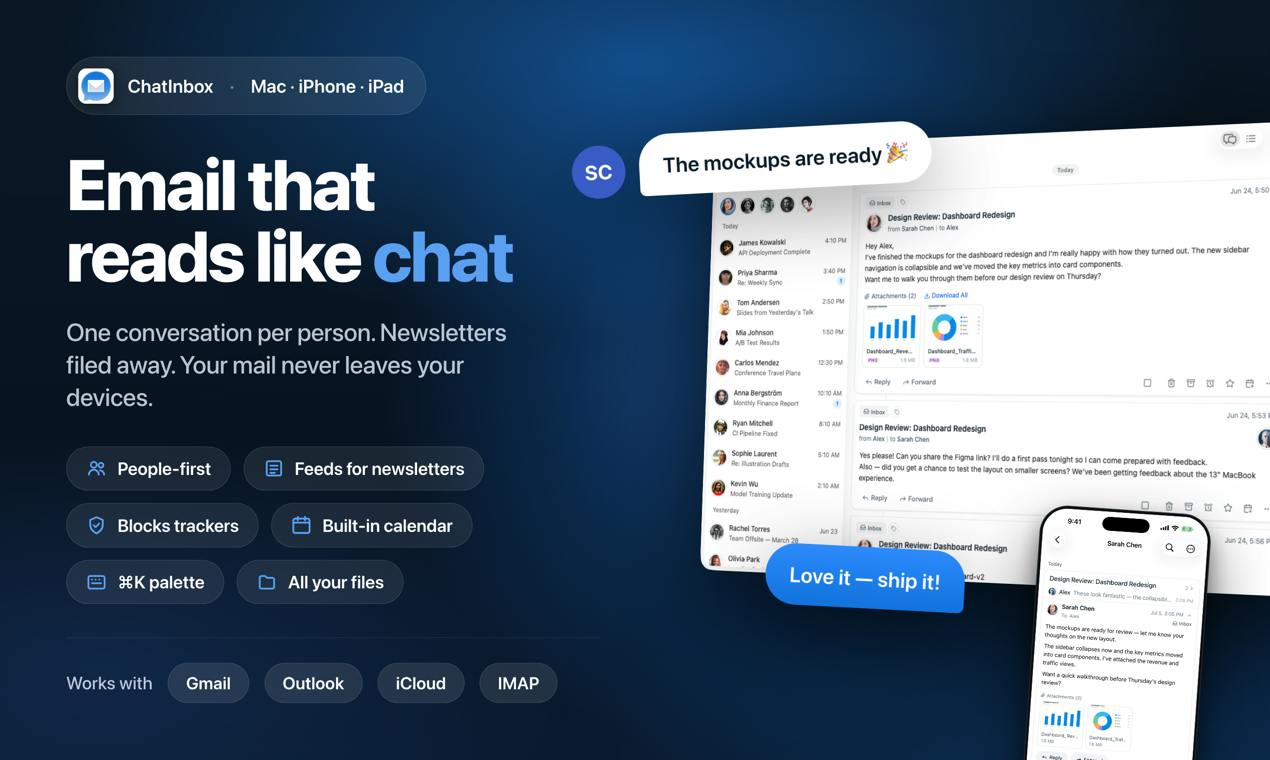
Traditional email clients sort messages by time, and when an inbox is flooded with hundreds of emails, correspondence from important clients often gets buried among newsletters and promotional messages. ChatInbox attempts to change this paradigm—it reorganizes the inbox by contact, merging all correspondence with each client, vendor, or friend into a single conversation thread that presents the complete history, all attachments, and whose turn it is to reply. This product, which received 75 upvotes and ranked 13th on Product Hunt, focuses on a "CRM-grade context" email experience.
From Timeline to Relationship Line: The Core Design Logic
The underlying idea of ChatInbox is to turn the inbox from a "message stream" into a "relationship stream." In a traditional inbox, multiple emails from the same contact are scattered across different points in time, and users must repeatedly search to piece together context. ChatInbox aggregates each contact into a continuously evolving conversation thread, into which all emails, files, and history are gathered.
This design is especially practical for users who need to maintain a large number of external relationships—salespeople, freelancers, and project managers no longer need to switch to a separate CRM system to view client correspondence records; relationship context is embedded directly in the inbox. The product team says this direction has undergone three years of iteration, and it currently natively supports Mac, iPhone, and iPad.
Cross-Platform Aggregation and Smart Categorization
ChatInbox supports Gmail, Outlook, iCloud, and any IMAP account, which means users can unify correspondence from multiple email addresses into a single contact-organized view. For users who use both work and personal email, this aggregation capability reduces the cost of switching between different clients.
Newsletters and receipts are automatically sorted into the Feeds category, no longer distracting attention from the main inbox. This mechanism complements the contact-grouping approach: interpersonal correspondence goes into the conversation view, while bulk information goes into a separate feed, so inbox noise is filtered through a two-layer structure.
IMAP (Internet Message Access Protocol) is one of the standard protocols for email clients to read and manage mail from a server. Unlike POP3, it keeps mail on the server and supports multi-device synchronization. Supporting "any IMAP account" means users can connect not only to mainstream services such as Gmail and Outlook, but also to self-hosted corporate mail servers, regional email providers, or legacy accounts from discontinued services. Note, however, that IMAP itself does not include extensions such as calendar or contact synchronization, and folder structures and labeling systems vary considerably across providers, so a unified aggregated view requires additional mapping work.
On-Device AI: A Privacy-First Trade-off
ChatInbox's AI capabilities are powered by Apple Intelligence, offering drafting, summarization, and triage features, all running on-device. The company explicitly states that email data never leaves the user's device, which is a meaningful commitment for users handling sensitive business information.
The privacy advantage of on-device operation also implies capability boundaries: feature depth is limited by the local model, and it is deeply tied to the Apple ecosystem. For non-Apple users, this value cannot yet be realized—the product currently covers only Apple's three major platforms.
Apple Intelligence is Apple's system-level AI framework introduced in 2024 with iOS 18, iPadOS 18, and macOS Sequoia, including writing tools, notification summaries, email triage, and more. Architecturally, it is divided into two layers: on-device models and Private Cloud Compute: simple tasks are completed on the local NPU, while complex requests are sent to Apple's dedicated cloud chips for processing without retaining data. ChatInbox's emphasis that everything "runs entirely on-device" indicates that its features mainly call local models, which also explains why feature depth is limited by local compute power and why it must rely on newer Apple devices (typically requiring M-series or A17 Pro chips and above).
Several Questions Worth Watching
Organizing the inbox by contact is not an entirely new concept, but ChatInbox introduces the "whose turn" status indicator into email, approaching the interaction logic of a lightweight CRM. The key variables in actual use are: whether the conversation view remains clear when a single contact generates an extremely large volume of email; whether the accuracy of the Feeds categorization can be maintained; and how contact identities are merged and deduplicated after multi-account aggregation.
The product is currently in an early Product Hunt exposure phase, with only 2 comments and a limited sample of community feedback. Three years of iteration shows the team has the patience for sustained investment, but email products have high switching costs, and whether users are willing to change long-established habits for a "relationship perspective" still needs time to verify.
Contact identity resolution is a classic challenge in multi-account aggregation: the same person may send mail from both work and personal email addresses, with inconsistent name spellings and signature formats. Common approaches use fuzzy matching based on email addresses, display names, phone numbers or company information in signatures, and allow users to merge manually. If matching fails, two different people may be merged into one conversation thread, or one person's emails may be split into two threads, directly affecting the core value of the "relationship perspective."
Who Should Try It
If you need to track correspondence with multiple clients or partners in your daily work and do not want to maintain a separate CRM, ChatInbox's contact aggregation approach is worth noting. Apple ecosystem users can directly experience the privacy advantages of on-device AI; users who rely heavily on non-Apple devices or need complex automation rules may need to wait for more complete platform coverage.
One-line Summary
ChatInbox rebuilds the inbox around contacts, offering CRM-grade context and on-device AI.
Paragraph Summary
ChatInbox is an email product that received 75 upvotes on Product Hunt. Its core idea is to transform the inbox from a time-ordered "message stream" into a contact-organized "relationship stream," aggregating all emails, attachments, and reply status for the same contact into a single conversation thread and indicating whose turn it is to reply. It supports Gmail, Outlook, iCloud, and any IMAP account, and automatically sorts newsletters and receipts into the Feeds category. AI capabilities are powered by Apple Intelligence, with drafting, summarization, and triage all performed on-device so that email data never leaves the device. The product natively supports Mac, iPhone, and iPad and has undergone three years of iteration, but platform coverage is limited, community feedback samples are limited, and user habit migration remains to be verified.
Related articles

Google Releases Gemini 4 Carbon: Its Strongest Model Yet, Debuting with a Cybersecurity Focus
Google releases Gemini 4 Carbon, calling it its strongest model, with a cybersecurity focus. It tops the third-party composite ranking at 59 points but leads by only one or two. This article analyzes its security test results, staged rollout, token pricing, and the divergence between self-reported and third-party tests on hallucinations.

LangChain Adds SchemagateRetriever: On-Demand Table Retrieval Cuts Text-to-SQL Prompts by 92.9%
LangChain docs add SchemagateRetriever: retrieves only the tables needed for text-to-SQL with permission filtering, cutting median prompt size by 92.9% on Spider 2.0 large schemas via offline BM25 selection with no model calls.

Multi-Step AI Agent Guardrail in Practice: Fact-Change Detection Drives False-Alarm Rate to 0%
Developer shares first version of a multi-step AI Agent guardrail: re-verifying dependency facts before irreversible actions cut false alarms from 50% to 17% across 23 scenarios, then to 0% via conservative normalization without lowering catch rate. Runs on local qwen2.5-7b.