Chrome Adds Suspicious Site Warnings: Enhanced Protection Mode Upgraded Again

Chrome's Enhanced Protection mode adds Suspicious Site Warnings, continuing the two-stage prompt mechanism.
Google has launched a "Suspicious Site Warnings" feature for Chrome that only takes effect when Enhanced Protection mode is enabled. It follows the 2024 two-stage warning design for file downloads: users receive a prompt before visiting sites with suspicious characteristics that are not yet explicitly flagged as malicious, allowing them to judge before exposure to potentially malicious content. The mechanism aims to fill the gray area traditional blacklists struggle to cover. The article analyzes Enhanced Protection mode's positioning as the culmination of Chrome's security capabilities, discusses the trade-off between security and user interruption in tiered warnings, and notes that browser security competition is shifting from passive blocking to proactive warning. Google has not yet disclosed trigger criteria or false positive rates, and the actual experience will depend on precision.
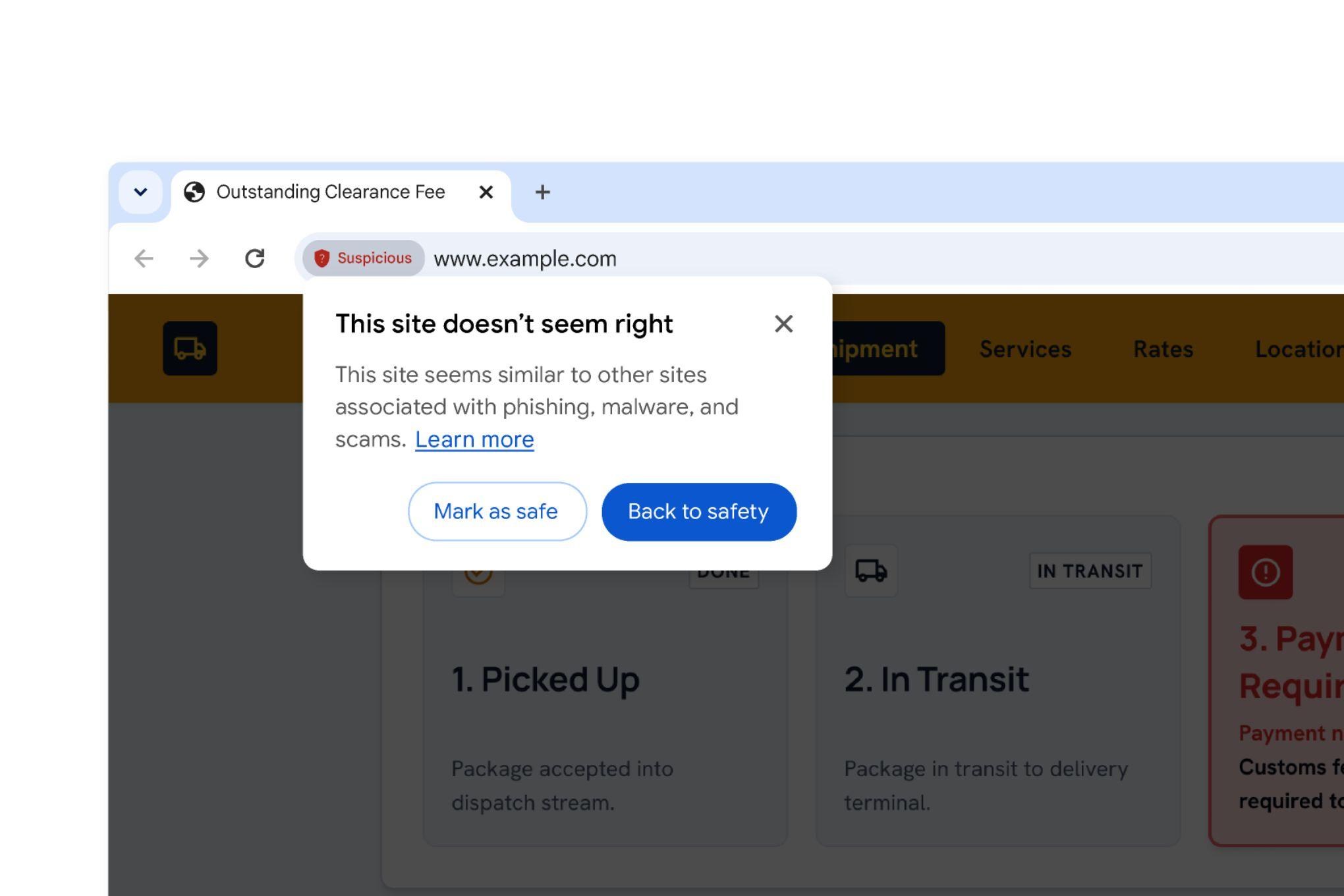
Google is rolling out a new security feature for the Chrome browser designed to give users a clearer picture of how potentially malicious a website might be before they open it. The feature, called "Suspicious Site Warnings," takes effect when Chrome's Enhanced Protection mode is enabled, and its design follows the two-stage warning system introduced for Chrome file downloads in 2024.
From File Downloads to Web Browsing: Extending the Two-Stage Warning
In 2024, Chrome introduced a two-stage warning mechanism for file downloads: when a user attempts to download a potentially harmful file, the browser first shows a warning, and if the user chooses to continue, a stronger secondary warning appears. This design strikes a balance between security and user autonomy, avoiding excessive interruption while adding enough friction for high-risk actions.
Now, Google has ported this approach to web browsing. When Enhanced Protection mode is on, Chrome displays a warning before the user visits a suspicious site, rather than intercepting it only after the page has loaded. This means users have a chance to make a judgment before being exposed to potentially malicious content.
According to Google, the feature mainly targets websites that have not yet been explicitly flagged as malicious but exhibit suspicious characteristics. Such sites often fall into a gray area that traditional blacklist mechanisms struggle to cover, and two-stage warnings can fill that gap.
The core limitation of traditional blacklist mechanisms is their lag: a URL must first be discovered by crawlers and judged malicious either manually or automatically before it enters the list, and the window from a new site going live to being cataloged often spans hours or even days. Gray-area sites exploit this gap by frequently changing domains or briefly hosting malicious scripts to evade blocking. Heuristics and reputation scoring therefore serve as supplementary tools—they do not rely on the definitive conclusion of "known malicious" but instead synthesize signals such as domain age, hosting location, redirect chains, and historical reports to produce a risk probability. Such judgments are inherently uncertain, and false positives are unavoidable, which explains why two-stage warnings are necessary: they turn probabilistic conclusions into tiered prompts rather than outright blocking.
Enhanced Protection Mode: A More Proactive Security Defense
Suspicious Site Warnings are part of Chrome's Enhanced Protection mode. This mode already provides capabilities such as real-time blacklist checks and in-depth download scanning, and the new feature further extends its protective scope.
Compared with Standard Protection mode, Enhanced Protection sends more data to Google for real-time analysis in exchange for more timely security responses. For security-sensitive users, this is an option worth enabling. However, Google also cautions that Enhanced Protection is not foolproof, and users still need to maintain basic cybersecurity awareness.
From a product strategy perspective, Google is positioning Enhanced Protection as the culmination of Chrome's security capabilities. By continually layering on new features, it seeks to send users a clear signal: enable Enhanced Protection, and you get the strongest protection Chrome can currently offer.
Chrome's "Safe Browsing" mechanism is divided into two tiers: Standard Protection and Enhanced Protection. Standard Protection maintains a local list of malicious URL hashes that Google periodically distributes; the matching process is largely done on-device, communicating with servers only when uploading a small amount of anonymous information. Enhanced Protection moves the judgment to the cloud: the browser sends fragments of visited URLs, metadata of downloaded files, and some page characteristics to Google for real-time comparison, thereby identifying fresh threats that have not yet entered the public blacklist. The trade-off is a larger privacy exposure surface, so this mode is off by default and requires users to actively enable it in settings. It is also tied to a Google account, and once enabled it can sync across other devices. Understanding this layering helps explain why "Suspicious Site Warnings" appear only in Enhanced mode—real-time risk assessment itself depends on the cloud channel.
The User Experience Trade-off: The Boundary Between Warning and Interruption
Security warning design has always faced a dilemma: too few warnings, and users may fall into traps; too many warnings, and users develop "warning fatigue," eventually ignoring prompts altogether. Chrome's two-stage warnings attempt to alleviate this contradiction through tiered responses—lightweight prompts for low-risk scenarios and stronger friction only for high-risk ones.
This design has already been validated in the file download context, but the web browsing context is more complex. Users may have various legitimate reasons for visiting a suspicious site, such as clicking a link by mistake, research purposes, or testing needs. Whether two-stage warnings will work equally well in the web context remains to be seen from actual usage data.
Google has not yet disclosed the specific trigger criteria or false positive rate for the feature. For users who rely on Chrome for daily work and entertainment, the actual experience will depend on its precision. If it triggers too frequently, it may interrupt normal browsing; if it is too lax, it may lose its protective value.
A New Focus in Browser Security Competition
This Chrome update also reflects a trend in browser security competition: shifting from passive blocking to proactive warning. Traditional security mechanisms rely more on lists of known malicious websites, while emerging solutions attempt to assess risk before the user visits.
This direction aligns with Google's overall security strategy in recent years. By pushing more security capabilities down to the browser layer, Google hopes to reduce users' dependence on third-party security software while raising the overall security level of the Chrome ecosystem.
For ordinary users, the most direct advice is to check the "Privacy and security" options in Chrome settings and confirm whether Enhanced Protection mode is enabled. If it is not yet on, consider enabling it according to your needs to gain more comprehensive protection, including Suspicious Site Warnings.
As the feature gradually rolls out, Chrome users will have the opportunity to experience firsthand how two-stage warnings perform in the web browsing context. Whether Google will adjust the trigger logic based on feedback is worth watching.
One-line Summary
Chrome's Enhanced Protection mode adds Suspicious Site Warnings, continuing the two-stage prompt mechanism.
Paragraph Summary
Google has launched a "Suspicious Site Warnings" feature for Chrome that only takes effect when Enhanced Protection mode is enabled. The feature follows the two-stage warning design from 2024 file downloads: users receive a prompt before visiting sites with suspicious characteristics that have not yet been explicitly flagged as malicious, allowing them to make a judgment before exposure to potentially malicious content. This mechanism aims to fill the gray area that traditional blacklists struggle to cover. The article analyzes Enhanced Protection mode's product positioning as the culmination of Chrome's security capabilities, discusses the trade-off between security and user interruption in tiered warnings, and notes that browser security competition is shifting from passive blocking to proactive warning. Google has not yet disclosed trigger criteria or false positive rates, and the actual experience will depend on precision.
Related articles

LLM Application Development: A High-Paying Career Guide for Ordinary People
LLM application development offers fresh graduates up to 35K/month, with SP offers reaching 600K. This article explains the core skills, how to break in, and how ordinary people can seize AI opportunities through learning by doing.

Say Goodbye to AI Influencer Faces: A Complete Guide to Creating Visual Assets for AI Comic Dramas from Scratch
Bilibili creator shares a full workflow for zero-basics AI comic drama visual assets: use Doubao Work skills with script-first, visual references, and real-person texture to escape AI influencer faces, then lock character and scene consistency with asset sheet layouts, weapon detail images, scene nine-grids, and cinematic color palettes.

The AI Production Pipeline Behind Great Videos: From Research to Agent Validation
AI video production isn't just a model race. This article breaks down a transferable four-step pipeline: researching professional workflows, organizing a skill checklist, configuring agents, and experimental validation—and explains how general-purpose LLMs like DeepSeek can replace paid tools to run the entire process.