Chrome AI Autofill Upgrade: Can Read Gmail to Fill Forms

Chrome autofill can read Gmail emails with authorization to extract flight, order, and other info for form filling.
Chrome's autofill feature is getting an AI-driven upgrade: with explicit user permission, the browser can extract unstructured information like flight confirmations, shipping tracking, and order details from the Gmail inbox to auto-fill web forms. This expands autofill's data sources from manually saved addresses and payment info to content already in the inbox, reducing repetitive input for frequent online bookers and shoppers. The article also notes that reading email lengthens the sensitive-data processing chain, making the convenience-privacy balance a continuous concern for Google. Strategically, it's another step in the browser's evolution from web container to personal assistant, with Google's Chrome-Gmail synergy providing a hard-to-replicate edge—though ultimate value depends on AI extraction accuracy and form-matching intelligence.
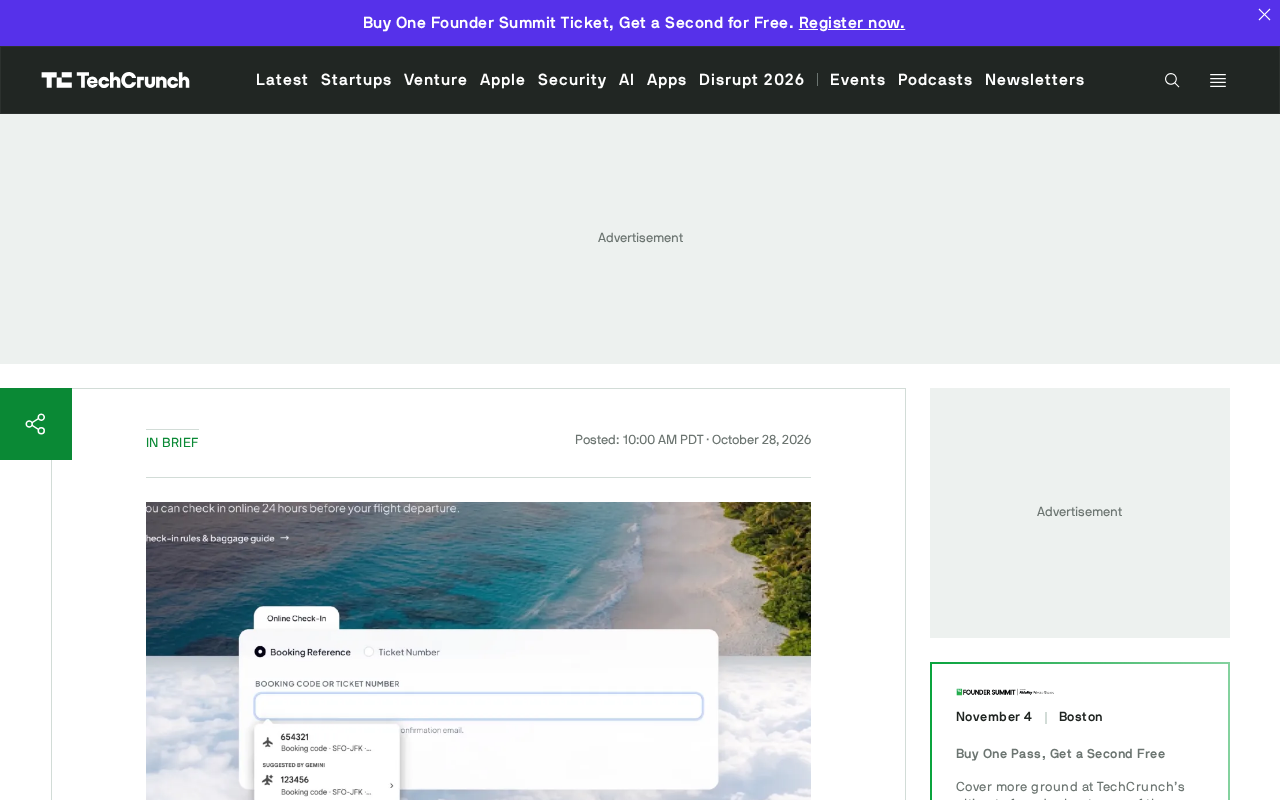
Chrome's autofill feature is undergoing a major AI-driven upgrade. According to the latest information, Chrome can now, with user permission, extract flight confirmations, shipping tracking information, order details, and more from the Gmail inbox, and use this data to automatically fill out web forms.
From "Remembering Addresses" to "Understanding the Inbox"
Traditional browser autofill primarily relies on structured data that users have manually saved, such as addresses and payment information. The core change in this upgrade is that Chrome is beginning to use AI to understand unstructured email content—booking numbers in flight confirmations, order numbers in shopping emails, and tracking codes in shipping notifications can all become candidate data sources for form filling.
This means the boundary of autofill has expanded from "information you have actively entered" to "information that already exists in your inbox." For users who frequently book or shop online, the value of reducing repetitive input is obvious.
Unstructured data refers to information that lacks a fixed field format and is difficult for databases or programs to parse directly—email bodies are a typical example. In a flight confirmation email, the booking number, departure time, and airport names are mixed into natural language and formatting. Traditional autofill can only recognize key-value correspondences between form fields and saved addresses, and cannot handle this kind of text. Large language models have the ability to extract entities and relationships from free text, converting sentences like "Your order number is A123" into structured fields that can be filled into forms. This is precisely the technical premise of Chrome's upgrade: first use AI to complete the conversion from unstructured to structured, then hand it over to the autofill logic.
Permission Is the Prerequisite, Privacy Is the Focus
The key qualifier for this feature is "with your permission"—user authorization is the starting point of data flow. Chrome does not scan Gmail by default; it requires explicit user consent before email content can be used for form filling.
However, this design still raises reasonable privacy discussions. Letting the browser read email content, even for efficiency purposes, means the processing chain for sensitive information is lengthened. Flight itineraries and order records themselves contain personal data such as time, location, and spending. How to strike a balance between convenience and privacy will be an area where Google needs to continuously address user concerns.
The principle of least privilege is a foundational guideline in privacy design, requiring systems to obtain only the scope and duration of data necessary to accomplish a specific function. In this scenario, the ideal approach would be for the user to authorize temporary extraction only of emails relevant to the current form, rather than having the browser continuously read the entire inbox. Related to this are data minimization and purpose limitation: collected email content should be used only for form filling, not for other purposes such as advertising profiling, with clear retention periods and deletion mechanisms. Users also need to be able to revoke authorization at any time and see which data has been used. Whether these mechanisms are transparent and verifiable often determines the actual size of privacy risk more than whether the user clicks "agree" once.
Another Step Toward the Browser as an AI Entry Point
Connecting Gmail data to Chrome autofill is another step in the browser's evolution from a "web page container" to a "personal assistant." Google's advantage lies in owning both the browser and the email service—this kind of cross-product data synergy is difficult for other browser vendors to replicate.
For users, the actual experience depends on the accuracy of AI information extraction and the intelligence of form matching. If it frequently fills in wrong information or requires repeated confirmation, the efficiency gains will be offset by friction. The ultimate value of this update depends on whether it can achieve "seamless and reliable" performance in real-world scenarios.
The value of cross-product data synergy depends on the integration of identity and data, which is not symmetrical in the browser ecosystem. Chrome and Gmail both belong to the Google account system, so email data can enter the browser-side processing flow directly after authorization; other browser vendors, even if they also integrate large models, lack email data sources of comparable scale and permissions, making it difficult to replicate this experience. However, this advantage also brings lock-in effects: the more users rely on cross-service data synergy, the higher the barrier to migrating to other browsers or email services. When evaluating such features, besides convenience, it is also worth noting the extent to which they deepen users' dependence on a single vendor's ecosystem.
One-line Summary
Chrome autofill, with authorization, can read Gmail emails and extract flight, order, and other information to fill forms.
Paragraph Summary
Chrome's autofill feature is undergoing an AI-driven upgrade: with explicit user permission, the browser can extract unstructured information such as flight confirmations, shipping tracking, and order details from the Gmail inbox and use it to automatically fill out web forms. This marks an expansion of autofill's data sources from manually saved addresses and payment information to content already present in the inbox, reducing repetitive input for users who frequently book and shop online. The article also notes that reading email lengthens the processing chain for sensitive information, and balancing convenience with privacy is an issue Google must continuously address. Strategically, this is another step in the browser's evolution from a web page container to a personal assistant. Google holds a difficult-to-replicate advantage through the cross-product synergy of Chrome and Gmail, but the ultimate value depends on the accuracy of AI extraction and the intelligence of form matching.
Related articles

Last Week Tonight Exposé: The Dangerous Ties Between Politicians and White Supremacy
Last Week Tonight investigates Georgia Senate candidate Mike Collins and Florida candidate Marshall Rawson, exposing their multiple ties to white supremacists and the Republican Party's silent response.
AI Buzz Weekly: GPT-6.5 Leak, New Claude Model, and MiniMax's Cost-Effectiveness
This week's AI buzz roundup: suspected GPT-6.5 leak, Microsoft configs showing GPT-6.1 Tera, Anthropic's new model that can identify entire classes of bugs, disappointing early Gemini 4 Carbon results, and MiniMax M3.1 Flash beating Claude Opus 5 and GPT-5.6 Sol in benchmarks at extremely low cost.

AI Briefing: Gemini 4 Carbon Released, Ant Open-Sources Ling-3.1
AI Briefing: Google releases Gemini 4 Carbon qubit model, claiming to surpass Opus 5.5 with half-price tokens; Ant open-sources Ling-3.1-1019 for real-task Personal Agents; domestic AI drug discovery succeeds in 18 of 19 projects, hitting all 6 GPCR targets; zero-revenue company valued at $20B raises another $1B; Sichuan convenience store robot sales fail.