Claude Adds Three New Interactive Artifacts: Whiteboard, Sheets, and Data

Claude adds Whiteboard, Sheets, and Data artifacts, evolving toward a team collaboration workspace.
Anthropic adds Whiteboard, Sheets, and Data interactive artifacts to Claude's Artifacts, available in Beta to all paid plans. Whiteboard supports natural language generation and CSV/PDF conversion into visual boards; Sheets offers one-click Google Sheets or CSV import; Data connects to external apps via Connectors or Zapier MCP to generate dashboards. All point toward team collaboration around shared data artifacts.
Anthropic has added three new interactive Artifacts to Claude: Whiteboard, Sheets, and Data. These features are currently available in Beta to all paid plans (Pro, Max, Team, Enterprise) and are rolling out across desktop, web, and mobile. Based on a hands-on video from a Bilibili creator, this article breaks down the actual capabilities, usage, and applicable scenarios of these three artifact types.
What Are the New Members of Claude Artifacts?
Artifacts is the sidebar area in Claude used to generate and store interactive content. This update adds three new types on top of the existing ones: Whiteboard, Sheets, and Data. Users can create or view these directly from the Artifacts entry in the left sidebar, and all generated artifacts are automatically stored there.
According to the creator's demonstration in the video, these features appear automatically in the account with no additional configuration. Anthropic stated in its Twitter announcement that the Beta version is available to all paid plans. This means everyone from individual Pro users to enterprise Team accounts can try this round of updates.
Artifacts is a feature Anthropic launched in mid-2024, initially used to render code, web pages, or documents generated by Claude in a separate window, allowing users to preview, iterate, and reuse them directly without repeatedly copying and pasting in the conversation flow. It is essentially an "interactive content container" that upgrades Claude's output from plain text to operable objects. The newly added Whiteboard, Sheets, and Data expand the boundaries of Artifacts types, extending them from code/document rendering into visual collaboration and data dashboards. All artifacts are automatically saved in the sidebar and support version management and sharing, which provides a foundation for teams to collaborate around the same piece of content.
Whiteboard: Turning Messy Data into Shareable Visual Whiteboards
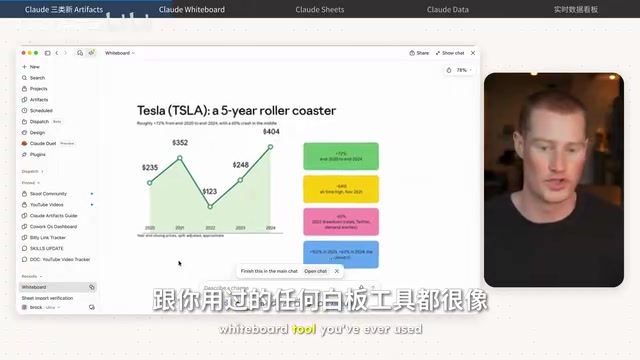
Whiteboard is positioned similarly to online whiteboard tools like Miro or Excalidraw. Users can use natural language to have Claude generate charts, cards, and layouts, or upload files such as CSV or PDF and have Claude convert the file contents into a structured whiteboard.
In the video, the creator first gives a simple prompt asking Claude to create a whiteboard explaining Tesla's stock price growth over the past five years, with necessary statistics attached. Claude quickly generates a whiteboard with cards, text, and graphics; users can manually edit text, change card colors, and ask Claude to append a chart with denser data points below. Throughout the process, Claude shows in real time where it is operating in the interface, so users can see the "orchestration" actions during generation.
A more complex use case is uploading a messy CSV zip archive containing YouTube channel data. Claude converts it into a clearly categorized visual dashboard, dividing content into categories such as Grokbot deep-dive videos, release and feature breakdowns, AI news roundups, and comparison tests, and lists next directions to test and better-performing content. The creator believes this capability is suitable for quickly organizing unstructured data into a content strategy board that teams can share.

Whiteboard supports sharing with team members via link, inviting specific email addresses, and exporting as PNG images. The creator also tried the option to export to Miro, indicating that Anthropic has left interfaces for cross-tool collaboration.
Sheets: A Spreadsheet-like Interface with One-click Import of Google Sheets Data
Sheets' interface is highly similar to Google Sheets, and its interaction logic is basically the same. A highlight the creator emphasizes is the ability to import data from Google Sheets or CSV files with one click. Because his Claude account was already connected to Google Sheets, he directly selected a spreadsheet tracking subscriber growth over several months, and Claude automatically populated hundreds of cells of data into Claude's Sheets interface.
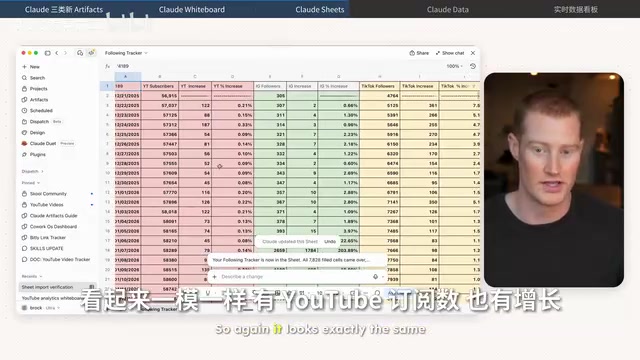
After import, users can ask Claude to update the spreadsheet contents by "describing changes," or edit manually like in a normal spreadsheet tool. Sharing is also done via link or specified members. For users who frequently switch between Claude and spreadsheet tools, the significance of this native integration lies in reducing the friction of copy-pasting.
Data: Renamed from Dashboard, Connects to External Apps to Pull Data
Data is not an entirely new feature but a renamed version of the previous Claude Dashboard. Its core purpose is to turn data such as CSV into visual dashboards and support multiple output forms such as animations, visual analysis, storytelling breakdowns, or visual short videos.
The creator focuses on demonstrating Data's ability to connect to external apps. Claude has a built-in Connectors feature that can directly search for and connect to supported apps. When he tried to connect to the email marketing tool Drip, he found that Claude did not directly support that app, so he completed the integration through Zapier MCP as an intermediary layer. Zapier claims it can connect to more than 9,000 apps. After adding Drip in the MCP server and logging in, the creator used a prompt to ask Claude to pull Drip account information through Zapier MCP and generate a dashboard.
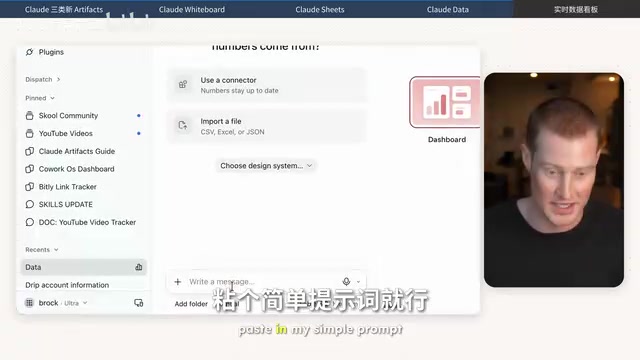
Claude then asked about the design style; after the creator chose "clay," it generated a dashboard including email list size, active count, unsubscribe count, undelivered count, and the number of emails sent in recent months. The data itself is not complex, but the whole process demonstrates Claude's potential as a data aggregation layer: users no longer need to manually move data between multiple tools but can let Claude actively pull and visualize it through connectors or MCP.
MCP (Model Context Protocol) is a protocol open-sourced by Anthropic in late 2024 to standardize the way AI models connect to external tools and data sources. It is like a "USB-C interface for the AI world": developers implement MCP servers according to the protocol, and Claude can call their capabilities through a unified interface without developing a separate integration for each app. Zapier MCP is a bridging service provided by Zapier based on this protocol, exposing more than 9,000 apps already connected to Zapier to Claude. This means that even if Claude does not natively support tools like Drip, users can use Zapier MCP to let Claude indirectly read and write their data, greatly expanding the business system coverage of the Data artifact.
What Does This Update Mean?
From the creator's hands-on testing, Anthropic is pushing Claude from a "conversational assistant" toward a "collaborative workspace." Whiteboard fills in visual communication capabilities, Sheets takes on the editing needs of structured data, and Data brings external business data into the conversation context through connectors and MCP. Together, the three point in one direction: enabling teams to interact around the same data artifact instead of each processing it in separate tools and then sending files back and forth.
It is worth noting that both Whiteboard and Sheets have built-in sharing mechanisms, and Anthropic repeatedly emphasizes team collaboration scenarios in its announcement. For teams already using Claude, these artifacts may gradually replace some lightweight whiteboard and spreadsheet collaboration workflows; for teams relying on multi-tool stacks, bridging solutions like Zapier MCP determine how many actual business systems the Data artifact can cover.
The limitations of the Beta stage are not yet clear, and the creator did not test all edge cases. But what is certain is that Claude's Artifacts are evolving from a single content container into a multi-form collaboration layer.
One-line Summary
Claude adds three new interactive artifacts—Whiteboard, Sheets, and Data—evolving toward a team collaboration workspace.
Paragraph Summary
Anthropic has added three new interactive artifacts to Claude's Artifacts: Whiteboard, Sheets, and Data, with the Beta version available to all paid plans. Whiteboard is similar to Miro and supports natural language whiteboard generation, uploading CSV/PDF to convert into visual dashboards, and sharing or exporting as PNG; Sheets has an interface highly similar to Google Sheets and supports one-click import of Google Sheets or CSV data; Data is renamed from the former Dashboard and can connect to external apps via built-in Connectors or Zapier MCP to pull data and generate dashboards. Together, the three point in one direction: enabling teams to collaborate around the same data artifact rather than moving files between multiple tools.
Related articles

Do Men's Friendships Need to Be "Deep"? Emotionally Restrained Camaraderie Counts Too
The Atlantic's Tyler Austin Harper argues that fewer male friendships is a real problem, but emotionally restrained, activity-based friendship is not inherently wrong.

Nvidia's Backup Plan for China's Autonomous Driving
TechCrunch Mobility reports on Nvidia's backup plan for China's autonomous driving industry, analyzing its strategic context, industry impact, and uncertainties.

Apple's First Smart Glasses Revealed: No AR, Coming at Next Year's WWDC
Bloomberg's Mark Gurman says Apple's first smart glasses will lack AR, launch at June's WWDC, and possibly ship by year-end. We analyze positioning, timeline, and impact.