Claude Code Dynamic Workflows: A Complete Guide to Six Patterns and Ten Scenarios

A complete guide to Claude Code's dynamic workflows: six orchestration patterns and ten practical scenarios.
Anthropic's Claude Code dynamic workflows let Claude spawn sub-agent squads on the fly for complex tasks. Built on three core functions (Agent, Parallel, Pipeline), the system offers six orchestration patterns — classify-then-act, split-and-synthesize, adversarial verification, generate-and-filter, tournament, and loop-until-done — validated across ten scenarios from large-scale code migration to deep research and scaled triage.
Introduction: When a Single Agent Isn't Enough
In June 2025, Anthropic published an important blog post titled "A Harness for Every Task," introducing Claude Code's dynamic workflow mechanism. The core idea is simple: when a task is complex enough, Claude no longer works alone — instead, it writes an orchestration program on the spot, directing an entire squad of agents to get the job done.
This isn't a pre-configured fixed process, but rather a collaboration plan "custom-built on the fly" for the specific task at hand. This shift from static to dynamic represents a significant evolution in AI programming tools.
Three Core Functions of Dynamic Workflows
The entire workflow engine is built on three foundational functions — the building blocks for constructing any orchestration structure.
Agent (Sub-agent Spawning)
Spawns a sub-agent; pass in a schema and get back validated JSON output. Supports model selection, isolated WorkTree activation, and custom agent types. This is the most basic unit of delegation.
Parallel (Concurrent Execution)
Executes a batch of tasks concurrently with barrier semantics — waits for all tasks to complete before returning results. Ideal for scenarios requiring "synchronized" execution, such as multi-dimensional simultaneous validation.
Pipeline (Sequential Stages)
Each item flows independently through all stages without barrier constraints — fast items don't wait for slow ones. Suitable for processing large volumes of independent items, like batch document review.
These three functions can be freely combined to build all kinds of orchestration structures.
Why Dynamic Workflows Are Needed
A single context window faces three typical failure modes when confronting complex tasks:
Agent laziness: On multi-part tasks, the model decides it's "good enough" halfway through and wraps up early. This is especially common in long tasks.
Self-preference bias: Asking a model to judge its own output inevitably leads to favoritism. It's like having an author review their own manuscript — blind spots are hard to catch.
Goal drift: As conversation turns accumulate, the work drifts further and further from the original objective. Context accumulation becomes a burden rather than an asset.
The dynamic workflow solution is straightforward: distribute work to a group of sub-agents with singular goals and clean contexts, each focused and keeping the others in check.
Key Differences: Static vs. Dynamic Workflows
Here's an example to illustrate: asking "Should we migrate our checkout service to a new vendor?"
- Static workflow: Runs five searches, summarizes into a generic research report
- Dynamic workflow: Reads your billing code, cross-references the new vendor's documentation item by item, calculates pricing based on your transaction volume, and even dispatches a "devil's advocate" agent to present the strongest counterargument
The former gives generalized advice; the latter gives advice specific to you. That's what "custom harness" means.
Six Common Orchestration Patterns Explained
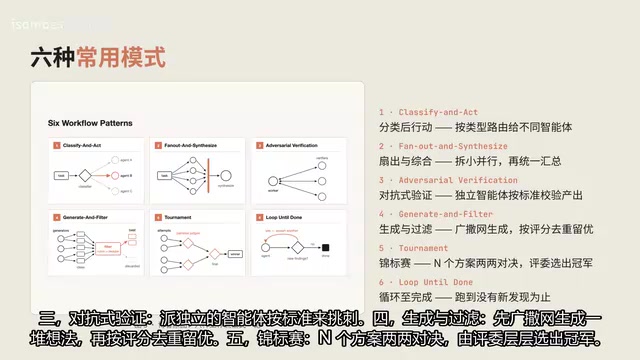
The blog distills six patterns validated in practice — like LEGO bricks that can be used individually or combined freely:
1. Classify Then Act
First determine the task type, then route to the appropriate specialized agent. Avoids applying a one-size-fits-all approach to every problem.
2. Split and Synthesize
Break large work into smaller pieces, process in parallel, then unify the synthesis. A classic divide-and-conquer strategy.
3. Adversarial Verification
Dispatch independent agents to "poke holes" according to defined standards. Leverages role opposition to eliminate self-preference bias.
4. Generate and Filter
Cast a wide net to generate many ideas first, then deduplicate and keep the best based on scoring criteria. The standard paradigm for creative exploration.
5. Tournament
N solutions compete head-to-head in pairs, with judges selecting winners through successive rounds until a champion emerges. Ideal for qualitative ranking scenarios.
6. Loop Until Done
When the task scope is unknown, keep running until no new findings emerge. Suitable for exploratory tasks.
Ten Key Application Scenarios
Large-Scale Code Migration and Refactoring
Break migration into concrete steps like call sites, failing tests, and code modification modules. Each fix is handled by a sub-agent in an isolated WorkTree, paired with adversarial review agents for quality gates — only passing code gets merged. This isn't theoretical — teams have used this approach to rewrite codebases from Zig to Rust.
Deep Research and Fact Verification
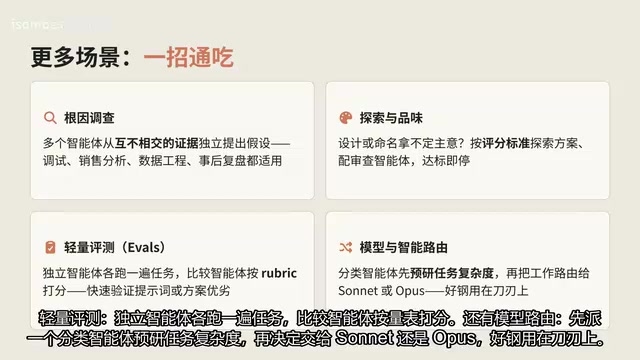
Split web searches and source scraping, perform adversarial verification on each assertion, then synthesize into a cited report. Clean context windows prevent cross-contamination between sources.
The verification step is particularly elegant: first, an extractor identifies every factual claim in the report, then dedicated verification agents are dispatched for each claim to cross-reference against sources, while source auditors separately assess source quality. Only after this multi-layer filtering does the output become a truly verified report.
Tournament-Style Ranking
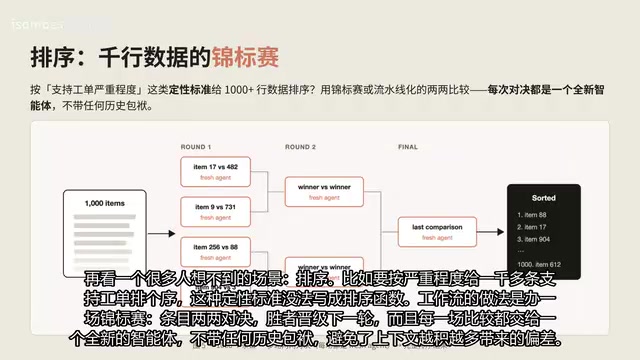
For example, ranking over a thousand support tickets by severity — a qualitative criterion that can't be written as a sort function. The workflow runs a tournament: items compete head-to-head in pairs, winners advance to the next round. Each comparison is handled by a fresh agent with no historical baggage, avoiding bias from context accumulation.
Rule Sentinel System
What do you do when rules written in claude.md keep getting ignored? The answer: one sentinel per rule. When a diff comes in, five rules each have a dedicated verification agent checking them individually, each sentinel with a clean context. Flagged items go to a "skeptic" for secondary review, distinguishing real violations from false positives.
Scaled Triage Processing
Tickets, bug reports, and user feedback stream in continuously — all untrusted content. Reading agents have only read-only tools with no privileges (isolation zone). After classification and deduplication, only structured summaries are passed to trusted-zone action agents that can open PRs for fixable issues or escalate to humans when needed. Combined with the loop command, the entire process can run continuously.
Practical Tips and Cost Control
Workflows aren't a silver bullet — their token consumption is significantly higher. Here are three tips to help you use them effectively:
Be as specific as possible in prompts: Directly specify the pattern you want. Small tasks can use a "quick workflow" — you don't need to go all-out every time.
Combine with loop and goal: Run repeatable workflows on a schedule with hard completion criteria, forming a continuous improvement loop.
Set token budgets: A simple "use at most 10,000 tokens" caps your spending and prevents runaway costs.
Saving and Reusing Workflows
Don't throw away workflows that work well. After a run, press S to save to your local workflow directory. Better yet, put workflow files in the .claude folder and reference them in SKILLS.md. Anyone on the team with this configuration installed will run the same polished workflow. The official recommendation is to treat saved workflows as templates while preserving Claude's flexibility to fine-tune on the fly.
Conclusion
The core value of dynamic workflows lies in using clean contexts plus division of labor and checks-and-balances to solve the laziness, bias, and drift problems of single agents. Six patterns cover most orchestration needs, and ten scenarios from migration refactoring to deep research have been validated as viable.
Start with complex, high-value tasks, and combine with loop/goal and token budgets to control pace and cost. Ordinary coding tasks really don't need three reviewers — save the heavy artillery for where it matters most.
Related articles

Tencent WorkBuddy Hands-On: How AI Agents Crush Traditional Chat Assistants
WorkBuddy vs Doubao tested: how AI Agents directly operate computers to convert PPT to PDF, archive files and more. Analysis of WorkBuddy's low barrier, domestic ecosystem, pricing and plugin marketplace, plus AI Agent selection advice.

Azure Cross-Tenant Attack Chain: Root Cause Analysis of Five Paths
Binary Security analyzes five full cross-tenant compromise paths in Azure, trending 271 points on HN. This article interprets their shared root cause perspective and offers defense recommendations for cloud tenant isolation and reflections on responsibility boundaries.

Recreating a Real Bubble Tea Station in Isaac Sim: Script-Driven Unitree G1 Brews Tea
Developers recreated a real self-service tea station in NVIDIA Isaac Sim, using scripts to drive a Unitree G1 through a five-step tea-brewing process, exploring whether physics simulation can be a source of synthetic robot demonstration data and discussing contact stability and imitation learning.