Claude Code Installation Guide for China: Bypass Login and Avoid Bans with CC Switch

A hands-on guide to installing, bypassing login, and configuring permissions and prompts for stable Claude Code usage in China
Based on a Bilibili creator's hands-on demo, this article walks through the complete workflow for using Claude Code in China. For installation, it notes that the official curl/irm commands often fail due to network and permission issues, and recommends NPM installation after setting up Git, Node.js, and a VPN. For login, it emphasizes verifying with `claude --version` first and not logging in directly; instead, use the open-source CC Switch tool to modify local config files and connect to third-party model APIs like DeepSeek, Kimi, and GLM—bypassing official accounts and reducing ban risk. The article also details the four permission modes and when to use them, recommending Default Mode for beginners and Plan Mode for real projects, explains that prompts should include role, goals, technical constraints, and acceptance criteria, and answers common questions about token consumption, model choice, and Chinese support.
Claude Code is an agentic coding tool from Anthropic that can read codebases, edit files, run commands, and integrate deeply with development tools. For programmers, it's essentially a domain-specific agent built for coding tasks. But when using it in China, many developers get stuck at installation and login—and even risk having their accounts banned. This tutorial, based on a hands-on demo from a Bilibili creator, walks through the complete workflow from installation to permission configuration, focusing on how to bypass official account login via the CC Switch tool for stable usage.
Before Installation: Avoiding the Pitfalls of the Official Installer
Why You Shouldn't Use the Official Install Commands
On the Claude Code website, you'll see several installation methods, usually a one-line curl or irm command. But according to the creator's testing, under typical China network conditions these commands will most likely throw a pile of permission errors and fail to install. Even with a VPN, some carrier-level network restrictions can still cause failures.
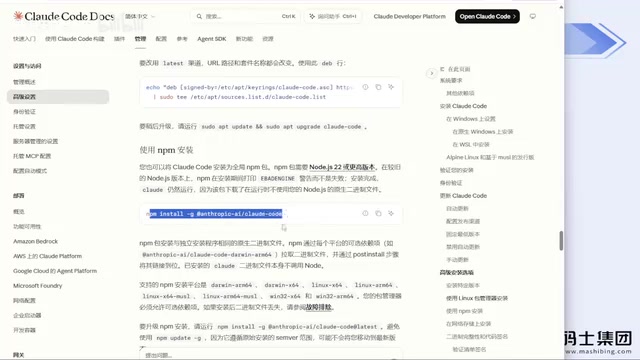
The official Claude Code installation typically uses curl -fsSL https://claude.ai/install.sh | bash or, on Windows, irm https://claude.ai/install.ps1 | iex. In essence, it downloads an install script from an overseas server and executes it directly via shell or PowerShell. When accessing that domain from China, you often get redirected, timeouts, or incomplete content, so the script fails partway through due to missing files or insufficient directory permissions. Windows' default PowerShell ExecutionPolicy also blocks remote scripts, further increasing the failure rate. NPM installation is more reliable because the npm registry can use a domestic mirror (such as npmmirror), and the package manager handles dependencies, permissions, and version validation—giving clear error messages when something goes wrong, which makes troubleshooting easier.
Recommended: Install via NPM
The creator strongly recommends switching to NPM installation, which has a very high success rate—installing it for non-programmer colleagues has basically never failed. Before installing, do three things:
- Install Git (just click Next through the wizard);
- Install Node.js (same wizard-style install, just change the install directory);
- Turn on your VPN.
Then run npm install -g @anthropic-ai/claude-code in the command line. This is the only step that requires a VPN; the rest don't.
Bypassing Login: How to Configure CC Switch
Don't Log In Right After Installing
After installation, don't immediately type claude to log in. First run claude --version to verify—if it shows a version number, the installation succeeded. If you log in directly, the official site will ask you to choose a Claude subscription, a Claude Console account, or a supported runtime plan. Once account login is involved, you may face intermittent bans down the line.
What Is CC Switch?
CC Switch is a small open-source tool that essentially modifies Claude Code's local configuration files (by default in the .claude folder in your user directory, e.g. settings.json), letting you freely switch model providers while bypassing account login. It doesn't require login or a Claude subscription, and it doesn't consume extra tokens—it just changes config, nothing else.
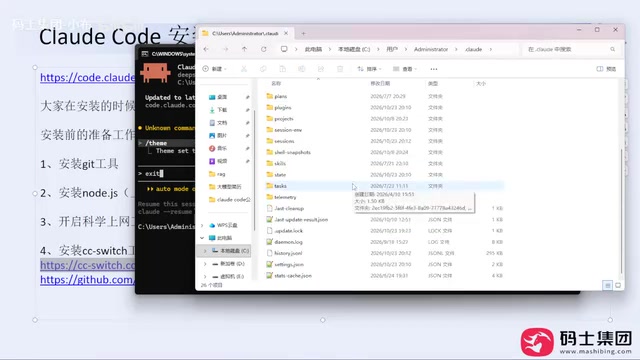
Claude Code's configuration is layered: user-level config lives in ~/.claude/settings.json, project-level config in .claude/settings.json at the project root. Environment variables and model endpoints are usually declared in an env field, such as ANTHROPIC_BASE_URL, ANTHROPIC_AUTH_TOKEN, and so on. As long as these fields point to a server compatible with the Anthropic API protocol, Claude Code won't go through the official login flow. "Protocol-compatible" means the third-party service implements the same request and response format as the Anthropic Messages API, so the client can call it without modification. CC Switch's job is to manage these fields visually—turning manual JSON editing into a graphical switch, reducing the risk of misconfiguration.
Configuration Steps
Download the CC Switch installer from GitHub or the official website (an exe on Windows) and install it directly. When you open it, the interface lists configurable agents. Click the plus sign to select a model provider—DeepSeekAd, Kimi K3, GLM, etc.—enter the corresponding API Key, then click add and enable. Once configured, go back to the command line and type claude to log in; at this point you're basically safe from bans. The creator has used this method since day one and has never been banned.
Key point: Claude Code is just a coding agent—it doesn't force you to use Claude models. As long as the provider offers an API interface, DeepSeek, Kimi, GLM, or even Xiaomi's models can be plugged in.
Permission Modes: Controlling the Agent's Behavioral Boundaries
The Differences Between the Four Modes
Claude Code requires user authorization when executing tasks and offers four permission modes, toggled with Shift + Tab:
- Default Mode (Manual Approval): Read-only operations pass through directly; modifying code or running commands triggers a confirmation dialog.
- Accept Edits On: File edits pass through directly; running commands still requires confirmation.
- Plan Mode On: The agent first plans the task, clarifies requirements, confirms the tech stack, and generates a document for your review—only writing code after you approve.
- Auto Mode On: Everything passes through with no confirmation dialogs at all.
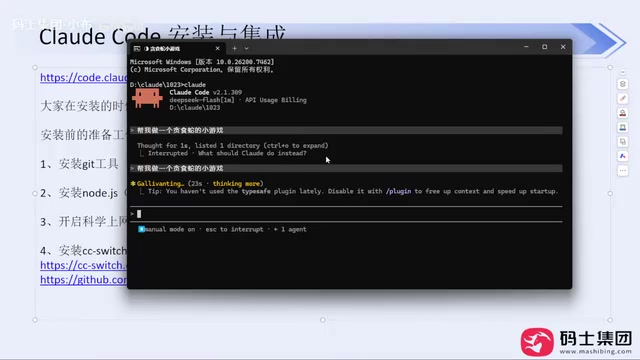
Behind the permission modes is Claude Code's tool-call approval mechanism. When the model decides to call a tool with side effects—writing files, executing shell commands—the client intercepts the request and waits for user confirmation; read-only tools (like reading files or searching code) are allowed or blocked according to the mode's rules. This design draws on the "human-in-the-loop" safety paradigm for agents: irreversible operations are gated by humans, while reversible or read-only operations are automated. Auto Mode is risky because it removes that gate—if the model misunderstands a requirement or hallucinates, errors land directly on disk and in command execution, and it's hard to trace which step went wrong.
Recommended Usage Strategy
The creator advises beginners to always start with Default Mode. Though clicking yes frequently is a bit tedious, every step stays within your control. Once you're proficient with the tool and the model has learned your coding conventions, you can switch to Accept Edits On. Auto Mode On grants too much permission, and what it produces may be wrong—generally not recommended.
Plan Mode On deserves special mention. The traditional development workflow is to meet about requirements, design the database and architecture, then assign tasks. Letting an agent write code directly often lacks planning—you get halfway through and realize the direction is wrong, wasting time and tokens. Plan Mode forces a document to be produced first, which you review and approve before execution—better suited to real projects.
Writing Prompts: Don't Treat the Agent Like a Wish-Granting Well
The Limits of a One-Liner
The creator demonstrates typing "make me a Snake game," and Claude Code does indeed generate a runnable game. But this approach performs very poorly in real production environments: no tech stack specified, no constraints added, inefficient to modify afterward, and it burns more time and tokens.
Elements of a Structured Prompt
A more sensible approach is to give the agent a clear role and constraints. For example: You are a senior frontend engineer. Generate a directly runnable Snake game in the current working environment. The goal is to use as few dependencies as possible, with clear, readable code, prioritizing maintainability and extensibility. Don't over-engineer or introduce complex architecture. Then list the functional requirements, code quality requirements, and workflow. Write these clearly, and the output will meet the standard.
In the agent context, a prompt isn't just a "question"—it's a definition of constraints on the task space. Role-setting influences which prior knowledge the model draws on; tech-stack constraints narrow the search space, preventing the model from free-styling and pulling in unnecessary dependencies; acceptance criteria give the model a basis for self-checking. The industry often calls this style of writing "context engineering," whose core is making implicit expectations explicit. For a coding agent, a structured prompt is essentially a lightweight requirements document—it improves first-pass generation quality and gives subsequent iterations something to work from, reducing token overhead from repeated clarification.
Can Non-Programmers Build Projects With It?
The creator is blunt: claims online that non-programmers can build great projects with a coding agent are "complete nonsense." Building small things for fun is fine, but for a project that can go live and has commercial value, non-programmers will struggle—and even if they pull it off, the token and time costs will be enormous. A coding agent replaces the executor's work, but project design, architecture choices, requirement definition, and acceptance criteria still need a human.
FAQ
Does using CC Switch increase token consumption? No. It only modifies local config files and doesn't touch model calls.
Do I have to use official Claude models? No. Claude Code is an agent tool, and the model can be switched freely. Domestic models like DeepSeek, Kimi, and GLM are already quite capable—more than enough for everyday coding, document organization, and requirements analysis.
How is Chinese language support? The creator uses DeepSeek as the backend model and hasn't encountered any Chinese comprehension or matching issues in project development. Major LLMs generally support Chinese reasonably well.
CC Switch or Codex? Both are agent tools; there's no mandate—use whichever you're familiar with.
One-line Summary
A hands-on guide to installing, bypassing login, and configuring permissions and prompts for stable Claude Code usage in China
Paragraph Summary
Based on a Bilibili creator's hands-on demo, this article walks through the complete workflow for using Claude Code in China. For installation, it notes that the official curl/irm commands often fail due to network and permission issues, and recommends NPM installation after setting up Git, Node.js, and a VPN. For login, it emphasizes verifying with claude --version first and not logging in directly; instead, use the open-source CC Switch tool to modify local config files and connect to third-party model APIs like DeepSeek, Kimi, and GLM—bypassing official accounts and reducing ban risk. The article also details the four permission modes and when to use them, recommending Default Mode for beginners and Plan Mode for real projects, explains that prompts should include role, goals, technical constraints, and acceptance criteria, and answers common questions about token consumption, model choice, and Chinese support.
Related articles

Malicious Claude Code Extension Infiltrates Cursor: Version 2.1.313 Self-Check and Cleanup Guide
A malicious Claude Code build 2.1.313 appeared in the Cursor extension marketplace for about 11 hours, affecting up to 5,000 users. StepSecurity disclosed that it stole system information, git email, and environment variable names, and attempted to implant SSH keys and reverse tunnels. This article covers the incident, malicious behavior, and complete self-check and cleanup steps.

15 Essential Prompts for Vibe Coding: Keep AI from Wrecking Your Code
Vibe Coding often tempts AI to break your code. These 15 prompts—from PRD, architecture, and database to testing and debugging—chain each output as the source of truth, turning AI coding from casual chat into a controllable engineering process.

Cursor vs Windsurf: Code Review or Direct Apply — Which Fits You Better?
Cursor shows a diff for review before changing code; Windsurf applies changes directly. We analyze how each mode affects your workflow and cover Cursor 2.0's multi-agent mode.