Codex Getting Started Tutorial: From Installation and Deployment to API Relay Configuration in Practice
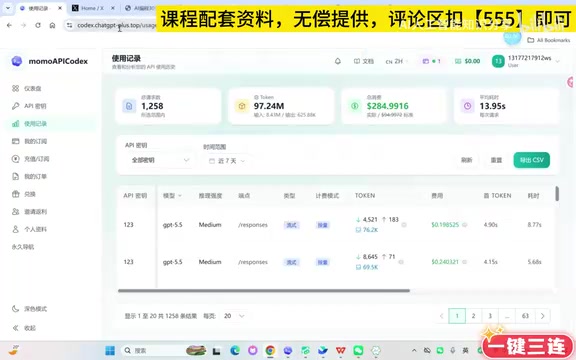
A guide for users in China to complete Codex registration, top-up, and local configuration in ten minutes via a third-party API relay station.
To address the three barriers to official Codex login—foreign credit cards, foreign phone numbers, and circumventing internet restrictions—the article offers a beginner-friendly alternative: accessing through a third-party API relay station. The tutorial walks through registering an account, making a small pay-as-you-go top-up, creating a key in the console (emphasizing that the group must match the purchased plan), pasting the configuration code from the key page at the beginning of the `.codex/config.toml` file under the Windows user directory, and entering the API key in the client to complete initialization. The author also acknowledges the risk of the operator absconding and recommends that beginners start with ten or twenty yuan; the whole process takes about ten minutes and requires no coding background.
Why You Need a "Relay Station": The Three Barriers to Logging into Codex
Codex currently has two main login methods. The official path is to use a ChatGPT account, but the video author explicitly warns that this path presents three practical barriers for users in China: foreign credit cards, foreign phone numbers, and circumventing internet restrictions. Among these, "foreign phone numbers" is described as something that "will stump 99% of students"—many people aren't blocked at the start, but rather get stuck when phone verification is suddenly triggered.
Because of this, the tutorial recommends a more practical path: accessing Codex through a third-party API relay station. The author admits that relay stations themselves carry the risk of the operator absconding—"I have to be honest with you"—but this doesn't prevent it from being a low-barrier way to experience Codex.
An API relay station is a third-party proxy service: it holds a legitimate API Key from an upstream model provider (such as OpenAI) on the server side, then distributes usable keys and usage quotas to end users, allowing them to bypass official account registration and payment. Its technical principle is to forward requests to the upstream interface, so users only need to configure base_url to point to the relay station address. But this also means that users' data and payments pass through a third party, carrying the risk of the service suddenly shutting down, keys becoming invalid, or even the operator absconding with the money, and it typically does not come with the official terms of use and data protection commitments.
Registration and Top-Up: Start with a Small Amount to Test the Waters
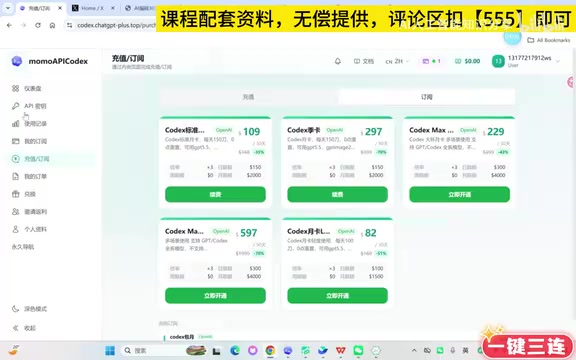
After entering the relay station, the first step is to register an account with a username and password, then go to the top-up page. The tutorial offers two top-up models:
- Pay-as-you-go: Top up ten or twenty yuan to get started
- Subscription: The author himself uses the version that costs 109 yuan per month
The author's practical advice is very clear: beginners should first use pay-as-you-go and top up ten or twenty yuan—"play around first, and once you understand it and feel comfortable" then consider a subscription. He even mentions that some students top up ten yuan a month and then can't be bothered to play anymore, while others find that even 109 yuan isn't enough. As for why he emphasizes small amounts, the author's principle is—even if the operator absconds, losing ten or twenty yuan won't hurt.
Create a Key and Configure Your Local Environment
After topping up, click "Create Key" in the upper-left corner of the console, and you can name it whatever you like. Here's a detail that's easy to overlook: the group must match the plan you purchased. Pay-as-you-go users should select the group corresponding to "public use balance," while monthly subscribers should select the monthly group; otherwise, problems will arise later in the client.
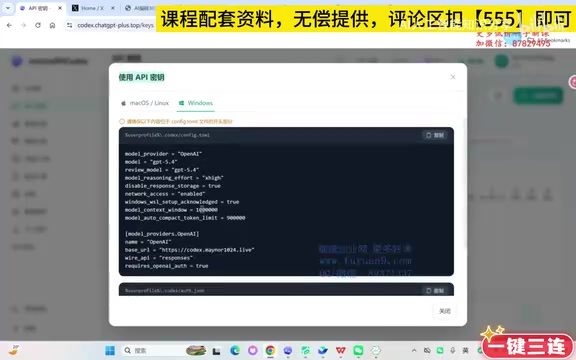
After creating it, click "Use Key" and you'll get a piece of configuration code. The core operation of the tutorial is: copy this code and write it into your local config.toml file.
Find the Configuration File Path
Windows users need to locate the .codex folder under their user directory. The specific path is C drive → Users → your username → .codex → config.toml. In the tutorial demonstration, the username directory varies by individual naming; the author's own is a folder named with a Chinese surname. Once found, right-click and choose to open it with Notepad to edit.
The Key Location for Pasting the Configuration
When first-time users open config.toml after installation, the file contains very little. You need to paste the code copied from the key page at the beginning of the file, which involves the model and base_url configurations.
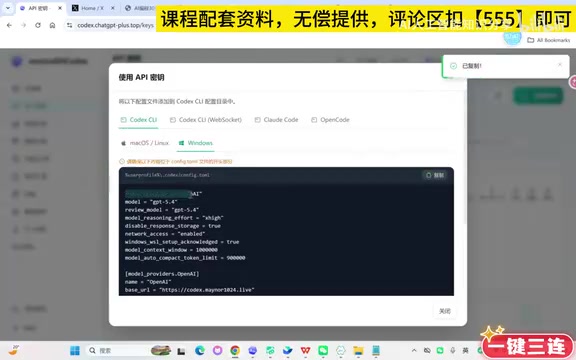
After pasting, save and exit. Back in the client, enter the API key into the corresponding input field and click "Use Now." The first time you enter, there will be a process of initializing the workspace, which the author notes takes about twenty or thirty seconds—"be a little patient."
config.toml is the local configuration file for tools such as Codex CLI, using the TOML (Tom's Obvious, Minimal Language) format, describing runtime parameters in the form of key = value. The model mentioned in the article is used to specify the name of the model to call, and base_url is used to change the API request address from the official endpoint to the relay station address. In addition to these two, the configuration file can usually also contain options such as model_provider, approval policy, and sandbox level. Because TOML is sensitive to sections ([section]) and the position of key-value pairs, if pasting overwrites an existing table header or places it under the wrong section, the client may fail to read the configuration—which is also the reason for requiring the paste at the beginning of the file.
Overall Time Required and Target Audience
According to the author's demonstration, the entire installation and deployment process can be completed in about ten minutes. The positioning of this approach is clear: it targets users without a coding background who don't want to deal with overseas payments and phone verification. The cost is that you need to accept the stability risk of the relay station and maintain a calm attitude toward small top-ups.
It's worth noting that choosing the wrong group and pasting in the wrong location are the two pitfalls beginners most commonly encounter during configuration. The former affects authentication, while the latter directly causes the client to fail to read the model configuration. Follow the path step by step and you basically won't run into problems.
Key Points
- Official login has barriers: Foreign credit cards, foreign phone numbers, and circumventing internet restrictions are all required—missing any one is a problem, and phone number verification is the step where people most easily get stuck.
- Relay stations are a low-barrier alternative: But they carry the risk of the operator absconding, so the author recommends starting with a small pay-as-you-go top-up to try it out.
- The group must match the plan: Choose the balance group for pay-as-you-go and the monthly group for monthly subscriptions, otherwise the client will have problems.
- The core of configuration is config.toml: Paste the code from the key page at the beginning of the
.codex/config.tomlfile under your Windows user directory. - The whole process takes about ten minutes: The first initialization requires waiting twenty or thirty seconds, and no coding background is needed.
One-line Summary
Guides users in China through a third-party API relay station to complete Codex registration, top-up, and local configuration in ten minutes.
Paragraph Summary
The article addresses the three barriers to official Codex login—foreign credit cards, foreign phone numbers, and circumventing internet restrictions—and offers a beginner-friendly alternative: accessing through a third-party API relay station. The tutorial demonstrates, step by step, registering an account, making a small pay-as-you-go top-up, creating a key in the console (emphasizing that the group must match the purchased plan), pasting the configuration code copied from the key page at the beginning of the .codex/config.toml file under the Windows user directory, and entering the API key in the client to complete initialization. The author also frankly acknowledges that relay stations carry the risk of the operator absconding, so beginners are advised to start with ten or twenty yuan to test the waters; the whole process takes about ten minutes and requires no coding background.
Related articles
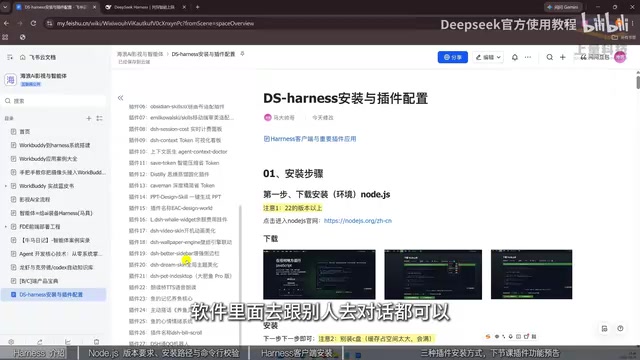
DeepSeek Harness from Beginner to Practice: Installation and Plugins Explained
DeepSeek Harness tutorial: installing NodeJS, deploying the Harness client, and three plugin installation methods (AI-installed, marketplace, command line), with a practical path to building AI Agent workflows.

DeepSeek Harness Tutorial: From Installation to Plugins — Building an AI Super Agent
DeepSeek Harness tutorial: detailed guide to Node.js installation, Harness client setup, and three plugin installation methods—self-install via AI, plugin marketplace, and command line—to turn AI into a super Agent that handles local files and complex tasks.

Slavic Polytheist Art: Marian Wawrzeniecki's Neopagan Paintings Rediscovered
Explore Polish painter Marian Wawrzeniecki's neopagan paintings (1891–1923), how Slavic polytheist art was rediscovered, and why this marginal art-history topic drew attention on Hacker News.