Conductor Cloud Service Shutting Down? A Comparative Review of Three Parallel AI Coding Agent Solutions

After Conductor's cloud service shutdown, the three parallel AI agent tools Orca, Codex, and Cursor each have their own applicable scenarios.
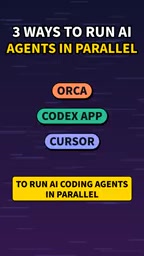
The shutdown of Conductor's cloud service means developers who relied on it to run AI coding agents in parallel need to migrate. A YouTube creator compared three alternative tools: the open-source and free Orca can run multiple agents such as ClaudeCode and Codex simultaneously, with each agent using an independent Git worktree, and can open old Conductor workspaces; Codex is built into the ChatGPT desktop app and supports parallel multitasking with handoff to the cloud for continued execution; Cursor's agent windows run multiple agents within the editor, each using an independent worktree, making it suitable for users who already use Cursor as their primary editor. The three represent open-source tools, big-tech integration, and editor built-ins respectively, with no absolute best; the choice depends on personal workflows and ecosystem preferences.
Conductor's cloud service is about to shut down, and many developers who relied on it to run AI coding agents in parallel need to find alternatives. Recently, a YouTube creator compared three tools in a video: the open-source and free Orca, Codex built into the ChatGPT desktop app, and Cursor's agent windows. All of them can let multiple AI agents work in parallel, but their implementation approaches and applicable scenarios differ.
Why Do You Need to Run AI Coding Agents in Parallel?
AI coding agents (such as ClaudeCode, Codex, etc.) are changing developers' workflows. However, a single agent can only handle one task at a time. When facing multiple independent requirements, serial execution wastes a lot of waiting time. Running multiple agents in parallel so that each handles one task can significantly improve efficiency.
Conductor once provided cloud-based parallel capabilities, but with the shutdown of its cloud service, developers have to switch to local or other solutions. The three alternatives mentioned in the video represent three approaches: open-source tools, big-tech integration, and editor built-ins.
Git worktree is a multi-working-tree mechanism provided by Git. A traditional Git repository can only check out one branch at a time, and switching branches requires stashing or committing current changes; while git worktree allows creating multiple independent working directories under the same repository, each of which can check out a different branch, with completely isolated file modifications. For parallel AI agent scenarios, this means each agent has its own file system view, avoiding the problem of two agents modifying the same file at the same time and overwriting each other. The code produced by agents can also be reviewed, merged, or discarded like ordinary branches.
Orca: An Open-Source and Free Parallel Workbench
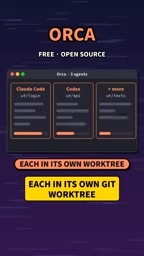
Orca's biggest feature is that it is free and open source. It allows you to run multiple agents such as ClaudeCode and Codex simultaneously, with each agent working in an independent Git worktree. This means that code modifications from different agents will not interfere with each other, and you can switch at any time to check the progress of each task.
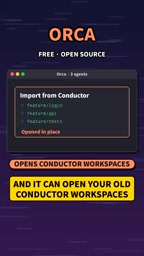
More practically, Orca can open your existing Conductor workspaces. For users migrating from Conductor, this reduces the hassle of reconfiguration. The design of an independent worktree for each agent also conforms to Git branch management best practices.
Codex: Parallel Tasks Built into the ChatGPT Desktop App
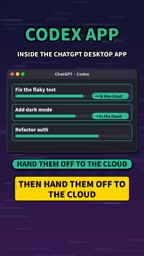
If you are already using the ChatGPT desktop app, then Codex's level of integration may be more appealing. It is built directly into the app, can run multiple tasks simultaneously, and then hand tasks off to the cloud for continued execution.
This "local + cloud" hybrid model is suitable for scenarios that require long-running or resource-intensive tasks. However, the video does not explain in detail whether Codex supports non-Codex agents or the specific limitations of cloud handoff. For developers who rely heavily on the OpenAI ecosystem, this is a natural choice.
Handing agent tasks off to the cloud means that after a local agent completes part of the work, it migrates the task state (including code context, execution plan, pending steps, etc.) to a cloud sandbox for continued execution. The value of this model is that the local machine does not need to occupy resources for a long time, tasks can continue executing after the computer is turned off, and it is also convenient to continue work across multiple devices. However, cloud handoff is usually limited by the platform ecosystem—tasks need to run in the same vendor's cloud environment, and there are additional requirements for networking, code privacy, and billing methods. Cross-vendor agents generally cannot enjoy this capability.
Cursor: Multiple Agent Windows Within the Editor
Cursor itself is a popular AI code editor. Its agent windows allow multiple agents to run directly within the editor, with each agent using an independent worktree.
For developers who already use Cursor as their primary editor, this avoids the hassle of switching tools. All operations are performed in a familiar environment, and the agents' output can be reviewed and merged directly in the editor. However, whether Cursor's agent parallel feature supports external agents such as ClaudeCode is not explicitly mentioned in the video and may require further verification.
How to Choose?
The three solutions each have their own focus:
- Orca is suitable for developers who pursue open-source and free tools, need compatibility with old Conductor workspaces, and want flexible use of multiple agents.
- Codex is suitable for users who are deeply embedded in the ChatGPT ecosystem and need cloud handoff capabilities.
- Cursor is suitable for developers who already use Cursor as their primary editor and want to reduce tool switching.
At the end, the video creator asked viewers which one they would choose (1, 2, or 3), indicating that there is no absolute best among the three and that the choice depends more on personal workflows and tool preferences. With the shutdown of Conductor's cloud service, evaluating and migrating to a suitable alternative as soon as possible is key to maintaining parallel development efficiency.
One-line Summary
After Conductor's cloud service shutdown, the three parallel AI agent tools Orca, Codex, and Cursor each have their own applicable scenarios.
Paragraph Summary
The shutdown of Conductor's cloud service means developers who relied on it to run AI coding agents in parallel need to migrate. A YouTube creator compared three alternative tools: the open-source and free Orca can run multiple agents such as ClaudeCode and Codex simultaneously, with each agent using an independent Git worktree, and can open old Conductor workspaces; Codex is built into the ChatGPT desktop app and supports parallel multitasking with handoff to the cloud for continued execution; Cursor's agent windows run multiple agents within the editor, each using an independent worktree, making it suitable for users who already use Cursor as their primary editor. The three represent open-source tools, big-tech integration, and editor built-ins respectively, with no absolute best; the choice depends on personal workflows and ecosystem preferences.
Related articles
 Tech Frontiers
Sherlock: An Open-Source Tool for Tracking Usernames Across Social Networks
Sherlock is an open-source Python tool that tracks social accounts across networks by username. This article covers its core features, why developers love it, typical use cases, and privacy compliance considerations.
 Tech Frontiers
GitHub Daily·Nov 07: Agent-Ready and Context Compression
GitHub Trending Nov 07: meta's agent-ready design system astryx, billion-context's 5x context compression, sherlock nearing 100k stars, plus local-first localthings and bare-metal GPU orchestration nvke.
 Tech Frontiers
Buoyant Open-Sources Kinference: An Inference Control Plane for vLLM on K8s
Buoyant open-sources Kinference, an inference control plane for vLLM on Kubernetes, with declarative routing, KV-cache-aware load balancing, and per-tenant metrics—claiming 95% lower median TTFT in official benchmarks.