Connecting Claude Code to AWS MCP: A Complete Guide to Read-Only Permissions
Connect Claude Code to a read-only AWS account with four MCP servers for real data queries instead of training-data guesses.
The article explains how to let Claude Code query a real AWS account via MCP in VS Code, with read-only as the core constraint. Four servers are configured—AWS knowledge, managed AWS MCP, billing, and CloudWatch—all routed through a single read-only IAM role. Team config lives in `.mcp.json`, personal servers in the user scope, and permissions are split between an allow list and IAM. In testing, the agent completed cost and alarm queries honestly.
Title
Connecting Claude Code to AWS MCP: A Complete Guide to Read-Only Permissions
Meta Description
A step-by-step guide to configuring Claude Code with four AWS MCP servers: read-only IAM roles, user vs. project scopes, allow list permission tiers, plus hands-on cost investigation and CloudWatch alarm queries.
Article Content
Letting an AI agent look at a real AWS account instead of guessing from training data—that's the core capability Claude Code delivers with MCP (Model Context Protocol) inside VS Code. The whole setup hinges on one constraint: read-only. The agent can look, but it can't touch.
Why Give Claude Code a Real View of AWS
Claude Code runs locally in VS Code and relies on your Claude subscription. On its own, its knowledge of AWS comes from training data, which means stale versions, unknown service states, and an account situation that's all guesswork. The value of MCP is giving the agent callable tools that replace "guessing" with "looking it up."
In the video, the author configured four MCP servers: the AWS knowledge server for the latest AWS documentation, the managed AWS MCP server covering arbitrary AWS APIs, the billing server for cost data, and the CloudWatch server for alarms, metrics, and logs. Every call against the account goes through a single read-only IAM role—that's the permission floor for the entire chain.
Broad coverage vs. narrow focus
The managed AWS MCP server reaches thousands of AWS APIs through a single endpoint. Coverage is broad, but the cost is that the agent has to write each call correctly. Focused servers like billing and CloudWatch offer a small set of clearly named tools that answer faster and are easier to allow. The author's advice: start with 2 to 4 servers—every additional server stuffs a batch of tool descriptions into the agent's context, driving up cost and noise.
MCP (Model Context Protocol) is an open protocol Anthropic launched in late 2024 to standardize connections between AI applications and external data sources and tools. Think of it as a "USB-C port for AI": the model doesn't directly access databases, cloud APIs, or file systems—it makes calls through a set of tools exposed by an MCP server. Each MCP server declares which tools it offers and what parameters each tool accepts, and the client (here, Claude Code) reads these descriptions at startup and injects them into the model's context. MCP supports multiple transports: stdio for local processes, HTTP/SSE for remote services. Because it decouples "capability" from "model," the same AWS tool configuration can be reused across projects and model backends—which is exactly the premise for the team-shared .mcp.json in this article.
Two Connection Methods and Team-Shared Configuration
The first step is confirming prerequisites: Claude Code, UV for running Python MCP servers via UVX, AWS CLI v2, and a read-only role with read-only access plus Cost Explorer read permissions.
Personal servers go in the user scope so every project can load them. The AWS knowledge server is a pure HTTPS endpoint, added via claude mcp add --transport HTTP --scope user—no keys and no AWS account required. The AWS MCP server goes through the MCP proxy for AWS, where the proxy signs each request using a read-only profile. The version must be pinned.
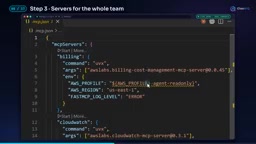
There are two paths to the managed AWS MCP server: first, the proxy signing mode, which can use any CLI profile, makes switching accounts easy, and gives the agent a dedicated read-only role; second, skipping the proxy and using the HTTP endpoint with browser OAuth login—simpler to configure, but the identity is fixed and the role needs an extra AWS managed policy attached. Either way, IAM is what ultimately determines what the agent can do.
Team-level servers live in .mcp.json at the repository root and get committed to version control. The billing server runs via UVX with a pinned version, the profile is passed through the AWS_PROFILE variable, and the default value is the read-only role—this file never contains secrets. The CloudWatch server is handled the same way, with logs kept quiet.
UVX is the tool runner from the Python package manager uv, similar to npx: it pulls and runs a Python command-line program by package name without a prior pip install, and it can pin a version. In this article, the billing and CloudWatch MCP servers both start as uvx <package>@<version>, so uv needs to be installed first. Pinning versions matters—MCP server tool signatures can change between versions, and without a lock, teammates who pull the latest version may find tool descriptions that don't match the docs or the allow list. MCP proxy for AWS is the official AWS local proxy: it reads credentials from a local AWS CLI profile and SigV4-signs every request sent to the managed MCP endpoint, so the remote service executes API requests as the caller. That means the permission boundary is determined entirely by the IAM role assumed by that profile—the proxy itself doesn't amplify permissions.
Permission Tiers: Allow List and IAM as Two Layers of Guardrails
Once configured, type /mcp in the Claude Code panel to check connection status. The project-level billing and CloudWatch servers load from the panel in trusted folders; via the command line, teammates have to approve them manually. The AWS knowledge and AWS MCP servers in the user scope show up as connected too.
Next, decide in settings.json under the .claude directory which tools run without confirmation: all three pure-read servers (AWS knowledge, billing, CloudWatch) get full approval, while the managed AWS MCP server stays on "ask me first" because it can make arbitrary API calls. Commit this file along with the other config.
There are two independent guardrails here: the allow list decides which tools run without asking, and the IAM role decides which operations can't possibly succeed. The verification in the video is direct—ask for the current AWS identity and it returns the read-only role; try to create a bucket and it returns Access denied.
Claude Code's allow list is configured in the permissions.allow field of settings.json, with entries shaped like mcp__<server-name>__<tool-name> and wildcard support. Its semantics are "execute without manual confirmation"—an interaction-layer efficiency switch, not a security boundary. A call whose confirmation is denied isn't blocked by the system; it just pops a dialog every time. The real security boundary is the second layer: IAM policies judge server-side whether a request is legitimate. So the correct approach for a read-only role is to grant only a ReadOnlyAccess-type managed policy plus necessary read permissions like ce:Get*, and explicitly deny write operations. The two layers have different jobs: the allow list governs "convenient or not," IAM governs "possible or not." Even if the allow list is misconfigured to permit a write tool, IAM still returns Access denied—which is exactly what the "create bucket rejected" test in the article verifies.
Hands-On: Cost Investigation and Alarm Queries
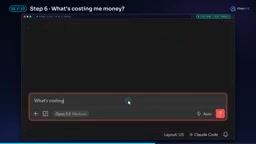
In a new session, ask "what's costing me money this week," requesting that the billing server give this week vs. last week's Top 5 services plus one cost-saving suggestion. Because billing is on the allow list, there's no permission prompt, and after about 20 seconds it returns live Cost Explorer data: the sandbox spent almost nothing this week, versus 59 cents last week, across Route 53, ECR, and S3. The real reason for the spending jump is two monthly charges on November 1—a Route 53 hosted zone and taxes—not that any particular item got more expensive. The cost-saving suggestion: if that hosted zone doesn't serve any live domain, deleting it saves about $6 a year. One tool call failed along the way because Cost Optimization Hub wasn't enabled, and Claude reported it honestly instead of making up an answer.
The second test combined two routine checks into one prompt: which CloudWatch alarms are firing in us-east-1, and whether S3 Vectors is available in Stockholm (eu-north-1). The CloudWatch server answered the first—no metrics or composite alarms in an alarm state; the knowledge server answered the second.
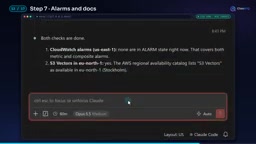
Interestingly, the knowledge server's first query failed because it used the wrong product name, and then it re-queried rather than guessing, ultimately confirming that S3 Vectors is listed for eu-north-1 in the AWS availability catalog.
Cost Structure and Team Scenarios
Claude Code runs on a subscription, and MCP servers themselves are free, but some calls cost money: Cost Explorer charges 1 cent per API request, and CloudWatch Logs Insights bills by data scanned. So ask focused questions.
Enterprises have another option: point Claude Code at Amazon Bedrock (set CLAUDE_CODE_USE_BEDROCK=1), so model calls go through the company's own AWS account, controlled by IAM and billed to AWS—with the MCP configuration completely unchanged.
Configuration Checklist
- Create the read-only role first, then talk about tools
- Start with 2 to 4 servers
- Put personal servers in the user scope, team servers in
.mcp.json - Pass profiles via variables, never write secrets
- Pin server versions
- Allow pure-read tools; set broad-coverage servers to require confirmation
- Run
/mcpbefore you start work
One-line Summary
Connect Claude Code to a read-only AWS account with four MCP servers for real data queries instead of training-data guesses.
Paragraph Summary
The article explains how to let Claude Code query a real AWS account directly via the MCP protocol in VS Code, with read-only as the core constraint throughout. The author configured four MCP servers: an AWS knowledge server for the latest docs, a managed AWS MCP server covering arbitrary APIs, a billing server for cost data, and a CloudWatch server for alarms and logs—all calls going through a single read-only IAM role. The managed server can be reached via proxy signing or OAuth; team config lives in .mcp.json committed to version control, while personal servers go in the user scope. Permissions come in two layers: the allow list decides what runs without confirmation, and IAM decides whether an operation can succeed. In testing, the agent completed cost investigation and alarm queries, and after a failed tool call re-queried rather than fabricating an answer—showing the value of real data access.
Related articles

Controversial US Surveillance Law Section 702 Nears Expiration: Congress Races to Renew
FISA Section 702 surveillance authority is nearing expiration. Congress is urgently pushing reauthorization, possibly attaching it to the NDAA. This article analyzes the controversies, legislative strategy, and future outlook.

iFood Manages 15,000 Repositories with Coding Agents: An Architectural Lesson at 4 Cents per Run
How iFood scaled coding agents to 15,000 repositories with its Remote Agents Platform: REST API-driven, GPT-5.6 Luna selection, structured output acceptance, $0.04 per run, security fixes doubled.

The No-Space Vacuum: The Mystery of Geometric Origins in Quantum Gravity
The "no-space vacuum" in group field theory refers to a state with no geometric quantum excitations—not empty space, but no space. This article explains how this quantum gravity concept yields macroscopic cosmic geometry through condensed matter mechanisms, along with the theory's current status and controversies.