Coze in Practice: A Guide to Multi-Agent Collaboration and Free Customization
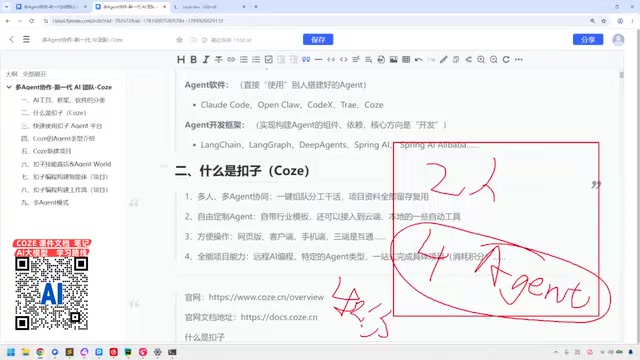
A Bilibili tutorial breaks down the practical logic of Coze multi-agent collaboration, template customization, three-platform sync, and product matrix.
Based on Bilibili creator 码士集团's tutorial series *Coze + Dify + Claude Code in Practice*, this article outlines the core features of the Coze agent platform. Coze supports creating multiple Agents that play experts in different domains and combining them with human members for rapid team assembly and project execution; the platform offers industry templates for legal, short video, AI comic drama, and other scenarios, balancing ease of use and flexibility; and the web, desktop client, and mobile ends are synchronized for operation anytime, anywhere. At the same time, the tutorial does not avoid real problems: although all-in-one project capabilities can connect to local Agents, credit consumption is high and results may require rework, so the creator does not recommend letting go completely. The product matrix covers Coze, Coze Programming, Compass, and Coze Studio, and beginners should start with the basic features of the personal edition.
In an era where AI tools keep multiplying, how to quickly assemble an "AI team" that can actually get work done has become a focus for many developers and content creators. The tutorial series Coze + Dify + Claude Code in Practice published by Bilibili creator 码士集团 starts with the agent platform Coze (扣子) and demonstrates a hands-on path into multi-agent collaboration. This article is based on the core points of that tutorial, combined with video screenshots, and outlines Coze's key features and usage logic.
Multi-Agent Collaboration: Building AI Workflows Like Assembling a Team
The tutorial opens with an intuitive analogy: companies divide work by department, with each unit handling its own responsibilities—and Coze works the same way. You can create multiple Agents on the platform, let each Agent play the role of an expert in a different domain, and then combine them with human members to form a hybrid team. The creator gives an example: two humans plus four Agents make a six-person project team.
The core value of this model is rapid team assembly. Whether you're producing AI comic dramas, handling programming tasks, or working on other projects that require multi-role coordination, you can move things forward by combining Agents with different specialties. In the video, the creator jokes: "In this era, you either talk about tokens or credits—if you have enough credits, you can find any talent." Here, "talent" refers to Agents.
From a practical implementation standpoint, multi-agent collaboration lowers the barrier to starting a project. Traditional development requires coordinating people, scheduling, and communication costs, whereas an Agent team can be invoked at any time and scaled on demand. However, the creator also cautions that Agent outputs may not fully meet expectations and may require repeated adjustment ("rework"), and that credit consumption cannot be ignored.
What exactly is an Agent?
An Agent is not a simple chatbot, but an AI program unit with perception, planning, and action capabilities. It usually consists of three parts: first, a large language model as the "brain" responsible for reasoning and decision-making; second, tool-calling capabilities that can access external interfaces such as search, code execution, and file reading/writing; and third, memory and context management, which allows it to remain coherent across multi-turn tasks. Unlike single-turn Q&A, an Agent breaks down steps around a goal, selects tools, and adjusts based on feedback until the task is complete.
In multi-agent collaboration, each Agent is often assigned a specific role and permissions—for example, a "researcher" gathers materials, a "programmer" writes code, and a "reviewer" checks outputs. They can coordinate through message passing, task allocation, or shared workspaces. The advantage of this architecture is separation of responsibilities and easier debugging, but it also introduces coordination costs and uncontrollable results—which is precisely why the original article emphasizes the need for human members to stay involved and to be prepared for repeated adjustments to outputs.
Free Customization and Industry Templates: Lowering the Barrier to Entry
Coze provides beginners with a large number of preset industry templates covering scenarios such as legal consulting, short video production, and AI comic dramas. Users can directly apply templates to get started quickly, or let Agents learn specific skills on their own. In the video, the creator shows the template selection interface and emphasizes the convenience of "using it right away."
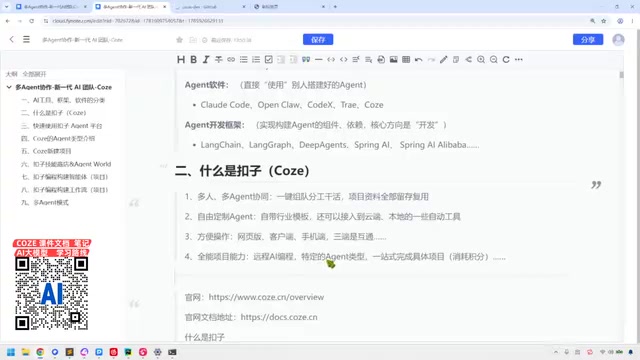
This combination of "templates + customization" balances ease of use and flexibility. For users unfamiliar with Agent orchestration, templates can quickly produce usable prototypes; for teams with clear requirements, they can deeply customize each Agent's instructions, tools, and knowledge base. The tutorial notes that Coze offers a diverse set of default Agent types, and users can choose suitable roles based on task type.
What are Agent templates and knowledge bases?
An Agent template is a packaged product of preconfigured role settings, prompts, tool combinations, and workflows provided by the platform. After applying a template, users can obtain an Agent prototype usable in a specific scenario (such as legal consulting or short video script generation) without writing instructions from scratch. The value of templates lies in codifying industry experience into reusable configurations, significantly shortening cold-start time.
A knowledge base is the Agent's "external memory," usually imported in the form of documents, web pages, or structured data. Combined with retrieval-augmented generation (RAG) technology, it allows the Agent to cite private materials when answering and reduces fabrication. The original article's mention of "letting Agents learn specific skills on their own" essentially means expanding capabilities by mounting knowledge bases, configuring tools, and adjusting system prompts. Understanding the division of labor between templates and knowledge bases helps users judge when to apply a template directly and when deep customization is needed.
Three-Platform Synchronization: Command Your Agents Anytime, Anywhere
Coze supports synchronization across the web version, desktop client, and mobile. In the video, the creator demonstrates the download entry point and points out the convenience of "being able to work anytime, anywhere"—you can take out your phone while traveling and have an Agent handle tasks.
This multi-platform coverage means Agents can be embedded in various work scenarios. The desktop end is suitable for deep configuration and debugging, while the mobile end is convenient for quick triggering and monitoring. The creator describes this experience as "feeling like a boss": taking out your phone to direct your Agent employees to work. Of course, the Agents' "salary" is credits—the more frequently you use them, the more credits you consume.
Weighing All-in-One Project Capabilities Against Credit Consumption
The tutorial mentions that Coze has "all-in-one project capabilities" and can connect to local Agents, allowing Agents to execute operations on the user's computer, similar to certain automation tools (the creator compares it to "crayfish"). This capability requires the use of specific local Agent types, which the later part of the video elaborates on.
However, the creator is reserved about "completing projects in one stop." The so-called one-stop approach means the user issues a single instruction and leaves the rest of the work entirely to the Agent. But actual results may not be ideal, and multiple reworks may be needed while credit consumption does not decrease. Therefore, the creator explicitly says it is "not recommended" to let go completely and suggests that users maintain control over the process.
The difference between local Agents and cloud Agents
The original article's statement about "connecting to local Agents and letting Agents execute operations on the user's computer" refers to moving the Agent's runtime environment from the cloud to the local device. Cloud Agents are hosted by platform servers; their advantages are out-of-the-box use and multi-platform synchronization, but they are limited by the range of tools provided by the platform. Local Agents run on the user's own computer and can directly manipulate local files, invoke local software, and access intranet resources, making them suitable for tasks requiring deep system integration.
The trade-off is that local Agents require users to install the runtime environment themselves, configure permissions, and bear security risks—after all, they have read/write access to local files. In addition, local execution is not subject to platform credit billing, but computing power is borne by the local machine. Understanding this difference can help users make reasonable choices between cloud and local based on task sensitivity and tool requirements.
Coze Product Matrix: Four Core Directions
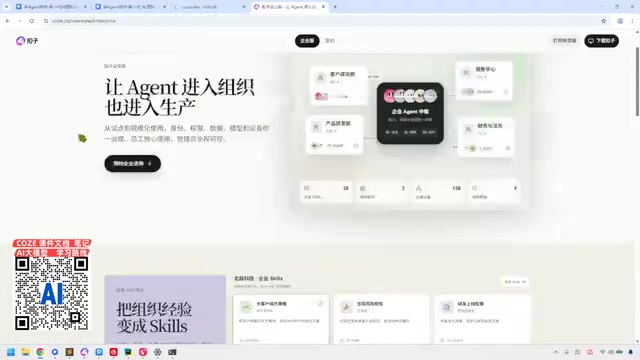
In the latter half of the video, the creator visits the Coze official website and outlines the product layout. The website offers a personal edition and an enterprise edition, with the personal edition being the starting point of the tutorial. In the upper right corner are two entry points: "Open Web Version" and "Download Coze," corresponding to the Web end and the client respectively.
At the bottom of the page, four core product directions of Coze are listed: Coze, Coze Programming, Compass, and Coze Open Source (Coze Studio). The creator notes that Compass is mainly used for testing Agents and does not need attention for now; the focus should be on Coze and Coze Programming. Coze Open Source, i.e., Coze Studio, is content that the tutorial will cover in depth later.
This division of the product matrix reflects Coze's complete chain from creating Agents to programming extensions and then to testing and evaluation. For beginners, it is recommended to start with the personal edition and explore advanced features after becoming familiar with the basic process.
What are Coze Programming, Compass, and Coze Studio?
Coze Programming is aimed at developers who need more complex logic. It supports defining workflows, writing plugins, and customizing nodes through code or visual orchestration, and is a key step in moving Agents from "usable" to "easy to use." Compass is an evaluation and observability tool used to test Agent performance, analyze call chains, and review effectiveness data, helping teams identify problems before launch. Coze Studio is the open-source version, allowing users to deploy privately and develop further, suitable for enterprises with requirements for data compliance or deep customization.
Together with the basic Coze edition, these three form a complete chain from creation and programming extension to testing/evaluation and open-source self-deployment. For beginners, becoming familiar with Agent creation and template application in the basic Coze edition first, and then exploring Coze Programming and Compass as needed, is a smoother learning path.
Conclusion
The tutorial by 码士集团 is practice-oriented and showcases Coze's features in multi-agent collaboration, template customization, and three-platform synchronization, while not avoiding the real issues of credit consumption and result uncertainty. For users who want to quickly build AI workflows, Coze provides a low-barrier starting point; but to truly implement it, effort is still needed in Agent configuration and process design. The series also covers Dify and Claude Code in later videos and is worth following.
Related articles

Running a PS2 Emulator in the Browser with Claude: Inside TabStationToo
TabStationToo ports the PCSX2 core to the browser with WebAssembly and WebGPU, letting a PS2 emulator run in a tab. We break down its tech, AI workflow, and optimization.

AI Customer Service Evaluation Gone Wrong: 41 Failures, 28 Were Test Bugs
A live evaluation of a Shopify AI customer service agent produced 41 failures, but 28 were test bugs. This article analyzes scorer flaws, overly strict response checks, and other evaluation pitfalls, and summarizes best practices to prevent test bugs from masking real model failures.

No API Needed! Build a WhatsApp Receptionist with a Free Claude Account
A developer shares a weekend experiment: using a free Claude.ai account and browser scripts to turn WhatsApp Web into an automated receptionist—no API required.